
DSF TKP110CW
DSF Portable Air Conditioner TKP110CW User Manual
Model: TKP110CW
Important Safety Instructions
Please read all instructions carefully before using this appliance. Failure to follow these instructions may result in electric shock, fire, or serious personal injury.
- Always connect the unit to a grounded power outlet.
- Do not operate the unit with a damaged cord or plug.
- Do not block air inlets or outlets.
- Keep the unit away from flammable materials.
- Ensure proper ventilation when operating.
- Unplug the unit before cleaning or servicing.
Product Overview
The DSF TKP110CW is a versatile 3-in-1 portable air conditioner, dehumidifier, and fan designed to provide efficient cooling for rooms up to 500 sq.ft. It features multiple control methods including remote, touch screen, smartphone app, and Alexa voice control.

Figure 1: DSF Portable Air Conditioner TKP110CW and its remote control.
Setup and Installation
Proper installation is crucial for optimal performance of your portable air conditioner. This unit includes a window mount kit for exhaust hose installation.
Unpacking
- Carefully remove the unit from its packaging.
- Check for any shipping damage. If damaged, contact your retailer immediately.
- Ensure all accessories are present: Portable Air Conditioner unit, Window Mount Kit, Remote Control, Quick Setup Guide, User Manual.
Window Kit Installation
The window kit is designed to exhaust hot air outside, preventing it from re-entering the room.
- Attach the exhaust hose to the back of the unit.
- Adjust the window slider kit to fit your window opening.
- Secure the exhaust hose adapter to the window slider kit.
- Close the window securely against the kit to seal the opening.

Figure 2: Example of portable air conditioner with window kit installation, showing dimensions (17.91" x 14.72" x 29.80").
Operating Instructions
Your portable air conditioner offers multiple operating modes and control options for your convenience.
Control Methods
The unit can be controlled via four methods:
- Remote Control: Use the included remote for convenient operation from a distance.
- Touch Screen Control Panel: Directly operate the unit using the intuitive touch panel on top.
- Smartphone App: Download the dedicated app for control via your smartphone.
- Alexa Smart Control: Integrate with Amazon Alexa for voice commands.

Figure 3: Overview of the four available control methods.
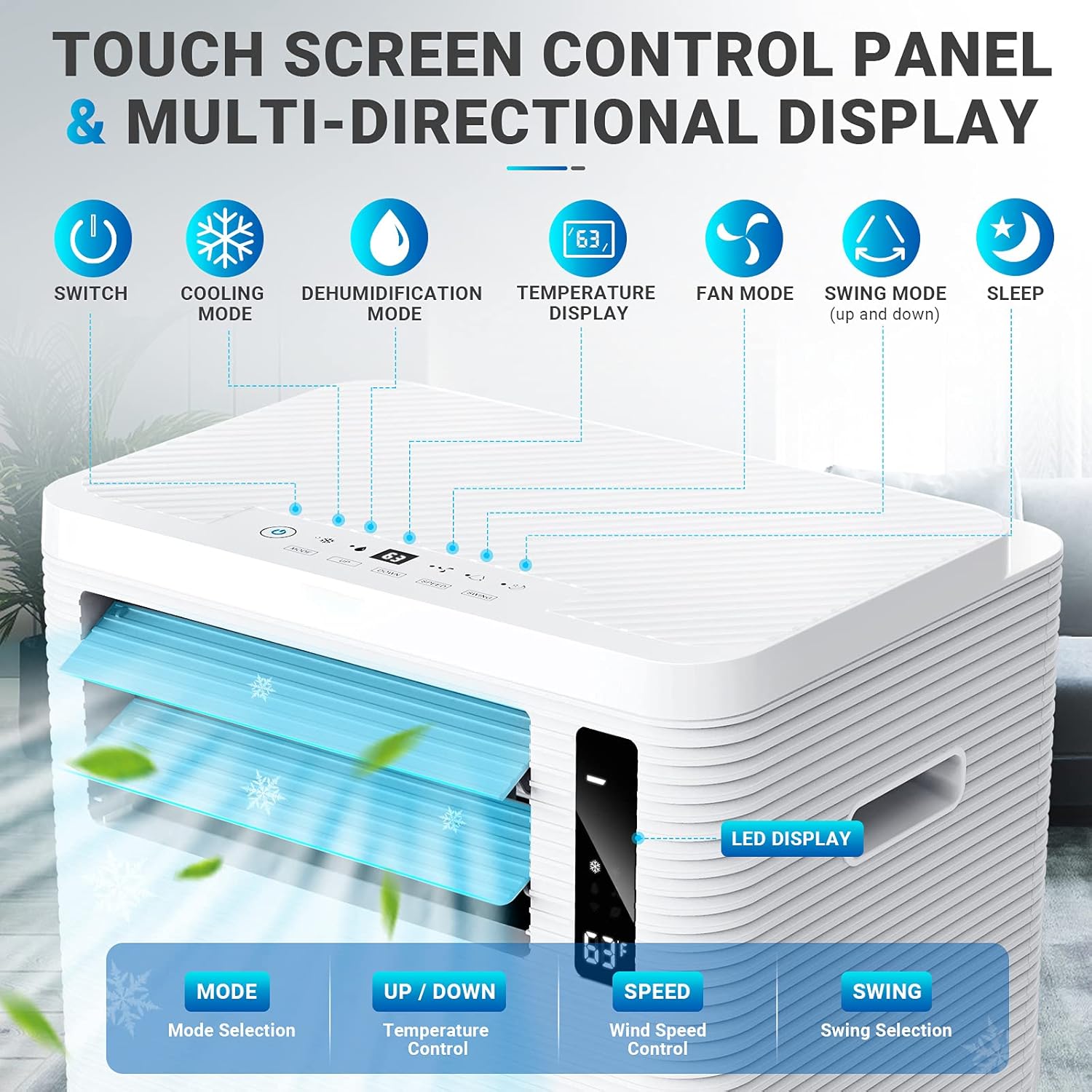
Figure 4: Detailed view of the touch screen control panel and LED display.
Operating Modes
The unit features three primary operating modes:
- Cooling Mode: Provides powerful cooling for rooms up to 500 sq.ft. Set temperature range: 61°F - 90°F. The louver swings automatically for wider air distribution.
- Dehumidification Mode: Effectively removes excess moisture from the air, improving comfort and air quality.
- Fan Mode: Circulates air with three adjustable speeds (Low, Mid, High) without cooling. Air flow volume: 340m³/h (Low), 400m³/h (Mid), 480m³/h (High).

Figure 5: Visual representation of Cooling, Dehumidifying, and Fan operating modes.

Figure 6: Fan speed settings and their typical use cases.
Special Features
- Sleep Mode: Automatically adjusts temperature overnight for energy saving and quieter operation. The LED display light can be turned off.
- 24-Hour Timer: Set the unit to turn on or off automatically within a 24-hour period.
- Louver Swing: The louver can be adjusted up and down by 120° for multi-angle air supply.
Maintenance
Regular maintenance ensures the longevity and efficient operation of your portable air conditioner.
Filter Cleaning
The reusable and washable filter helps reduce air impurities and should be cleaned regularly.
- Unplug the unit from the power outlet.
- Locate and remove the air filter.
- Rinse the filter under running tap water until clean.
- Allow the filter to air dry completely before reinserting it into the unit.
- Do not operate the unit without the filter.
Unit Cleaning
- Wipe the exterior of the unit with a soft, damp cloth.
- Do not use harsh chemicals, abrasives, or solvents.
- Ensure the unit is completely dry before plugging it back in.
Storage
When storing the unit for an extended period:
- Drain any accumulated water from the unit.
- Clean the air filter.
- Store the unit in a cool, dry place, preferably in its original packaging.
Troubleshooting
Before contacting customer support, please refer to the following common issues and their solutions.
| Problem | Possible Cause | Solution |
|---|---|---|
| Unit does not turn on | No power supply; Power cord not plugged in; Circuit breaker tripped. | Check power outlet; Ensure plug is securely inserted; Reset circuit breaker. |
| Unit not cooling effectively | Air filter clogged; Room too large; Exhaust hose not properly installed; Doors/windows open. | Clean air filter; Ensure room size is within specifications (up to 500 sq.ft); Check exhaust hose connection; Close all doors and windows. |
| Unit is noisy | Unit not on a flat surface; Obstruction in fan. | Place unit on a level surface; Check for and remove any obstructions. |
| Water leakage | Drain plug not secured; Water tank full (if applicable). | Ensure drain plug is tightly closed; Drain water tank if full. |
Specifications
| Feature | Detail |
|---|---|
| Model Number | TKP110CW |
| Cooling Capacity | 15000 BTU ASHRAE (10000 BTU DOE) |
| Coverage Area | Up to 500 sq.ft |
| Operating Modes | Cooling, Dehumidifier, Fan |
| Temperature Range | 61°F - 90°F |
| Fan Speeds | Low, Mid, High (340m³/h, 400m³/h, 480m³/h) |
| Refrigerant | R32 (Total Amount: 440g) |
| Power Input | 1200W |
| Voltage/Frequency | 1Ph, 115V, 60HZ |
| Noise Level | 52-56 dB |
| Dimensions (L x W x H) | 17.91” x 14.72” x 29.80” (45.49 x 37.39 x 75.69 cm) |
| Weight | 31.98 kg |
| Certifications | UL, CEC |
Warranty and Support
Your DSF Portable Air Conditioner TKP110CW comes with a comprehensive warranty and dedicated customer support.
Warranty Information
This product is covered by a two-year quality guarantee from the date of purchase. This warranty covers defects in materials and workmanship under normal use.
Please retain your proof of purchase for warranty claims.
Customer Support
For technical assistance, troubleshooting beyond this manual, or warranty inquiries, please contact DSF customer support. Refer to the Quick Setup Guide or product packaging for contact details.
Note: Do not attempt to repair the unit yourself. Unauthorized repairs will void the warranty.
Ask a question about this manual
Ask about setup, troubleshooting, compatibility, parts, safety, or missing instructions. Manuals+ will review the question and use this page’s manual context to help answer it.