
1. Introduction
This manual provides essential instructions for the safe and efficient operation, maintenance, and troubleshooting of your Philips Saeco SM8785/00 Xelsis Deluxe Fully Automatic Coffee Machine. Please read this manual thoroughly before using the appliance and keep it for future reference.
2. Safety Information
Always follow basic safety precautions when using electrical appliances to reduce the risk of fire, electric shock, and injury. Ensure the appliance is placed on a stable, level surface. Do not immerse the appliance in water. Keep out of reach of children. Refer to the separate safety leaflet for detailed safety instructions.
3. Product Overview
The Saeco Xelsis Deluxe is a fully automatic coffee machine designed to deliver a wide range of coffee and milk-based beverages. It features a touch screen interface, Wi-Fi connectivity for updates and new recipes, and customizable user profiles.
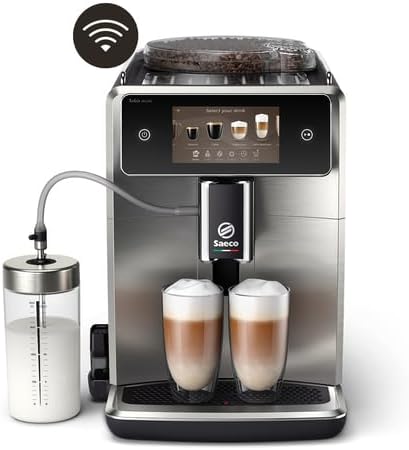
Image 1: The Saeco Xelsis Deluxe coffee machine with its external milk carafe, preparing two lattes. This image highlights the machine's sleek design and its capability to produce milk-based drinks.
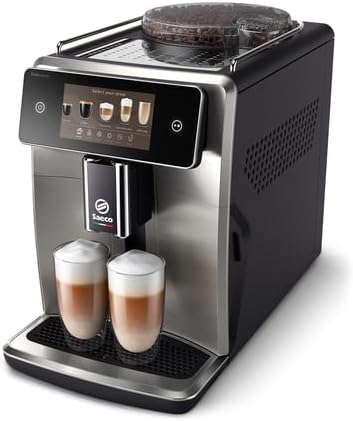
Image 2: An angled view of the Saeco Xelsis Deluxe coffee machine, showcasing its compact form factor and two freshly prepared lattes on the drip tray. The integrated touch screen is visible.
4. Setup and First Use
- Unboxing and Initial Cleaning: Carefully remove all packaging materials. Wash the water tank, drip tray, coffee grounds container, and external milk carafe with warm water and a mild detergent. Rinse thoroughly and dry.
- Water Filter Installation: Install the AquaClean water filter in the water tank. Submerge the filter in water until no more air bubbles appear, then insert it into the designated slot in the water tank. Fill the water tank with fresh tap water.
- Power Connection: Plug the appliance into a grounded power outlet.
- Initial Start-up and Configuration: Turn on the machine. During the first start-up, the machine will perform an internal rinse cycle and fill its internal tubing, which may produce some noise. Follow the on-screen instructions to set your language, water hardness, and other initial preferences.
- Wi-Fi Setup: Access the Wi-Fi settings through the touch screen. If you encounter issues detecting your network, try changing your router's Wi-Fi channel (e.g., from channel 13 to 6) if applicable. The network name and password complexity should not be an issue.
- Firmware Update: After connecting to Wi-Fi and registering your account, a firmware update may become available. Initiate the update and allow 1-2 hours for completion. Do not turn off or interrupt the machine during this process. The machine may reboot and ask for re-configuration; your preferences and account settings will typically be retained.
5. Operating Instructions
5.1 Touch Screen Interface
The Saeco Xelsis Deluxe features an intuitive 5-inch touch screen display for easy navigation and selection of beverages and settings.
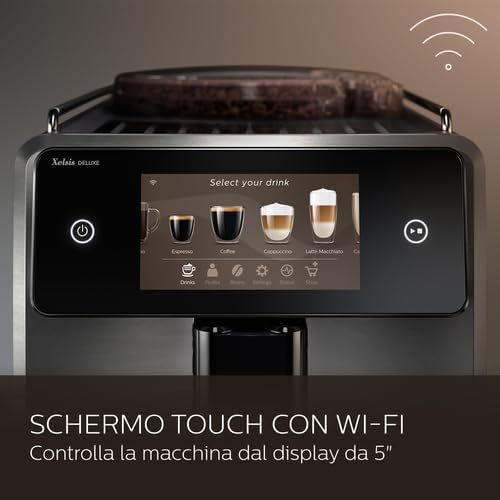
Image 3: A close-up view of the Saeco Xelsis Deluxe's 5-inch touch screen, displaying various coffee drink options and a Wi-Fi connectivity icon. This interface allows for easy selection and customization.
5.2 Selecting and Customizing Beverages
The machine offers 22 pre-programmed coffee varieties. You can customize each drink to your preference.

Image 4: An assortment of 22 different coffee and milk-based beverages, illustrating the wide range of drinks the Saeco Xelsis Deluxe can prepare. Each drink is presented in a unique glass or cup.
- BeanMaestro Function: If using branded coffee beans, select the brand and type on the machine. The BeanMaestro function will automatically optimize brewing parameters for the best extraction.
- CoffeeMaestro Function: For unbranded or custom coffee blends, the CoffeeMaestro function guides you through a series of questions to optimize extraction parameters automatically.
- Customization Options: Adjust up to 7 parameters for each drink, including temperature, flavor intensity, coffee volume, milk quantity, foam quantity, coffee-milk ratio, and dispensing order.

Image 5: A close-up shot of coffee beans inside the hopper of the Saeco Xelsis Deluxe, emphasizing the machine's use of fresh whole beans for optimal flavor. This relates to the BeanMaestro function.
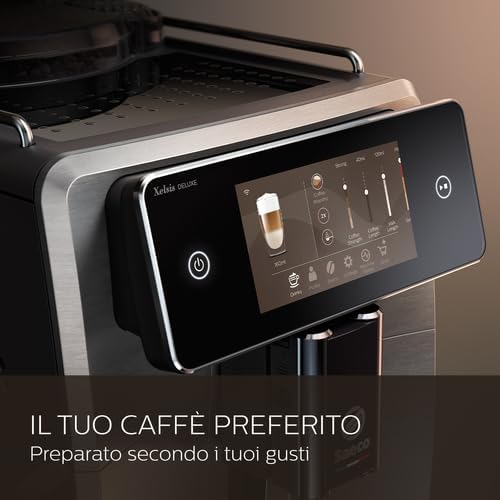
Image 6: The Saeco Xelsis Deluxe touch screen displaying detailed customization options for a selected drink, including sliders for coffee strength, volume, and milk foam. This illustrates the machine's personalization capabilities.
5.3 User Profiles
The machine allows you to save up to 8 personalized user profiles, each storing individual drink preferences. This enables quick access to your favorite customized beverages.
5.4 Using Pre-Ground Coffee
In addition to whole beans, the machine supports the use of pre-ground coffee. Refer to the on-screen instructions for adding pre-ground coffee to the dedicated compartment.
5.5 Smart Connectivity
The Wi-Fi connectivity allows for automatic recipe updates and potential integration with smart home systems like Alexa, enabling voice control and notifications for maintenance or supply levels.
6. Maintenance and Cleaning
Regular maintenance ensures optimal performance and longevity of your coffee machine.
- AquaClean Filter: The innovative AquaClean anti-calc filter allows for up to 5000 cups without descaling, provided the filter is replaced as indicated by the machine. Follow the on-screen prompts for filter replacement.
- Cleaning Methods: The machine offers 5 cleaning and disinfection methods, ranging from quick standard rinses to steam hygiene for the coffee and milk circuits. Perform these regularly as prompted by the machine or as needed.
- Descaling: Although the AquaClean filter reduces the need, descaling will eventually be required. Follow the guided descaling procedure on the touch screen using Saeco descaling solution.
- Grinder Maintenance: The ceramic grinder is designed for durability. Ensure the coffee bean hopper is kept clean. Adjust the grinder settings as needed for optimal coffee extraction.
- Removable Parts: Regularly clean the brew group, drip tray, and coffee grounds container. Refer to the on-screen instructions for removing and cleaning these components.
7. Troubleshooting
This section addresses common issues you might encounter with your Saeco Xelsis Deluxe coffee machine.
- Machine is noisy during initial setup: This is normal as the machine fills its internal water circuits. The noise level will decrease once the system is primed.
- Wi-Fi connection issues: Ensure your router is broadcasting on a compatible channel (e.g., try channels 1-11 if experiencing issues on higher channels like 13). Verify your network name and password are correct.
- Firmware update appears stuck: Firmware updates can take 1-2 hours. Do not power off the machine during this process. Allow it to complete fully.
- Coffee not dispensing or poor quality: Check water tank level, ensure coffee beans are present, and verify the brew group is correctly inserted and clean. Adjust grinder settings if coffee is too weak or too strong.
- Milk not frothing correctly: Ensure the milk carafe and milk circuit are clean. Use fresh, cold milk. Check that all components of the milk system are correctly assembled.
For persistent issues, consult the full troubleshooting guide available on the Philips support website or contact customer service.
8. Specifications
| Feature | Detail |
|---|---|
| Brand | Philips |
| Model Number | SM8785/00 |
| Colour | Black |
| Product Dimensions | 28.7 x 48.69 x 39.6 cm |
| Capacity (Water Tank) | 5 Liters |
| Voltage | 230V |
| Material | Stainless Steel |
| Special Features | Programmable |
| Item Weight | 12 kg |
| Coffee Maker Type | Espresso Machine |
| Recommended Uses | Home use, Small office use |
9. Warranty and Support
For detailed warranty information, please refer to the warranty card included with your product or visit the official Philips website. For customer support, technical assistance, or to order spare parts, please contact Philips customer service through their official channels.