
EnergyCell Pilot 4GS
EnergyCell Pilot 4GS 12000mAh Portable Charger User Manual
Model: Pilot 4GS | Brand: EnergyCell
1. Introduction
Thank you for choosing the EnergyCell Pilot 4GS Portable Charger. This 12000mAh power bank is designed to provide reliable and fast charging for your electronic devices, especially iOS devices. Its compact design and dual output ports make it an ideal companion for daily use and travel. This manual provides essential information on how to set up, operate, and maintain your portable charger.

Image 1.1: The EnergyCell Pilot 4GS 12000mAh Portable Charger in silver, showcasing its sleek design and port layout.
2. Package Contents
Please verify that all items are present in your package:
- 1 x EnergyCell Pilot 4GS 12000mAh Portable Charger
- 1 x Lightning Charging Cable
- 1 x User Manual (this document)
3. Product Overview
Familiarize yourself with the components of your Pilot 4GS portable charger:
- Power Button: Activates the power bank and checks battery level.
- LED Indicators: Display the remaining battery capacity.
- Lightning Input Port: Used to recharge the power bank.
- Dual USB-A Output Ports: Used to charge external devices.

Image 3.1: Overview of the power bank's ports and charging capabilities, illustrating simultaneous charging of multiple devices.
4. Setup
4.1 Initial Charging of the Power Bank
Before using your Pilot 4GS for the first time, it is recommended to fully charge it.
- Connect the included Lightning charging cable to the Lightning input port on the power bank.
- Connect the other end of the Lightning cable to a USB power adapter (not included) and plug it into a wall outlet.
- The LED indicators will illuminate to show the charging progress. Once all LEDs are solid, the power bank is fully charged.

Image 4.1: The power bank connected to a device, demonstrating its fast charging capability. The input port for charging the power bank is similar in appearance to the output ports.
5. Operating Instructions
5.1 Charging Your Devices
The Pilot 4GS features dual USB-A output ports, allowing you to charge two devices simultaneously.
- Connect your device's charging cable (USB-A end) to one of the output ports on the power bank.
- Connect the other end of the cable to your device.
- The power bank will automatically detect the device and begin charging. If charging does not start, press the power button once.
- Note on Compatibility: The included Lightning cable is for charging the power bank and compatible with iPhone 11, 12, 13, and 14 series phones. For iPhone 15 and 16 series, a USB-C cable (not included) is required to charge your phone from the power bank.
5.2 Checking Battery Level
Press the power button once to view the remaining battery capacity indicated by the LED lights.
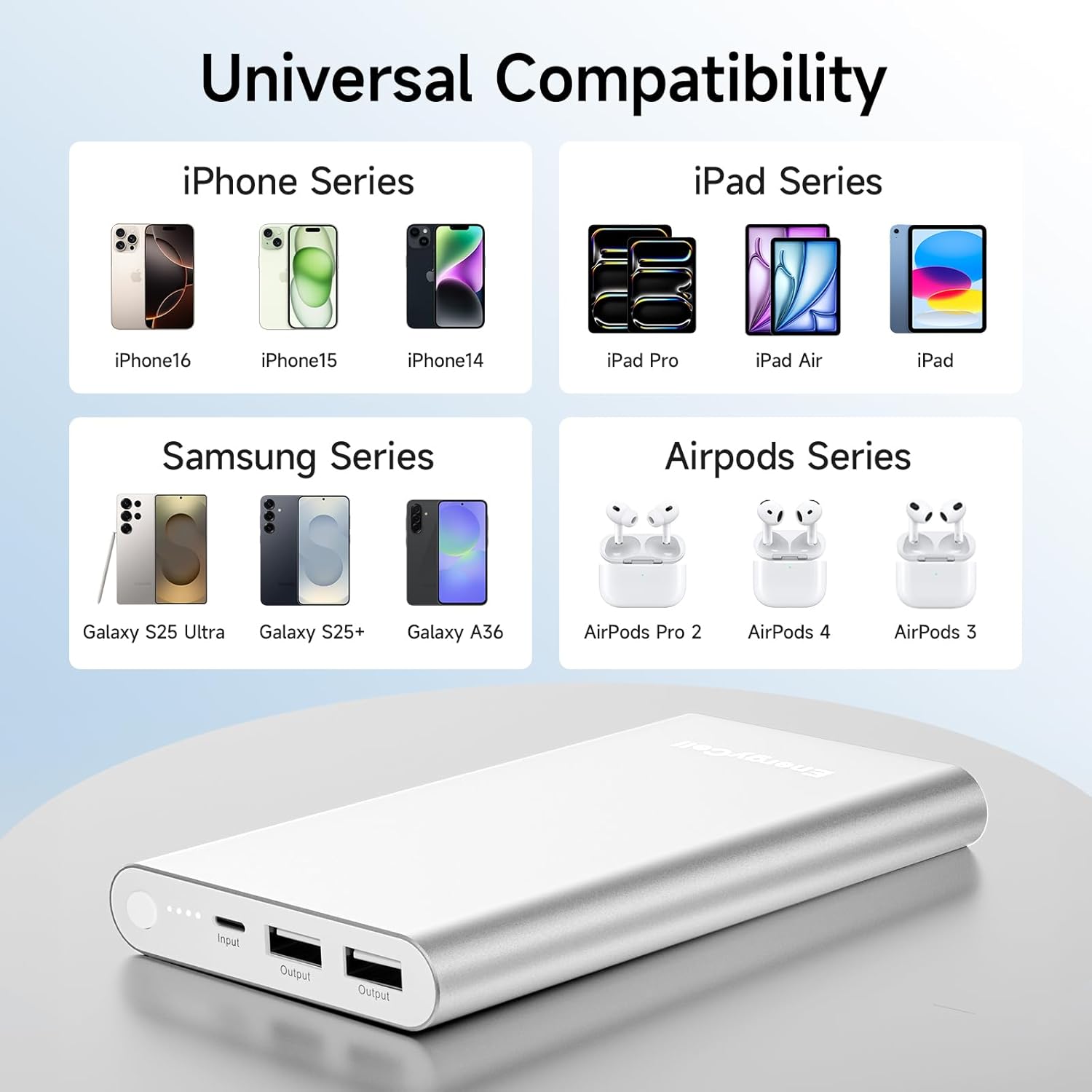
Image 5.1: The power bank is compatible with a wide range of devices, including various iPhone, iPad, Samsung, and AirPod models.
6. Maintenance
- Keep the power bank dry and away from moisture.
- Avoid exposing the device to extreme temperatures (hot or cold).
- Clean the surface with a soft, dry cloth. Do not use harsh chemicals or abrasive materials.
- Store the power bank in a cool, dry place when not in use.

Image 6.1: The aluminum body design offers durability and resistance to minor spills, though it is recommended to keep the device dry.
7. Troubleshooting
| Problem | Possible Cause | Solution |
|---|---|---|
| Power bank not charging | Loose cable connection; Faulty cable/adapter; Power outlet issue. | Ensure cables are securely connected. Try a different cable or power adapter. Test the power outlet. |
| Device not charging from power bank | Power bank battery low; Loose cable connection; Incompatible cable; Device issue. | Recharge the power bank. Ensure cables are secure. Use a compatible charging cable for your device. Press the power button on the power bank. |
| Slow charging | Non-fast charging cable/adapter; Device charging limitations. | Use high-quality, fast-charging compatible cables. Ensure your device supports faster charging rates. |
8. Specifications
| Feature | Detail |
|---|---|
| Model | Pilot 4GS |
| Battery Capacity | 12000mAh |
| Input | Lightning (8-pin) |
| Output | Dual USB-A, 5V/3A (max per port) |
| Dimensions | 5.6 x 2.9 x 0.58 inches |
| Weight | 10.2 ounces |
| Material | Matte Metal Shell |
| Safety Features | Overload, Overcurrent, Overcharging, Over Pressure, Short Circuit Protection |
9. Safety Information
- Do not disassemble, modify, or repair the device.
- Do not expose the power bank to water, fire, or extreme temperatures.
- Avoid dropping or subjecting the device to strong impacts.
- Use only certified charging cables and adapters.
- Keep out of reach of children.
- The Pilot 4GS is designed to be airline-approved for carry-on luggage. Always check with your airline for specific regulations before traveling.

Image 9.1: The Pilot 4GS portable charger is approved for air travel, making it a convenient accessory for flights.
10. Warranty and Support
For warranty information and customer support, please refer to the documentation included with your purchase or visit the official EnergyCell website. If you encounter any issues not covered in this manual, please contact EnergyCell customer service for assistance.
Related documentsPilot 4GS

Ask a question about this manual
Ask about setup, troubleshooting, compatibility, parts, safety, or missing instructions. Manuals+ will review the question and use this page’s manual context to help answer it.