
1. Introduction
This manual provides essential information for the BUTO 55T32-COF T-Con Timing Control Board Unit. The T-Con board is a critical component in a television, responsible for processing video signals from the main board and transmitting them to the LCD panel, enabling the display of images. Proper identification and careful handling are crucial for successful replacement and operation.
2. Product Identification
It is imperative to correctly identify the T-Con board before purchase and installation. The BUTO 55T32-COF T-Con board is available in various sizes (43-inch, 50-inch, and 55-inch versions). To ensure compatibility, you must match the part number 55T32-COF with the original board in your television. Do not rely solely on the TV model number, as different circuit boards can be used in the same TV model.
Locate the sticker or printing on your existing T-Con board to confirm the exact model number. The physical appearance of the board should also match the product images provided.
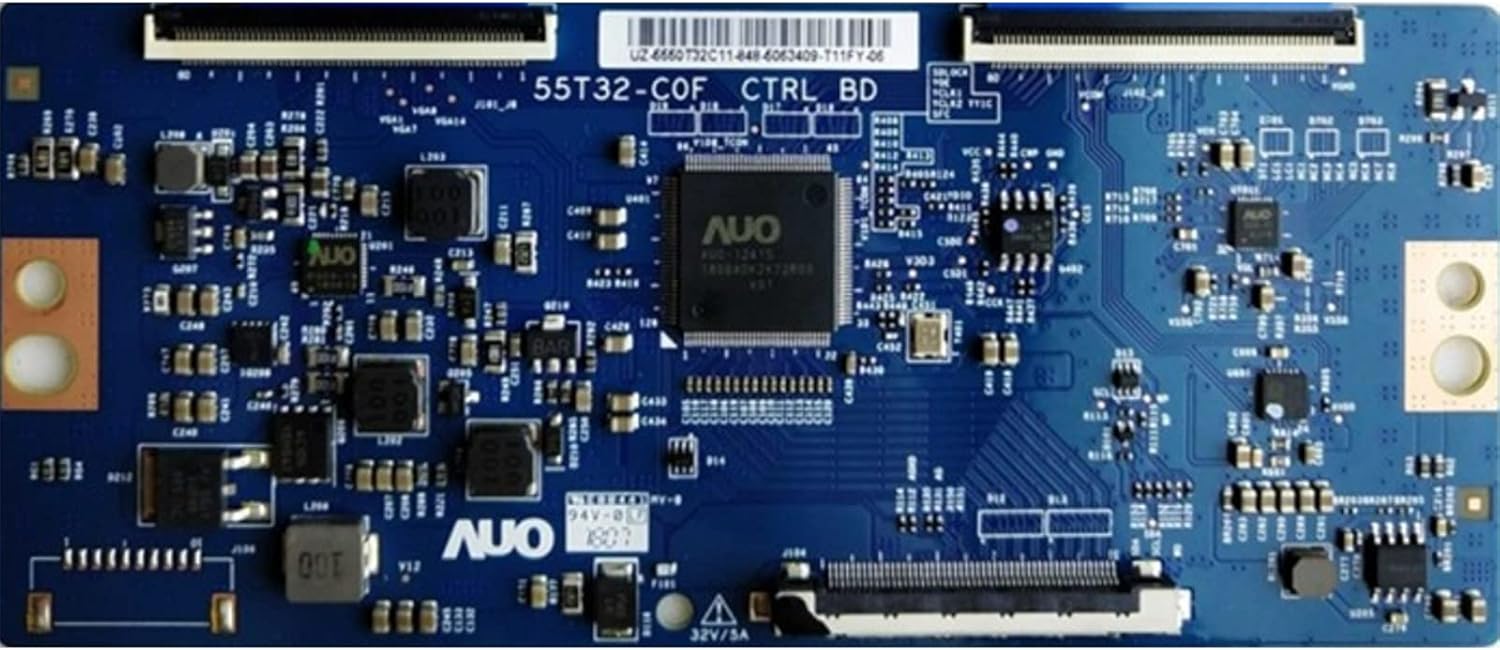
Figure 2.1: Overview of the BUTO 55T32-COF T-Con Timing Control Board Unit.

Figure 2.2: Example of T-Con board identification, showing where the size (e.g., 50 inches) is typically indicated on the board.
3. Installation
Installation of a T-Con board requires technical knowledge and careful handling of electronic components. If you are not experienced with TV repair, it is highly recommended to seek assistance from a qualified technician.
3.1 Safety Precautions
- Always disconnect the television from the power source before beginning any installation or repair work.
- Discharge any residual static electricity from your body by touching a grounded metal object before handling the board. Consider using an anti-static wrist strap.
- Handle the T-Con board by its edges to avoid touching sensitive components.
- Keep screws and small parts organized to prevent loss.
3.2 Installation Steps (General Guidance)
- Carefully open the back panel of your television to access the internal components.
- Locate the existing T-Con board. It is typically connected to the main board and the LCD panel via ribbon cables.
- Gently disconnect all ribbon cables and power connectors from the old T-Con board. Note their orientation for reinstallation.
- Remove the screws securing the old T-Con board and carefully lift it out.
- Position the new BUTO 55T32-COF T-Con board in place and secure it with the screws.
- Reconnect all ribbon cables and power connectors, ensuring they are seated correctly and securely. Improper connection can cause display issues or damage.
- Before closing the TV back panel, perform a preliminary test by reconnecting the TV to power and checking the display.
- If the display functions correctly, disconnect power again and reassemble the TV's back panel.
4. Functionality
The T-Con (Timing Control) board acts as an intermediary between the TV's main board and the LCD panel. It receives digital video signals from the main board, converts them into a format suitable for the LCD panel, and generates the timing signals required to control the individual pixels on the display. A properly functioning T-Con board is essential for a clear and stable image display.
5. Maintenance
The BUTO 55T32-COF T-Con board is a sealed electronic component and does not require routine maintenance. To ensure its longevity and proper operation:
- Ensure the television is operated within its recommended environmental conditions (temperature, humidity).
- Keep the interior of the television free from dust and debris, which can impede cooling and lead to component failure.
- Avoid exposing the television to excessive moisture or liquids.
6. Troubleshooting
Before replacing the T-Con board, it is crucial to accurately diagnose the television's fault. Many display issues are often misattributed to the T-Con board.
6.1 Common Misdiagnoses
Important Note: Horizontal and vertical lines on the screen are typically NOT caused by a faulty T-Con board. These symptoms almost always indicate a defective LCD panel (screen) itself. Replacing the T-Con board will not resolve issues related to a damaged LCD panel.

Figure 6.1: Examples of screen problems (e.g., horizontal/vertical lines, distorted colors, partial display) that are indicative of a defective LCD panel, not a T-Con board issue. If your screen exhibits these phenomena, replacing the T-Con board is unlikely to fix the problem.
6.2 Symptoms Potentially Related to T-Con Board
A faulty T-Con board might manifest as:
- No image on screen, but backlight is present (screen is lit but black).
- Image appears very dim or washed out.
- Negative image or inverted colors.
- Intermittent image display.
- Image flickering or unstable display (not related to input signal).
If you are unsure about diagnosing your TV's issue, please contact a professional technician or BUTO customer support for assistance before purchasing or installing a replacement part.
7. Specifications
| Model Number | 55T32-COF |
| Brand | BUTO |
| Type | T-Con Timing Control Board Unit |
| Compatibility | Compatible with 43-inch, 50-inch, and 55-inch displays (verify part number on original board) |
| ASIN | B09BQ41N8P |
| Date First Available | August 6, 2021 |
8. Warranty and Support
For warranty information, technical support, or assistance with diagnosis, please contact BUTO customer service. Refer to your purchase documentation for specific warranty terms and contact details. Our team is available to provide further guidance before and after your purchase.
Contact information can typically be found on the product packaging or the retailer's website where the item was purchased.