1. Introduction
The LM70CIMM-3 is a digital temperature sensor manufactured by National Semiconductor. It provides accurate temperature readings in a compact 8-pin MSOP (Micro Small Outline Package) for surface mount applications. This manual provides essential information for its proper handling, installation, and operation, ensuring reliable performance in various electronic projects and industrial applications.
2. Product Overview
The LM70CIMM-3 is designed for precision temperature sensing. Key features include its small form factor, digital output, and suitability for a wide range of applications from prototyping to industrial control. This particular offering is a lot of 10 pieces, packaged to ensure ESD safety and quality.
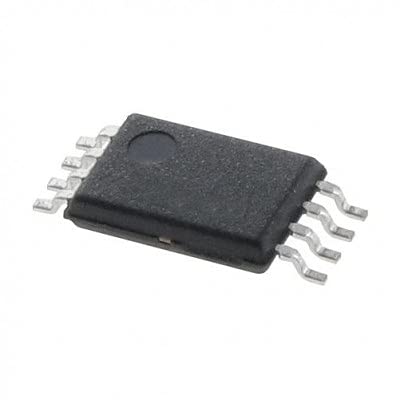
Figure 1: The LM70CIMM-3 temperature sensor. This image displays the compact 8-pin Micro Small Outline Package (MSOP) of the LM70CIMM-3 temperature sensor, highlighting its small form factor suitable for surface mount applications.
- Package Type: Micro Small Outline Package (MSOP)
- Pin Count: 8-pin
- Function: Digital Temperature Sensor
- Application: Suitable for breadboard, DIY, maker, repair, and prototype projects.
- Packaging: New, never used parts, packaged in ESD safe packaging.
3. Setup and Installation
The LM70CIMM-3 is a surface mount device (SMD) requiring careful handling and soldering. Proper installation is crucial for its functionality and longevity.
- ESD Precautions: Always wear an anti-static wrist strap and work on an ESD-safe mat when handling the sensor. Electrostatic discharge can permanently damage the device.
- Soldering: Use appropriate soldering equipment and techniques for MSOP packages. Refer to the official National Semiconductor LM70 datasheet for recommended soldering profiles and maximum temperature limits.
- Pin Orientation: Identify the pin 1 indicator on the package to ensure correct orientation during soldering. Incorrect orientation can lead to device malfunction or damage.
- Power Supply: Connect the sensor to a stable and clean power supply within its specified operating voltage range.
- Data Connections: Connect the digital communication pins (e.g., SPI or I2C, as specified in the datasheet) to your microcontroller or processing unit.
For detailed pinout diagrams and electrical characteristics, consult the official LM70 datasheet from National Semiconductor Corporation.
4. Operating Instructions
Once installed, the LM70CIMM-3 can be operated by interfacing with its digital communication protocol.
- Initialization: Power on your system. The sensor typically requires a brief stabilization period after power-up.
- Communication Protocol: Implement the appropriate communication protocol (e.g., SPI or I2C) in your microcontroller's firmware. The LM70 datasheet provides detailed information on register addresses, command structures, and data formats.
- Reading Temperature: Send the command to request a temperature reading. The sensor will respond with digital data representing the measured temperature.
- Data Conversion: Convert the raw digital data into a meaningful temperature unit (e.g., Celsius or Fahrenheit) using the conversion formula provided in the LM70 datasheet.
- Continuous Monitoring: For continuous temperature monitoring, periodically poll the sensor for new readings.
Ensure your software correctly handles the sensor's output format and any error codes that may be returned.
5. Maintenance
The LM70CIMM-3 is a solid-state device designed for reliable, long-term operation with minimal maintenance requirements.
- Environmental Conditions: Ensure the sensor operates within its specified temperature and humidity ranges. Extreme conditions can affect performance and lifespan.
- Cleanliness: Keep the sensor and its immediate environment free from dust, debris, and corrosive substances. A gentle wipe with a dry, lint-free cloth may be used if necessary, ensuring no static discharge.
- Physical Inspection: Periodically inspect solder joints and connections for any signs of damage or degradation, especially in environments subject to vibration or temperature cycling.
Avoid applying mechanical stress to the sensor package or pins.
6. Troubleshooting
If you encounter issues with the LM70CIMM-3, consider the following troubleshooting steps:
- No Temperature Readings:
- Verify power supply voltage and stability.
- Check all electrical connections and solder joints for continuity.
- Confirm correct pin orientation and absence of short circuits.
- Ensure the communication protocol (SPI/I2C) is correctly implemented in your software.
- Incorrect or Erratic Readings:
- Check for electrical noise on the power supply or data lines.
- Ensure the sensor is not exposed to extreme temperatures outside its operating range.
- Verify the data conversion formula in your software matches the datasheet specifications.
- Inspect for physical damage to the sensor package.
- Device Not Responding:
- Re-check power and ground connections.
- Confirm the clock and data lines are correctly connected and signals are present.
- Consider potential ESD damage if proper precautions were not taken during handling.
Always refer to the official LM70 datasheet for detailed electrical characteristics and application notes.
7. Specifications
| Model Number | LM70CIMM3 |
| Manufacturer | National Semiconductor Corporation |
| Function | Digital Temperature Sensor |
| Package Type | Micro Small Outline Package (MSOP) |
| Pin Count | 8-pin |
| ASIN | B09BNTZBHZ |
| Date First Available | August 2, 2021 |