
1. Introduction
Thank you for choosing the VAV Intelligent Programmable RC Robot Toy. This robot offers a variety of interactive features including remote control, gesture sensing, intelligent programming, and various entertainment modes. Please read this manual thoroughly before use to ensure proper operation and to maximize your enjoyment of the product.

Figure 1: VAV Intelligent Programmable RC Robot Toy
2. Safety Information
- This product is recommended for ages 6 years and up. Adult supervision is advised.
- Do not disassemble or modify the robot or remote control.
- Keep the robot away from water and high temperatures.
- Ensure the robot is turned off when not in use or during charging.
- Use only the provided charging cable.
- Do not aim the projectile launcher at eyes or face.
3. Package Contents
Verify that all items are present in the package:
- VAV Intelligent Programmable RC Robot
- Remote Control
- USB Charging Cable
- Protective Shield
- Launcher
- 3 x Bullets
- Screwdriver
- Instruction Manual

Figure 2: Included components
4. Components Overview

Figure 3: Robot and Remote Control labeled diagram
Robot Components:
- Power Button: Turns the robot on/off.
- LED Indicator Light: Displays robot status.
- Gesture Sensing Zone: Area for gesture commands.
- Loudspeaker: Emits sounds and voice commands.
- Launcher: Attachable projectile launcher.
- USB Charging Plug: For recharging the robot's internal battery.
- Protective Shield: Attachable shield.
- Standby Button: Puts the robot in standby mode.
- Swift Wheels: Located on the robot's feet for movement.
Remote Control Functions:
- Automatic Demonstration
- Nursery Rhymes
- Stories
- Music
- Popular Science
- English Song
- Programming
- Slide Forward
- Turn Left
- Fast Slide Forward
- Turn Right
- Slide Backward
- Voice Command
- Light
- Stop / Standby
- Volume-
- Volume+
- Turn Left
- Fast Step Forward
- Turn Right
- Step Backward
5. Setup
5.1. Remote Control Battery Installation
The remote control requires 2 'AA' batteries (not included).
- Use the provided screwdriver to open the battery compartment on the back of the remote control.
- Insert 2 'AA' batteries, ensuring correct polarity (+/-).
- Close the battery compartment and secure it with the screw.
5.2. Robot Charging
The robot has a built-in rechargeable Lithium Ion battery.
- Locate the USB Charging Plug on the back of the robot.
- Connect the small end of the USB charging cable to the robot's charging port.
- Connect the large end of the USB charging cable to a USB power source (e.g., adapter, power bank, laptop, car charger).
- The LED indicator on the robot will show charging status. A full charge typically takes about 1 hour and provides approximately 60 minutes of playtime.
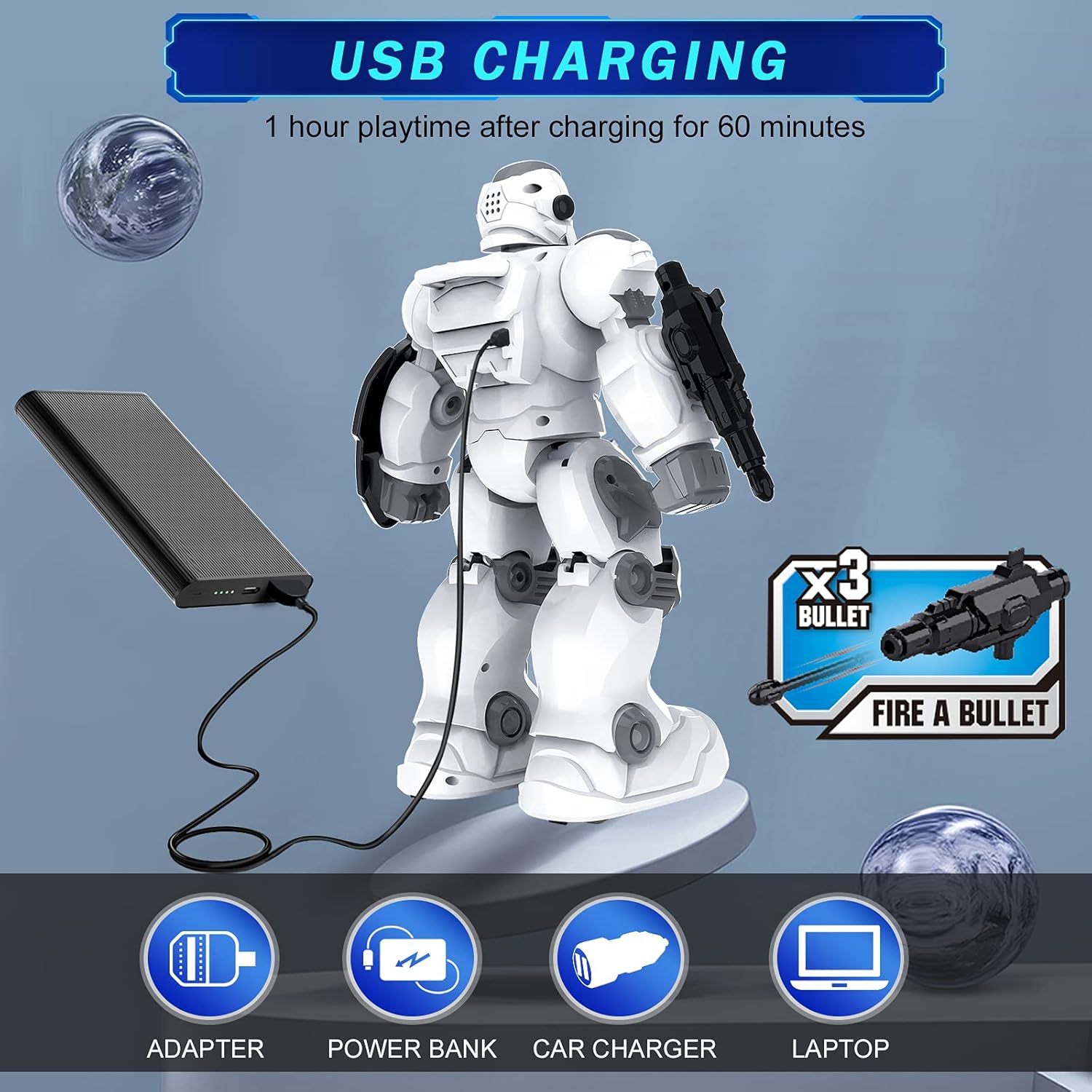
Figure 4: USB Charging for the robot
5.3. Attaching Accessories
The launcher and protective shield can be attached to the robot's arms. Align the accessories with the designated slots on the robot's arms and firmly press them into place.

Figure 5: Attaching the Launcher and Protective Shield
6. Operating Instructions
6.1. Power On/Off
Press the Power Button on the robot's chest to turn it on. The LED eyes will light up. To turn off, press the Power Button again or use the Stop/Standby button on the remote.
6.2. Remote Control Operation
Use the directional buttons on the remote control to move the robot:
- Slide Forward/Backward: Moves the robot forward or backward.
- Turn Left/Right: Rotates the robot left or right.
- Fast Slide Forward/Step Forward: Engages faster movement.
6.3. Gesture Sensing
The robot can respond to hand gestures. Ensure your hand is within the Gesture Sensing Zone on the robot's chest.
- Move Forward: Swipe hand forward.
- Move Backward: Swipe hand backward.
- Turn Left: Swipe hand left.
- Turn Right: Swipe hand right.
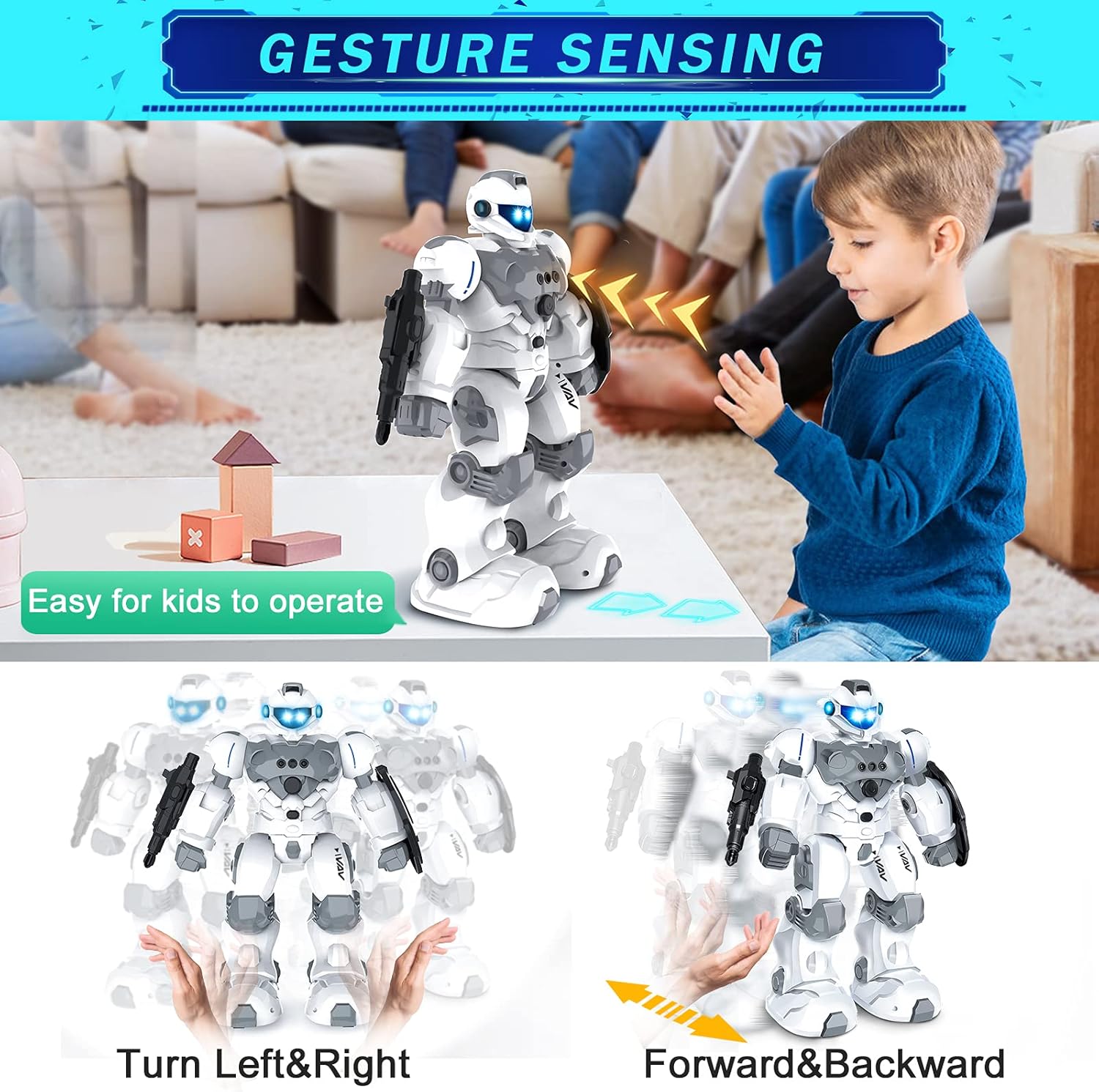
Figure 6: Gesture Sensing in action
6.4. Intelligent Programming
Program a sequence of movements for the robot:
- Press the Programming button on the remote control.
- Input your desired sequence of actions using the remote control buttons (e.g., Slide Forward, Turn Right, Music).
- Press the Programming button again to save and execute the sequence. The robot will perform the programmed actions step-by-step.
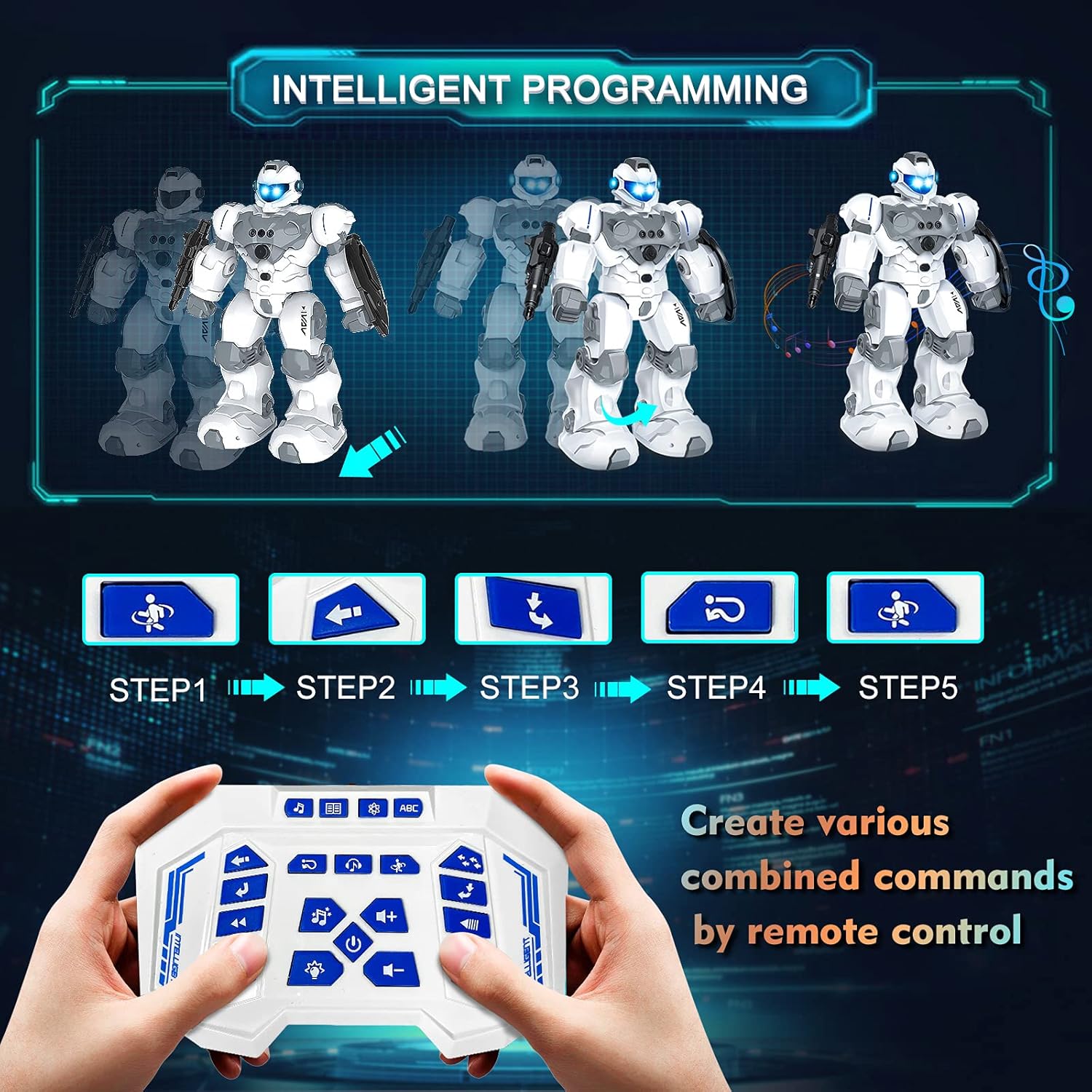
Figure 7: Intelligent Programming sequence
6.5. Other Functions
The remote control offers various entertainment and educational modes:
- Automatic Demonstration: Press the 'Automatic Demonstration' button for a pre-programmed show.
- Music/Dancing: Press the 'Music' or 'Dancing' buttons to activate musical playback and dance moves.
- Nursery Rhymes/Stories/Popular Science/English Song: Engage these modes for educational content.
- Light: Control the robot's LED lights.
- Voice Command: Activates voice interaction (refer to specific commands in the manual).
- Fire Bullet: Load bullets into the launcher and press the 'Fire Bullet' button to shoot.

Figure 8: Robot firing a bullet
Watch the official product video for a demonstration of the robot's features:
Video 1: VAV Robot Toys for Boys and Girls - Official Product Demonstration. This video showcases various functions including movement, dancing, and firing projectiles.
7. Maintenance
- Clean the robot and remote control with a soft, dry cloth. Do not use water or cleaning agents.
- Store the robot and accessories in a cool, dry place away from direct sunlight.
- Remove batteries from the remote control if not used for an extended period to prevent leakage.
8. Troubleshooting
| Problem | Possible Cause | Solution |
|---|---|---|
| Robot does not turn on. | Low battery or no power. | Charge the robot's battery. Ensure the power button is pressed. |
| Remote control not working. | Dead or incorrectly installed batteries. | Replace remote control batteries, checking polarity. |
| Robot not responding to commands. | Out of range, interference, or low battery. | Ensure robot and remote are within range (approx. 2.4GHz). Check robot battery. Avoid strong interference sources. |
| Gesture sensing not working. | Hand not in sensing zone or insufficient light. | Ensure hand is directly in front of the Gesture Sensing Zone. Operate in well-lit conditions. |
9. Specifications
- Product Dimensions: 8.27 x 8.66 x 7.87 inches
- Item Weight: 12.3 ounces
- Item Model Number: BG1528
- Manufacturer: VAV
- Recommended Age: 6 years and up
- Robot Battery: 1 Lithium Ion battery (included)
- Remote Control Battery: 2 'AA' batteries (not included)
- Charging Time: Approximately 1 hour
- Playtime: Approximately 60 minutes
10. Warranty and Support
VAV stands behind its products. If you encounter any issues or have questions regarding your VAV Intelligent Programmable RC Robot Toy, please contact our customer support. Your satisfaction is our priority. Please refer to the product packaging or our official website for the most up-to-date warranty information and contact details.