
Introduction
This manual provides instructions for the PLBEREMC Universal Remote Control, designed for use with a wide range of Panasonic televisions. This remote offers a direct replacement solution, eliminating the need for complex programming. Simply insert batteries to begin operation.
Setup: Battery Installation
The remote control requires two (2) AAA batteries (not included) for operation. Follow these steps to install the batteries:
- Locate the battery compartment cover on the back of the remote control.
- Press down on the tab and slide the cover downwards to open the compartment.
- Insert two AAA batteries, ensuring the positive (+) and negative (-) terminals align correctly with the markings inside the compartment.
- Slide the battery compartment cover back into place until it clicks securely.
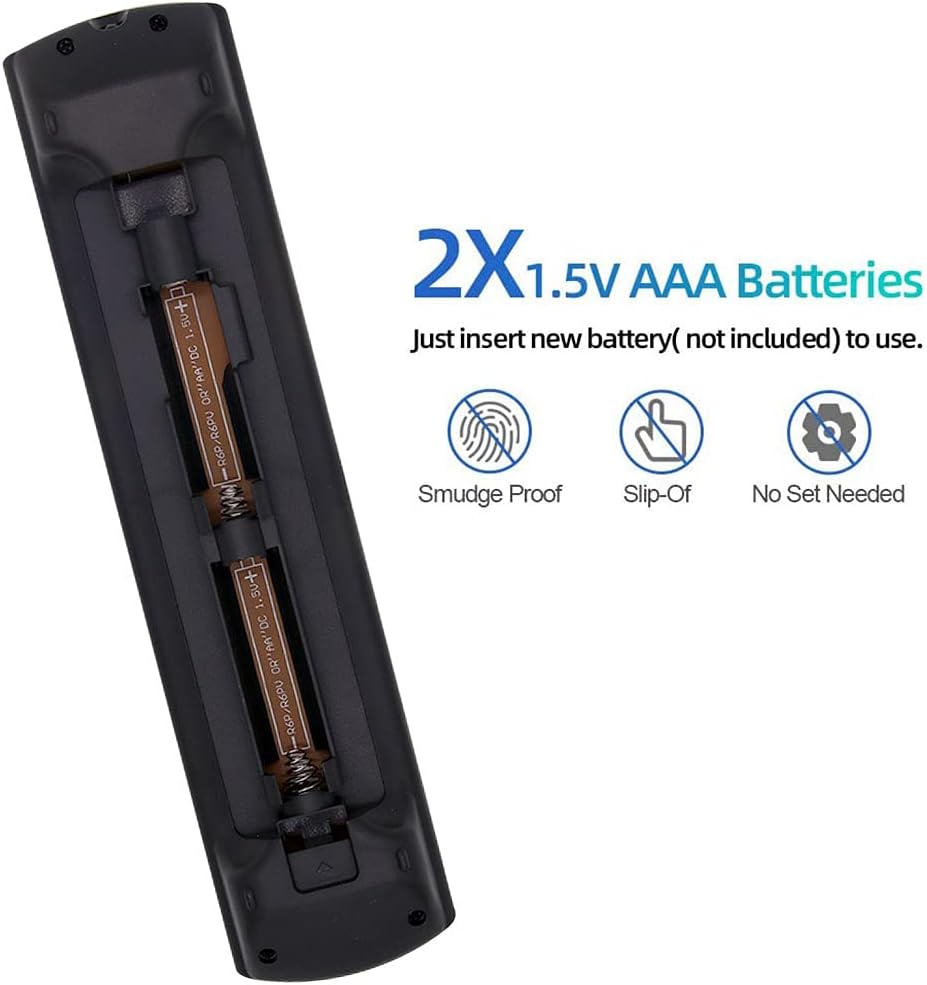
Figure 1: Battery Installation. This image illustrates the open battery compartment of the remote control, showing the correct orientation for inserting two AAA batteries. The remote is designed for easy battery replacement.
Important: Ensure batteries are inserted with the correct polarity. Incorrect installation may prevent the remote from functioning.
Operating Instructions
This universal remote control is designed to function immediately with compatible Panasonic TVs without any programming. Point the remote directly at your television's infrared receiver.

Figure 2: Remote Control Layout. This image displays the full button layout of the PLBEREMC Universal Remote Control, including power, input, channel, volume, navigation, and dedicated app buttons.
Key Functions:
- Power Button (●): Turns the television on or off.
- Input Button: Cycles through available input sources (HDMI, AV, etc.).
- Volume Up/Down (+/-): Adjusts the television's volume level.
- Channel Up/Down (▲/▼): Changes television channels.
- Mute Button: Silences or restores television audio.
- Navigation Pad (Up, Down, Left, Right, OK): Used for menu navigation and selection.
- Home Button: Accesses the television's main menu or smart TV interface.
- Netflix Button: Direct access to the Netflix application.
- Guide Button: Displays the electronic program guide (if supported by your TV).
- Back/Return Button: Returns to the previous screen or menu.
- Number Buttons (0-9): Direct channel selection.
Compatibility
This remote control is compatible with a wide range of Panasonic TV models, including Plasma, Viera HDTV, 3D LCD, and LED TVs. It is designed to replace many original Panasonic remote models without requiring any setup or programming.

Figure 3: Universal Compatibility. This image highlights the remote's broad compatibility with Panasonic LCD, LED, HDTV, UHD, 3D, Viera Plasma, 4K Ultra HD, and Android Smart TVs.
Compatible TV Series and Remote Models:
This remote is a suitable replacement for numerous Panasonic TV models, including but not limited to those associated with original remote models such as N2QAYB000027, N2QAYB000065, N2QAYB000079, and many others listed in the product description. It also supports TV series like TC-P42C1, TC-P50C1, TC-P42G10, TC-P50G20, TC-P50GT30, TC-P50ST50, and various S, G, GT, and ST series Panasonic Viera TVs.

Figure 4: Replacement for Original Remotes. This image demonstrates the universal remote's ability to replace various older Panasonic remote models, ensuring broad compatibility.
Maintenance
- Cleaning: Use a soft, dry cloth to clean the remote control. Do not use liquid cleaners or abrasive materials.
- Battery Replacement: Replace batteries when the remote's response becomes sluggish or stops working. Always replace both batteries at the same time with new ones.
- Storage: If the remote will not be used for an extended period, remove the batteries to prevent leakage and potential damage.
- Avoid Damage: Do not drop the remote or expose it to extreme temperatures, humidity, or direct sunlight.
Troubleshooting
| Problem | Possible Cause | Solution |
|---|---|---|
| Remote is not working. |
|
|
| Some buttons do not respond. |
|
|
| Battery compartment issues (e.g., loose batteries). |
|
|
Specifications
- Model: TC-P42C1 (Universal Replacement)
- Brand: PLBEREMC
- Power Source: 2 x AAA Batteries (not included)
- Dimensions: Approximately 1.97 x 1.18 x 1.57 inches (5 x 3 x 4 cm)
- Item Weight: Approximately 1.06 ounces (30 grams)
- Special Feature: Universal compatibility for Panasonic TVs, no programming required.
- Color: Black

Figure 5: Remote Control Dimensions. This image provides a visual representation of the remote control's length, width, and thickness.
Warranty and Support
This product comes with a quality assurance guarantee. If you encounter any quality problems or require assistance, please contact the seller directly. They are committed to providing a satisfactory solution.
For further support or inquiries, refer to your purchase documentation or the seller's contact information provided at the time of purchase.