
1. Introduction
Thank you for choosing the Benss Portable AM FM Radio, Model BD07. This compact and lightweight radio is designed for reliable reception of AM and FM broadcasts, offering clear audio through its built-in speaker or a connected headphone. Its battery-powered operation makes it ideal for both everyday listening and emergency situations. Please read this manual carefully to ensure proper use and maintenance of your device.
2. Product Overview
Familiarize yourself with the components of your Benss Portable AM FM Radio.
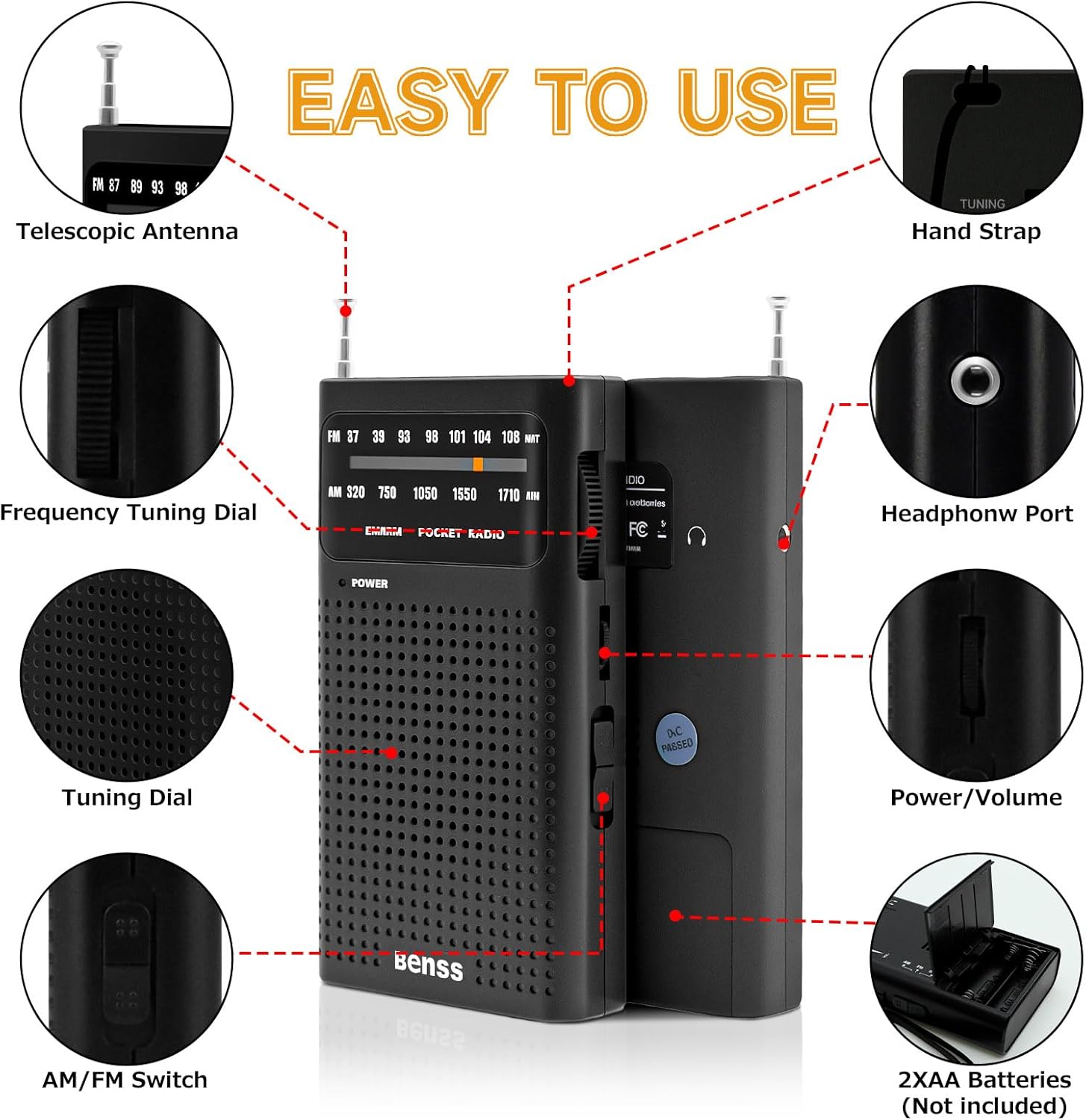
Image 2.1: Labeled diagram showing the radio's components, including the telescopic antenna, tuning dials, AM/FM switch, headphone port, and battery compartment.
Key Components:
- Telescopic Antenna: Extends for improved FM reception.
- Frequency Tuning Dial: Used to select radio stations.
- AM/FM Switch: Toggles between AM and FM radio bands.
- Power/Volume Control: Rotary knob to turn the radio on/off and adjust volume.
- Headphone Port (3.5mm): For private listening with headphones.
- Battery Compartment: Holds two AA batteries.
- Hand Strap: For convenient carrying.
3. Setup
3.1 Battery Installation
The Benss Portable AM FM Radio operates on two AA batteries (not included).
- Locate the battery compartment cover on the back of the radio.
- Slide the cover open in the direction indicated by the arrow.
- Insert two AA batteries, ensuring the correct polarity (+ and -) as marked inside the compartment.
- Close the battery compartment cover securely.

Image 3.1: Battery compartment on the back of the radio, open for AA battery insertion.
4. Operating Instructions
4.1 Power On/Off and Volume Control
- To turn the radio ON, rotate the Power/Volume control knob clockwise until you hear a click and the power indicator light illuminates.
- Continue rotating the knob clockwise to increase the volume.
- To turn the radio OFF, rotate the Power/Volume control knob counter-clockwise until it clicks and the power indicator light turns off.

Image 4.1: Front view of the radio, highlighting the power indicator and tuning display.
4.2 Selecting AM or FM Band
Use the AM/FM switch located on the side of the radio to select your desired frequency band.

Image 4.2: Side view of the radio, illustrating the AM/FM band selection switch.
4.3 Tuning to a Station
- Extend the telescopic antenna for optimal FM reception. For AM reception, the internal antenna is generally sufficient, but rotating the radio may improve signal.
- Slowly rotate the Frequency Tuning Dial (located on the side) to scan for stations.
- Observe the tuning indicator in the display window to help pinpoint stations.
- Adjust the antenna position and radio orientation for the clearest sound.
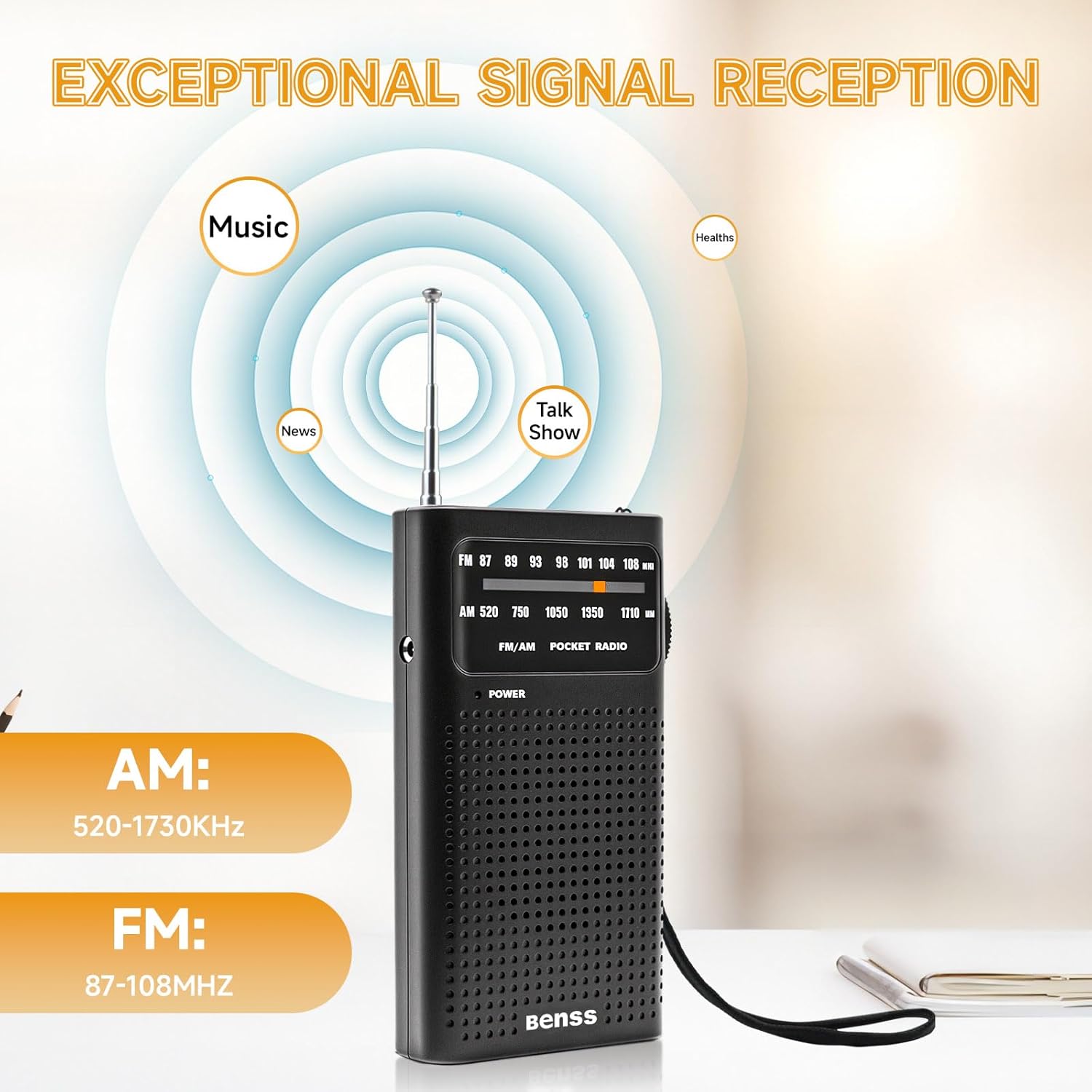
Image 4.3: Radio displaying AM and FM frequency ranges, illustrating signal reception capabilities.
4.4 Using Headphones
For private listening, plug any standard 3.5mm headphones into the headphone port located on the side of the radio. The built-in speaker will automatically mute when headphones are connected.

Image 4.4: User enjoying the radio with headphones for private listening.
5. Maintenance
5.1 Cleaning
- Wipe the radio with a soft, dry cloth.
- Do not use liquid cleaners, abrasive pads, or chemical solvents, as these can damage the surface.
5.2 Battery Care
- Remove batteries if the radio will not be used for an extended period to prevent leakage.
- Replace both batteries simultaneously; do not mix old and new batteries or different types of batteries.
5.3 Storage
- Store the radio in a cool, dry place away from direct sunlight and extreme temperatures.
- Keep out of reach of children.
6. Troubleshooting
If you encounter issues with your radio, please refer to the following common problems and solutions:
| Problem | Possible Cause | Solution |
|---|---|---|
| No power | Batteries are dead or incorrectly inserted. | Check battery polarity; replace with fresh AA batteries. |
| Poor reception / Static | Weak signal; antenna not extended; interference. | Extend the telescopic antenna fully. Rotate the radio for better signal. Move away from electronic devices that may cause interference. |
| No sound from speaker | Volume too low; headphones connected. | Increase volume. Disconnect headphones if present. |
| Tuning difficulty | Fine-tuning required. | Slowly adjust the tuning dial for precise station selection. |
7. Specifications
Technical details for the Benss Portable AM FM Radio BD07:
| Feature | Detail |
|---|---|
| Model Number | BD07 |
| Brand | Benss |
| Dimensions (L x W x H) | 13 cm x 6 cm x 1 cm (approx. 5.1 x 2.4 x 0.4 inches) |
| Weight | 135g (approx. 4.8 oz) |
| FM Frequency Range | 87 - 108 MHz |
| AM Frequency Range | 520 - 1730 kHz |
| Power Source | 2 x AA Batteries (not included) |
| Audio Output | Built-in speaker, 3.5mm headphone jack |
| Special Features | Portable, Telescopic Antenna |
| Color | Black |
8. Safety Information
- Do not expose the radio to water, moisture, or extreme temperatures.
- Avoid dropping or subjecting the radio to strong impacts.
- Do not attempt to disassemble or modify the radio. This will void any potential warranty and could cause damage.
- Dispose of used batteries responsibly according to local regulations.
- Listening at high volume levels for extended periods can cause hearing damage.
9. Warranty and Support
Specific warranty information for the Benss Portable AM FM Radio BD07 is not provided in this manual. For warranty details or technical support, please refer to the product packaging or contact the retailer where the product was purchased. You may also visit the official Benss website for further assistance.