
Atomi Smart SL1
Atomi Smart WiFi LED Spot Lights User Manual
Model: SL1
1. Introduction
Thank you for choosing the Atomi Smart WiFi LED Spot Lights. This 4-pack starter kit is designed to enhance your outdoor living spaces with intelligent, customizable lighting. Featuring 400 lumens of bright, dimmable light, these IP65 waterproof spot lights offer over 16 million color options and tunable white light, all controllable via the Atomi Smart app or voice commands with Amazon Alexa and Google Assistant.
This manual provides essential information for the proper setup, operation, and maintenance of your Atomi Smart WiFi LED Spot Lights to ensure optimal performance and longevity.
2. What's Included
Your Atomi Smart WiFi LED Spot Lights kit includes the following components:
- 4 x Atomi Smart LED Spot Lights
- 4 x Ground Spikes
- 1 x Smart Bridge
- 1 x USB Wall Charger
- 1 x Spot Lighting Cable (11.5 ft)
- 1 x Power Cable
- 1 x Extension Cable (16.4 ft)
- Hardware for Screws
- 1 x User Manual (this document)
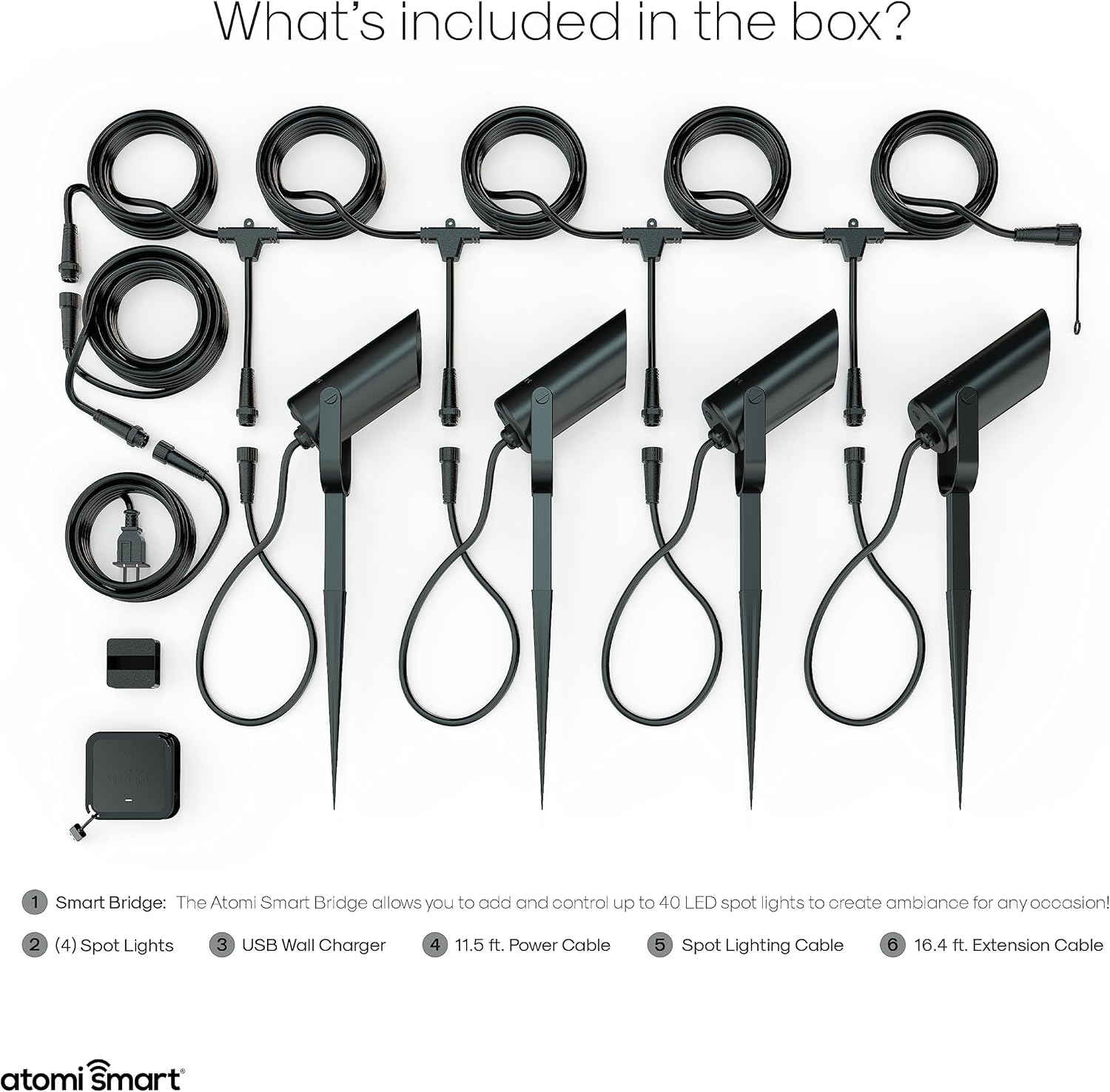
Figure 2.1: All components included in the Atomi Smart WiFi LED Spot Lights kit.
3. Setup and Installation
Follow these steps to set up your Atomi Smart WiFi LED Spot Lights:
3.1 Physical Installation
- Choose Location: Select an outdoor area for your spot lights. Ensure the location is within range of your home's Wi-Fi network.
- Assemble Lights: Attach the ground spikes to the bottom of each spot light.
- Position Lights: Insert the assembled spot lights into the ground in your desired arrangement.
- Connect Cables: Connect the spot lights to the main spot lighting cable, ensuring all connections are secure. Use the extension cable if needed to cover a larger area. Connect the power cable to the spot lighting cable and then to the Smart Bridge.
- Power On: Plug the USB wall charger into an outdoor-rated power outlet and connect it to the Smart Bridge. The lights should power on.

Figure 3.1: The Atomi Smart Spot Lights feature durable construction and IP65 weather resistance.
3.2 App Download and Pairing
To control your lights, download the Atomi Smart app and pair your device:
- Download App: Search for "Atomi Smart" in the Apple App Store or Google Play Store and download the app.
- Create Account: Open the app and follow the on-screen instructions to create a new account or log in if you already have one.
- Add Device: Tap the "+" icon in the top right corner of the app to add a new device. Select "Lighting" and then "Smart Spot Lights."
- Connect to Wi-Fi: Follow the in-app instructions to connect your Smart Bridge to your 2.4GHz Wi-Fi network. Ensure your phone is connected to the same Wi-Fi network during the pairing process.
- Name Device: Once successfully paired, you can name your spot lights for easy identification and control.

Figure 3.2: Control your Atomi Smart Spot Lights directly from your smartphone using the Atomi Smart app.
4. Operating Your Spot Lights
The Atomi Smart app provides comprehensive control over your spot lights. You can also integrate them with voice assistants.
4.1 App Control Features
Once your lights are paired, you can access various functions within the Atomi Smart app:
- On/Off: Toggle the lights on or off remotely.
- Color Changing: Select from over 16 million colors using the color wheel.
- Tunable White: Adjust the white light from warm to cool tones.
- Brightness & Saturation: Fine-tune the intensity and vibrancy of the light.
- Scenes & Effects: Choose from pre-set scenes or create custom lighting effects for different occasions.
- Scheduling: Set daily or weekly schedules for your lights to turn on/off automatically at specific times.
- Countdown Timer: Set a timer for the lights to turn off after a specified duration.
- Grouping: Group multiple Atomi Smart devices to control them simultaneously.

Figure 4.1: Utilize built-in scenes and effects for special occasions directly from the Atomi Smart app.
4.2 Voice Control Integration
Your Atomi Smart WiFi LED Spot Lights are compatible with Amazon Alexa and Google Assistant for convenient voice control:
- Link Accounts: In the Alexa or Google Home app, enable the Atomi Smart skill/action and link your Atomi Smart account.
- Discover Devices: Once linked, ask your voice assistant to discover new devices.
- Voice Commands: You can now use voice commands such as:
- "Alexa, turn on the patio lights."
- "Hey Google, set the garden lights to blue."
- "Alexa, dim the spot lights to 50%."

Figure 4.2: Seamlessly control your Atomi Smart Spot Lights using Amazon Alexa or Google Assistant.
4.3 Product Overview Video
For a visual guide on the features and capabilities of your Atomi Smart Spot Lights, please watch the official product video below:
Video 4.1: An official overview of the Atomi Smart Spot Lights, demonstrating key features like app control, voice assistant compatibility, color options, dimming, scheduling, and durable design.
5. Maintenance
The Atomi Smart WiFi LED Spot Lights are designed for outdoor use with an IP65 rating, indicating resistance to dust and water jets. To ensure their longevity and optimal performance:
- Regular Cleaning: Periodically wipe down the lights with a soft, damp cloth to remove dirt, dust, and debris. Avoid abrasive cleaners or solvents.
- Inspect Connections: Annually check all cable connections for tightness and ensure they are free from corrosion or damage.
- Clear Obstructions: Ensure no plants or objects are blocking the light output or causing excessive heat buildup around the fixtures.
- Winter Care: While IP65 rated for all weather, in areas with extreme winter conditions (heavy snow, ice), consider clearing snow accumulation around the lights to prevent prolonged submersion or ice damage.
6. Troubleshooting
If you encounter issues with your Atomi Smart WiFi LED Spot Lights, refer to the following common problems and solutions:
6.1 Lights Not Responding or Connecting to Wi-Fi
- Check Power: Ensure the Smart Bridge is properly plugged into a working power outlet and the lights are receiving power.
- Wi-Fi Signal: Verify that your Wi-Fi router is working correctly and the Smart Bridge is within range of a strong 2.4GHz Wi-Fi signal. The Atomi Smart app only supports 2.4GHz networks.
- Router Reboot: Try restarting your Wi-Fi router and then the Smart Bridge.
- Re-pairing: If connectivity issues persist, try re-pairing the Smart Bridge with the Atomi Smart app. Follow the setup instructions in Section 3.2.
- App Update: Ensure your Atomi Smart app is updated to the latest version.
6.2 Lights Not Changing Color or Brightness
- App Control: Confirm you are using the correct controls within the Atomi Smart app for color and brightness adjustments.
- Connectivity: Ensure the lights are connected to the app and show as "Online." If offline, refer to Section 6.1.
- Individual Light Issue: If only one light is affected, check its physical connection to the main cable.
6.3 Lights Turning On/Off at Unexpected Times
- Check Schedules: Review your schedules and timers within the Atomi Smart app to ensure they are set as desired. Delete or modify any conflicting schedules.
- Voice Assistant Routines: If integrated with Alexa or Google Assistant, check for any routines or automations that might be controlling the lights.
6.4 Water Inside Light Fixture (Despite IP65 Rating)
- Inspect Seals: While designed to be waterproof, inspect the seals and connections for any visible damage or improper seating that could allow water ingress.
- Proper Installation: Ensure the lights are installed upright and not in a position where water can pool directly on top of the fixture or connections for extended periods.
- Contact Support: If water ingress occurs and affects functionality, contact Atomi Smart customer service for assistance, as this may indicate a manufacturing defect.
7. Specifications
| Feature | Specification |
|---|---|
| Brand | Atomi Smart |
| Model Number | SL1 |
| Color | Black |
| Light Source Type | LED (RGB-CCT) |
| Brightness | 400 Lumens per light |
| Wattage | 10 Watts per light |
| Voltage | 120 Volts |
| Number of Lights | 4 (in starter kit) |
| Connectivity | Wi-Fi (2.4GHz) |
| Control Method | App (Atomi Smart), Voice (Alexa, Google Assistant) |
| Indoor/Outdoor Usage | Outdoor |
| Water Resistance Level | IP65 (Water Resistant) |
| Material | Aluminum housing, Polycarbonate shade |
| Item Weight | 10.58 pounds (total package) |
| Dimensions (per light) | Approx. 4.4 in. (L) x 2 in. (W) x 11.7 in. (H) with spike |

Figure 7.1: Approximate dimensions of a single Atomi Smart Spot Light with its ground spike.
8. Warranty and Support
Atomi Smart provides a 5-year limited warranty on all its smart products, including the WiFi LED Spot Lights. This warranty covers defects in materials and workmanship under normal use.
For technical support, warranty claims, or any questions not covered in this manual, please contact Atomi Smart customer service:
- Website: Visit the Atomi Smart official website for FAQs and support resources.
- Email: Refer to the Atomi Smart website for the most current support email address.
- Phone: Refer to the Atomi Smart website for the most current support phone number.
Please have your product model number (SL1) and proof of purchase ready when contacting support.