
1. Introduction
The General Components Bison 2200A is a 24V forced air diesel heater designed for heating applications in commercial vehicles, RVs, boats, and cabins. It provides efficient and quiet heating, capable of operating effectively in various environmental conditions. This manual provides essential information for the safe installation, operation, and maintenance of your Bison 2200A heater.
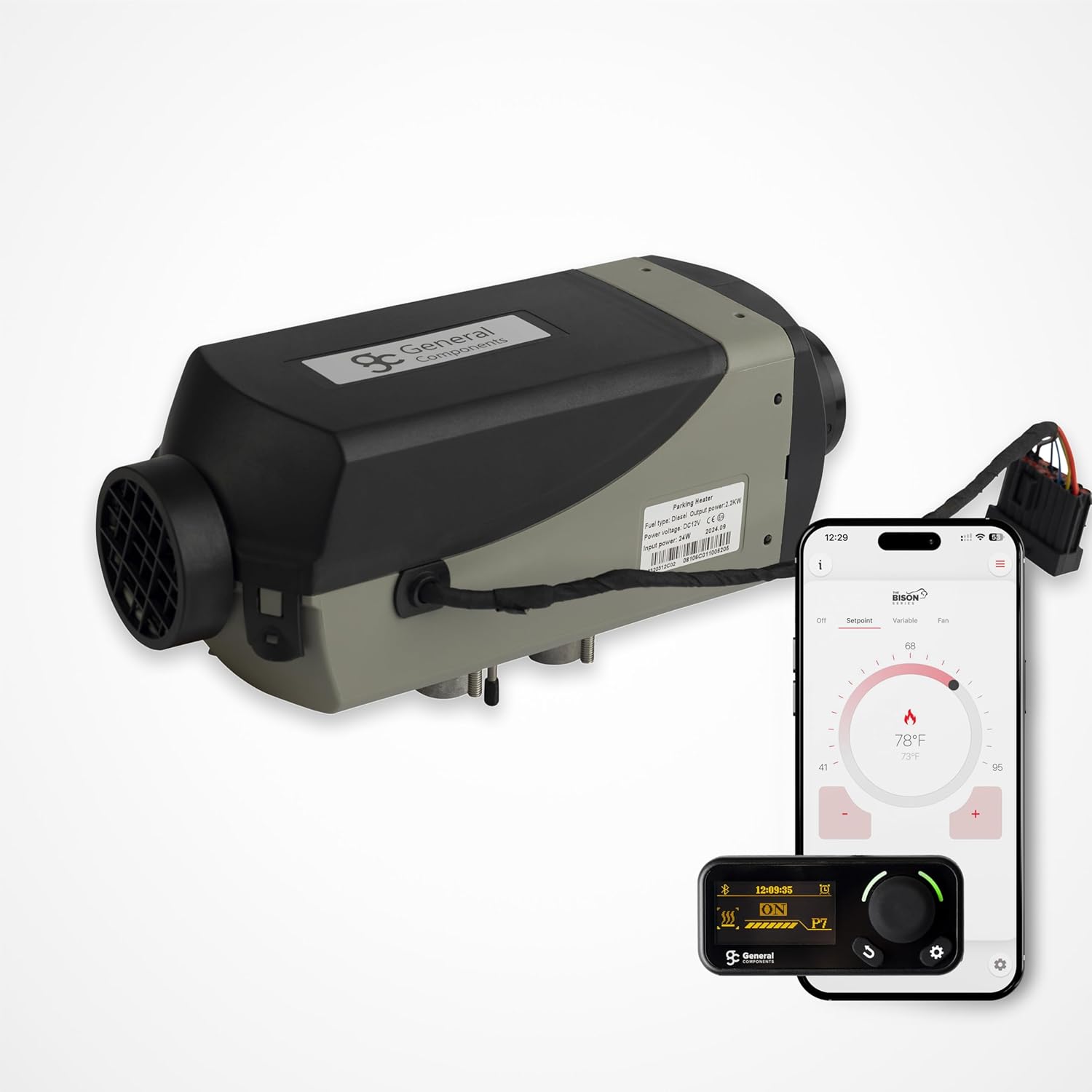
Figure 1.1: Bison 2200A Forced Air Diesel Heater with its digital controller and a smartphone displaying the control app. This image illustrates the main unit and its primary control interfaces.
2. Safety Information
Read all safety warnings and instructions carefully before installing or operating the heater. Failure to follow these instructions may result in fire, explosion, electric shock, property damage, or personal injury.
- Ventilation: Ensure adequate ventilation in the installation area. Never operate the heater in an enclosed space without proper exhaust ventilation to prevent carbon monoxide buildup.
- Fuel Handling: Use only diesel fuel. Do not use gasoline or other volatile fuels. Handle fuel in a well-ventilated area away from ignition sources.
- Exhaust System: The exhaust pipe must be routed outside the vehicle/cabin and away from combustible materials. Ensure all connections are sealed to prevent exhaust gas leakage into the heated space.
- Electrical Connections: All electrical connections must be secure and correctly wired according to the provided diagrams. Ensure the power supply matches the heater's voltage requirements (24V DC).
- Clearances: Maintain sufficient clearance around the heater and its air inlets/outlets to prevent overheating and ensure proper airflow. Do not block air intake or exhaust.
- Flammable Materials: Keep flammable materials, liquids, and vapors away from the heater.
- Children and Pets: Keep children and pets away from the heater during operation.
3. Package Contents
Verify that all components listed below are present in your package before beginning installation. If any parts are missing or damaged, contact General Components customer support.
- Bison 2200A Heater Unit
- Programmable Digital Controller
- 1m Air Duct with one register
- Fuel Pump with 7m Fuel Line
- Fuel Pickup Tube and Tee
- Wiring Harness Straps
- Screws, Clamps, and Straps
- Exhaust and Intake Tubing

Figure 3.1: Overview of all components included in the Bison 2200A heater kit, showing the main unit, fuel system, wiring, and mounting hardware.
4. Setup and Installation
The Bison 2200A heater kit includes all necessary hardware for a basic installation. Follow these general steps for proper setup. Refer to the detailed installation diagrams provided separately with your product for specific mounting and connection instructions.
- Mounting the Heater: Select a suitable, secure location for the heater unit, ensuring adequate clearance for airflow and maintenance. Use the provided mounting hardware to firmly attach the unit.
- Fuel System Connection: Install the fuel pickup tube into the vehicle's fuel tank. Connect the fuel line from the pickup tube to the fuel pump, and then from the fuel pump to the heater unit. Ensure all fuel connections are tight and leak-free.
- Exhaust and Intake Tubing: Connect the intake tubing to the heater's air intake and the exhaust tubing to the heater's exhaust port. Route both tubes outside the vehicle/cabin, ensuring the exhaust is directed away from any openings and combustible materials. Secure tubing with clamps.
- Electrical Wiring: Connect the wiring harness to the heater unit, fuel pump, and digital controller. Connect the main power wires to a 24V DC power source, observing correct polarity. Ensure all electrical connections are secure and protected.
- Air Duct Installation: Attach the 1m air duct to the heater's hot air outlet and route it to the desired heating area. Install the air register at the end of the duct.
5. Operating Instructions
The Bison 2200A heater features a programmable digital controller for easy operation and temperature management. It offers multiple operating modes to suit various heating needs.
5.1 Digital Controller
The digital controller allows you to set the desired temperature, select operating modes, and monitor the heater's status. Refer to the controller's specific user guide for detailed button functions and menu navigation.
5.2 Operating Modes
- Automatic Regulation: In this mode, the heater automatically adjusts its heat output to maintain a user-defined temperature range (adjustable from 41°F to 95°F or 5°C to 35°C).
- Constant Heat Output Selection: This mode allows manual selection of a constant heat output level, from minimum to maximum, regardless of the ambient temperature.
- Air Circulation/Ventilation: This is a fan-only mode that circulates air without generating heat. Useful for ventilation purposes.
5.3 Mobile App Control
The Bison 2200A can also be controlled via a mobile application, offering seamless climate control from your smartphone. Download the General Components app from the App Store or Google Play.

Figure 5.1: Screenshots demonstrating the General Components mobile application interface for controlling the heater, including system self-check and temperature settings.
6. Maintenance
Regular maintenance ensures optimal performance and longevity of your Bison 2200A heater. Perform these checks periodically:
- Cleaning: Keep the heater's exterior clean. Ensure air intake and outlet grilles are free from dust and debris. Do not use abrasive cleaners.
- Air Filter: Check and clean or replace the air filter (if applicable) regularly to ensure proper airflow and prevent dust accumulation inside the unit.
- Fuel System: Inspect fuel lines for any signs of leaks, cracks, or damage. Ensure the fuel filter is clean.
- Exhaust System: Check the exhaust pipe for blockages, corrosion, or damage. Ensure all connections are secure.
- Electrical Connections: Periodically inspect all electrical connections for tightness and signs of corrosion.
7. Troubleshooting
If you encounter issues with your Bison 2200A heater, refer to the following common troubleshooting steps. For persistent problems, contact General Components customer support.
| Problem | Possible Cause | Solution |
|---|---|---|
| Heater does not start | No power, low fuel, clogged fuel line, faulty ignition. | Check power supply and connections. Ensure sufficient fuel. Inspect fuel lines and filter. Consult service manual for ignition issues. |
| Insufficient heat output | Low power setting, restricted airflow, dirty filter. | Increase power setting on controller. Check for obstructions in air ducts. Clean or replace air filter. |
| Excessive smoke | Incorrect fuel/air mixture, carbon buildup, faulty fuel pump. | Ensure correct fuel type. Perform maintenance to clean combustion chamber. Contact service for fuel pump inspection. |
| Unusual noise | Loose components, fan obstruction, worn bearings. | Inspect for loose parts and tighten. Check fan for obstructions. Contact service for internal component issues. |
| Error code displayed | Specific system fault. | Refer to the digital controller's manual for specific error code meanings and troubleshooting steps. |
8. Specifications
Detailed technical specifications for the Bison 2200A Forced Air Diesel Heater.

Figure 8.1: Official technical data table for the Bison 2200A heater, detailing performance metrics and dimensions.
| Parameter | Value |
|---|---|
| Model | 2200A |
| Heat Output Range | 0.85 - 2.2 kW/hr (2900 - 7506 BTU/hr) |
| Diesel Fuel Consumption | 0.1 - 0.28 L/hr (0.03 - 0.07 U.S Gal/hr) |
| Electric Power Consumption (24V DC) | 0.58 - 2.83 Amps (7 - 34 Watts) |
| Voltage Operating Range (24V DC) | 10.5 - 16V (with Low and High Voltage Protection) |
| Operating Modes | Automatic Regulation, Constant Heat Output Selection, Air Circulation/Ventilation |
| Dimensions (L x W x H) | 24.21 x 4.53 x 4.80 inches (310 x 115 x 122 mm) |
| Manufacturer Part Number | GC0645 |
| Date First Available | July 28, 2021 |

Figure 8.2: Dimensional drawing of the Bison 2200A heater, indicating length, width, and height measurements.
9. Warranty and Support
The General Components Bison 2200A Forced Air Diesel Heater is backed by a 2-Year Warranty, reflecting General Components' commitment to quality and customer satisfaction. For technical assistance, warranty claims, or any inquiries, please contact General Components customer support through their official channels.