
1. Product Overview
The INTSUPERMAI DZ-400 is a single chamber vacuum packaging machine designed for sealing various items in composite film bags. It features a microcomputer control system for precise operation.
Key Features:
- Independent safety switch and three-plug power interface for secure operation.
- Equipped with a high-capacity pump for efficient vacuum creation.
- Durable construction with a 304 stainless steel stamping vacuum chamber, designed to prevent deformation under high pressure.
- Transparent tempered glass lid allows visibility of the vacuum and sealing process, and its design enhances vacuum space.
- Microcomputer control system with simple button operation and memory function for stored parameters.
- Compatible with various bag types including grain bags, aluminum foil bags, glossy bags, and folded bags.
Specifications:
| Specification | Value |
|---|---|
| Brand | INTSUPERMAI |
| Model | DZ-400 |
| Material | Stainless Steel |
| Color | Silver |
| Product Dimensions (L x W x H) | 21.2" x 19.3" x 35.4" (54cm x 49cm x 90cm) |
| Power Source | Corded Electric |
| Operation Mode | Automatic |
| Wattage | 900 watts |
| Voltage | 110 Volts |
| Item Weight | 214 pounds (97 kg) |

Figure 1: Front view of the INTSUPERMAI DZ-400 Single Chamber Vacuum Packaging Machine.

Figure 2: Overall dimensions of the DZ-400 machine, including height, width, and depth measurements.

Figure 3: Internal chamber dimensions of the DZ-400, showing the sealing bar length and chamber depth.
2. Safety Instructions
Read all safety instructions carefully before operating the machine to prevent injury or damage.
- Ensure the machine is connected to a grounded power outlet with the correct voltage (110V).
- Do not operate the machine with wet hands or in wet environments.
- Keep hands and loose clothing away from moving parts and the sealing bar during operation.
- Always turn off and unplug the machine before cleaning or maintenance.
- Do not attempt to modify or repair the machine yourself. Contact qualified service personnel.
- Use only approved vacuum bags designed for vacuum packaging machines.
- Ensure the lid is properly closed before starting the vacuum cycle.
3. Setup
3.1 Unpacking and Placement
- Carefully remove the machine from its packaging.
- Inspect the machine for any signs of damage during transit. Report any damage to the supplier immediately.
- Place the machine on a stable, level surface capable of supporting its weight (approximately 214 lbs).
- Ensure adequate ventilation around the machine.
3.2 Power Connection
- Locate the power input on the rear of the machine.
- Connect the power cord to a grounded 110V AC power outlet.
- Turn on the main power switch, typically located near the power input.
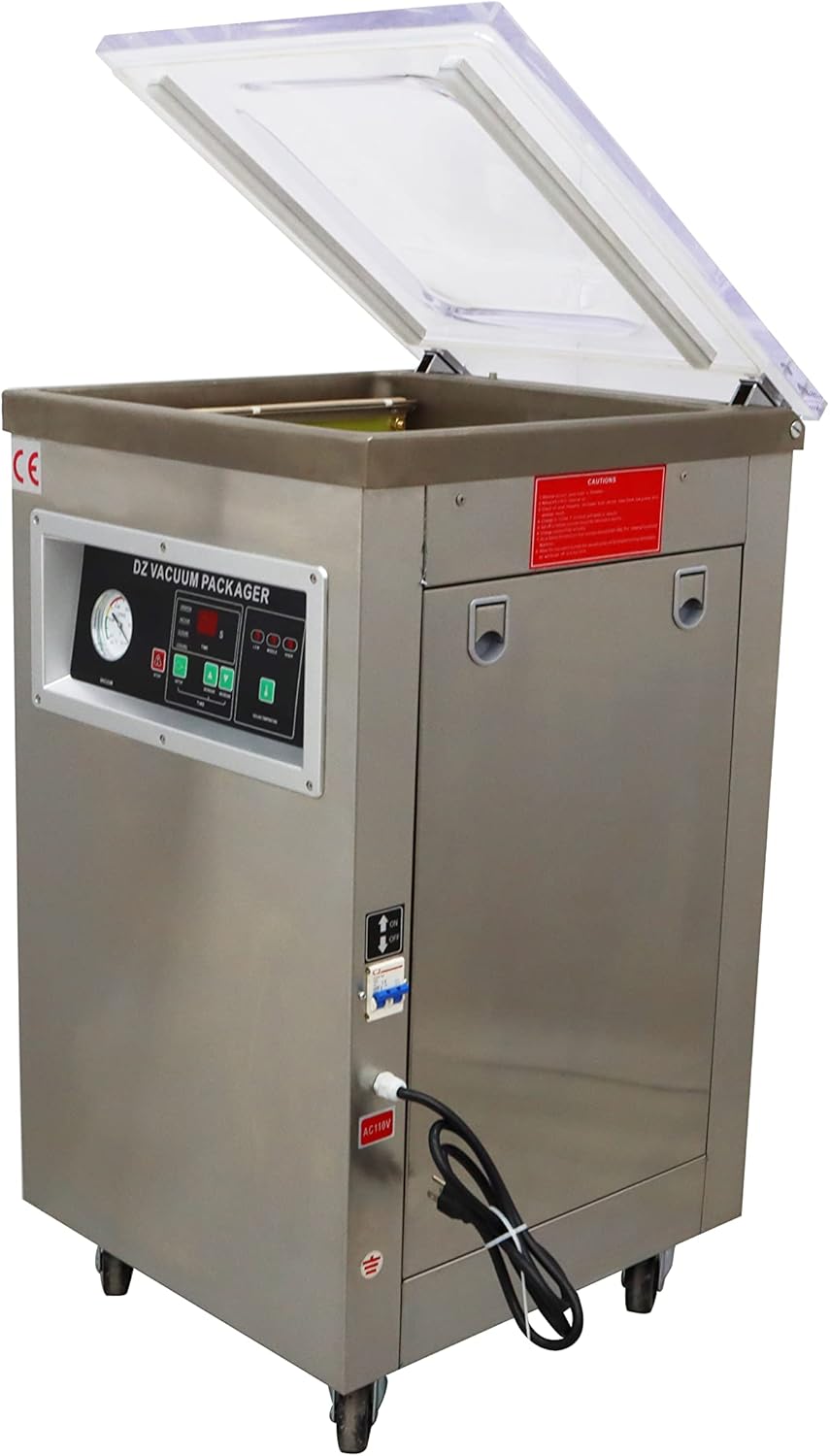
Figure 4: Rear view of the machine, highlighting the power input and main safety switch.
4. Operation
4.1 Control Panel Overview
The microcomputer control panel allows for precise adjustment of vacuum, sealing, and cooling times, as well as sealing temperature.

Figure 5: Detailed view of the microcomputer operation panel, showing controls for vacuum, sealing, and cooling times, and sealing temperature settings.
4.2 Adjusting Settings
- Press the SETUP button to cycle through the adjustable parameters: VACUUM time, CLOSURE (sealing) time, and COOLING time.
- Use the INCREASE and DECREASE buttons to adjust the values for each parameter.
- The SEALING TEMPERATURE can be set to Low, Middle, or High using the corresponding buttons.
- The machine retains the last set parameters in its memory.
4.3 Vacuum Sealing Process
- Prepare the items to be vacuum sealed and place them inside appropriate vacuum bags.
- Open the machine lid.
- Place the open end of the vacuum bag over the sealing bar, ensuring the contents are flat within the chamber and the bag opening is smooth.
- Close the lid firmly. The vacuum cycle will begin automatically based on the set parameters.
- The vacuum gauge will indicate the vacuum level. Once the cycle is complete, the lid will release, and the sealed package can be removed.

Figure 6: The vacuum packaging machine with its transparent lid open, revealing the sealing bar and chamber.

Figure 7: Close-up view of the vacuum chamber interior, showing the sealing bar where the bag opening is placed.
4.4 Operational Demonstration Video
Video 1: A demonstration of the INTSUPERMAI Single Chamber Vacuum Packaging Machine (DZ-400 model), showing the setup of parameters and the vacuum sealing process for food items.

Figure 8: Examples of various food items successfully vacuum sealed using the machine, demonstrating its versatility.
5. Maintenance
Regular maintenance ensures optimal performance and extends the lifespan of your vacuum packaging machine.
5.1 Cleaning
- Always unplug the machine before cleaning.
- Wipe down the stainless steel exterior and the vacuum chamber with a damp cloth and mild detergent. Avoid abrasive cleaners.
- Clean the sealing bar and the silicone strip regularly to ensure a proper seal. Remove any food debris.
- Ensure all surfaces are dry before reconnecting power and operating the machine.
5.2 Oil Level Check (Vacuum Pump)
Periodically check the oil level of the vacuum pump. Refer to the oil sight glass, usually located on the side or rear of the machine. If the oil level is low or discolored, consult the service manual or contact support for instructions on refilling or changing the oil.
5.3 Sealing Strip and Gasket Replacement
Over time, the sealing strip and chamber gasket may wear out, affecting sealing performance. Inspect these components regularly for cracks, tears, or flattening. Replace them as needed with genuine replacement parts.
6. Troubleshooting
This section addresses common issues you might encounter with your vacuum packaging machine.
- Machine does not power on:
Check if the power cord is securely plugged into a grounded outlet. Verify the main power switch is in the 'ON' position. Check the circuit breaker. - Vacuum is not achieved or is weak:
Ensure the lid is fully closed and sealed. Inspect the chamber gasket and sealing strip for damage or debris. Check if the vacuum bag is properly placed over the sealing bar and is free of wrinkles. Verify the vacuum time setting on the control panel. - Bag does not seal properly:
Check the sealing strip for cleanliness and damage. Ensure the sealing time and temperature settings are appropriate for the bag material. The bag opening must be flat and free of moisture or food particles. - Lid does not open after cycle:
Wait for the pressure equalization to complete. If it remains stuck, ensure the vacuum cycle has finished and there is no residual vacuum. Do not force the lid open.
For issues not listed here or if troubleshooting steps do not resolve the problem, contact customer support.
7. Model Comparison: DZ-400 vs. DZ-500
The INTSUPERMAI vacuum packaging machines are available in different models, such as the DZ-400 and DZ-500. The primary difference between these models lies in the size of their vacuum chamber and sealing strip length, which affects the maximum size of bags that can be processed.

Figure 9: Visual comparison illustrating the difference in vacuum chamber and sealing strip dimensions between the DZ-400 and DZ-500 models.