
Introduction
This manual provides essential instructions for the safe and efficient use of your Pioneer AVH-240EX Multimedia DVD Receiver. Please read this manual thoroughly before operating the unit to ensure proper usage and to prevent potential damage or injury. Keep this manual for future reference.
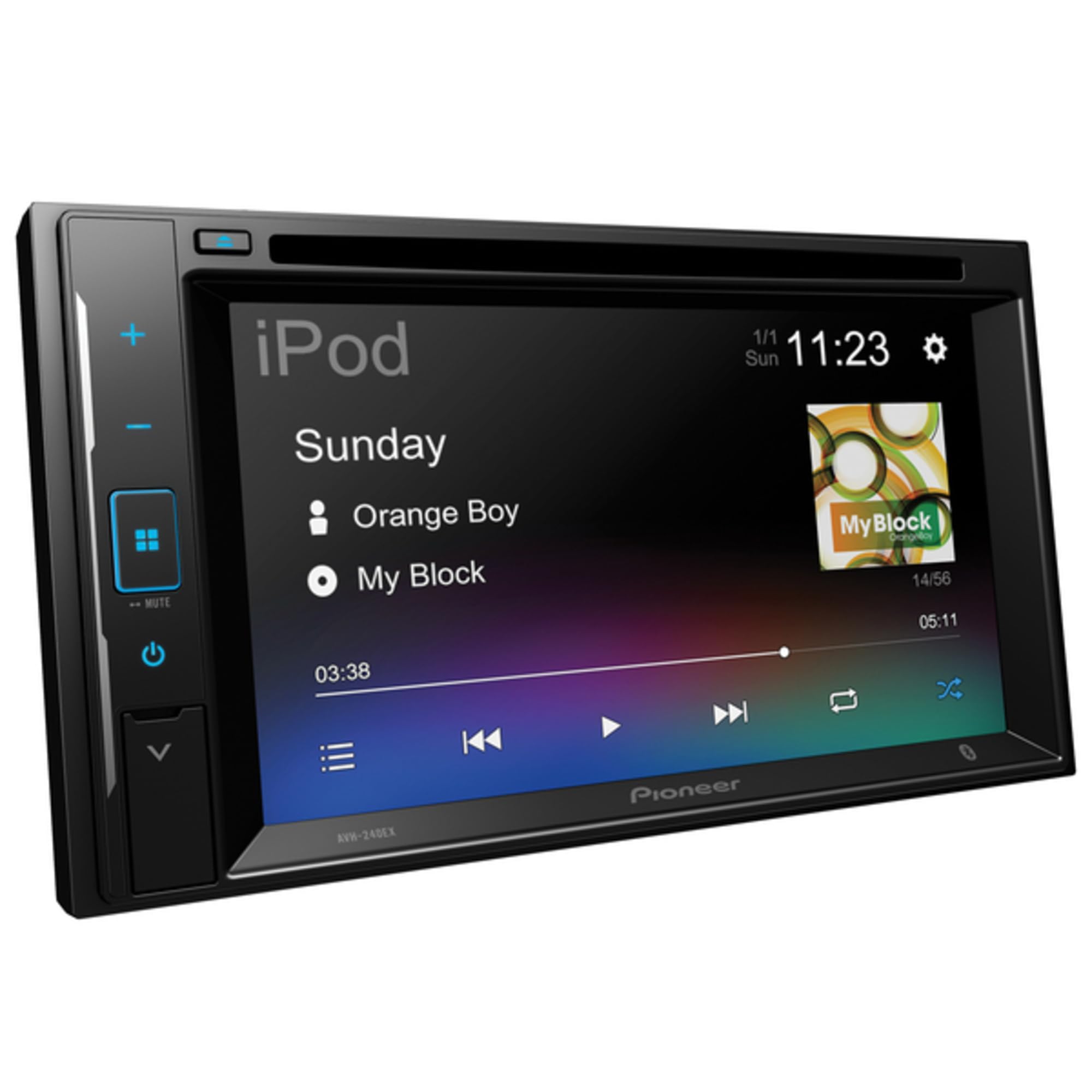
Figure 1: Pioneer AVH-240EX Multimedia DVD Receiver front view.
Safety Information
WARNING: Read all safety instructions in the product documentation before use. Distracted driving can result in serious injury, or death. Only use a function when it is safe and legal in your location, pay attention to the road and your surroundings, and obey all traffic rules.
This product contains chemicals known to the State of California to cause cancer and birth defects or other reproductive harm. For more information, please refer to the product packaging or manufacturer's website.
Rear visibility systems (backup cameras) are required under federal regulations in certain new vehicles according to a phase-in schedule that began on May 1, 2016. Owners of vehicles equipped with compliant rear visibility systems should not install or use this product in a way that alters or disables that system's compliance with applicable regulations. If you are unsure whether your vehicle has a rear visibility system subject to these regulations, please contact the vehicle manufacturer or dealer.
Setup and Installation
Proper installation is crucial for optimal performance and safety. It is recommended that installation be performed by a qualified professional.
Components Overview
The Pioneer AVH-240EX includes the main multimedia receiver unit. Additional wiring harnesses and a dash kit may be required depending on your vehicle's make and model to ensure compatibility and a seamless fit. Consult your vehicle's specific requirements.

Figure 2: Pioneer AVH-241EX (similar model) installed in a vehicle dashboard, showing the 6.2" resistive touch screen.
Wiring and Connections
The unit features multiple input/output options for system flexibility, including a dedicated backup camera input. Ensure all connections are secure and correctly matched to avoid electrical issues or malfunction.
Video 1: Overview of the Pioneer AVH-241EX features, including input/output options. This video demonstrates the physical unit and its connectivity.
Initial Power On
- After installation, turn on your vehicle's ignition.
- The unit should power on automatically. A safety warning screen will appear.
- Tap "OK" to proceed to the main menu.
Operating Instructions
Basic Controls
- Power Button: Press to turn the unit on/off.
- Volume Control: Use the +/- buttons on the side panel or the touch screen interface to adjust volume.
- Source Selection: Tap the "Source" button or the corresponding icon on the home screen to switch between Radio, Disc, Bluetooth Audio, USB, Pandora, Spotify, AUX, and other AV inputs.
- Display Off: Press the dedicated button to turn the display off while audio continues to play. Press again to turn it back on.
Video 2: A detailed product overview of the Pioneer AVH-241EX, demonstrating the user interface, various input options, and settings.
Radio Operation
- Select "Radio" from the source menu.
- Use the FM1, FM2, FM3, AM bands.
- Tap the frequency numbers to select preset stations.
- Use the seek arrows to tune to the next available station.
- The unit supports FM/AM RDS Radio with 30 presets.
Media Playback
- DVD/CD: Insert a disc into the slot. The unit will automatically detect and begin playback.
- USB: Connect a USB device to the USB port. The unit supports MP3, WAV, MPEG-4, FLAC, and other digital media playback.
- Bluetooth Audio: Pair your smartphone or other Bluetooth device to stream audio wirelessly.
- iPod: Connect your iPod via USB for direct control and playback.
Bluetooth Functions
The AVH-240EX features built-in Bluetooth for hands-free calling and audio streaming. Ensure your device's Bluetooth is enabled and visible for pairing.
- To pair, navigate to the Bluetooth menu on the receiver and search for available devices on your phone.
- Select "Pioneer AVH-240EX" from your device's Bluetooth list.
- Confirm the pairing code if prompted.
Customization and Settings
Access the settings menu (gear icon) to customize various aspects of your receiver:
- Audio Settings: Adjust the 13-band graphic equalizer, fader/balance, source level adjuster, and subwoofer settings (if connected).
- System Settings: Configure AV source settings, beep tone, auto mix, input/output settings, camera settings, demo mode, system language, and restore settings.
- Theme/Display: Change the background, illumination color, and overall theme of the user interface.
The unit also supports Alexa Built-in when paired with the Pioneer Vozsis app. For information on supported languages and services, visit pioneerelectronics.com/PUSA/Car/Alexa.
Maintenance
Cleaning the Unit
Wipe the front panel and screen with a soft, dry cloth. Avoid using harsh chemicals or abrasive cleaners, as they may damage the surface.
Disc Care
Handle discs by their edges to prevent fingerprints and scratches. Store discs in their cases when not in use. Clean dirty discs with a soft, lint-free cloth, wiping from the center outwards.
Troubleshooting
If you encounter issues with your AVH-240EX, refer to the following common troubleshooting steps. For more detailed solutions, consult the comprehensive owner's manual available on the Pioneer website.
| Problem | Possible Cause | Solution |
|---|---|---|
| No Power | Incorrect wiring; Blown fuse. | Check power connections; Replace fuse if necessary. |
| No Audio | Volume too low; Mute activated; Incorrect source selected; Speaker wiring issue. | Increase volume; Deactivate mute; Select correct source; Check speaker connections. |
| Bluetooth Not Connecting | Device not in pairing mode; Interference; Previously paired device connected. | Ensure device is discoverable; Move closer to unit; Disconnect other Bluetooth devices. |
| Disc Error | Dirty or scratched disc; Incorrect disc format. | Clean disc; Try a different disc; Ensure disc format is supported. |
Specifications
- Model Number: AVH-240EX
- Brand: PIONEER
- Screen Size: 6.2 Inches
- Display Type: Resistive WVGA Touch Screen
- Media Type: DVD R, CD
- Item Weight: 4.84 pounds
- Product Dimensions: 11 x 11 x 7 inches
- Connectivity: Bluetooth, USB, AUX, RCA (multiple input/output)
- Audio Features: 13-band Graphic Equalizer, Subwoofer Control
- Special Features: Alexa Built-in (via Pioneer Vozsis app), Backup Camera Input
Warranty and Support
For warranty information, technical support, or to download the full owner's manual, please visit the official Pioneer Electronics (USA) Inc. website or contact their customer service. Pioneer Electronics (USA) Inc. proudly supports and encourages you to support the Consumer Technology Association (CTA), Mobile Electronics Certification Program (MECP) for installers and the Specialty Equipment Market Association (SEMA).
Official Website: www.pioneerelectronics.com