
1. Introduction
This manual provides essential information for the proper installation, operation, and maintenance of the Ace Instruments Digital Differential Pressure Gauge, Model AI-DDPG. This device is designed for accurate measurement of differential pressure in various controlled environments.
The AI-DDPG is suitable for applications requiring precise pressure monitoring, such as clean rooms, HVAC systems, hospital operating theaters, laminar flow cabinets, and other safety-critical units.
2. Key Features
- Measuring Parameter: Differential Pressure
- Range: -50 to 50 Pascals
- Accuracy: ±0.5% full Scale
- Resolution: 1 Pascal
- Display: Integrated 4 Digits Red LED Segment Display 0.5”
- Maximum Over Pressure: 2 Times the Rated Pressure
- Sensors: Integrated High-Speed Differential Pressure Sensor
- Communication: RS485 Modbus RTU Protocol Communication for BMS/SCADA/PLC Integration
- Mounting Options: Panel Mounting (Default), Wall Mounting with accessory (Grouting Box)
- Medium: Air or Gases (Non-Corrosive)
- Connection: 2 Nos. Hose Nipples of 4mm ABS Plastic at the back
- Alarm Type: Built-in Buzzer Alarm for Process Violation Alert
- Construction: Matte Finish ABS Plastic Enclosure
- Power Supply: 24 Volts D.C. Typical
- Size: Standard 4 ½'' (114.3mm) Diameter
- Depth: 30 mm Depth
- Weight: 180 Grams
3. What's in the Box
- 1 Unit of Digital Differential Pressure Gauge
- Silicon Tube
- Power Adapter
- Instruction Manual (this document)
- Factory Calibration Certificate
- Wall Mounting Box (if applicable to your purchase)
4. Setup and Installation
4.1 Mounting Options
The AI-DDPG offers flexible mounting solutions:
- Panel Mounting: This is the default installation method, integrating the gauge directly into a control panel.
- Wall Mounting: For brick wall installations, a dedicated grouting box accessory is provided.


4.2 Connections
The rear of the device features connections for pressure input, power, and communication.
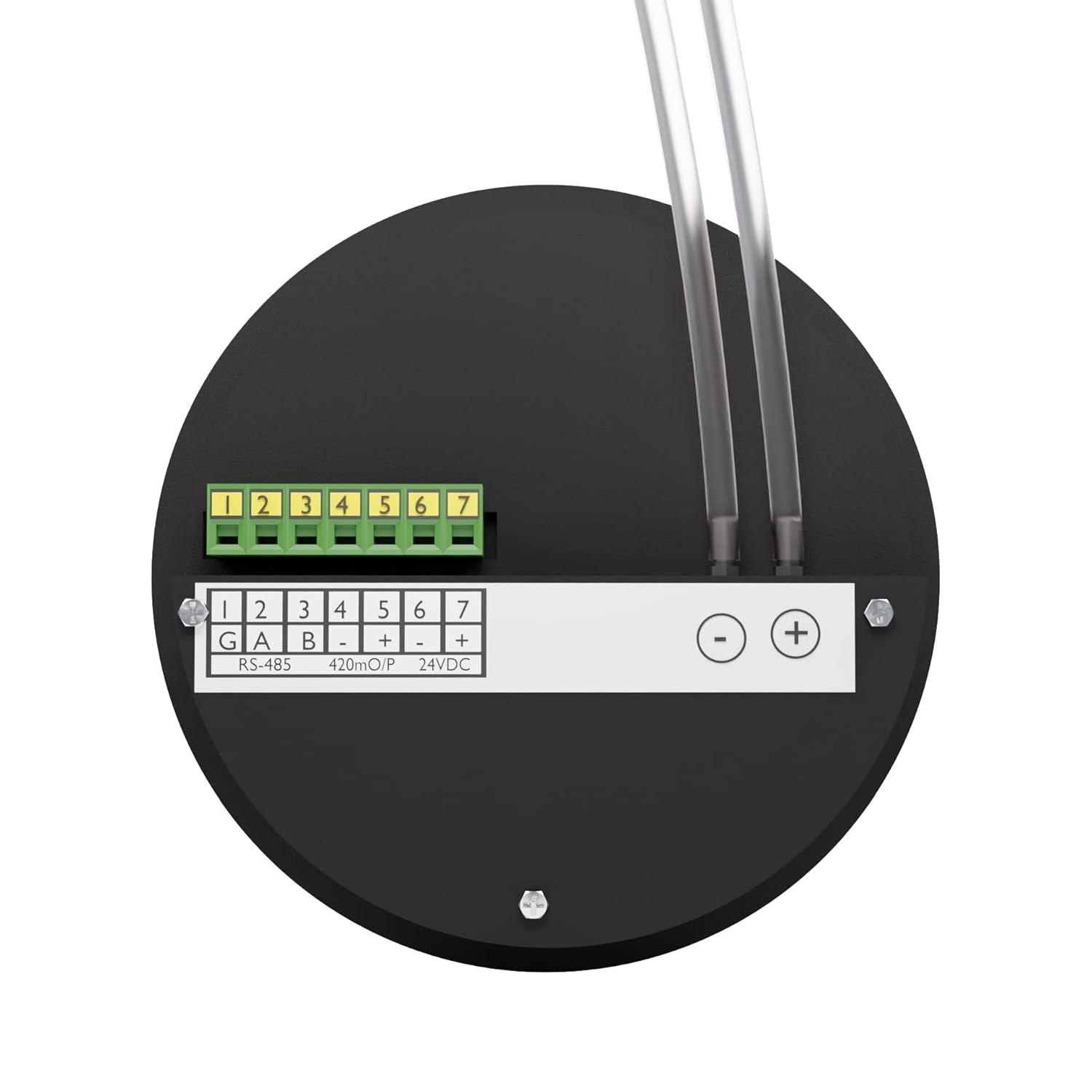
- Pressure Input: Connect the provided silicon tubes to the two 4mm ABS plastic hose nipples at the back of the unit. Ensure secure connections to prevent leaks.
- Power Supply: Connect the 24V DC power adapter to the designated power input terminals. Refer to the power adapter label for correct voltage and current specifications.


- RS485 Modbus Communication: For integration with Building Management Systems (BMS), SCADA, or PLC, connect the RS485 communication lines to the terminal block labeled G, A, B.
For detailed wiring diagrams and Modbus protocol specifications, please refer to the separate technical documentation or contact Ace Instruments support.
5. Operating Instructions
5.1 Power On and Display
Once powered, the 4-digit red LED display will illuminate, showing the current differential pressure reading. The unit of measurement (Pascals or mm.W.C.) will also be indicated.

5.2 Unit Selection
The device allows for easy switching between Pascals and mm.W.C. (millimeters of Water Column) units. Press the 'UNIT ACK' button to toggle between these measurement units.
5.3 Alarm Functionality
The AI-DDPG includes a built-in buzzer alarm to alert users of process violations. When the measured differential pressure exceeds or falls below predefined thresholds, the buzzer will activate. Refer to the programming section (if available in separate documentation) for setting alarm limits.
5.4 Video Overview
For a visual guide on the product's features and functionality, please watch the official product video below.
6. Maintenance
The Ace Instruments AI-DDPG is designed for reliable operation with minimal maintenance. Adhere to the following guidelines:
- Cleaning: Use a soft, dry cloth to clean the exterior of the device. Avoid abrasive cleaners or solvents that could damage the ABS plastic enclosure or display.
- Pressure Medium: Ensure that only air or non-corrosive gases are introduced into the pressure ports. Exposure to corrosive substances can damage the internal sensor.
- Calibration: Regular calibration is recommended to maintain measurement accuracy. Refer to the factory calibration certificate for initial calibration details. Contact Ace Instruments for re-calibration services.
- Tube Inspection: Periodically inspect the silicon tubes for any signs of wear, kinks, or damage that could affect pressure readings. Replace if necessary.
7. Troubleshooting
If you encounter issues with your AI-DDPG, consider the following basic troubleshooting steps:
- No Display/Power: Verify that the 24V DC power adapter is correctly connected and receiving power from the mains. Check the power adapter for any visible damage.
- Incorrect Readings:
- Ensure pressure tubes are securely connected and free from blockages or leaks.
- Confirm that the correct measurement unit is selected on the display.
- Check if the pressure medium is within the specified range (-50 to 50 Pascals).
- Buzzer Alarm Constantly On: This indicates that the measured pressure is outside the set alarm limits. Check the environmental conditions or review the alarm settings if programmable.
- Communication Issues (RS485): Verify wiring connections for RS485 (G, A, B). Ensure the Modbus master device is correctly configured and communicating with the gauge.
For persistent issues or advanced troubleshooting, please contact Ace Instruments technical support.
8. Specifications
| Specification | Detail |
|---|---|
| Product Dimensions | 1.18 x 1.97 x 1.97 inches |
| Item Weight | 180 Grams (6.35 ounces) |
| Brand | Ace Instruments |
| Material | ABS Plastic, Silicon |
| Manufacturer | Ace Instruments |
| Measuring Parameter | Differential Pressure |
| Range | -50 to 50 Pascals |
| Accuracy | ±0.5% full Scale |
| Resolution | 1 Pascal |
| Display | 4 Digits Red LED Segment Display 0.5” |
| Communication | RS485 Modbus RTU Protocol |
| Power Supply | 24 Volts D.C. Typical |
9. Warranty and Support
For warranty information, please refer to the documentation included with your product or contact Ace Instruments directly. Technical support is available from the manufacturer for any operational or technical queries.
Manufacturer: Ace Instruments
Model: AI-DDPG