
1. Product Overview
This manual provides instructions for the installation and maintenance of the Stripledspareparts LED Backlight Strip replacement set. This product is designed to replace faulty LED backlight strips in various Samsung TV models, restoring proper display illumination.
The replacement set includes three (3) LED backlight strips, specifically configured for the listed Samsung TV models. These strips are designed for direct replacement without modification, ensuring ease of installation and a long operating life.
2. Important Pre-Installation Checks and Safety Information
- Safety First: Always disconnect the television from the main power supply before beginning any installation or repair work. Failure to do so can result in electric shock or damage to the television.
- Compatibility Verification: The listed TV models (UE40H5203, UE40H5003, etc.) serve as a reference only. Due to variations in manufacturing batches, different backlight strips may be used for the same TV model. It is crucial to physically open your TV casing and compare the existing backlight strips with the product images and specifications provided in this manual to ensure an exact match.
- If you have not opened the TV, locate the TV model number on the nameplate at the back of your television and compare it with the compatible models listed. However, physical verification of the existing strips is the most reliable method.
- Stripledspareparts is not responsible for compatibility issues if verification of the existing backlight strip model is not performed.
- Handle the LED strips with care to avoid bending or damaging the LEDs or circuit board.
3. Package Contents
Your package should contain the following items:
- One (1) set of Stripledspareparts LED Backlight Strips (typically 3 individual strips).
Please inspect all components for any signs of damage upon receipt. Contact customer support immediately if any parts are missing or damaged.
4. Setup and Installation
Installation of LED backlight strips requires technical knowledge and careful handling of electronic components. If you are not comfortable performing this procedure, it is recommended to seek assistance from a qualified technician.
- Prepare the TV: Disconnect the TV from all power sources and external devices. Place the TV face down on a soft, clean surface to prevent screen damage.
- Open the TV Casing: Carefully remove the back cover of the television. This usually involves unscrewing several screws around the perimeter and sometimes in the center. Refer to your specific TV model's service manual for precise instructions on opening the casing.
- Access the Backlight Assembly: Once the back cover is removed, you will need to carefully remove internal components such as circuit boards, speakers, and the metal chassis to gain access to the display panel and backlight assembly. Take photos at each step to aid reassembly.
- Remove the Old Backlight Strips: Gently detach the display panel layers (diffusers, reflectors) to expose the old LED backlight strips. Disconnect the power connectors from the old strips and carefully peel them off the TV panel. Note their exact positioning.
- Install New Backlight Strips: Position the new Stripledspareparts LED backlight strips in the exact locations where the old ones were removed. Ensure they are securely attached and the connectors are properly aligned and plugged in. The strips are designed to be consistent with the original, requiring no modification.
- Test the Backlights: Before reassembling the entire TV, temporarily connect the TV to power and turn it on to verify that the new LED backlights illuminate correctly. Disconnect power again after testing.
- Reassemble the TV: Carefully reassemble the display panel layers, internal components, and the back cover in reverse order of disassembly. Ensure all screws are tightened appropriately and no cables are pinched.
 Figure 1: Close-up of the Stripledspareparts LED backlight strips, showing the individual LED components.
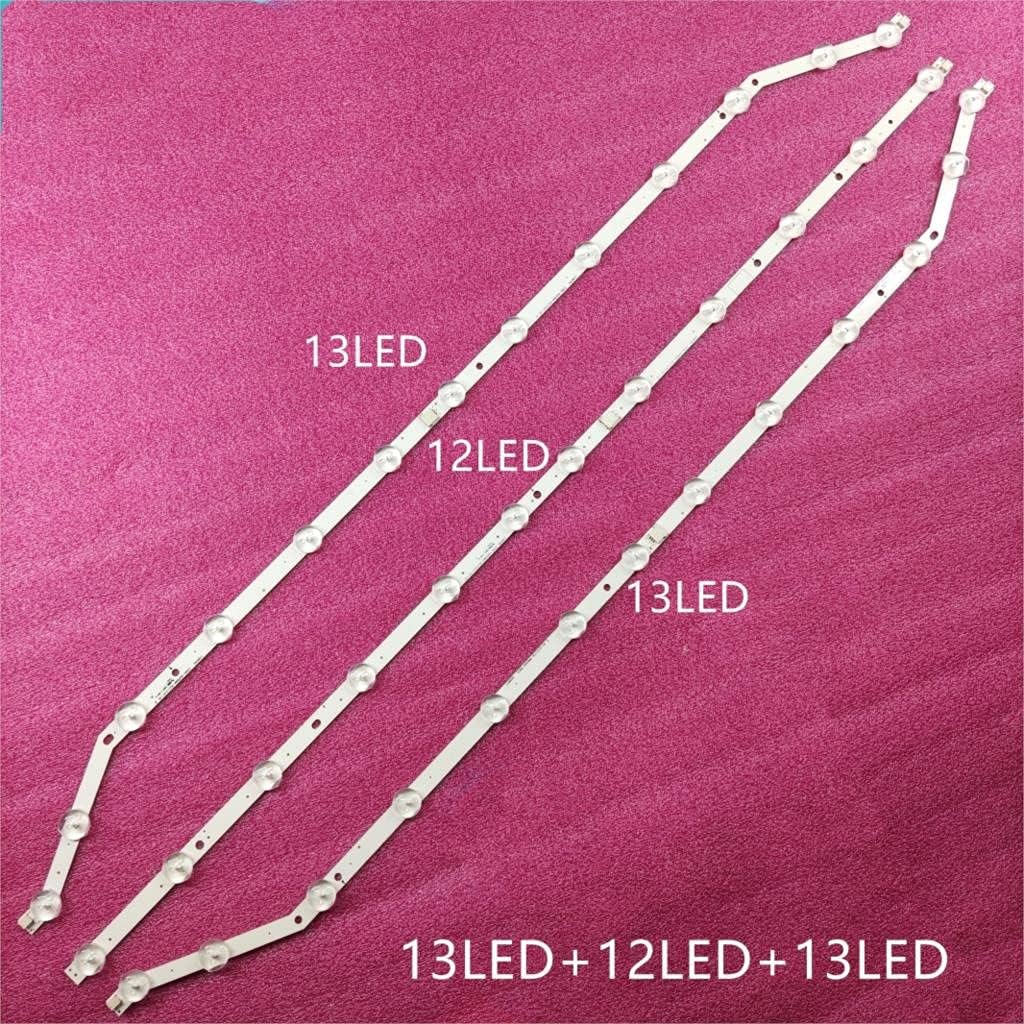 Figure 2: The set of three LED backlight strips, illustrating the number of LEDs on each strip (13, 12, and 13 LEDs respectively).
5. Operation
Once correctly installed, the LED backlight strips operate automatically as part of your television's display system. There are no user-adjustable settings for the backlight strips themselves. The brightness and other display settings will be controlled through your television's standard menu options.
6. Maintenance
The LED backlight strips are designed for long-term, maintenance-free operation. To ensure their longevity:
- Avoid exposing the television to extreme temperatures or high humidity.
- Do not attempt to clean the LED strips directly once installed inside the TV.
- Ensure proper ventilation for your television to prevent overheating, which can reduce the lifespan of electronic components, including LED backlights.
7. Troubleshooting
If you experience issues after installing the new backlight strips, consider the following:
- No Backlight / Dim Screen:
- Verify all connectors to the LED strips are securely seated.
- Ensure the power supply to the LED driver board is functioning correctly.
- Double-check compatibility: Confirm that the installed strips are indeed the correct replacement for your specific TV's original strips.
- Flickering Backlight:
- This could indicate a loose connection or a faulty LED driver board (not part of this product).
- Ensure the strips are not damaged or bent.
- Uneven Brightness:
- Check for proper placement of diffuser sheets and reflectors during reassembly.
- Ensure all LED strips are fully functional.
If troubleshooting steps do not resolve the issue, it is recommended to consult a professional television repair technician.
8. Specifications
| Feature | Detail |
|---|---|
| Product Type | LED Backlight Strip Replacement Set |
| Brand | Stripledspareparts |
| Model Number | MATH-STRIPLED-190721-27448 |
| Compatible TV Models | Samsung UE40H5203, UE40H5003, UE40H5273, UE40H5303, UN40EH5300, HG40EA570, HG40EA590, UN40H5100, UA40H5203 |
| Strip Type | SMD (Surface-Mount Device) |
| Light Source Type | LED |
| Number of Strips in Set | 3 |
| Average Life (hrs) | 100,000 |
9. Warranty and Support
Specific warranty information for this product may vary depending on the retailer and region of purchase. Please refer to your purchase documentation or contact the seller directly for details regarding warranty coverage and return policies.
For technical support or further inquiries, please contact Stripledspareparts customer service through the platform where the product was purchased.


