
1. Important Compatibility Information
This LED backlight strip is a replacement component designed for specific television models. To ensure correct fit and function, it is crucial to verify compatibility before installation. TV models can serve as a reference, but variations may exist between different production batches.
- Always open the TV casing: Confirm that the existing backlight strips are physically consistent with this product. Compare the length, number of LEDs, connector type, and mounting holes.
- Compare part numbers: If possible, match the part numbers printed on your original backlight strips with the product specifications.
- TV Model Number: If you cannot open the TV, compare the TV model number found on the nameplate on the back of your television. However, this method is less reliable than direct visual comparison of the strips.
- Visual Inspection: Carefully check the item's color, size, quantity, and overall appearance against your existing strips.
Failure to confirm the exact model and physical characteristics of your existing backlight strips may result in incompatibility.
2. Product Overview
This product consists of replacement LED backlight strips for televisions. These strips are essential components responsible for illuminating the TV display. They are designed to be consistent with original specifications, requiring no modification for installation.
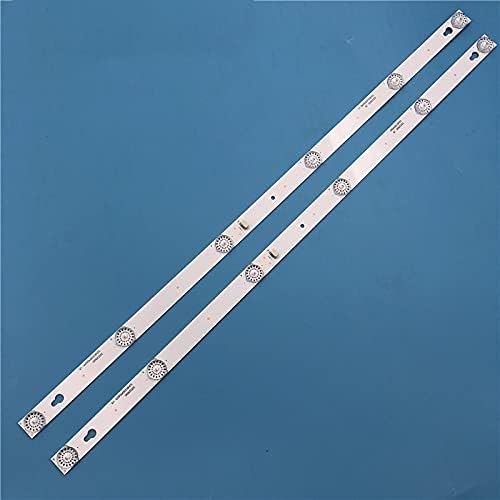
Image 1: Two Stripledspareparts TV LED backlight strips, showing their full length and arrangement. These strips are designed for specific TV models to restore display illumination.
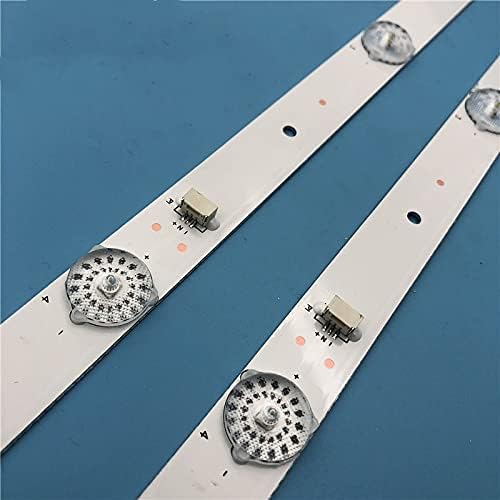
Image 2: A detailed view of the individual LED components and connection points on a Stripledspareparts backlight strip. This image highlights the precise construction and electrical contacts.
3. Setup and Installation Guide
Replacing TV LED backlight strips requires technical knowledge and careful handling of electronic components. If you are not comfortable performing this repair, it is recommended to seek assistance from a qualified technician.
Safety Precautions:
- Always unplug the TV from the power outlet before beginning any repair work.
- Discharge any residual power by holding the power button for a few seconds after unplugging.
- Wear anti-static gloves to prevent damage to sensitive electronic components.
- Work in a clean, well-lit area.
Installation Steps:
- Disassemble the TV: Carefully remove the back cover, stand, and any internal components (e.g., main board, power supply board, speakers) necessary to access the display panel. Document each step and keep screws organized.
- Remove the Display Panel: This is the most delicate step. Gently detach the LCD panel from the frame, ensuring not to bend or crack it. Place it on a soft, clean surface, screen-side down.
- Access Backlight Assembly: Remove the diffuser sheets and reflective layers to expose the old LED backlight strips.
- Remove Old Strips: Disconnect the power cables from the old strips and carefully peel them off the TV chassis. Note their exact placement.
- Install New Strips: Align the new Stripledspareparts LED strips in the exact positions of the old ones. Ensure all mounting holes and adhesive points match. Connect the power cables securely.
- Test Backlights: Before reassembling the entire TV, temporarily connect the power supply and main board, then plug in the TV to verify that the new backlight strips illuminate correctly. Unplug the TV after testing.
- Reassemble the TV: Carefully place the diffuser sheets, reflective layers, and LCD panel back into position. Reattach all internal components and the back cover, ensuring all connections are secure and screws are tightened appropriately.
- Final Test: Plug in the TV and power it on to confirm full functionality.
4. Operating Instructions
Once the Stripledspareparts LED backlight strips are successfully installed, the television should operate as normal. There are no specific operating instructions for the backlight strips themselves, as they function automatically as part of the TV's display system. Simply power on your television as you normally would.
5. Maintenance
LED backlight strips are generally maintenance-free components. To ensure the longevity of your TV and its new backlights:
- Avoid exposing the TV to extreme temperatures or humidity.
- Ensure adequate ventilation around the TV to prevent overheating.
- Clean the TV screen and casing with a soft, dry cloth. Avoid harsh chemicals.
- Consider adjusting the TV's backlight brightness settings to a moderate level, as excessively high brightness can reduce the lifespan of LED components over time.
6. Troubleshooting
If you encounter issues after replacing the backlight strips, consider the following:
- No Picture, but Sound is Present: This is the primary symptom of backlight failure. If this persists after replacement, re-check all connections to the new strips and ensure they are fully seated. Verify that the power supply board is functioning correctly.
- Uneven Brightness or Dark Spots: This could indicate a faulty new strip, improper installation (e.g., a strip not fully seated or a damaged LED during reassembly), or issues with the diffuser sheets.
- TV Does Not Power On: Double-check all internal connections, especially to the power supply board and main board. Ensure no cables were pinched or damaged during reassembly.
- Flickering Backlight: This might suggest a loose connection, a faulty LED driver, or an issue with one of the new strips.
If troubleshooting steps do not resolve the issue, it is advisable to consult a professional TV repair technician.
7. Specifications
| Feature | Detail |
|---|---|
| Product Type | TV LED Backlight Strip |
| Brand | Stripledspareparts |
| Model Number | MATH-STRIPLED-190721-28492 |
| Compatibility | Thomson 32HB5426, TCL 32L2600, TL32P1A, 4C-LB3206-HR03J, 32D2900, 32HR330M06A5 (Verify existing strips) |
| Package Contents | Quantity as selected (e.g., 4 pieces) |
| Item Type | Strip |
8. Warranty and Support
For information regarding product warranty, returns, or technical support, please refer to the purchase documentation or contact the seller directly. Ensure you retain your proof of purchase for any warranty claims.