
DSGKUU DMF-2S
DSGKUU 12V/24V Smart Fully Automatic Battery Charger User Manual
Model: DMF-2S
1. Introduction
This user manual provides comprehensive instructions for the DSGKUU 12A 12V/24V Smart Fully Automatic Battery Charger. This device is designed to maintain and charge various types of 12V and 24V batteries, including Wet, MF, Gel, VRLA, flooded, 12.6V Lithium, and AGM/EFB batteries. Its intelligent features ensure efficient and safe charging, extending battery life and preparing your vehicle for unexpected situations.

Figure 1: DSGKUU 12A 12V/24V Smart Fully Automatic Battery Charger with clamps.
2. Safety Information
Always prioritize safety when operating the battery charger. This device incorporates multiple protection mechanisms to ensure safe operation. Read and understand all safety warnings before use.
- Short Circuit Protection: Prevents damage in case of a short circuit.
- Polarity Error Protection: Protects against incorrect connection of positive and negative terminals.
- Overheating Protection: Automatically shuts down if the device temperature exceeds safe limits.
- Over Current Protection: Safeguards against excessive current flow.
- Low-Voltage Protection: Prevents damage from charging extremely low voltage batteries.
- Over Voltage Protection: Protects against damage from excessive input voltage.

Figure 2: Visual representation of the safety protection features including over-current, over-voltage, reverse polarity, short-circuit, and over-heat protection.
3. Product Features
The DSGKUU Smart Battery Charger is equipped with advanced features for optimal battery charging and maintenance:
- Intelligent Digital Display: The LCD screen displays real-time Battery Voltage, Charge Current, and Cumulative Charge (Ah). It provides clear feedback and automatically indicates "100%" when fully charged, stopping the charging process.
- Multiple Charging Functions: Features a 4-stage charging process (fast charge, top-off, trickle charge) for efficient and complete charging.
- Pulse Repair Function: Helps to recondition and extend the life of depleted batteries.
- Universal Compatibility: Supports a wide range of 12V and 24V batteries, including Wet, MF, Gel, VRLA, flooded, 12.6V Lithium, and AGM/EFB types. Ideal for various vehicles and long-term battery maintenance.
- Automatic Charging Mode: Automatically detects whether a 12V or 24V battery is connected and initiates the appropriate charging cycle. The microprocessor-controlled program monitors the entire charging process.
- Extreme Weather Resistance: Designed to operate effectively in a wide temperature range, automatically adjusting charging modes for summer (above 28°C/82.4°F) and winter (below 10°C/50°F) conditions.
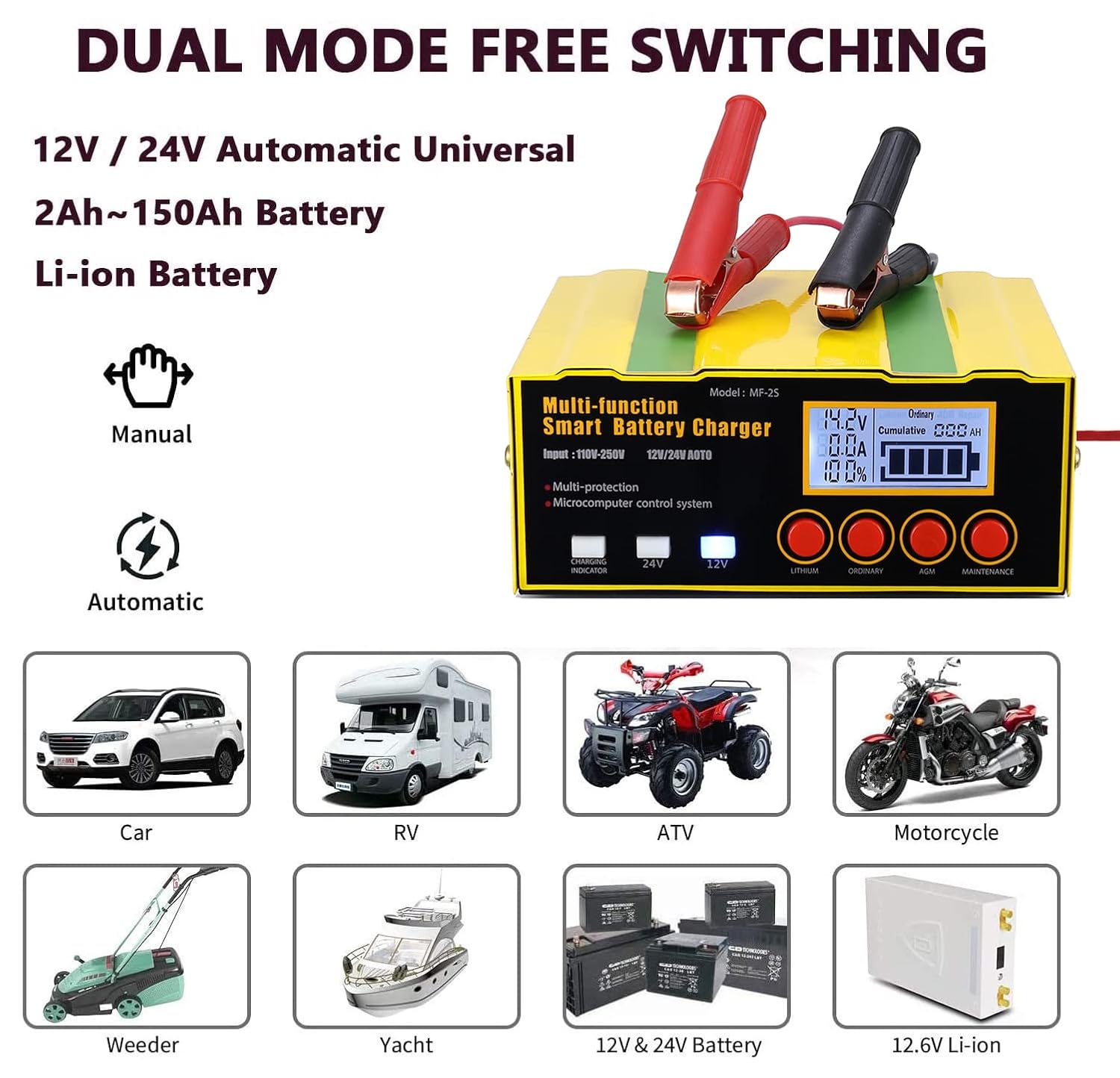
Figure 3: Illustration of the charger's dual mode switching capability, supporting various vehicles and battery types like cars, RVs, ATVs, motorcycles, weeders, yachts, and different 12V/24V and 12.6V Li-ion batteries.

Figure 4: The charger's ability to adapt to extreme weather, with automatic summer mode (above 28°C) and winter mode (below 10°C).
4. Setup
Before using the charger, ensure you have all components and understand the connection process.
4.1 Package Contents
- 1 x DSGKUU Car Battery Charger
- 1 x Charger Manual (this document)
4.2 Connecting the Charger
The charger is designed for direct connection to the battery without needing to remove the battery from the vehicle. Ensure the charger is disconnected from AC power before making connections.
- Identify the positive (+) and negative (-) terminals on your battery.
- Connect the red charging clip (positive) to the battery's positive (+) terminal.
- Connect the black charging clip (negative) to the battery's negative (-) terminal.
- Once the clips are securely attached, plug the charger's AC power cord into a standard 110-250V 50/60Hz electrical outlet.
- The charger will automatically detect the battery voltage (12V or 24V) and begin the charging process.
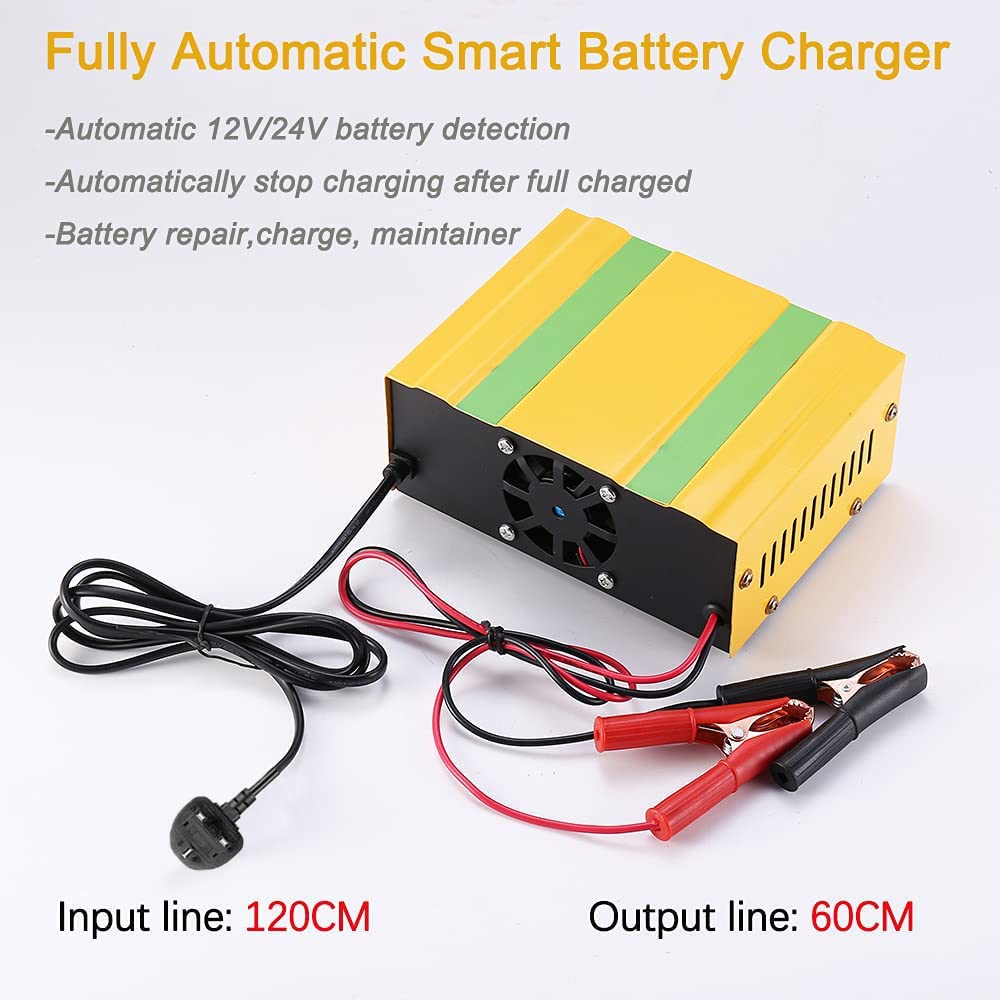
Figure 5: The charger showing its input power line (120cm) and output charging lines (60cm) with battery clamps.

Figure 6: Detailed connection diagram illustrating how to connect the red and black clips to 12V and 24V batteries. The charger can directly charge the battery without removal from the car.
5. Operating Instructions
The DSGKUU charger operates largely automatically, but understanding its modes enhances usability.
5.1 Automatic Charging
Once connected to a battery and power source, the charger will automatically detect the battery type (12V or 24V) and initiate the appropriate charging cycle. The LCD screen will display charging progress, including voltage, current, and cumulative charge. Charging stops automatically when the battery reaches full capacity, indicated by "100%" on the display.
5.2 Using Maintenance Mode
Maintenance mode is particularly useful for batteries that have been unused for extended periods, are in cold temperatures, or have high internal resistance. This mode helps to recondition the battery before standard charging.
- Connect the charger to the battery as described in the Setup section.
- Select the correct battery type using the mode buttons (Lithium, Ordinary, AGM).
- Press the "Maintenance" button. The charger will begin the maintenance cycle.
- The maintenance cycle typically takes about 1 hour.
- Upon completion of the maintenance cycle, the charger will automatically switch to smart charging mode and continue until the battery is fully charged.
6. Maintenance
Regular use of the charger's features can help maintain your battery's health.
- Pulse Repair Function: Utilize this function periodically, especially for older or underperforming batteries, to help restore lost performance and extend their lifespan.
- Regular Charging: For vehicles stored for long periods, connect the charger to maintain the battery's charge, preventing deep discharge and sulfation.
- Cleaning: Keep the charger and its cables clean and free from dirt or debris. Disconnect from power before cleaning.
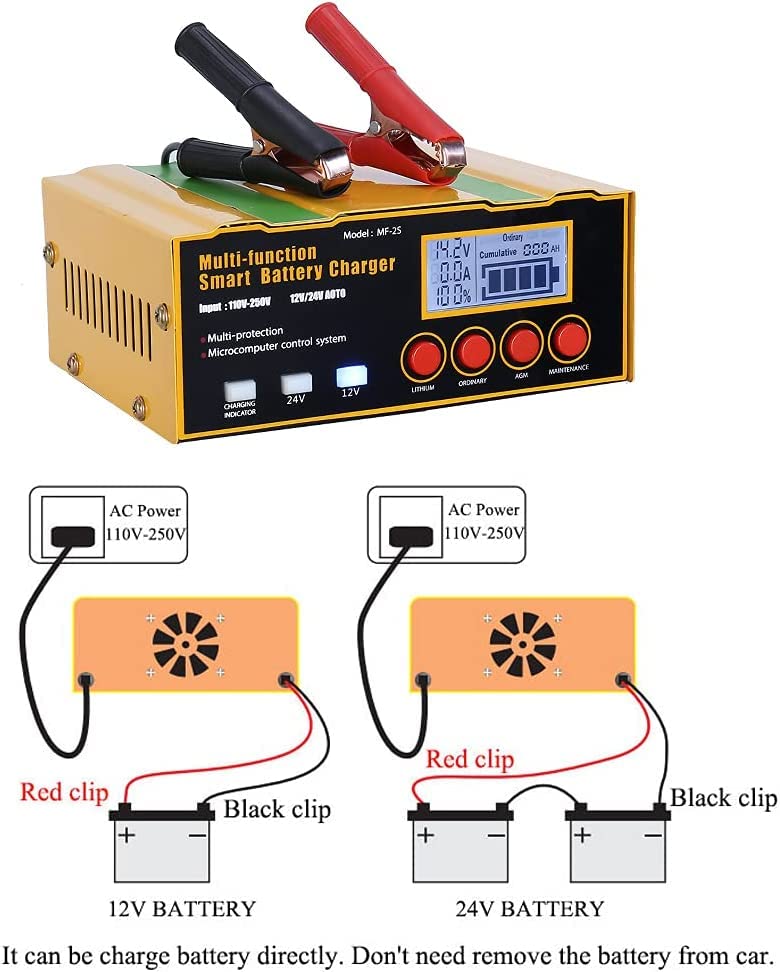
Figure 7: The charger's ability to restore lost battery performance and provide stronger engine starts.
7. Troubleshooting
The DSGKUU charger is designed with intelligent protection features to prevent most common issues. If the charger is not operating as expected, consider the following:
- Charger Not Turning On: Ensure the AC power cord is securely plugged into a live outlet and the battery clamps are correctly connected to the battery terminals.
- Charging Not Initiating: Verify that the battery voltage is within the charger's supported range (12V/24V). Check for correct polarity connection; the charger has polarity error protection, which might prevent charging if reversed.
- Overheating: If the charger feels excessively hot, it may have activated its overheating protection. Disconnect it, allow it to cool down, and ensure adequate ventilation around the unit during operation.
- Display Errors: Refer to the LCD display for error codes or messages. Ensure the battery type selected matches the connected battery.
For persistent issues, contact customer support.
8. Specifications
| Attribute | Detail |
|---|---|
| Brand | DSGKUU |
| Model | DMF-2S |
| Battery Type Compatibility | All 12V/24V batteries (Wet, MF, Gel, VRLA, Flooded), 12.6V Lithium battery, AGM/EFB battery |
| Battery Capacity Range | 4Ah - 105Ah |
| AC Input | 110-250V, 50/60Hz |
| Output Voltage | 12V / 24V (Automatic Detection) |
| Product Dimensions (L x W x H) | 170 x 135 x 70 mm (6.7 x 5.3 x 2.8 inches) |
| Item Weight | 900 g (0.9 kg / 1.98 lbs) |
| Charging Time (Maintenance Mode) | Approximately 1 hour for maintenance cycle |
| Safety Protections | Short Circuit, Polarity Error, Overheating, Over Current, Low-Voltage, Over Voltage |
9. Warranty and Support
Specific warranty details for the DSGKUU 12A Car Battery Charger are not provided in this manual. Please refer to the product packaging or the retailer's website for warranty information.
For technical support, troubleshooting assistance, or inquiries regarding your product, please contact DSGKUU customer service through the contact information provided at the point of purchase or on the official DSGKUU website.
Related Documents - DMF-2S
 |
Intelligent Battery Indicator Board: Features, Specifications, and Wiring Guide Comprehensive guide to the intelligent battery indicator board, detailing its features, operating parameters, wiring instructions for lithium and lead-acid batteries, and voltage-based performance indicators. |
 |
Hawkray Trail Camera User Manual: Features, Settings, and Applications Comprehensive user manual for the Hawkray Trail Camera. Learn about its features, packing list, product structure, quick start guide, advanced settings, technical parameters, and FAQs. This guide covers setup, operation, and troubleshooting for wildlife monitoring and surveillance. |
 |
Traxxas Jato 4x4 Brushless Owner's Manual Comprehensive owner's manual for the Traxxas Jato 4x4 Brushless RC car, covering setup, operation, maintenance, and safety precautions for model 90154-4. |
 |
KJK Trail Camera: User Guide, Setup, and Troubleshooting Official user guide for KJK trail cameras. Learn setup, detection system operation, battery management (AA, 6V, solar), installation tips, and answers to frequently asked questions for optimal wildlife monitoring. |
 |
FLYWOO GOKU F405 5IN1 AIO User Manual v1 - Specs, Wiring, and Setup Comprehensive user manual for the FLYWOO GOKU F405 5IN1 AIO flight controller. Includes detailed specifications, layout diagrams, wiring instructions, receiver calibration steps, VTX settings, and troubleshooting FAQ for FPV drone enthusiasts. |
 |
Occkic 2S 50A Lithium Battery Protection Board Specifications & Guide Technical specifications, usage guidelines, and safety precautions for the Occkic 2S 50A Lithium Battery Protection Board, a BMS module designed for 2-series lithium-ion/polymer cells. |
Ask a question about this manual
Ask about setup, troubleshooting, compatibility, parts, safety, or missing instructions. Manuals+ will review the question and use this page’s manual context to help answer it.