
1. Introduction
Thank you for choosing the Honeywell PowerPlus HEPA Air Purifier HPA3100. This device is designed to help improve indoor air quality by capturing microscopic airborne particles such as allergens, dust, pollen, smoke, pet dander, and odors. It is suitable for medium to large rooms, circulating and filtering the air up to 4.8 times per hour in spaces up to 200 square feet.

Image 1.1: The Honeywell PowerPlus HEPA Air Purifier HPA3100, shown with its retail packaging.
2. Important Safety Instructions
Please read and save these safety instructions before using this air purifier. Failure to follow these instructions may result in electric shock, fire, or injury.
- Always unplug the air purifier before moving, cleaning, or replacing filters.
- Do not operate any air purifier with a damaged cord or plug.
- Keep the cord away from heated surfaces.
- Do not use the air purifier outdoors or on wet surfaces.
- Place the air purifier on a firm, level surface at least 6 inches (15 cm) from walls and furniture for optimal airflow.
- Do not block air openings.
- This appliance has a polarized plug (one blade is wider than the other). To reduce the risk of electric shock, this plug is intended to fit in a polarized outlet only one way. If the plug does not fit fully in the outlet, reverse the plug. If it still does not fit, contact a qualified electrician. Do not attempt to defeat this safety feature.
3. Product Features
The Honeywell PowerPlus HEPA Air Purifier HPA3100 is equipped with advanced features to ensure clean air in your living space:
- Powerful HEPA Filtration: Captures up to 99.97% of microscopic airborne particles as small as 0.3 microns, including dust, pet dander, pollen, and smoke.
- Activated Carbon Pre-Filter: Helps capture larger particles and reduces common household odors and Volatile Organic Compounds (VOCs).
- Optional Specialty Filters: Enhance purification with specialized filters designed to tackle specific odors from pets, kitchens, smoke, or VOCs from home renovations (sold separately).
- Multiple Cleaning Levels: Features 4 cleaning levels including Microscopic Particles, General Clean, Pollen, and a powerful Turbo mode.
- Auto Mode: Automatically adjusts cleaning levels based on air quality.
- Timers: Programmable auto-off timer for 2, 4, or 8 hours.
- Night Dimmer: Dims control panel lights for undisturbed sleep.
- Filter Check/Reset Indicator: Alerts you when it's time to replace filters.
- Certifications: ENERGY STAR certified for energy efficiency and AHAM Verified for performance.
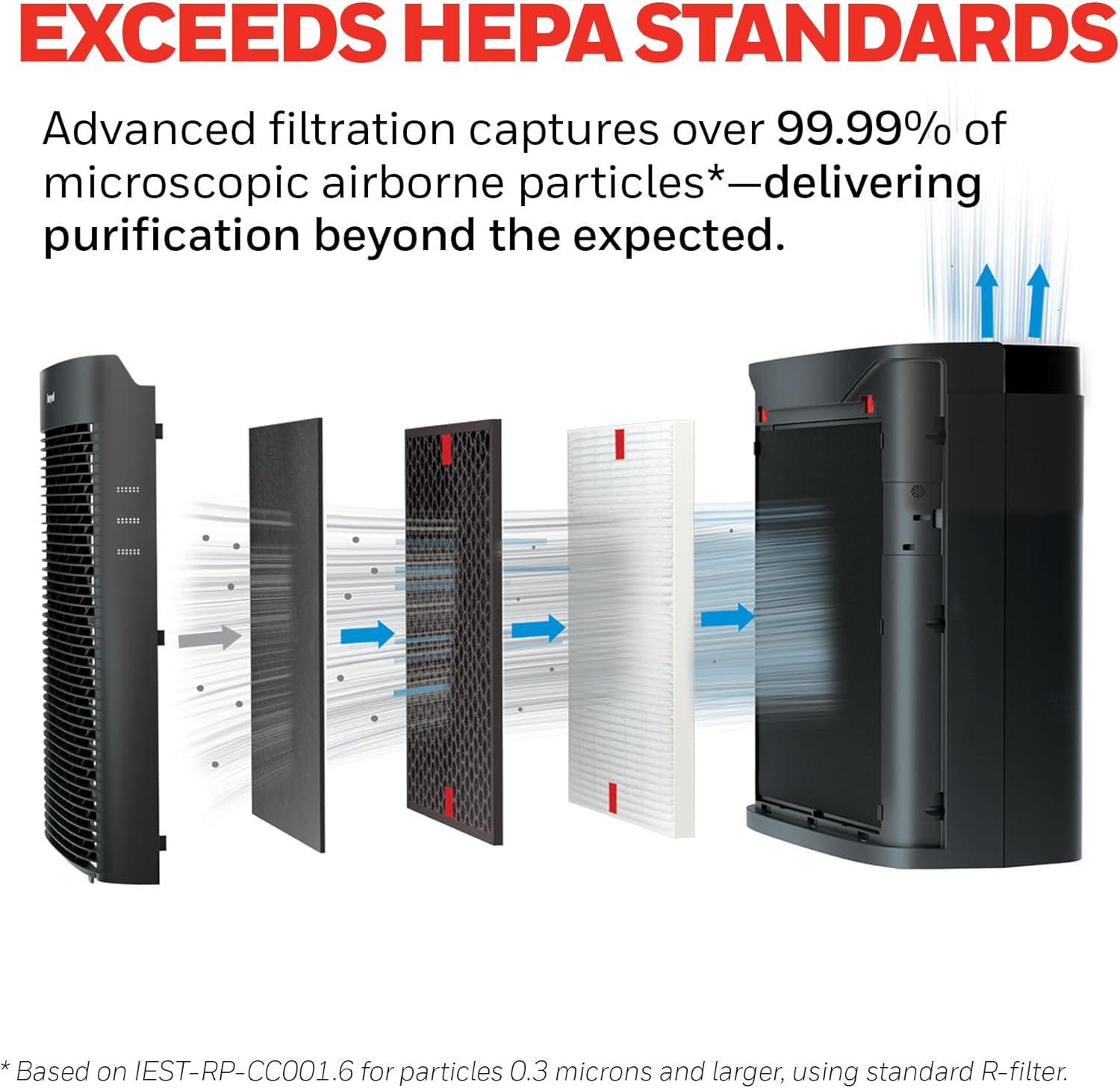
Image 3.1: The multi-layered filtration system, illustrating how air passes through different filters to capture particles.

Image 3.2: Visual representation of the types of microscopic particles the air purifier is engineered to remove.
4. Setup
4.1 Unpacking
Carefully remove the air purifier from its packaging. Remove any plastic bags or protective materials from the unit and filters. Ensure all components are present: the air purifier unit, one 'R' HEPA filter, and one 'A' Pre-Filter.
4.2 Filter Installation
The air purifier comes with filters pre-installed, but they are typically wrapped in plastic for shipping. You must remove this plastic before use.
- Open the front grille of the air purifier by gently pulling it from the top or sides.
- Remove the pre-filter (labeled 'A') and the HEPA filter (labeled 'R') from inside the unit.
- Remove the protective plastic packaging from both filters.
- Place the HEPA filter(s) back into the unit, ensuring they are seated correctly.
- Place the pre-filter 'A' over the HEPA filter(s), securing it with the tabs.
- Close the front grille securely.

Image 4.1: Illustration of filter installation, showing the placement of the pre-filter (A), HEPA filter (R), and optional specialty filter (S).
4.3 Placement
For optimal performance, place the air purifier in the room where you spend the most time. Ensure there is at least 6 inches (15 cm) of clearance around the unit for proper air circulation. Avoid placing it near large obstacles that could impede airflow.
5. Operation
The control panel is located on the top of the unit. Familiarize yourself with the buttons and indicators:

Image 5.1: Top view of the air purifier, highlighting the control panel.
5.1 Power On/Off
Press the Power Button (usually a circle with a vertical line) to turn the unit on or off.
5.2 Cleaning Levels
Press the Cleaning Level Button to cycle through the available settings:
- Microscopic Particles: For general air purification.
- General Clean: A balanced setting for everyday use.
- Pollen: Optimized for capturing pollen during allergy seasons.
- Turbo: Provides maximum cleaning power for rapid air purification.

Image 5.2: The air purifier operating in Turbo Mode, designed for high performance.
5.3 Auto-Off Timer
Press the Timer Button to set the unit to automatically turn off after 2, 4, or 8 hours.
5.4 Control Panel Dimmer
Press the Dimmer Button to adjust the brightness of the control panel lights, ideal for nighttime use.
6. Maintenance
Regular maintenance ensures optimal performance and extends the life of your air purifier.
6.1 Filter Replacement Schedule
The air purifier features a Filter Check/Reset indicator to remind you when to replace filters. However, general guidelines are:
- 'R' HEPA Filter: Replace annually.
- 'A' Pre-Filter: Replace every 3 months.
- Optional 'S' Specialty Filters: Replace as needed, typically every 3 months, depending on usage and air quality.
Always use genuine Honeywell replacement filters for reliable air cleaning.


Images 6.1-6.3: Visuals detailing the types of particles and odors captured by the filters, including optional specialty filters.
6.2 Resetting Filter Indicator
After replacing a filter, plug in the unit and press and hold the corresponding Filter Reset Button for approximately 2 seconds until the indicator light turns off.
6.3 Cleaning the Exterior
Wipe the exterior of the air purifier with a soft, dry cloth. Do not use water, waxes, polish, or any chemical solutions.
7. Troubleshooting
If your air purifier is not operating correctly, please refer to the following common issues and solutions:
| Problem | Possible Cause | Solution |
|---|---|---|
| Unit will not turn on | Not plugged in; Power outage; Front grille not closed properly. | Ensure unit is securely plugged into a working outlet; Check household circuit breaker; Ensure front grille is fully closed and latched. |
| Reduced airflow or poor purification | Filters are dirty or clogged; Filters are still in plastic packaging. | Replace filters as per maintenance schedule; Ensure all plastic packaging is removed from filters. |
| Unusual noise | Foreign object inside unit; Filters not installed correctly. | Unplug unit and check for any obstructions; Reinstall filters, ensuring they are seated properly. |
| Filter indicator light remains on after replacement | Filter indicator not reset. | Press and hold the corresponding Filter Reset Button for 2 seconds until the light turns off. |
8. Specifications
| Feature | Detail |
|---|---|
| Model Number | HPA3100 |
| Color | Black |
| Product Dimensions | 13.9"D x 9.2"W x 15"H |
| Recommended Room Size | Up to 200 sq. ft. (4.8 air changes per hour) |
| Maximum Coverage Area | 968 sq. ft. (1 air change per hour) |
| Noise Level | 45 Decibels |
| Controller Type | Button Control |
| Certifications | AHAM Certified, Energy Star Certified |
| Item Weight | 6.38 pounds |
| Included Components | 1 Air Purifier, 1 HRF-R1 Filter, 1 HRF-AP1 Filter |
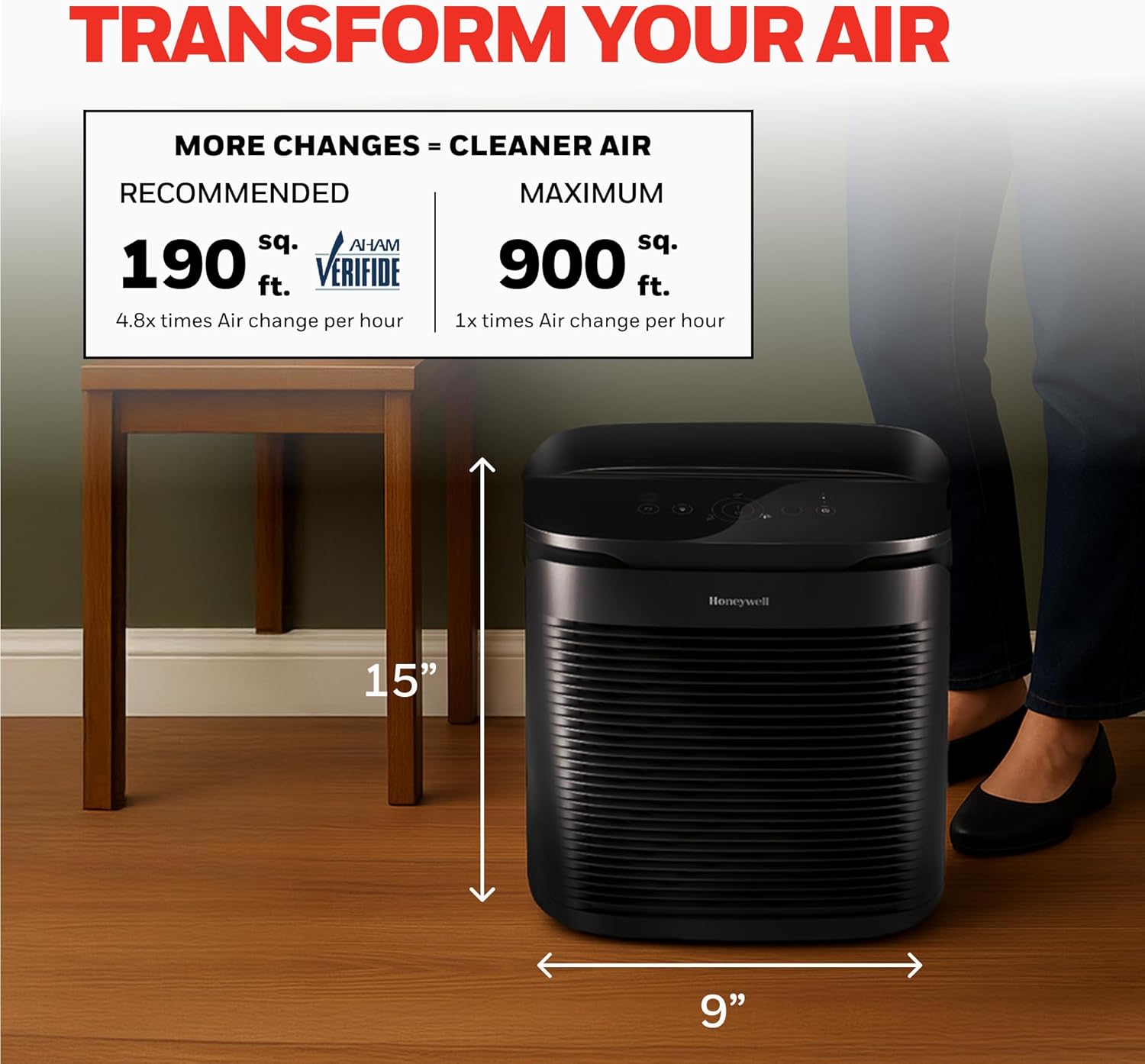
Image 8.1: Dimensions of the air purifier and recommended room size for effective air changes.
9. Warranty and Support
9.1 Warranty Information
The Honeywell PowerPlus HEPA Air Purifier HPA3100 comes with a 5-year limited warranty. Please refer to the warranty card included with your product for full terms and conditions.
9.2 Customer Support
For technical assistance, replacement parts, or general inquiries, please visit the official Honeywell website or contact their customer support line. Contact details can typically be found on the product packaging or the Honeywell website.