
1. Introduction
This manual provides detailed instructions for the installation, operation, and maintenance of your Cielsa Dawn Smart Fingerprint Digital Door Knob, Model CD-E030-TB. Please read this manual thoroughly before installation and use to ensure proper function and safety.
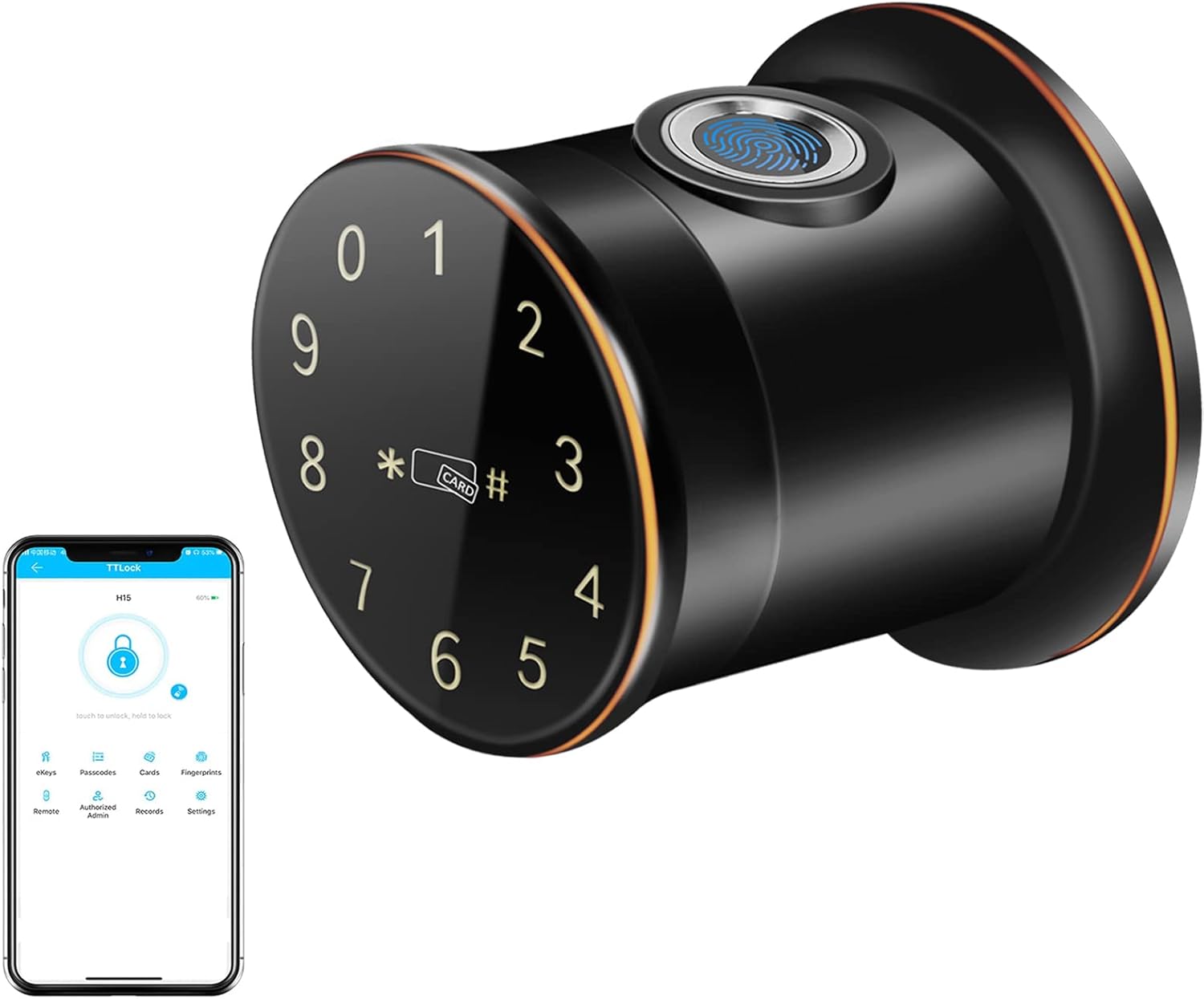
Image 1.1: Cielsa Dawn Smart Fingerprint Digital Door Knob and App Interface
2. Product Overview
2.1 Key Features
- 5-in-1 Access Methods: Fingerprint, Passcode, Mobile App (Bluetooth), MIFARE M1 Card, and Emergency Key.
- Enhanced Security: Anti-peep passcode function and automatic lockout after multiple incorrect entries.
- Durable Construction: Front and rear panels made of zinc alloy, designed for impact resistance.
- Weather Resistance: IP65 waterproof rating, suitable for various environments.
- Smart Reminders: Low battery warning and emergency power supply option via external power bank.
- Auto-Lock Function: Automatically locks after a set period (e.g., 2 seconds) for added security.
- Reversible Design: Compatible with both left-handed and right-handed doors.
2.2 Components and Power
The smart door knob is powered by 4 AA batteries (not included). It features a USB charging port for emergency power supply if batteries are depleted. An IC card slot is also integrated for card access.

Image 2.1: Power Options and IC Card Access
3. Setup and Installation
3.1 Pre-Installation Checks
- Ensure your door thickness is between 3.3 cm (1.3 inches) and 5.2 cm (1.9 inches).
- Verify that the existing door hole dimensions are compatible with the lock's specifications.
- Gather necessary tools: a small screwdriver is typically sufficient.
3.2 Installation Steps
- Remove your existing door knob and latch mechanism.
- Install the new latch into the door edge.
- Attach the exterior knob assembly, ensuring the spindle aligns with the latch.
- Connect the interior knob assembly, securing it with screws.
- Insert 4 AA batteries into the interior knob's battery compartment.
- Test the lock's basic functionality before closing the door.
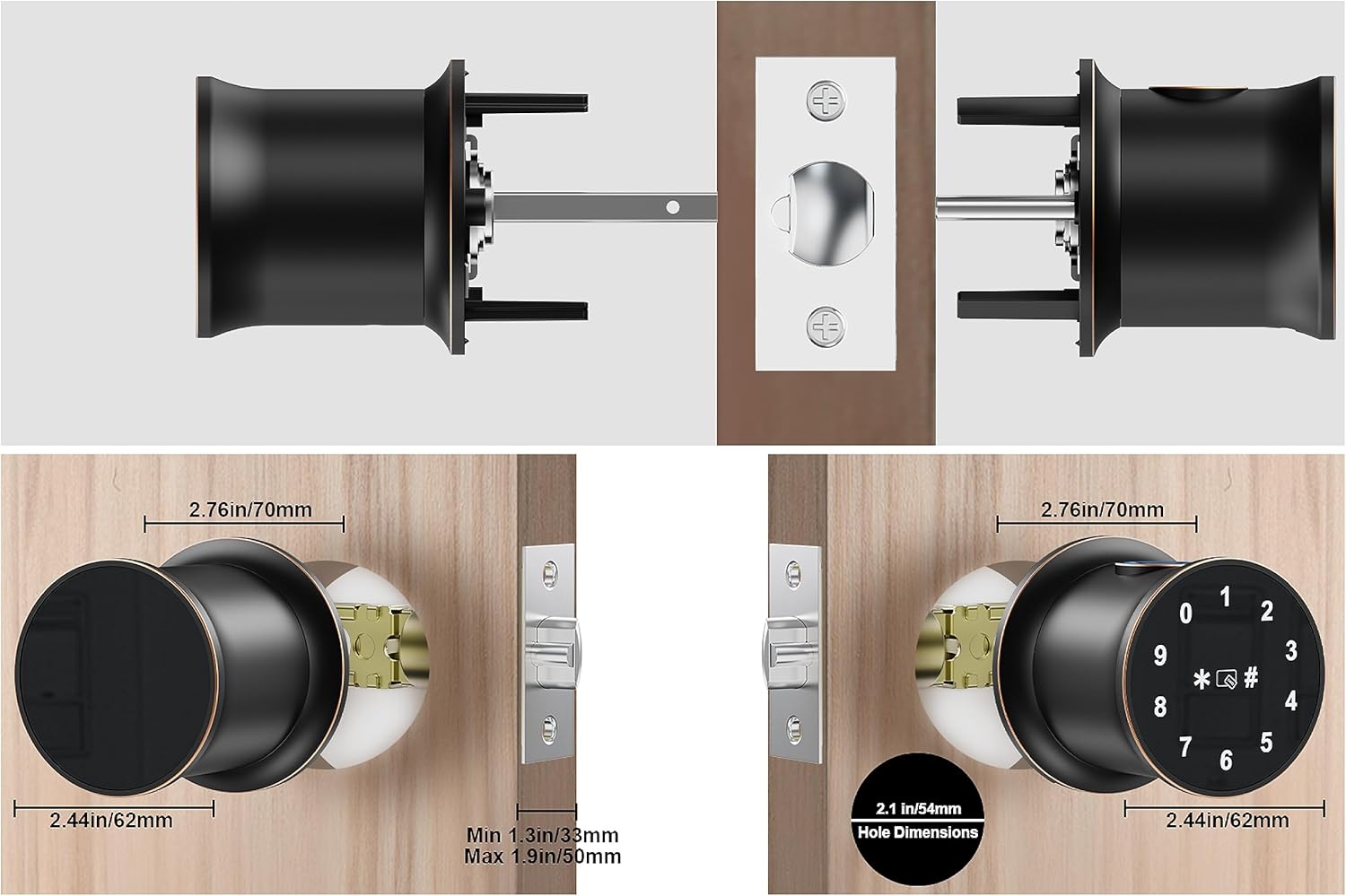
Image 3.1: Installation Dimensions Diagram
3.3 Door Handing Reversibility
The Cielsa Dawn Smart Fingerprint Digital Door Knob is designed to be reversible, allowing it to be installed on both left-handed and right-handed doors. Follow the instructions in the quick start guide for adjusting the knob's orientation if necessary.

Image 3.2: Reversible Door Handing
4. Operating Instructions
4.1 Unlocking Methods
- Fingerprint: Place your registered finger on the fingerprint sensor. The lock will unlock in a fraction of a second.
- Passcode: Enter your registered passcode on the touchscreen keypad, followed by the '#' key.
- Mobile App (Bluetooth): Use the dedicated mobile application to unlock the door via Bluetooth when within range.
- MIFARE M1 Card: Tap a registered MIFARE M1 card on the designated area of the knob.
- Emergency Key: In case of electronic failure or dead batteries, use the physical emergency key to unlock the door.
4.2 Mobile App Usage
The mobile application allows for remote management and unlocking of your door knob. Features include:
- Remote Unlock: Unlock the door from anywhere via Wi-Fi (requires a compatible Wi-Fi gateway, sold separately).
- User Management: Add, modify, or delete fingerprints, passcodes, and IC cards.
- Temporary Access: Generate temporary passcodes for guests or service providers.
- Activity Logs: View a history of lock and unlock events.

Image 4.1: Remote Unlocking via Mobile App
4.3 Anti-Peep Passcode
To prevent others from guessing your passcode, you can enter random digits before or after your actual passcode. The lock will still recognize the correct sequence within the longer string of numbers.
4.4 Auto-Lock Function
The door knob is equipped with an auto-lock feature that automatically secures the door after a short period (e.g., 2 seconds) once it has been closed. This ensures your door is always locked.

Image 4.2: 2-Second Auto-Lock Feature
5. Maintenance
5.1 Battery Replacement
The smart lock will provide a low battery warning when the battery level is critical. Replace all 4 AA batteries promptly to ensure continuous operation. Do not mix old and new batteries or different types of batteries.
5.2 Emergency Power
If the batteries completely drain before replacement, you can connect an external power bank to the USB charging port on the exterior knob to temporarily power the lock and gain access.
5.3 Cleaning
Clean the exterior of the door knob with a soft, damp cloth. Avoid using abrasive cleaners or solvents that could damage the finish or electronic components.
6. Troubleshooting
- Lock not responding: Check battery level. If low, replace batteries or use emergency power.
- Fingerprint not recognized: Ensure your finger is clean and dry. Re-register your fingerprint if issues persist.
- Passcode not working: Verify the correct passcode is entered. Remember the anti-peep function allows extra digits. If 6 incorrect attempts are made, the lock will temporarily disable for 1 minute.
- App connectivity issues: Ensure Bluetooth is enabled on your phone and you are within range. For remote access, confirm your Wi-Fi gateway is properly configured and connected.
- Lock mechanism jammed: Do not force the knob. Check for any obstructions in the door frame or latch.
7. Specifications
| Feature | Specification |
|---|---|
| Model Number | CD-E030-TB |
| Dimensions (L x W x H) | 15 x 7 x 7 cm (5.9 x 2.76 x 2.76 inches) |
| Weight | 997.9 grams (2.2 lbs) |
| Material | Stainless Steel, Zinc Alloy |
| Color | Bronze |
| Door Thickness Compatibility | 3.3 cm to 5.2 cm (1.3 to 1.9 inches) |
| Power Supply | 4 x AA Batteries (not included) |
| Emergency Power | USB Charging Port |
| Waterproof Rating | IP65 |
| Operating Temperature | -20 ℃ to 70 ℃ (-4 ℉ to 158 ℉) |
8. Warranty and Support
Your Cielsa Dawn Smart Fingerprint Digital Door Knob comes with the following:
- 30-Day Money-Back Guarantee: From the date of purchase.
- 1-Year Product Warranty: Covers manufacturing defects from the date of purchase.
- Lifetime Customer Service: For technical assistance and support.
For warranty claims or technical support, please refer to the contact information provided with your purchase or visit the official Cielsa Dawn website.