
DSF MBG01A
DSF MBG01A Multifunctional Bench Grinder User Manual
Model: MBG01A
1. Introduction
The DSF MBG01A Multifunctional Bench Grinder is a versatile electric grinding tool designed for a wide range of sharpening, polishing, and grinding tasks. It features a flexible shaft and variable speed control, making it suitable for various applications from household maintenance to detailed DIY projects.
This manual provides essential information for the safe and effective operation, maintenance, and troubleshooting of your MBG01A Bench Grinder.
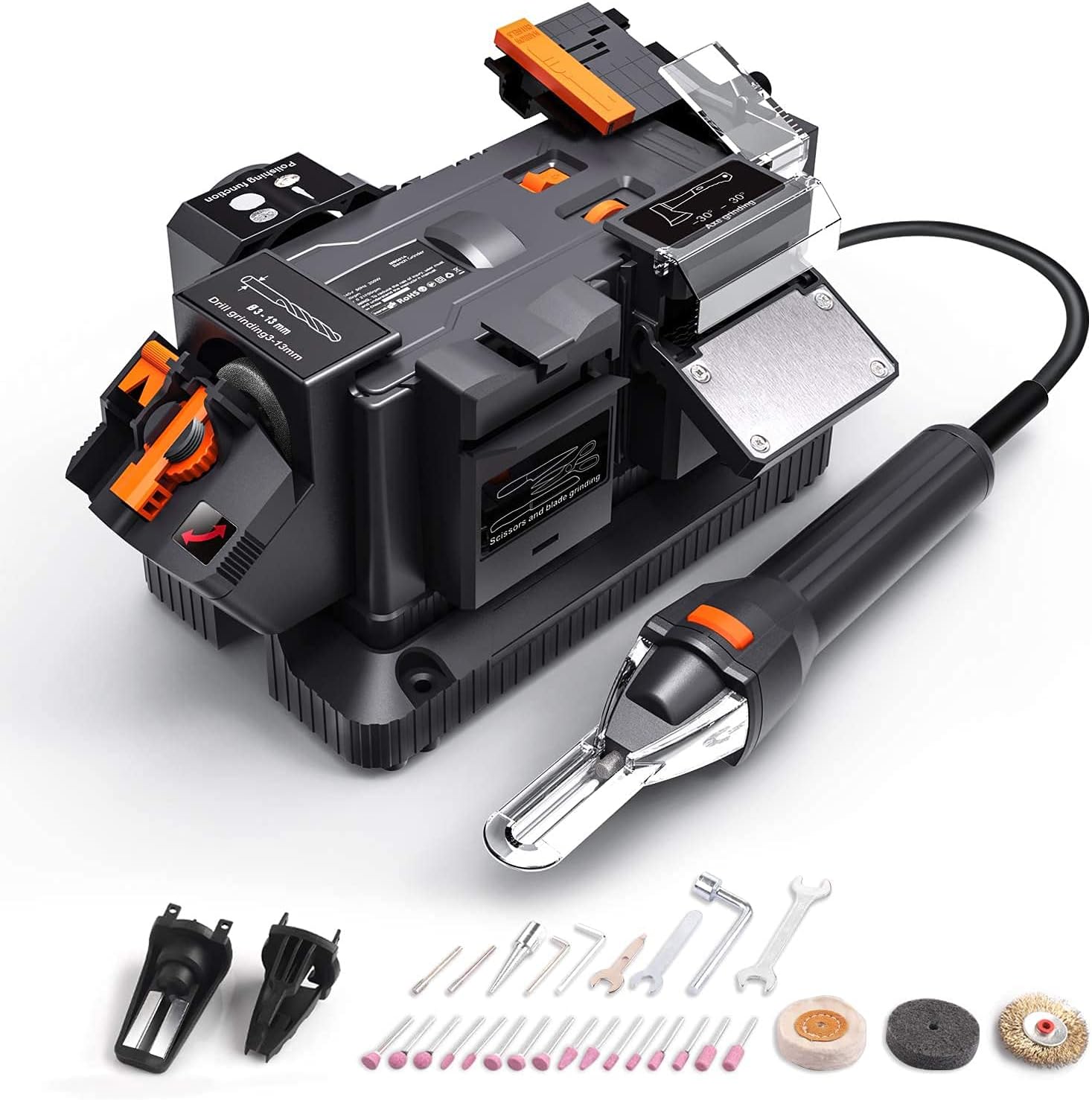
Figure 1: DSF MBG01A Multifunctional Bench Grinder with included accessories.
2. Safety Instructions
Always adhere to the following safety guidelines to prevent injury and damage to the tool:
- Read all instructions before operating the tool.
- Wear appropriate personal protective equipment (PPE), including safety glasses, gloves, and hearing protection.
- Ensure the work area is clean, well-lit, and free from obstructions.
- Keep children and bystanders away from the operating area.
- Unplug the tool from the power source before making any adjustments, changing accessories, or performing maintenance.
- Do not operate the tool in damp or wet conditions.
- Do not force the tool; let the tool do the work at its intended speed.
- Ensure the safety switch contacts are fully engaged by the accessory before starting the machine.
3. Product Components
The MBG01A Bench Grinder includes the following main components and accessories:
- Main Grinder Unit
- Flexible Shaft
- Diamond Wheel (50x10x7.5mm)
- White Corundum Wheel (50x11x8mm)
- Drill Bit Sharpening Attachment
- Chisel Sharpening Attachment
- Axe Sharpening Attachment
- Knife/Scissor Sharpening Slot
- Polishing Wheel
- Various Rotary Tool Accessories (grinding stones, polishing pads, etc.)
4. Setup and Assembly
Before first use, ensure all components are present and undamaged. Place the grinder on a stable, flat surface.
4.1 Attaching Accessories
Different tasks require specific attachments. Ensure the correct attachment is securely installed before operation.
4.1.1 Drill Bit Sharpening Attachment
- Insert the drill bit sharpening attachment into its designated slot on the main unit.
- Ensure it clicks into place and the safety switch contacts are engaged.
- Adjust the drill bit holder for the appropriate drill diameter (3-13mm).

Figure 2: Proper insertion of a drill bit into the sharpening attachment.
4.1.2 Chisel Sharpening Attachment
- Attach the chisel sharpening guide to the main unit.
- Adjust the angle setting for the desired grind (20-40°).
- The grindable chisel width range is 6-51mm.

Figure 3: Sharpening a chisel using the dedicated attachment.
4.1.3 Axe Sharpening Attachment
- Secure the axe sharpening guide.
- Adjust the angle setting for the desired grind (-30° to 30°).

Figure 4: Sharpening an axe with the adjustable guide.
4.1.4 Flexible Shaft Installation
The flexible shaft allows for detailed work and access to tight spaces.
- Ensure the main unit is unplugged.
- Locate the flexible shaft port on the grinder.
- Screw the flexible shaft connector firmly into the port.
- Attach desired rotary tool accessories to the flexible shaft's chuck.

Figure 5: The flexible shaft in use for sharpening a chainsaw.
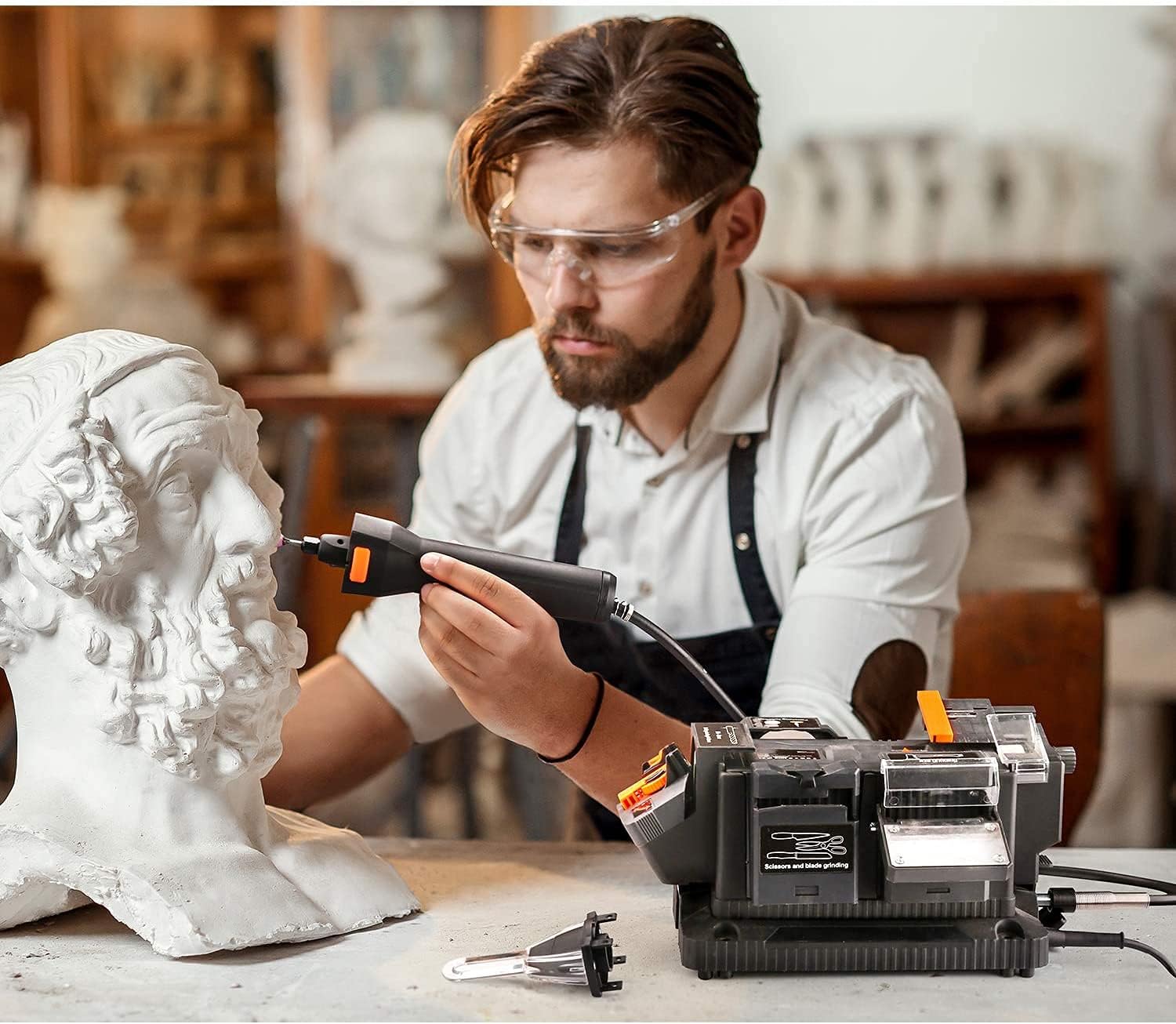
Figure 6: Example of detailed work using the flexible shaft for carving.
5. Operating Instructions
5.1 Powering On and Off
The MBG01A features a safety mechanism to prevent accidental startup.
- First, press the main power switch.
- Ensure that the holders have pressed the scroll switches on both parts of the grinding wheel. This means the accessory must be correctly seated and engaging the safety contacts.
- Once both safety contacts are engaged, the machine will start to work.
- To turn off, press the main power switch again.
5.2 Variable Speed Control
The grinder features 6 variable speeds. Adjust the speed according to the material and task. Lower speeds are generally for polishing or delicate work, while higher speeds are for grinding and sharpening.
5.3 Specific Operations
5.3.1 Sharpening Drill Bits
Insert the drill bit into the appropriate slot on the drill bit sharpening attachment. Gently rotate and apply even pressure to sharpen both cutting edges.
5.3.2 Sharpening Knives and Scissors
Use the dedicated slot for knives and scissors. Maintain a consistent angle and draw the blade through the slot with light, even pressure. For scissors, sharpen each blade individually.

Figure 7: Sharpening a knife and scissors using the integrated slots.
5.3.3 Polishing and Descaling
Attach the polishing wheel. Apply polishing compound if necessary. Gently press the item against the rotating wheel to polish or remove rust/scale.

Figure 8: Polishing a metal object using the polishing wheel attachment.
6. Maintenance
Regular maintenance ensures the longevity and optimal performance of your MBG01A Bench Grinder.
- Cleaning: After each use, unplug the tool and clean off any dust, debris, or metal shavings using a brush or compressed air. Do not use solvents.
- Wheel Inspection: Regularly inspect the grinding wheels for wear, cracks, or damage. Replace worn or damaged wheels immediately.
- Accessory Care: Clean and store all attachments and accessories properly after use.
- Storage: Store the grinder in a dry, clean place, away from direct sunlight and extreme temperatures.
7. Troubleshooting
| Problem | Possible Cause | Solution |
|---|---|---|
| Tool does not start. |
|
|
| Motor sounds labored or weak. |
|
|
| Poor sharpening results. |
|
|
8. Technical Specifications
| Feature | Specification |
|---|---|
| Model Number | MBG01A |
| Brand | DSF |
| Power | 200W / 1.67A |
| Power Source | AC |
| Speed Settings | 6 Variable Speeds |
| Diamond Wheel Dimensions | 50x10x7.5mm |
| White Corundum Wheel Dimensions | 50x11x8mm |
| Grindable Chisel Width | 6-51mm |
| Chisel Angle Adjustment | 20 - 40° |
| Axe Angle Adjustment | -30 - 30° |
| Grindable Drill Diameter | 3-13mm |
| UPC | 788934193257 |
9. Warranty and Support
For warranty information and customer support, please refer to the documentation included with your purchase or contact DSF customer service directly. Keep your proof of purchase for warranty claims.
For further assistance or technical inquiries, please visit the manufacturer's official website or contact their support team.
Ask a question about this manual
Ask about setup, troubleshooting, compatibility, parts, safety, or missing instructions. Manuals+ will review the question and use this page’s manual context to help answer it.