
1. Product Overview
This manual provides essential information for the safe and effective installation and use of your SwarKing BLP601 replacement battery. This battery is designed to restore optimal power performance to your compatible Oppo smartphone.
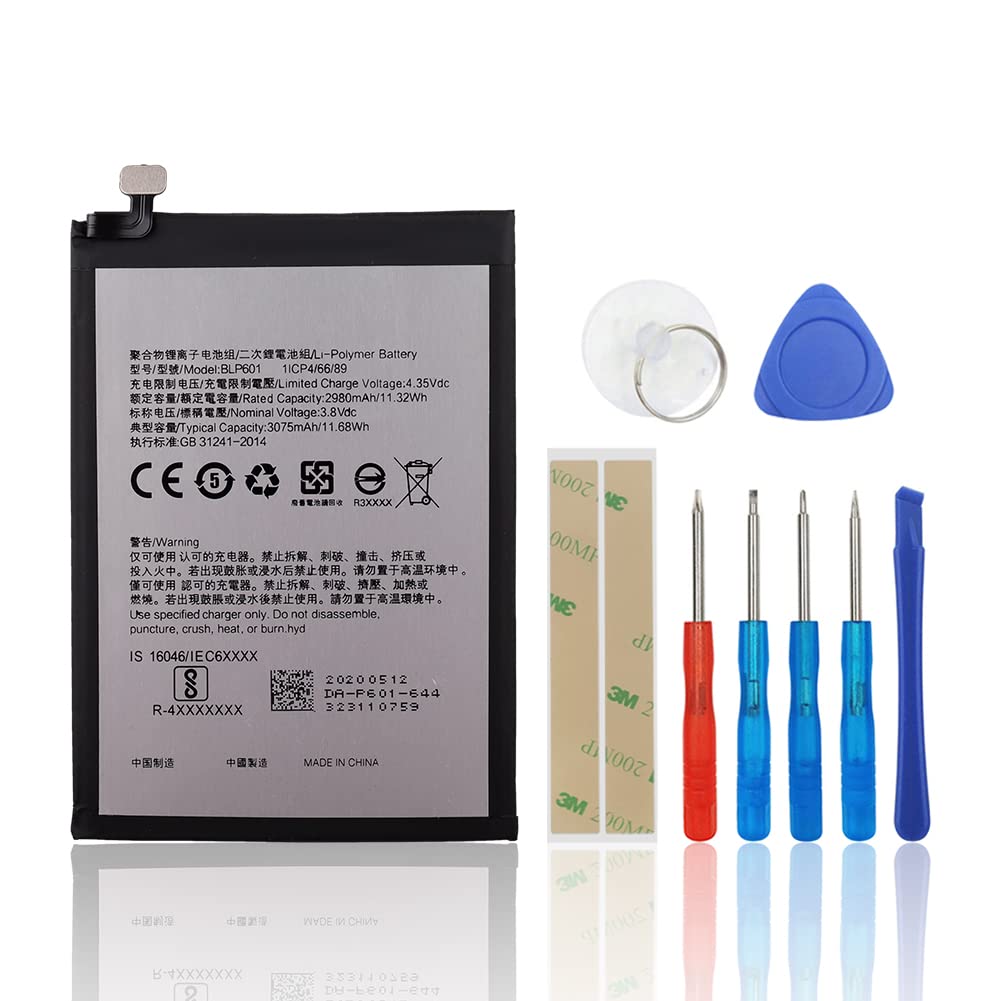
Image 1.1: Front and back view of the SwarKing BLP601 replacement battery, showing specifications and regulatory marks.
2. Compatibility
The SwarKing BLP601 replacement battery is compatible with the following Oppo smartphone models:
- Oppo A53
- Oppo A53T
- Oppo A53M
- Oppo A59
- Oppo A59S
- Oppo F1S (A1601)

Image 2.1: Visual confirmation of compatible Oppo models with the BLP601 battery.
3. Package Contents
Your SwarKing BLP601 replacement battery package includes:
- 1 x SwarKing BLP601 Replacement Battery
- 1 x Replacement Toolkit (includes various screwdrivers, pry tool, suction cup, and adhesive strips)

Image 3.1: The included toolkit for battery replacement.
4. Safety Information
WARNING:
- Do not disassemble, puncture, crush, heat, or burn the battery.
- Avoid exposing the battery to high temperatures or direct sunlight.
- Do not immerse the battery in water or other liquids.
- Use only the specified charger for your device.
- Keep the battery away from children.
- Dispose of used batteries according to local regulations.
5. Installation (Setup)
Replacing a smartphone battery requires careful handling of delicate components. If you are not confident in performing this procedure, it is recommended to seek professional assistance.
5.1 Tools Required
The included toolkit contains the necessary screwdrivers, pry tools, and adhesive strips for the replacement process. Ensure you have a clean, well-lit workspace.
5.2 Installation Steps
- Power Off Device: Completely power off your smartphone before beginning.
- Remove Back Cover: Carefully remove the back cover of your phone. This may require heating the edges to loosen adhesive.
- Disconnect Old Battery: Locate the battery connector on the motherboard and gently disconnect it.
- Remove Old Battery: Carefully pry out the old battery. It may be secured with adhesive.
- Install New Battery: Place the new SwarKing BLP601 battery into the battery compartment. Secure it with the provided adhesive strips if necessary.
- Connect New Battery: Reconnect the new battery's connector to the motherboard.
- Reassemble Device: Carefully reattach the back cover and any other components removed during disassembly.
- Initial Charge: After reassembly, fully charge the new battery before its first use.
Note: Detailed visual instructions for battery replacement are widely available on video platforms like YouTube. Search for '[Your Phone Model] battery replacement' for step-by-step guides.

Image 5.1: Detail of the battery connector, which must be carefully handled during installation.
6. Operating (Initial Use)
After successful installation, it is recommended to perform an initial calibration cycle for the new battery:
- Charge the battery to 100% without interruption.
- Use your phone normally until the battery completely drains and the phone shuts off.
- Charge the phone again to 100% without interruption.
This process helps the phone's battery management system accurately read the new battery's capacity.
7. Maintenance
To maximize the lifespan and performance of your SwarKing BLP601 battery:
- Avoid extreme temperatures (both hot and cold).
- Do not frequently drain the battery completely to 0%. Aim to recharge before it gets too low.
- Avoid keeping the battery at 100% charge for extended periods, especially if not in use.
- Use only compatible and certified chargers.
8. Troubleshooting
If you experience issues after replacing your battery, consider the following:
8.1 Common Battery Issues
- Phone powers off suddenly: This can indicate a faulty battery connection or a defective battery. Recheck connections.
- Charges frequently / Runs out shortly: The battery may not be holding a charge effectively. Ensure proper calibration (Section 6).
- Battery percentage drops quickly: Similar to running out shortly, this suggests reduced capacity or calibration issues.

Image 8.1: Visual representation of common battery performance issues.
8.2 General Troubleshooting Steps
- Recheck Connections: Ensure the battery connector is securely seated.
- Perform Calibration: Follow the steps in Section 6.
- Test with Original Charger: Ensure your charging accessories are not the cause of the issue.
- Factory Reset (Last Resort): A factory reset can sometimes resolve software-related battery drain issues, but back up your data first.
9. Specifications
| Specification | Value |
|---|---|
| Model Number | BLP601 |
| Battery Type | Lithium Polymer |
| Rated Capacity | 2980mAh / 11.32Wh |
| Typical Capacity | 3075mAh / 11.68Wh |
| Nominal Voltage | 3.8 Vdc |
| Limited Charge Voltage | 4.35 Vdc |
| Certifications | UL, CE, ROHS |
| Cycle Life | Up to 500+ cycles |
10. Warranty and Support
SwarKing provides a customer guarantee for quality-related issues. If you are not 100% satisfied with your battery replacement, please contact us for a replacement or a complete refund. We aim to respond to all inquiries within 24 hours.
For support, please refer to the contact information provided with your purchase or on the SwarKing official website.