
1. Introduction
Thank you for choosing the Komerci Marreal AP006 HEPA H13 Air Purifier. This device is designed to improve your indoor air quality by effectively removing pollen, bacteria, fine dust, and unpleasant odors. It features a comprehensive 6-stage filtration system, UVC disinfection, PM2.5 ionizer, and convenient WiFi control via the Tuya app. Please read this manual thoroughly before operation to ensure safe and efficient use.
2. Safety Instructions
- Always place the air purifier on a firm, level surface.
- Do not block air inlets or outlets. Maintain at least 20 cm clearance from walls or furniture.
- Keep the device away from water and moisture. Do not operate in bathrooms or other humid environments.
- Unplug the air purifier before cleaning, maintenance, or filter replacement.
- Do not use if the power cord or plug is damaged. Contact customer support for repairs.
- This appliance is not intended for use by persons (including children) with reduced physical, sensory or mental capabilities, or lack of experience and knowledge, unless they have been given supervision or instruction concerning use of the appliance by a person responsible for their safety.
- Do not insert any objects into the air outlets or inlets.
- The UVC lamp inside this appliance contains mercury. Do not open the UVC lamp compartment. If the UVC lamp breaks, avoid contact with mercury and dispose of it according to local regulations.
3. Product Overview
The Komerci Marreal AP006 Air Purifier features a sleek design with an intuitive control panel and a multi-stage filtration system.
3.1 Control Panel
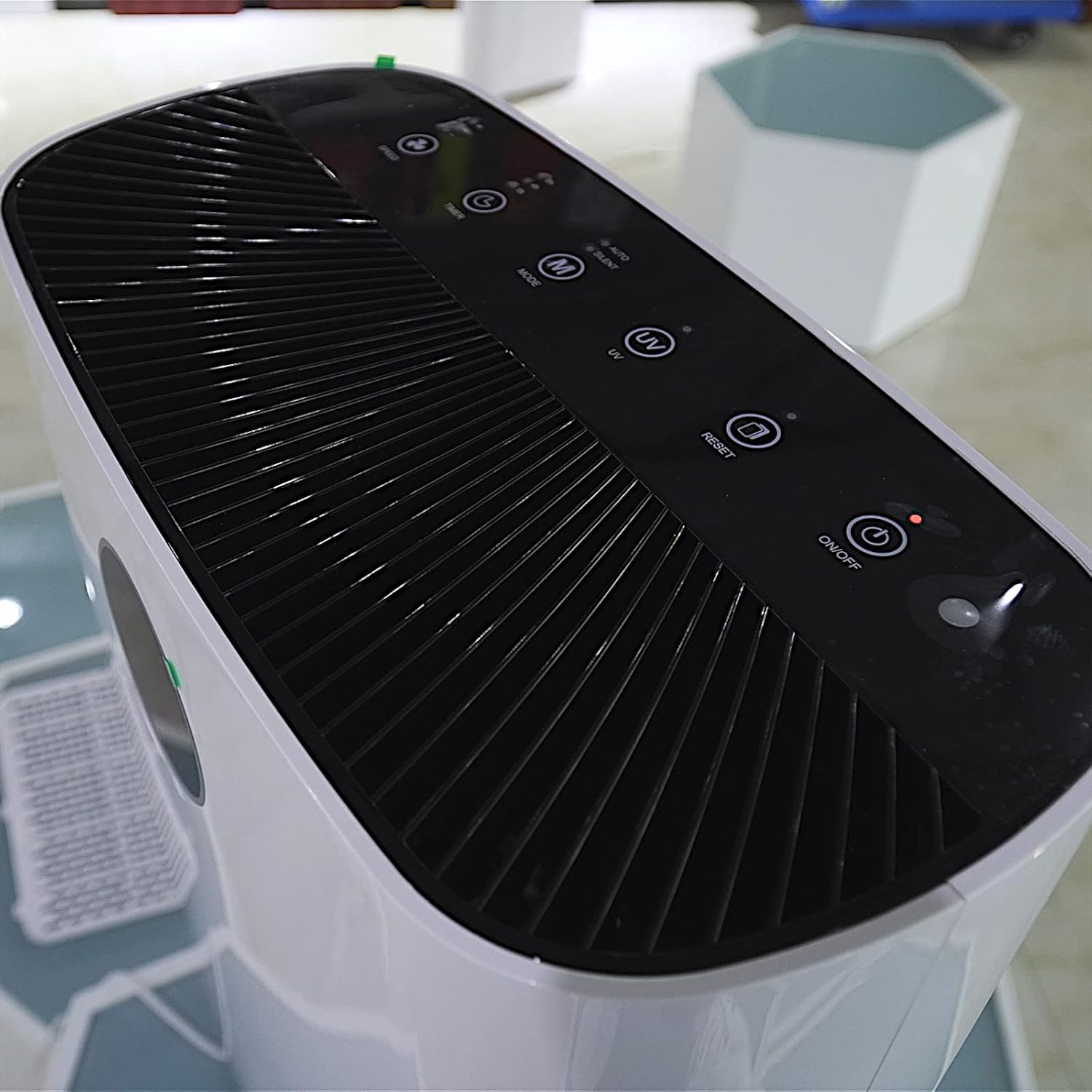
Image: Top view of the Komerci Marreal AP006 air purifier, highlighting the touch control panel.
The touch control panel located on the top of the unit allows you to manage all functions, including power, mode selection, fan speed, UV light, ionizer, and filter reset. An air quality indicator is also present.
3.2 Filtration System Components

Image: Exploded view of the Komerci Marreal AP006 air purifier's multi-stage filter system.
The AP006 utilizes a sophisticated 6-stage filtration process to ensure comprehensive air purification:
- Pre-filter: Captures large particles like dust, lint, and pet dander, extending the life of subsequent filters.
- H13 HEPA Filter: Traps 99.97% of airborne particles as small as 0.3 microns, including pollen, mold spores, and fine dust.
- Activated Carbon Filter: Absorbs odors, smoke, and harmful gases like VOCs.
- Photocatalyst Filter: Works with UV light to decompose harmful organic compounds.
- UVC Disinfection: Emits ultraviolet light to neutralize bacteria, viruses, and other microorganisms.
- Ionizer: Releases negative ions to clump airborne particles, making them easier to filter and improving air freshness.

Image: Detailed diagram illustrating the function of each stage in the 6-stage filtration system.
4. Setup
- Unpack the Device: Carefully remove the air purifier from its packaging.
- Remove Filter Packaging:
The filters inside the unit are typically sealed in plastic for protection during shipping. You must remove this packaging before first use.
- Locate the filter cover on the back of the unit.
- Gently press the latch or pull the cover to open it.
- Remove all filters and unwrap them from their protective plastic bags.
- Reinsert the filters into the unit in the correct order (refer to the diagram in Section 3.2 if unsure).
- Close the filter cover securely.

Image: Rear view of the air purifier, showing the removable filter cover.
- Position the Purifier: Place the air purifier in the desired room, ensuring adequate space around it for optimal airflow.
- Connect Power: Plug the power cord into a suitable electrical outlet.
5. Operating Instructions
5.1 Basic Operation
- Power On/Off: Press the Power button on the control panel to turn the unit on or off.
- Fan Speed: Press the Fan Speed button to cycle through 4 available fan speeds (Low, Medium, High, Turbo).
- Mode Selection: Press the Mode button to select between different operating modes:
- Auto Mode: The purifier automatically adjusts fan speed based on detected air quality (PM2.5 sensor).
- Night Mode: Operates at the lowest fan speed with reduced light indicators for quiet operation during sleep.
- UVC Function: Press the UV button to activate or deactivate the UVC disinfection lamp.
- Ionizer Function: Press the Ion button to activate or deactivate the negative ion generator.
5.2 WiFi Control (Tuya App)
The Komerci Marreal AP006 can be controlled remotely using the Tuya Smart app on your smartphone.
- Download the "Tuya Smart" app from your smartphone's app store (iOS or Android).
- Register or log in to your Tuya Smart account.
- Ensure your air purifier is powered on and your smartphone is connected to a 2.4GHz Wi-Fi network.
- In the app, tap "+" to add a new device. Select "Air Purifier" or search for the device type.
- Follow the on-screen instructions in the app to connect your air purifier to your Wi-Fi network. This may involve putting the air purifier into pairing mode (refer to the app's instructions or the purifier's display for pairing indicators).
- Once connected, you can control all functions of the air purifier from your smartphone, including power, fan speed, modes, timer settings, and monitoring air quality.
6. Maintenance
6.1 Filter Replacement
The air purifier is equipped with a filter life indicator. When the filter needs replacement, a specific indicator light (e.g., "Filter Reset" or a flashing icon) will illuminate on the control panel.
- Power Off and Unplug: Always turn off and unplug the air purifier before replacing filters.
- Open Filter Cover: Open the filter compartment cover on the back of the unit.
- Remove Old Filters: Carefully remove the used filters. Dispose of them according to local waste disposal regulations.
- Install New Filters: Unwrap new filters and insert them into the unit in the correct sequence. Ensure they are seated properly.
- Close Cover: Close the filter compartment cover securely.
- Reset Filter Indicator: Plug in the unit and power it on. Press and hold the Filter Reset button (or indicated button) on the control panel for 3-5 seconds until the indicator light turns off or resets.
Note: The lifespan of filters varies depending on air quality and usage. It is generally recommended to replace the combined filter unit every 6-12 months.
6.2 Cleaning the Exterior
- Wipe the exterior of the air purifier with a soft, damp cloth.
- Do not use abrasive cleaners, solvents, or harsh chemicals.
- Ensure no water enters the air inlets or outlets.
6.3 Cleaning the Pre-filter
The pre-filter can be gently cleaned to extend its life.
- Remove the pre-filter as described in Section 6.1.
- Use a soft brush or a vacuum cleaner with a brush attachment to remove accumulated dust and debris.
- Do not wash the HEPA or activated carbon filters with water.
- Reinstall the clean pre-filter.
7. Troubleshooting
| Problem | Possible Cause | Solution |
|---|---|---|
| Unit does not power on. | No power supply. Power cord not properly connected. |
Check if the unit is plugged into a working outlet. Ensure the power cord is securely connected to both the unit and the outlet. |
| Weak airflow. | Filters are clogged. Air inlets/outlets are blocked. |
Check and replace filters if necessary. Ensure nothing is obstructing the air inlets or outlets. |
| Unusual noise. | Foreign object inside. Filters not installed correctly. |
Unplug and check for any foreign objects. Reinstall filters, ensuring they are seated properly. |
| Air quality not improving. | Filters need replacement. Room size exceeds capacity. Air inlets/outlets blocked. |
Replace filters. Ensure the unit is suitable for the room size (up to 61 m²). Check for obstructions. |
| WiFi connection failure. | Incorrect Wi-Fi password. Not connected to 2.4GHz network. Device not in pairing mode. |
Verify Wi-Fi password. Ensure your router is broadcasting a 2.4GHz network and your phone is connected to it. Follow app instructions to put the purifier into pairing mode. |
8. Specifications
| Brand | Komerci |
| Model Number | AP-6006 (5093V) |
| Color | White |
| Product Dimensions (L x W x H) | 23 x 46 x 49 cm (9.06 x 18.11 x 19.29 inches) |
| Noise Level | 35-65 dB(A) (depending on fan speed) |
| Power Source | Corded Electric |
| Control Method | Touch, Wi-Fi (Tuya App) |
| Filter Type | HEPA (H13), Activated Carbon, Pre-filter |
| Effective Coverage Area | Up to 61 m² (152.5 m³) |
| Special Features | 6-stage filtration, UVC disinfection, Ionizer, PM2.5 sensor, Auto Mode, Night Mode, 4 Fan Speeds, Filter Replacement Indicator |
| Power Consumption | Max. 33 W |
9. Warranty and Support
For warranty information, please refer to the warranty card included with your purchase or contact Komerci customer support.
If you encounter any issues or have questions regarding your Komerci Marreal AP006 Air Purifier, please contact our customer support team. Contact details can typically be found on the product packaging or the official Komerci website.
