
Introduction
This manual provides comprehensive instructions for the VEVOR Commercial Ice Maker Machine, designed for efficient and reliable ice production in various commercial and home settings. Please read this manual thoroughly before installation and operation to ensure safe and optimal performance of your ice maker.

Image: The VEVOR Commercial Ice Maker Machine is shown with its main unit, control panel, water filter, ice scoop, and connection hoses, ready for installation.

Image: The VEVOR Commercial Ice Maker Machine is suitable for a wide range of applications, including bars, home kitchens, restaurants, and coffee shops, providing a steady supply of ice.
Key Features
- Rapid & Efficient Ice Making: Equipped with an 800W powerful compressor, capable of producing approximately 360 lbs of ice every 24 hours. Each cycle yields 195 ice cubes in 8-15 minutes.
- Large Storage Capacity: Features a 250 lbs large storage bin, ideal for storing a significant quantity of ice cubes.
- Durable Construction: Constructed with an all-stainless steel shell and food-grade PP liner, ensuring clear and safe ice. The cyclopentane foaming layer provides extended ice storage.
- Intelligent Control Panel: Allows for easy adjustment of ice cube thickness, initiation of automatic cleaning, and setting reservation functions. Icons on the panel provide real-time status monitoring.
- Split Design: The split design offers more space for ice production and storage. Note: The head and ice storage cabinet are shipped separately and may arrive on different days.
- Easy Installation: Comes with a water filter, scoop, and water pipes for convenient installation near a water supply. Four anti-slip bottom feet keep the ice maker elevated from the floor and moisture.

Image: This diagram highlights the VEVOR ice maker's efficient production (360LB/24H), large storage (250LB), ice cube size (0.9"x0.9"x0.7"), 800W compressor, stainless steel surface, cyclopentane foaming layer, and food-grade PP liner.
Setup and Installation
Proper installation is crucial for the optimal performance and longevity of your VEVOR Commercial Ice Maker. Follow these steps carefully:
- Unpacking: Carefully unpack all components. Ensure both the ice maker head and the storage cabinet are present.
- Placement: Choose a stable, level location near a water supply and drainage point. Ensure adequate ventilation around the unit. The four anti-slip feet should be adjusted to ensure stability and prevent moisture contact with the floor.
- Assembly:
- Attach the ice maker head to the storage cabinet. This typically involves aligning and securing the two parts.
- Install the ice storage bin door/cover. This is easily installed with tools, ensuring a secure fit for insulation.
- Water Connection: Connect the ice maker to a direct tap water supply using the provided water pipes. Ensure all connections are secure to prevent leaks. Install the water filter as instructed to ensure purified water for ice production.
- Drainage: Connect the drain pipe to the water discharge hole. Ensure the drain pipe is properly sloped to allow for continuous water flow and prevent blockages.
- Power Connection: Plug the power cord into a grounded electrical outlet. Ensure the voltage matches the unit's requirements (110 Volts).
- Initial Cleaning: Before first use, perform an initial cleaning cycle as described in the "Maintenance" section.

Image: This image illustrates the connection points for the VEVOR ice maker, including the power cord, water filter for purified water, tap water supply inlet, and the drain pipe connection to the water discharge hole. The main power switch is also visible.
Video: This video provides a detailed visual display of the commercial ice machine, including its components, assembly, and operational features. It demonstrates the installation of the ice bin door, water connections, and the overall setup process.
Operating Instructions
The VEVOR Commercial Ice Maker features an intelligent control panel for easy operation.
Control Panel Overview:
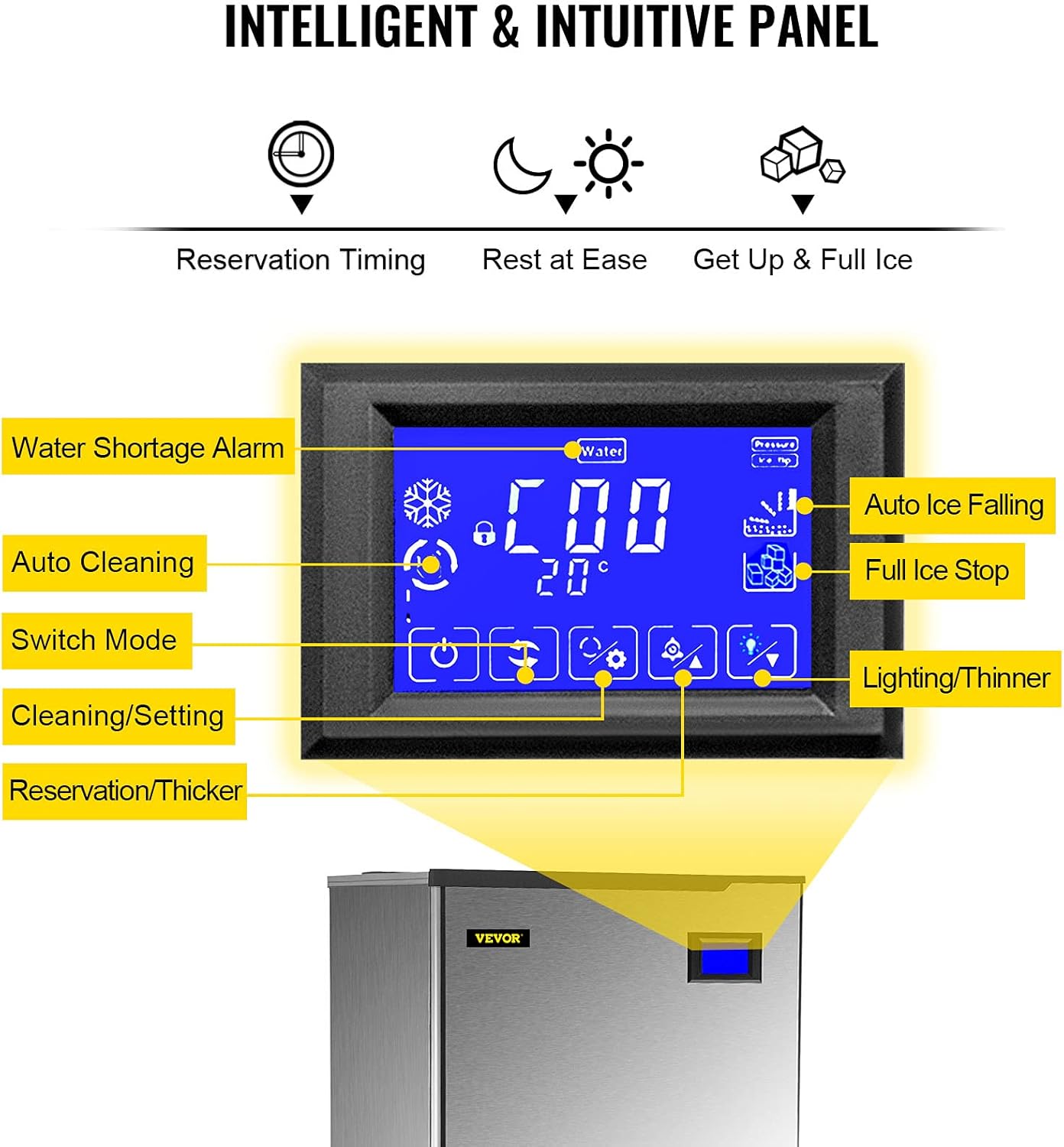
Image: The intelligent control panel displays various icons and information, including water shortage alarm, auto cleaning, switch mode, cleaning/setting, reservation/thicker ice, auto ice falling, full ice stop, and lighting/thinner ice settings.
- Power On/Off: Use the main power switch located at the back of the unit to turn the machine on or off.
- Ice Production: Once powered on and water supply is connected, the machine will automatically begin the ice-making process. The control panel will display the current status.
- Adjusting Ice Thickness: Use the "Cleaning/Setting" or "Reservation/Thicker" buttons on the control panel to adjust the thickness of the ice cubes. Thinner ice takes less time to produce (5-8 minutes), while thicker ice takes longer (11-15 minutes).
- Reservation Function: Utilize the reservation timing feature to preset the ice maker to operate at specific times, allowing for ice production when needed.
- Monitoring Status: The control panel icons provide real-time feedback on the machine's status, including water shortage alarms, full ice bin alerts, and auto ice falling indicators.

Image: This image demonstrates the three adjustable ice cube thicknesses: Thin Ice (5-8 min), Medium Ice (8-11 min), and Thick Ice (11-15 min), along with suggested uses such as seafood preservation, smoothie making, and chilling beer & wine.
Maintenance
Regular maintenance ensures the longevity and hygienic operation of your ice maker.
- Automatic Cleaning: The ice maker features an auto-cleaning function. Initiate this process by pressing the designated button on the control panel (typically within 5 seconds). This helps maintain cleanliness and prevents mineral buildup.
- Water Filter Replacement: Regularly check and replace the water filter to ensure clean water supply and prevent scale buildup in the machine.
- Exterior Cleaning: Wipe down the stainless steel exterior with a soft, damp cloth and mild detergent. Avoid abrasive cleaners.
- Interior Cleaning: Periodically clean the ice storage bin and other accessible interior parts with a food-safe cleaner. Ensure thorough rinsing.
- Drainage System: Ensure the drain pipe remains clear and free of obstructions.

Image: This diagram shows the self-cleaning feature of the ice maker, highlighting the one-button cleaning process and automatic drain function for fast and time-consuming maintenance.
Troubleshooting
If you encounter issues with your VEVOR Commercial Ice Maker, refer to the following common troubleshooting steps:
| Problem | Possible Cause | Solution |
|---|---|---|
| Machine not making ice. | No water supply; clogged water filter; power issue; low refrigerant. | Check water connection and supply; replace water filter; ensure power is connected and switch is on; contact customer support for refrigerant issues. |
| Ice production is slow. | High ambient temperature; poor ventilation; dirty condenser; incorrect ice thickness setting. | Ensure proper room temperature; check for adequate airflow around the unit; clean the condenser; adjust ice thickness setting to thinner. |
| Ice cubes are not clear. | Poor water quality; dirty water system. | Replace water filter; perform auto-cleaning cycle; consider additional water filtration if water quality is consistently poor. |
| Error codes displayed. | Specific internal malfunction. | Refer to the specific error code in the full product manual (if available) or contact VEVOR customer support with the error code. |
For issues not covered here or persistent problems, please contact VEVOR customer support.
Specifications

Image: This image provides a visual summary of the product specifications, including model, ice yield, storage capacity, ice cube size, voltage, rated power, material, refrigerant, cooling type, dimensions, and weight.
- Model Name: commercial ice maker
- Model Number: LB-Ice machine
- Brand: VEVOR
- Ice Yield (24H): 360 lbs (163.3 kg)
- Ice Storage Capacity: 250 lbs (113.4 kg)
- Built-in Ice Tray: 195 PCS (13x15)
- Ice-Making Cycle: 15-20 minutes
- Ice Cube Size: 0.9" x 0.9" x 0.7" (22 x 22 x 18.5 mm)
- Voltage: 110 Volts / 60Hz
- Rated Power: 800 watts
- Material: Stainless Steel + PP + ABS
- Refrigerant: R404a
- Cooling Type: Air Cooling
- Product Dimensions: 29"D x 22"W x 35"H (56.7 x 72.8 x 164.5 cm)
- Item Weight: 150 pounds (68 kg)
- Included Components: Water filter, Ice Spoon
Warranty and After-sales Service
VEVOR offers the following support for this ice maker:
- 30-Day Policy: 30-day resend or return policy for quality problems from the original purchase date.
- 1-Year Warranty: A 1-year warranty from the original purchase date covers manufacturing defects.
- Contact Support: If you have any questions or issues with the ice machine, please contact VEVOR directly. It is recommended to provide photos and a 10-minute video of the product to assist in efficient problem resolution.
For further assistance, please visit the official VEVOR store or contact their customer support channels.
Official VEVOR Store: VEVOR Store on Amazon


