
Musical Fidelity M8xi
MUSICAL FIDELITY M8xi 1100-watt Stereo Integrated Amp/DAC
Instruction Manual
Model: M8xi
Product Overview
The Musical Fidelity M8xi is a high-performance stereo integrated amplifier and Digital-to-Analog Converter (DAC) designed for audiophile-grade sound reproduction. It features a unique dual-mono design, separating the preamplifier and power amplifier sections for optimal signal integrity and power delivery. With substantial power output and a sophisticated DAC, the M8xi is engineered to drive a wide range of loudspeakers with precision and clarity.
- Dual-Mono Design: The M8xi incorporates a separate preamplifier with two monobloc power amplifiers, each with its own heat sink and transformer, ensuring genuine dual-mono operation. The preamp has a dedicated power supply and is positioned close to input sockets for ultra-low impedance signal paths.
- High Power Output: Delivers 550 Watts per channel into 8 Ohms (870W into 4 Ohms), with a peak output of 1.6kW into 2 Ohms. It is equipped with twelve large bipolar transistors per channel, providing 200 amps peak-to-peak current availability.
- Advanced Power Amplifier Design: Features a new power amp design with increased output stage efficiency and a pure Class A driver stage, contributing to lower distortion and enhanced sound quality with a wider soundstage and improved dynamics.
- Integrated DAC: Includes a 5-input DAC with its own power supply, supporting resolutions up to 24-bit/192kHz via Coaxial and USB B inputs, and 24-bit/96kHz via Optical inputs.
- Robust Construction: Built with high-quality metalwork, including a custom-made fine line extrusion of milspec aluminum for the front panel and custom heat sinks for superior heat dissipation.
Setup Guide
Before connecting your M8xi amplifier, ensure all components are powered off. Place the amplifier on a stable, level surface with adequate ventilation around it.
Front Panel Overview

Figure 1: Front Panel of the M8xi. Features include the Power/Standby button, Source selector knob, central display, Volume control knob, and Display button.
The front panel provides access to primary controls: the Power/Standby button, Source selector, Volume control, and Display button. The central display shows current operational status and selected input.
Rear Panel Connections
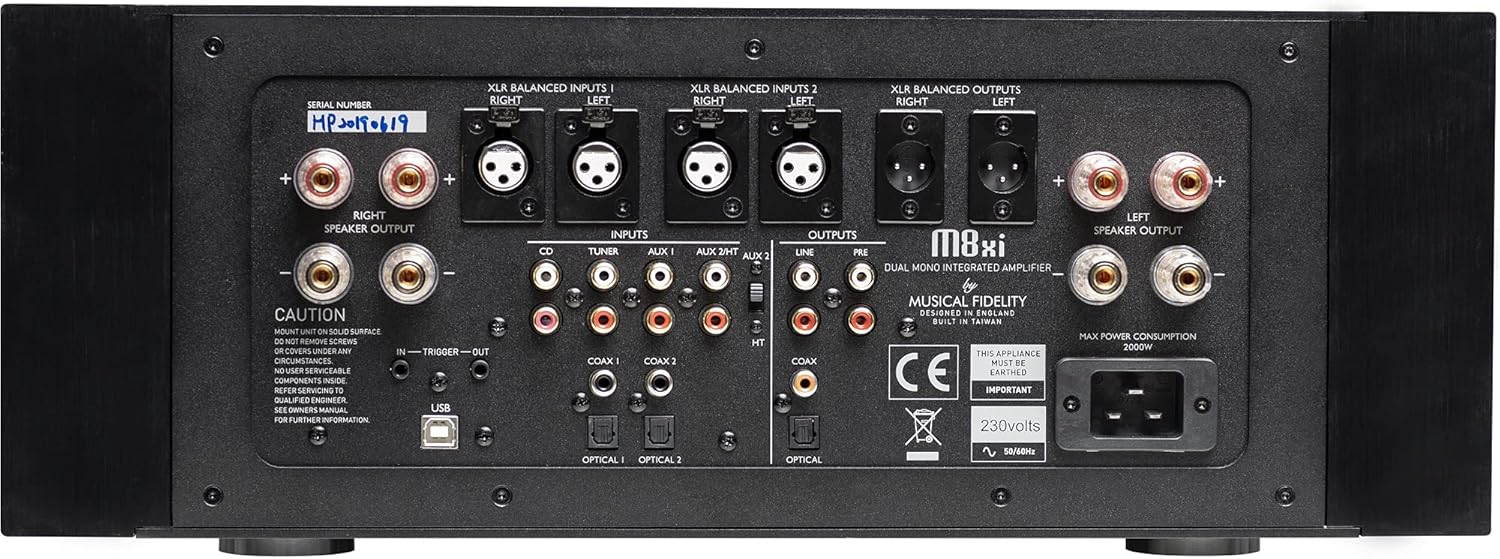
Figure 2: Rear Panel of the M8xi. This panel houses all audio input and output terminals, including balanced XLR, unbalanced RCA, digital coaxial, optical, and USB inputs, as well as speaker outputs.
The rear panel offers a comprehensive array of analog and digital inputs and outputs:
- Analog Inputs:
- 4 pairs of RCA line-level connectors (CD, Tuner, AUX1, AUX2)
- 2 pairs of XLR balanced connectors (XLR Balanced Inputs 1 & 2)
- Digital Inputs:
- 2x Coaxial S/PDIF (up to 24 bit 192kHz)
- 2x Optical S/PDIF (up to 24 bit 96kHz)
- 1x USB B Asynchronous USB (up to 24 bit 192kHz)
- Analog Outputs:
- 1 pair RCA fixed line-level output
- 1 pair RCA variable pre-out
- 1 pair XLR variable line-level output
- Digital Outputs:
- 1x Coaxial S/PDIF (up to 24 bit 192kHz)
- 1x Optical S/PDIF (up to 24 bit 96kHz)
- Speaker Outputs: Left and Right speaker terminals for connecting your loudspeakers. Ensure correct polarity (+ to + and - to -).
- Power Input: IEC power inlet for connecting the main power cable.
Connection Procedure
- Connect Sources: Connect your audio sources (CD player, streamer, turntable with phono preamp, computer, etc.) to the appropriate analog (RCA or XLR) or digital (Coaxial, Optical, USB) inputs on the rear panel.
- Connect Speakers: Connect your loudspeakers to the Left and Right speaker output terminals. Use high-quality speaker cables and ensure secure connections. Observe correct polarity.
- Connect Power: Plug the supplied power cord into the IEC inlet on the rear panel, then plug the other end into a suitable AC power outlet.
- Initial Power On: Press the Power/Standby button on the front panel to turn on the unit. The display will illuminate.
Operating Instructions
Power On/Off and Standby
- To power on the M8xi from standby, press the Power/Standby button on the front panel.
- To put the M8xi into standby mode, press the Power/Standby button again.
- For complete power off, disconnect the main power cable from the wall outlet.
Source Selection
Rotate the Source knob on the front panel to cycle through the available analog and digital inputs. The selected input will be displayed on the central screen.
Volume Control
Rotate the large Volume knob on the front panel clockwise to increase the volume and counter-clockwise to decrease it. Adjust the volume to a comfortable listening level before playing audio.
Display Control
Press the Display button to adjust the brightness or turn off the front panel display. This can be useful in dark listening environments.
Using the Integrated DAC
The M8xi's built-in DAC allows direct connection of digital audio sources. Select the desired digital input (Coax 1, Coax 2, Optical 1, Optical 2, or USB) using the Source knob. Ensure your digital source is configured to output audio to the M8xi.
- USB Audio: For connecting a computer, you may need to install specific drivers depending on your operating system. Refer to the Musical Fidelity website for the latest driver information. Once connected, select the M8xi as the audio output device in your computer's sound settings.
- Coaxial/Optical: Connect digital audio cables from your source (e.g., CD transport, network streamer) to the corresponding inputs on the M8xi.
Maintenance
Proper maintenance ensures the longevity and optimal performance of your M8xi amplifier.
- Cleaning:
Always disconnect the power cable before cleaning. Use a soft, dry, lint-free cloth to wipe the exterior surfaces. For stubborn marks, a slightly damp cloth with a mild, non-abrasive cleaner can be used, but ensure no liquid enters the unit. Avoid harsh chemicals or abrasive materials.
- Ventilation:
Ensure adequate airflow around the amplifier. Do not block the ventilation slots on the top or sides. Avoid placing the unit in enclosed cabinets without proper ventilation.
- Connections:
Periodically check all cable connections (power, audio, speaker) to ensure they are secure and free from corrosion. Loose connections can lead to poor sound quality or intermittent operation.
- Storage:
If storing the unit for an extended period, disconnect it from power, clean it, and store it in a dry, dust-free environment, preferably in its original packaging.
Troubleshooting
If you experience issues with your M8xi, consult the following common troubleshooting steps before contacting customer support.
| Problem | Possible Cause | Solution |
|---|---|---|
| No power/Unit does not turn on. | Power cable not connected securely; Power outlet not active; Unit in standby mode. | Ensure power cable is fully inserted into the unit and wall outlet. Check the wall outlet with another device. Press the Power/Standby button. |
| No sound from speakers. | Incorrect input selected; Volume too low; Speaker cables disconnected or incorrectly connected; Source device not playing or improperly connected. | Select the correct input. Increase volume. Check speaker cable connections and polarity. Verify source device is playing and connected correctly. |
| Distorted or poor sound quality. | Loose or faulty cables; Source signal issue; Overdriving speakers; Incorrect speaker impedance. | Check all audio cables for secure connection and damage. Test with a different source. Reduce volume. Ensure speaker impedance is compatible with the amplifier. |
| Digital input (DAC) not working. | Incorrect digital input selected; Digital cable faulty; Source device not configured for digital output; USB drivers not installed (for USB). | Verify correct digital input. Check digital cable. Ensure source device is outputting digital audio. Install necessary USB drivers from Musical Fidelity website. |
| Unit gets excessively hot. | Insufficient ventilation; Overloaded operation. | Ensure adequate space around the unit for airflow. Do not block ventilation slots. Reduce listening volume or check speaker impedance. If overheating persists, disconnect power and contact support. |
Technical Specifications
Detailed specifications for the Musical Fidelity M8xi integrated amplifier:
- Amplifier Power Output (20Hz - 20kHz): 550 Watts per channel into 8 Ohms (870W into 4 Ohms); Peak 1.6kW into 2 Ohms
- Maximum Output Voltage: 67 Volts RMS, 20Hz to 20 kHz; onset of clipping (190 Volts peak-to-peak)
- THD+N: <0.004% typical, 20Hz to 20 kHz (XLR)
- Signal/Noise Ratio: > 86dB 'A'-weighted (XLR)
- Input Impedance: 25KΩ (RCA), 50KΩ (XLR)
- Frequency Response: +0, –1dB, 10Hz to 100 kHz
- Maximum Peak Output Current: 105 Amps
- Damping Factor: 150
- Output Devices: 3+3 pairs (bridged arrangement) per channel
- Analog Inputs: 4 pairs line level RCA, 2 pairs line level XLR (balanced)
- Digital Inputs: 2x Coax S/PDIF (up to 24 bit 192kHz), 2x Optical S/PDIF (up to 24 bit 96kHz), 1x USB B Asynchronous USB (up to 24 bit 192kHz)
- Analog Outputs: 1 pair line level RCA fixed, 1 pair pre-out RCA variable, 1 pair line level XLR variable
- Digital Outputs: 1x Coax S/PDIF (up to 24 bit 192kHz), 1x Optical S/PDIF (up to 24 bit 96kHz)
- Dimensions (WxHxD): 485 x 185 x 510mm
- Max. Consumption: 2000 Watts
- Model Number: M8xi
- ASIN: B09B2ZZ295
- Date First Available: July 22, 2021
Warranty Information
Musical Fidelity products are designed and manufactured to the highest quality standards. For specific warranty terms and conditions, please refer to the warranty card included with your product or visit the official Musical Fidelity website. Keep your proof of purchase for warranty claims.
Protection plans may be available for extended coverage. Please consult your retailer or the product's purchase page for details on available protection plans.
Customer Support
For technical assistance, service, or further inquiries regarding your Musical Fidelity M8xi, please contact your authorized Musical Fidelity dealer or distributor. You can also find support resources, FAQs, and contact information on the official Musical Fidelity website.
When contacting support, please have your product model number (M8xi) and serial number ready. The serial number is located on the rear panel of the unit.