
1. Introduction
Thank you for choosing the ONN ONA18CH901 Amplified Digital HDTV Antenna. This antenna is designed to receive free over-the-air digital television broadcasts, offering a 150-mile reception range and a 360-degree motorized rotation feature for optimal signal acquisition. This manual provides essential information for proper installation, operation, and maintenance to ensure the best performance from your antenna.

Image 1.1: The ONN ONA18CH901 HD Outdoor Motorized Antenna, highlighting its 150-mile range capability.
2. Safety Information
Please read all safety instructions before installing or operating this product. Failure to follow these instructions may result in injury or damage.
- Electrical Safety: Ensure all power connections are secure and conform to local electrical codes. Do not expose the power supply or control box to moisture.
- Installation Safety: Exercise extreme caution when installing the antenna, especially at elevated locations. Avoid contact with power lines. It is recommended to have a second person assist with installation.
- Weather Conditions: Do not install the antenna during lightning storms or strong winds. The antenna is designed to be weather-resistant (anti-sun, anti-storm, anti-snow, anti-UV), but extreme conditions should be avoided during installation.
- Product Handling: Handle the antenna components carefully to prevent damage.

Image 2.1: The antenna is designed with UV-coated, weather-resistant materials for outdoor installation on walls, roofs, or balconies.
3. Package Contents
Verify that all components are present before beginning installation:
- ONN ONA18CH901 Amplified Digital HDTV Antenna
- Motorized Control Box
- Remote Control
- Power Adapter for Control Box
- Coaxial Cable
- Mounting Pole (may be included or sold separately depending on package)
- User Manual (this document)
4. Product Overview
The ONN ONA18CH901 antenna system consists of the main antenna unit, a motorized control box, and a remote control. The antenna is designed for outdoor installation to maximize signal reception.

Image 4.1: The ONN HDTV Antenna unit shown mounted on a pole. The antenna features multiple elements for enhanced signal capture.
Control Box Features:
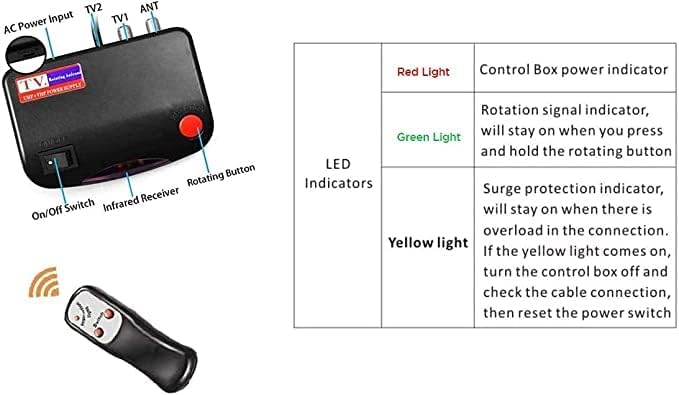
Image 4.2: Detailed view of the control box and remote control. The control box includes inputs for AC power and the antenna, outputs for two TVs, an On/Off switch, an infrared receiver for the remote, and a manual rotating button.
| Indicator | Description |
|---|---|
| Red Light | Control Box power indicator. Illuminates when the control box is powered on. |
| Green Light | Rotation signal indicator. Stays on when the rotating button (on control box or remote) is pressed and held. |
| Yellow Light | Surge protection indicator. Stays on if there is an overload in the connection. If this light appears, turn off the control box, check all cable connections, and then reset the power switch. |
5. Setup & Installation
Proper installation is critical for optimal performance. Choose a location with a clear line of sight to broadcast towers, typically on a roof, wall, or balcony.
5.1 Mounting the Antenna
- Assemble Antenna: Follow the assembly instructions provided with your antenna unit to attach all elements securely.
- Choose Mounting Location: Select an outdoor location that is as high as possible and free from obstructions like trees or buildings.
- Secure Mounting Pole: Install the mounting pole (if not already present) firmly to a stable surface (e.g., roof, wall, or balcony railing) using appropriate hardware. Ensure the pole is vertical.
- Attach Antenna to Pole: Mount the assembled antenna unit onto the top of the mounting pole. Ensure it is securely fastened to prevent movement in windy conditions.
5.2 Connecting the System
Refer to the connection diagram below for proper wiring.

Image 5.1: Connection diagram illustrating how the antenna connects to the power supply (control box), which then distributes the signal to one or two televisions for HD picture quality.
- Connect Antenna to Control Box: Connect one end of the coaxial cable to the antenna's output and the other end to the 'ANT' input on the motorized control box.
- Connect Control Box to TV(s): Connect a coaxial cable from the 'TV1' output on the control box to the 'ANT IN' or 'CABLE IN' port on your television. If connecting a second TV, use the 'TV2' output.
- Connect Power: Plug the power adapter into the 'AC Power Input' on the control box, then plug the adapter into a standard electrical outlet. Turn on the control box using the On/Off switch. The red power indicator light should illuminate.
6. Operating Instructions
After installation, you can operate the antenna using the remote control or the buttons on the control box.
6.1 Scanning for Channels
- Ensure your TV is set to the correct input (Antenna/Air).
- Access your TV's menu and navigate to the 'Channel Scan' or 'Auto Program' option.
- Initiate the channel scan. Your TV will search for available digital channels. This process may take several minutes.
6.2 Rotating the Antenna
The motorized rotation allows you to fine-tune the antenna's direction for optimal signal reception.
- Use the rotating buttons on the remote control (or the 'Rotating Button' on the control box) to adjust the antenna's direction.
- While rotating, the green 'Rotation signal indicator' on the control box will be lit.
- Observe your TV screen for signal strength or picture quality. Rotate the antenna slowly until you achieve the best possible reception for your desired channels.
- You may need to perform a channel scan after significant antenna rotation to pick up new channels or improve existing ones.
7. Maintenance
The ONN ONA18CH901 antenna requires minimal maintenance due to its durable, weather-resistant design.
- Periodic Inspection: Periodically check the antenna and mounting hardware for any signs of wear, corrosion, or loosening, especially after severe weather.
- Cleaning: If necessary, gently clean the antenna elements with a soft, damp cloth. Do not use harsh chemicals or abrasive cleaners.
- Cable Integrity: Ensure all coaxial cables are free from damage and connections remain tight.
8. Troubleshooting
If you experience issues with your antenna, try the following troubleshooting steps:
- No Signal / Poor Picture Quality:
- Ensure all cables are securely connected.
- Verify the control box is powered on (red light illuminated).
- Rotate the antenna slowly using the remote control to find the optimal direction. Perform a channel scan after each significant adjustment.
- Check your TV's input setting to ensure it is set to 'Antenna' or 'Air'.
- If possible, try repositioning the antenna to a higher or less obstructed location.
- Antenna Not Rotating:
- Ensure the control box is powered on.
- Check the remote control batteries.
- Ensure the remote control has a clear line of sight to the control box's infrared receiver.
- Check for any physical obstructions preventing the antenna from rotating.
- Yellow Light on Control Box:
- This indicates a surge or overload. Turn off the control box, disconnect and reconnect all cables, then power it back on. If the issue persists, contact customer support.
9. Specifications
| Feature | Specification |
|---|---|
| Brand | ONN |
| Model Number | ONA18CH901 |
| Antenna Type | Amplified Digital HDTV Antenna |
| Maximum Range | 150 Miles |
| Rotation | 360 Degree Motorized |
| Color | Black, Silver |
| Power Source | Corded Electric |
| Product Dimensions | 1"L x 4"W x 1"H (Antenna unit) |
| Item Weight | Approximately 16.72 pounds (Package Weight) |
| UPC | 681131283496 |
10. Warranty & Support
For warranty information or technical support, please refer to the documentation included with your purchase or visit the official ONN product support website. Keep your proof of purchase for warranty claims.