
Pretty Paws PP005
Pretty Paws PP005 WiFi Automatic Pet Feeder User Manual
Model: PP005
1. Introduction
Thank you for choosing the Pretty Paws PP005 WiFi Automatic Pet Feeder. This smart device is designed to provide convenient and reliable feeding for your beloved pets, whether you are at home or away. With its intuitive mobile application, you can easily schedule meals, control portion sizes, and monitor your pet's feeding habits.
This manual provides detailed instructions on how to set up, operate, and maintain your new pet feeder. Please read it thoroughly before use to ensure proper functionality and safety.

Image 1.1: The Pretty Paws PP005 WiFi Automatic Pet Feeder, showcasing its sleek design and the accompanying packaging, with a cat observing the feeder.

Image 1.2: The Pretty Paws PP005 WiFi Automatic Pet Feeder seamlessly integrated into a modern home environment, highlighting its minimalist design.
2. Important Safety Instructions
Please read and follow all safety instructions carefully to prevent injury or damage to the device.
- Do not immerse the main unit in water or other liquids. Only the food bowl and food container are washable.
- This appliance is not intended for use by persons (including children) with reduced physical, sensory or mental capabilities, or lack of experience and knowledge, unless they have been given supervision or instruction concerning use of the appliance by a person responsible for their safety.
- Use only the original power adapter provided with the feeder.
- Ensure the feeder is placed on a stable, level surface to prevent tipping.
- Do not use the feeder with wet food or treats. It is designed for dry pet food only.
- Keep pets from chewing on the power cord.
- Unplug the feeder before cleaning or if it will not be used for an extended period.
- Do not attempt to disassemble or repair the feeder yourself. Contact customer support for assistance.
3. Package Contents
Please check the package contents upon opening. If any items are missing or damaged, contact customer support.
- Pretty Paws PP005 Automatic Pet Feeder (Main Unit)
- Food Container (6L capacity)
- Food Bowl
- Power Adapter
- User Manual (this document)
4. Product Components
Familiarize yourself with the different parts of your Pretty Paws PP005 Pet Feeder:
- Food Container: Transparent container for storing dry pet food.
- Lid: Secures the food container and keeps food fresh.
- Main Unit: Houses the dispensing mechanism, control panel, and power input.
- Control Panel: Features an LCD screen and buttons for manual operation and status indication.
- Food Bowl: Detachable bowl where dispensed food collects.
- Infrared Sensors: Detect low food levels in the container.
- Power Port: For connecting the power adapter.

Image 4.1: Internal view of the Pretty Paws PP005 feeder highlighting the infrared sensors that detect low food levels.
5. Setup Guide
5.1. Assembly
- Place the main unit on a stable, level surface.
- Insert the food container onto the main unit, ensuring it clicks securely into place.
- Place the food bowl into its designated slot at the front of the main unit.
- Fill the food container with dry pet food. Ensure the food kibble size is appropriate for the dispenser mechanism (typically 5-15mm diameter).
- Close the lid securely.
5.2. Power Connection
- Connect the power adapter to the power port on the back of the feeder.
- Plug the adapter into a standard wall outlet.
- The feeder will power on, and the LCD screen will illuminate.
5.3. App Download and Installation
The Pretty Paws PP005 operates via a dedicated mobile application. Download the app from your smartphone's app store:


Image 5.1: Links to download the companion app from Google Play and the App Store.
5.4. Wi-Fi Connection and App Pairing
Follow the in-app instructions to connect your feeder to your home Wi-Fi network and pair it with your smartphone. Ensure your Wi-Fi network is 2.4GHz, as 5GHz networks are not supported.

Image 5.2: The Pretty Paws PP005 feeder demonstrating its connectivity with the mobile application on a smartphone.
6. Operating the Feeder
6.1. Automatic Feeding Schedule
The primary function of the PP005 is scheduled automatic feeding. Use the mobile app to set up your pet's feeding schedule:
- Open the Pretty Paws app and select your feeder.
- Navigate to the "Schedule" or "Feeding Plan" section.
- Add new feeding times, specifying the time of day and the number of portions for each meal.
- The feeder supports up to 50 meals per day, with adjustable portion sizes from 5 to 360 grams per meal.
- Save your settings. The feeder will now dispense food automatically according to your schedule.

Image 6.1: A smartphone displaying the Pretty Paws app, illustrating the ease of setting up feeding schedules and managing settings.

Image 6.2: An infographic detailing the key functionalities of the Pretty Paws app, such as manual feeding, personalized settings, anti-clogging features, and food level alarms.
6.2. Manual Feeding
You can dispense food manually in two ways:
- Via App: In the Pretty Paws app, there is typically a "Manual Feed" button. Tap it to dispense a single portion immediately.
- Via Device: Press the manual feed button on the feeder's control panel (refer to component diagram for exact location). Each press will dispense one portion.
6.3. Low Food Warning
The PP005 is equipped with infrared sensors that monitor the food level in the container. When the food level is low, the feeder will:
- Illuminate a warning light on the control panel (often red).
- Send a notification to your smartphone via the app.
This feature ensures you are always aware when it's time to refill the food container.
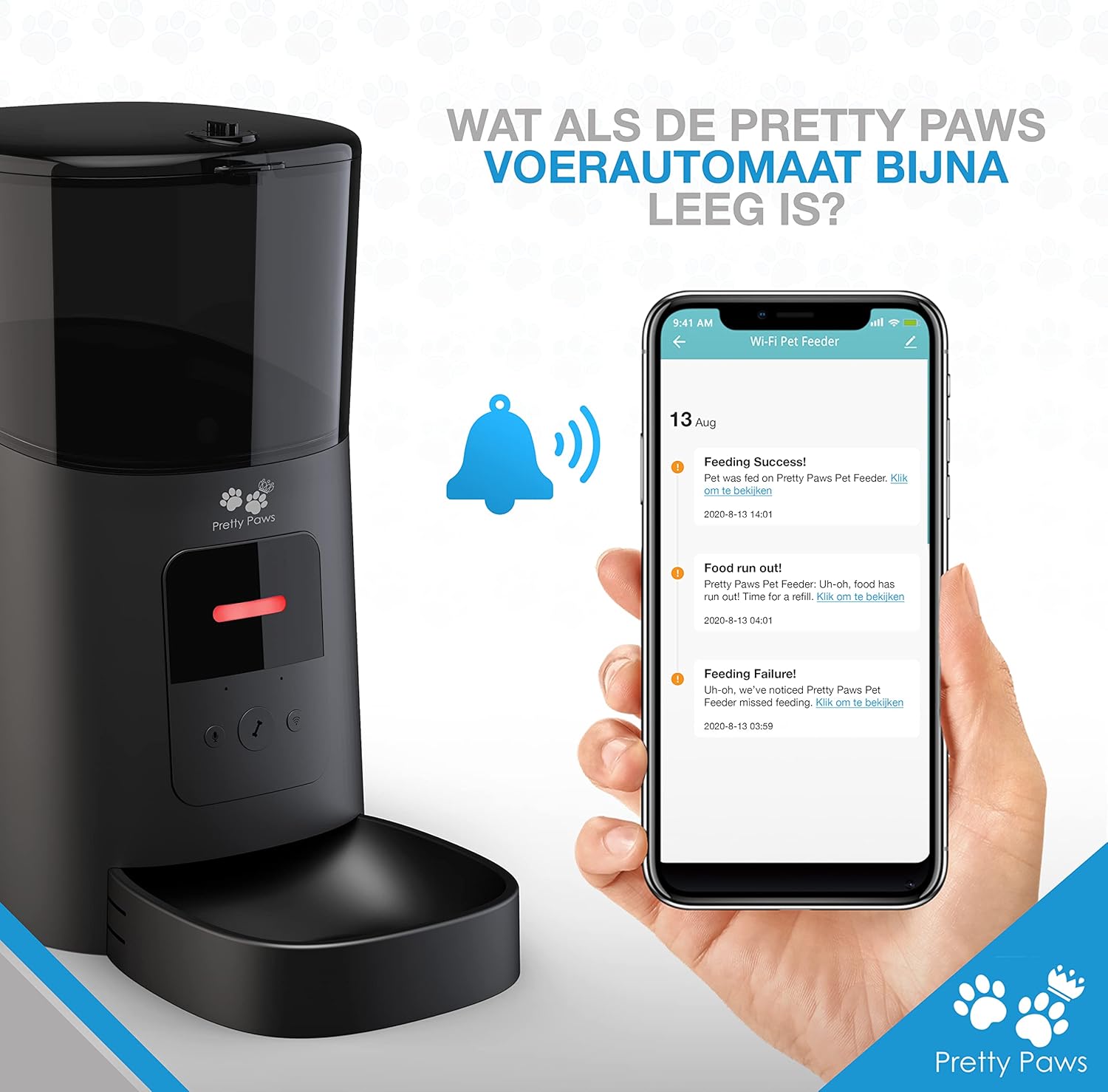
Image 6.3: The Pretty Paws PP005 feeder indicating a low food level with a red light, accompanied by a smartphone showing a "Food run out!" notification from the app.
7. Maintenance and Cleaning
Regular cleaning ensures the longevity and hygienic operation of your pet feeder.
- Food Bowl: The food bowl is detachable and dishwasher safe. It is recommended to clean it at least once a week.
- Food Container: The food container can be detached and washed by hand or in a dishwasher. Ensure it is completely dry before refilling with food.
- Main Unit: Do not immerse the main unit in water. Wipe the exterior with a soft, damp cloth. Do not use abrasive cleaners or solvents.
- Dispensing Mechanism: Periodically check the dispensing mechanism for any food blockages or debris. Clear any obstructions carefully.

Image 7.1: The detachable components of the Pretty Paws PP005 feeder, including the food container and bowl, shown being cleaned, emphasizing their dishwasher-safe design.
8. Troubleshooting
If you encounter issues with your Pretty Paws PP005 feeder, refer to the following common problems and solutions:
| Problem | Possible Cause | Solution |
|---|---|---|
| Feeder not dispensing food. |
|
|
| App cannot connect to feeder. |
|
|
| Low food warning light is on, but container has food. |
|
|
9. Specifications
| Brand: | Pretty Paws |
| Model Number: | PP005 |
| Color: | Pretty Paws Black |
| Capacity: | 6 Liters |
| Manufacturer: | Pretty Paws |
| Dimensions (L x W x H): | 23 cm x 19.5 cm x 36.2 cm (approx.) |
| Weight: | 1.72 kg (approx.) |
| Target Species: | Cat (suitable for small to medium dogs as well) |
| Control Mode: | Automatic, Manual (via App and Device) |
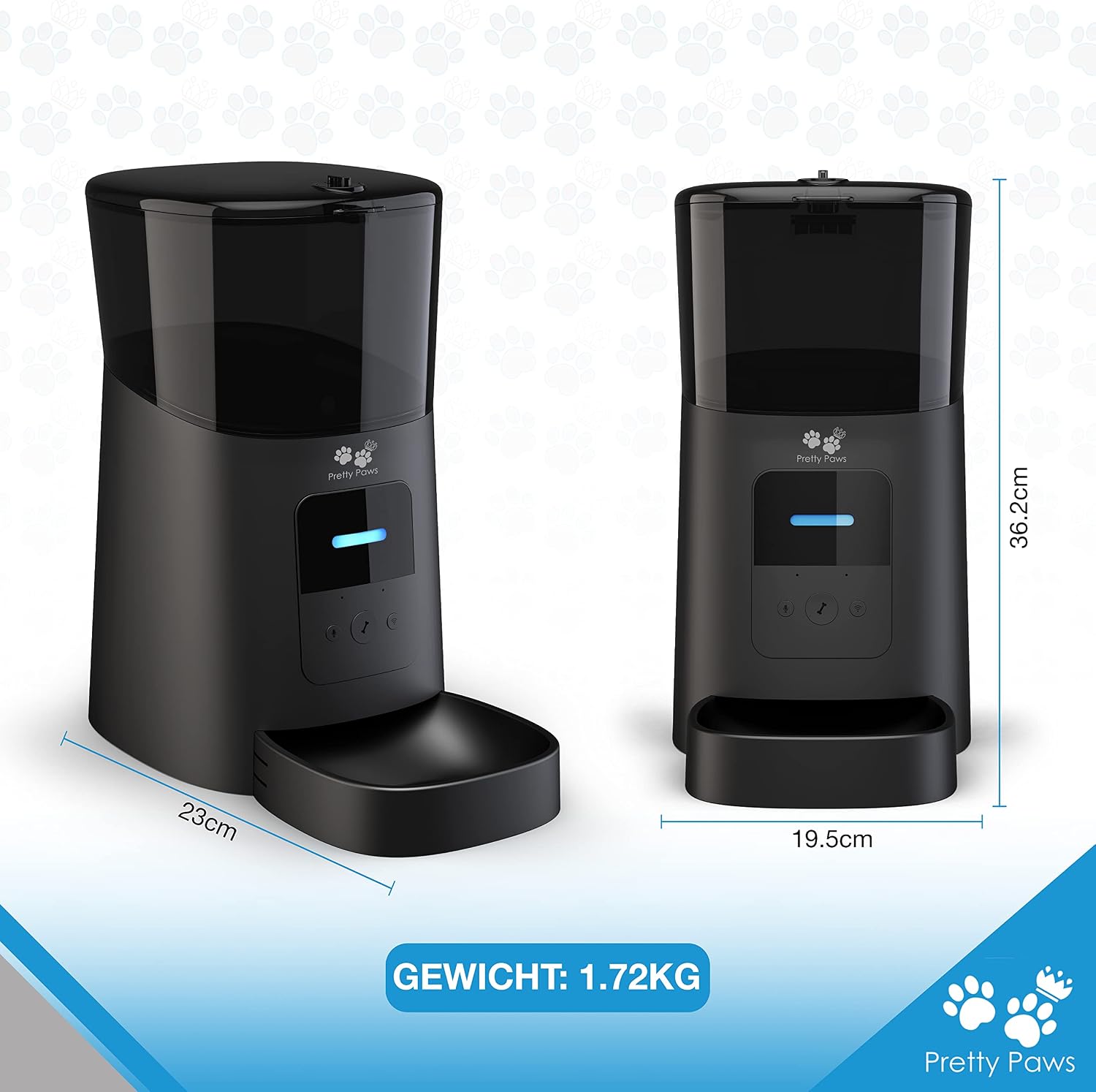
Image 9.1: The Pretty Paws PP005 feeder with its key dimensions (length, width, height) and weight clearly marked.
10. Warranty and Support
Pretty Paws products are manufactured to the highest quality standards. For specific warranty information, please refer to the warranty card included in your product packaging or visit the official Pretty Paws website.
If you have any questions, require technical assistance, or need to report an issue, please contact Pretty Paws customer support through the contact information provided on their official website or within the mobile application.
Please have your model number (PP005) and purchase details ready when contacting support.
Ask a question about this manual
Ask about setup, troubleshooting, compatibility, parts, safety, or missing instructions. Manuals+ will review the question and use this page’s manual context to help answer it.