
1. Introduction
The RD TC66 is a compact Type-C USB power meter designed to measure voltage, current, power, capacity, energy, resistance, and temperature. It supports various fast-charge protocols and offers bi-directional current flow measurement. This manual provides detailed instructions for its setup, operation, and maintenance.

Figure 1: RD TC66 Type-C Voltage Current Power Meter. This image shows the compact device with its Type-C connector and color LCD display, indicating various measurement parameters.
2. Product Features
- Bi-directional current flow measurement support.
- Support for fast-charge protocols: QC2.0, QC3.0, Huawei FCP, Huawei SCP, SAMSUNG AFC, PD.
- Offline data storage with 10 data groups.
- Simultaneous display of voltage, current, power, capacity, energy, resistance, and temperature on a 0.96-inch color digital LCD.
- Compact design for portability.
- 6-digit measurement resolution for enhanced precision.
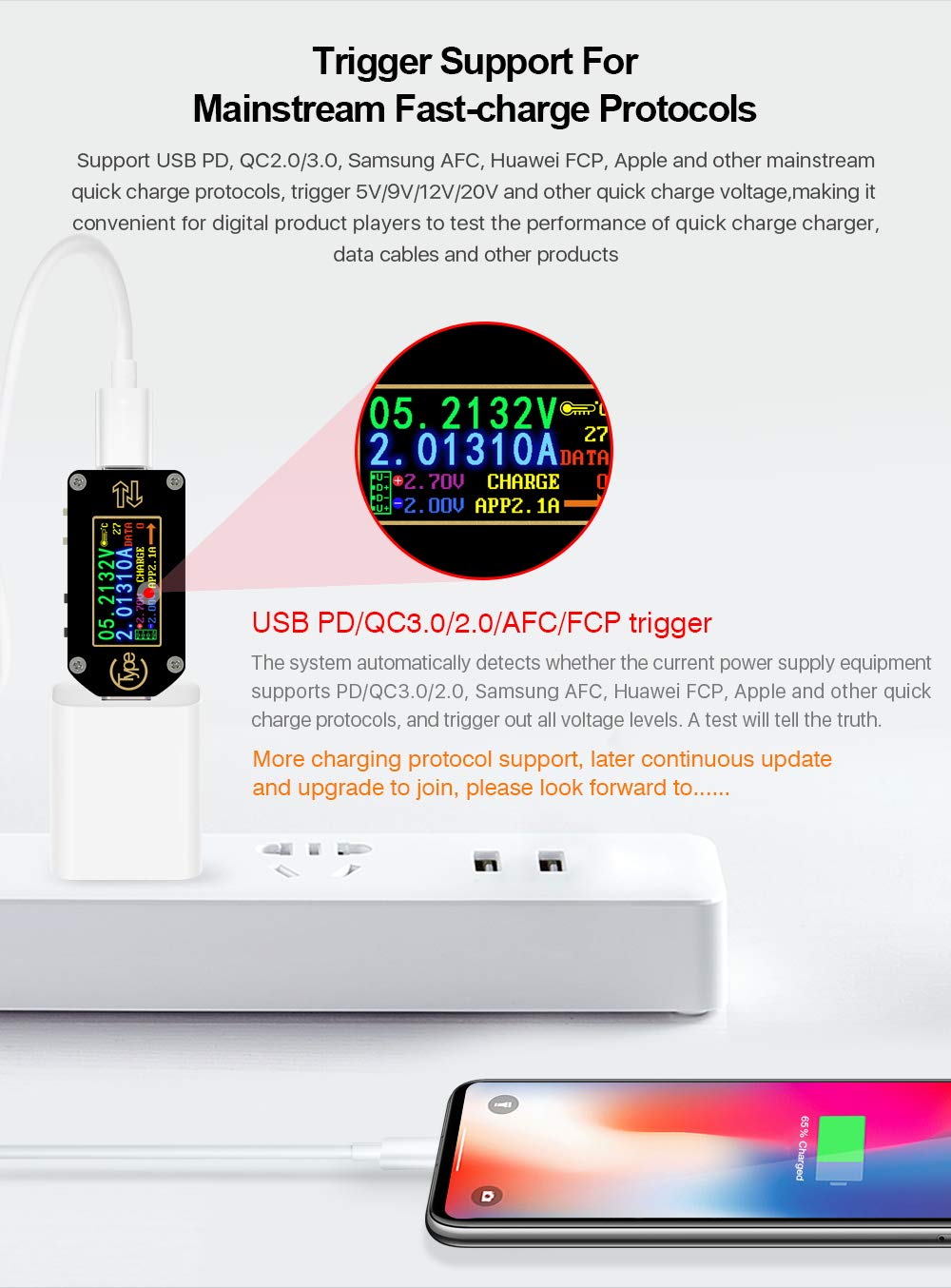
Figure 2: 6-Digit Measurement Resolution. This image illustrates the TC66's capability to display measurements with higher precision (6 digits) compared to older models (4 digits).
3. Setup and Connection
To begin using the TC66, connect it between your power source (charger, power bank) and the device you wish to test (phone, tablet, etc.).
- Identify the Type-C male connector and the Type-C female port on the TC66.
- Plug the TC66's male connector into the power source's output port.
- Connect your device's charging cable to the TC66's female port.
- Ensure all connections are secure. The display will illuminate, showing real-time measurement data.

Figure 3: Proper and improper connection methods. This diagram illustrates how to correctly connect the TC66 between a power adapter and a device to ensure the display lights up and measurements are taken.
The TC66 supports bi-directional current measurement. The display will indicate the direction of current flow.

Figure 4: Bi-directional current measurement. The image shows the TC66 displaying current flow in two directions, indicating its capability to measure both forward and reverse current.
4. Operating Instructions
4.1 Display Interface
The TC66 features a 0.96-inch IPS HD color LCD display with a 160-degree wide view. Two buttons are used to navigate through different display scenarios.

Figure 5: Human-Computer Interaction Interface. This image labels various elements on the TC66 display, including Voltage, Current, Temperature, Data Group Number, Direction of Current, Load Impedance, Power, Capacity Accumulation, and Energy Accumulation values.
The display provides multiple screens for different information:
- Main Interface Display: Shows real-time voltage, current, power, capacity, energy, resistance, and temperature.
- Offline Storage Interface: Displays recorded data groups.
- Fast Charge Identification Interface: Identifies the active fast charging protocol.
- Quick Charge Protocol Detection Interface: Shows detected quick charge protocols.
- Protocol Trigger Interface: Allows triggering specific fast charge protocols.
- System Set Interface: For device settings.
- System Information Interface: Displays device serial number, firmware version, and run time.
- Simple Measurement Interface: A simplified view of key measurements.

Figure 6: Multiple Display Modes. This composite image shows various screens available on the TC66, including Main Interface, Offline Storage, Fast Charge Identification, Protocol Detection, Protocol Trigger, System Settings, System Information, and Simple Measurement interfaces.
4.2 Fast Charge Protocol Trigger
The TC66 can automatically detect and trigger various fast-charge protocols, including USB PD, QC2.0/3.0, Samsung AFC, Huawei FCP, and Apple. This feature is useful for testing the performance of chargers, power banks, and cables.
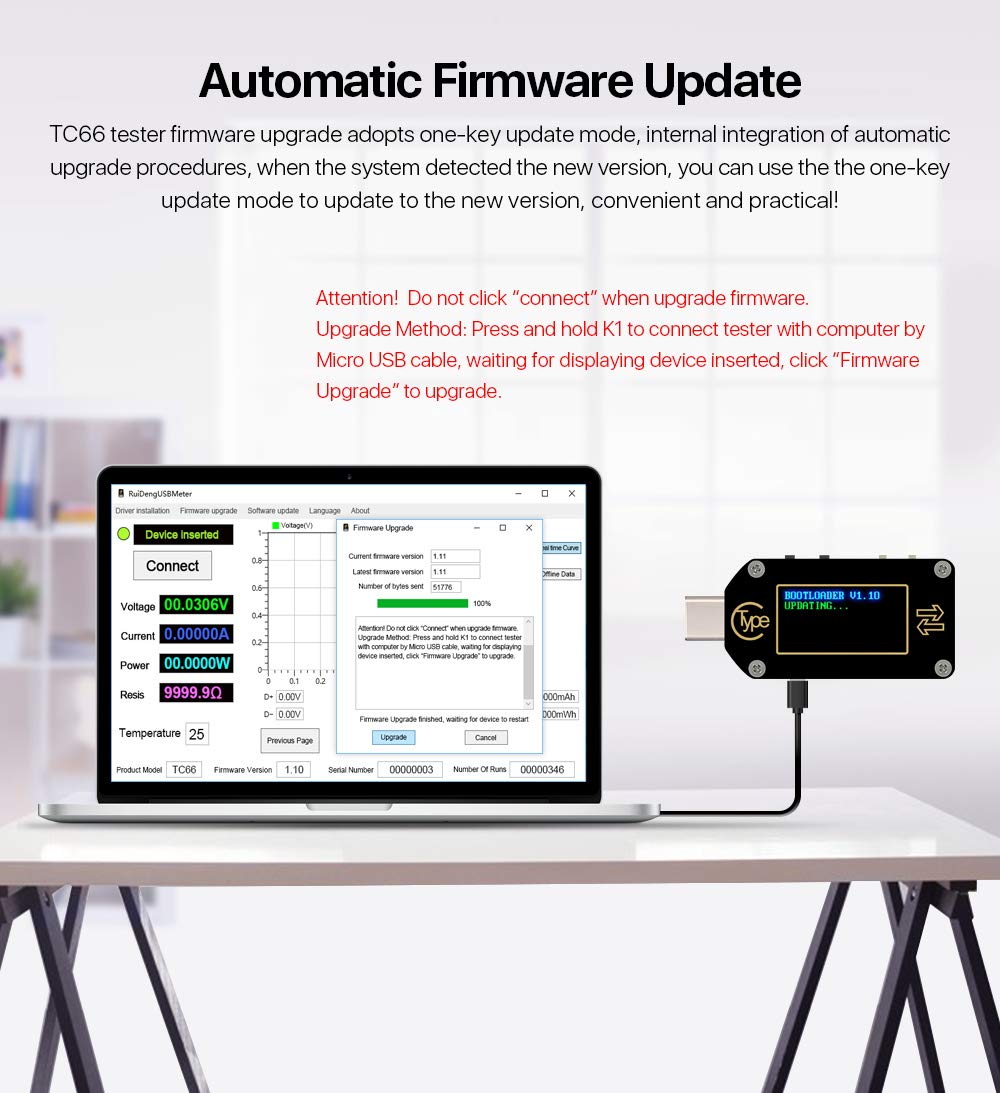
Figure 7: Fast Charge Protocol Trigger. The image shows the TC66 connected to a power adapter, displaying the detected charging protocol (e.g., CHARGE APP2.1A), indicating its ability to trigger and test fast charging.
Caution: When using the PD trigger function, ensure the connected device can handle the triggered voltage to prevent damage.
4.3 Data Storage
The TC66 supports offline data storage for up to 10 data groups. This allows users to record and review measurement data without being continuously connected to a computer or app.
5. Firmware Update
The TC66 firmware can be updated via a one-key update mode. When the system detects a new version, you can use the update procedure for convenience and practicality.
- Connect the TC66 to a computer using a Micro USB cable.
- Wait for the device to be recognized and display "device inserted".
- Click "Firmware Upgrade" in the associated software.
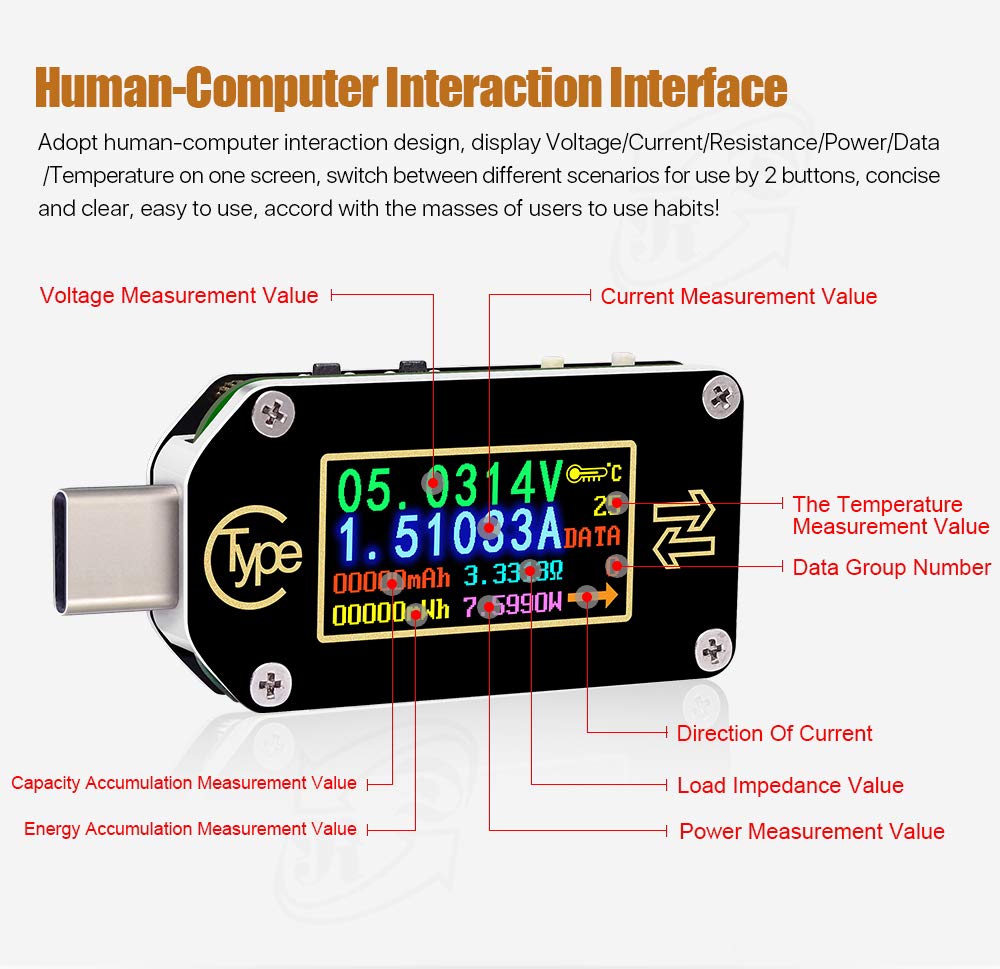
Figure 8: Automatic Firmware Update. This image shows the TC66 connected to a computer, with a software interface indicating the firmware upgrade process. It highlights the "Connect" and "Firmware Upgrade" buttons.
Attention: Do not click "connect" when upgrading firmware. Only click "Firmware Upgrade" after the device is inserted and recognized.
6. PC Software and Phone App Control
The TC66 can be controlled and monitored via PC software (Windows 64-bit and above) and a phone application (for TC66C model, iPhone and Android supported). This allows for real-time data graphing, export to Excel, and more advanced control.

Figure 9: PC Software Control & Phone App Control. This image displays screenshots of the PC software interface showing voltage/current graphs and the mobile app interface for both iPhone and Android, demonstrating remote monitoring and control capabilities.
For detailed instructions on using the PC software or phone app, refer to the specific software documentation provided by the manufacturer.
7. Technical Specifications
| Parameter | Value | Parameter | Value |
|---|---|---|---|
| Model | TC66(C) | Display screen | 0.96 inch color IPS display |
| Voltage measurement range | 0.005V-30.0000V | Voltage measurement resolution | 0.00001V (0.1mV) |
| Current measurement range | 0-5.00000A | Current measurement resolution | 0.00001A (0.01mA) |
| Power supply voltage | 3.5-24V | Voltage measurement accuracy | ±(0.5‰+20digits under 23℃) |
| Capacity accumulation range | 0-99999mAh | Current measurement accuracy | ±(1‰+30digits under 23℃) |
| Energy accumulation range | 0-99999mWh-999.99Wh | Power measurement range | 0-150W |
| Load impedance range | 1Ω-9999.9Ω | Refresh rate | 2Hz |
| Temperature measurement range | 0℃-80℃/32℉-176℉ | Working temperature range | 0℃-45℃/32℉-113℉ |
| Dimensions | 49mm X 22mm X 8mm | Product weight | about 8g (about package 22g) |
8. Troubleshooting
- Display not lighting up: Ensure the TC66 is correctly connected between a power source and a load. Check that the power source is active.
- Inaccurate readings: Verify that the cables used are in good condition. Ensure the TC66 is firmly connected. Environmental factors like extreme temperatures can affect accuracy.
- Fast charge protocol not triggering: Confirm that both the charger and the device support the desired fast charge protocol. Some protocols require specific cable types.
- Software/App connection issues: For PC software, ensure you are running Windows 64-bit or above. For the phone app, ensure Bluetooth is enabled and the app is compatible with your TC66C model. Refer to the specific software documentation for connection guides.
9. Maintenance
- Keep the device clean and dry. Avoid exposure to dust, moisture, and extreme temperatures.
- Do not attempt to disassemble the device, as this will void any warranty and may cause damage.
- Store the TC66 in a protective case when not in use to prevent physical damage to the display or connectors.
10. Warranty and Support
For warranty information and technical support, please refer to the official RD website or contact your retailer. Keep your purchase receipt as proof of purchase.
Manufacturer: HANGZHOU RUIDENG TECHNOLOGY CO., LTD


