
ECONTROLLY RC-GB326WJSA-ECO
GB326WJSA Voice Replaced Remote Control User Manual
For Sharp AQUOS Smart TV Models: 50BG1, 32BK1, 32BG1, 42BG1, 42BK1, 50BK1, 60BK1, 70BK1
1. Introduction
Thank you for choosing the ECONTROLLY GB326WJSA Voice Replaced Remote Control. This remote is designed to provide seamless control over your compatible Sharp AQUOS Smart TV, offering a direct replacement experience without the need for complex programming. Simply insert batteries, and you're ready to go.
This manual provides detailed instructions on setting up, operating, and maintaining your new remote control, along with troubleshooting tips to ensure optimal performance.
2. Product Overview
The GB326WJSA remote control features a user-friendly layout with dedicated buttons for essential TV functions, navigation, and quick access to popular streaming services. Below is an illustration of the remote and a description of its key components.

Figure 2.1: Front view of the GB326WJSA remote control, showing all buttons and their layout.
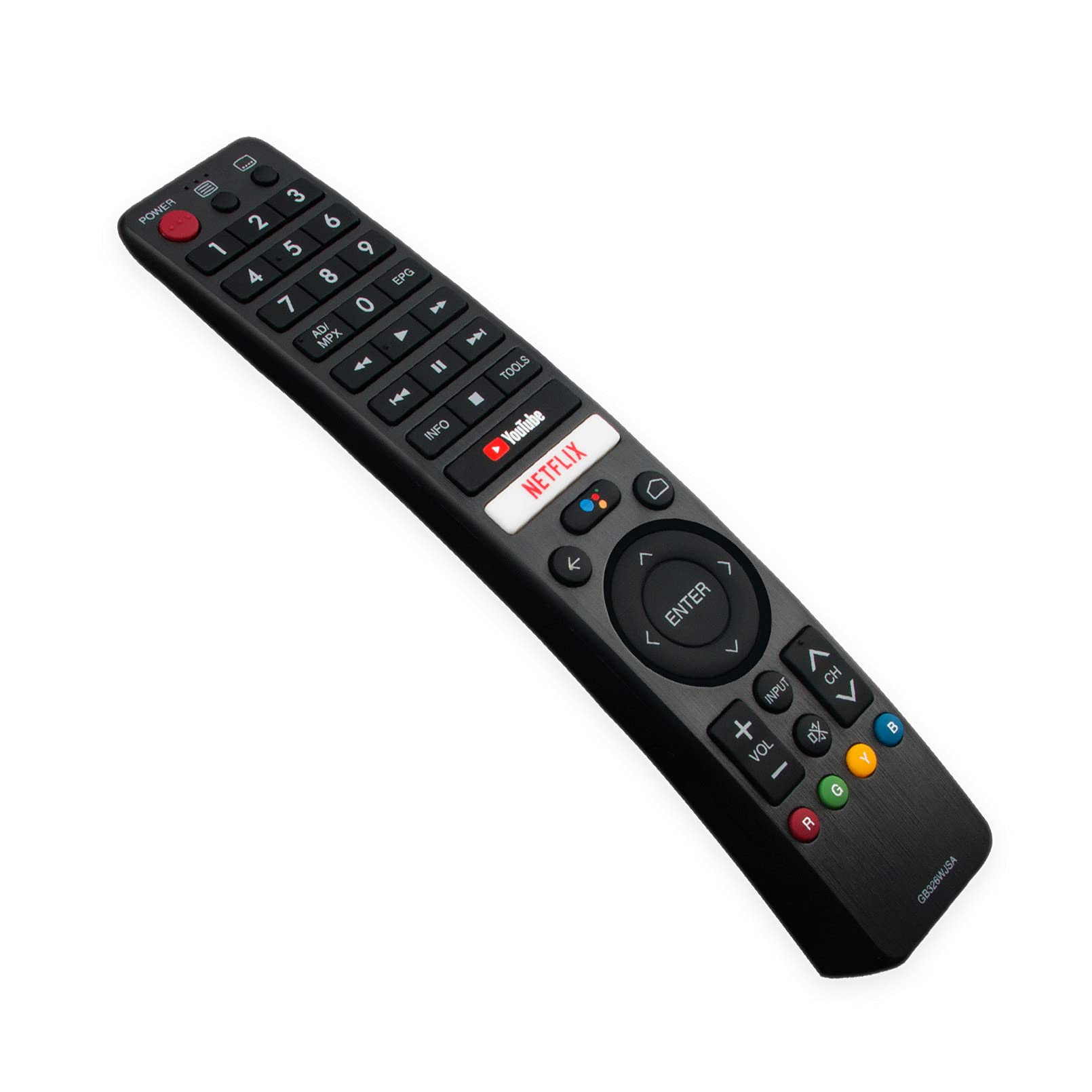
Figure 2.2: Angled view of the GB326WJSA remote control, highlighting its ergonomic design.
Button Functions:
- POWER: Turns the TV on or off.
- Number Buttons (0-9): Direct channel selection.
- AD/MPX: Audio Description / Multiplex audio selection.
- EPG: Electronic Program Guide.
- Playback Controls: Rewind, Play/Pause, Fast Forward, Stop.
- INFO: Displays on-screen information.
- TOOLS: Accesses quick settings or tools menu.
- YouTube / NETFLIX: Dedicated buttons for quick access to these streaming services.
- Navigation Pad (Up, Down, Left, Right, ENTER): Navigates menus and confirms selections.
- Back Arrow: Returns to the previous screen or menu.
- Home Button: Returns to the TV's home screen.
- Voice Button (Microphone icon): Activates voice command feature.
- VOL +/-: Adjusts volume up or down.
- INPUT: Selects input source (HDMI, AV, etc.).
- CH +/-: Changes channels up or down.
- Mute: Mutes or unmutes the TV sound.
- Color Buttons (R, G, Y, B): Context-sensitive functions within menus or applications.
3. Setup
Setting up your ECONTROLLY GB326WJSA remote control is straightforward. No programming or pairing is required for basic functionality.
Battery Installation:
- Locate the battery compartment on the back of the remote control.
- Slide open the battery cover.
- Insert two (2) AAA alkaline batteries, ensuring the positive (+) and negative (-) terminals align correctly with the indicators inside the compartment.
- Close the battery cover securely.
Once batteries are installed, the remote control is ready for use with your compatible Sharp AQUOS Smart TV.
4. Operating Instructions
This section details the basic operation of your remote control.
Basic TV Control:
- Point the remote control directly at your Sharp AQUOS Smart TV.
- Press the POWER button to turn the TV on or off.
- Use the VOL +/- buttons to adjust the volume.
- Use the CH +/- buttons to change channels.
- Press the INPUT button to cycle through available input sources (HDMI, AV, etc.).
Smart TV and Menu Navigation:
- Press the Home button to access the TV's main smart hub or home screen.
- Use the Navigation Pad (Up, Down, Left, Right arrows) to move through menus and select options.
- Press the ENTER button to confirm a selection.
- Use the Back Arrow button to go back to the previous menu or screen.
- Press the YouTube or NETFLIX buttons for direct access to these applications.
Voice Control Feature:
The remote control is equipped with a voice control button (microphone icon). To use this feature:
- Press and hold the Voice button.
- Speak clearly into the microphone located on the remote control.
- Release the button when you are finished speaking.
Note: While this remote is designed with a voice feature, some users have reported that the voice command functionality may not work as expected. Ensure your TV supports voice commands and is properly configured. If issues persist, refer to the Troubleshooting section.
5. Maintenance
Proper maintenance will extend the life of your remote control.
Cleaning:
- Wipe the remote control with a soft, dry cloth.
- For stubborn dirt, slightly dampen the cloth with water or a mild, non-abrasive cleaner.
- Do not use harsh chemicals or abrasive cleaning agents.
- Avoid getting moisture into the battery compartment or around the buttons.
Battery Replacement:
- Replace batteries when the remote control's response becomes sluggish or stops working.
- Always replace both batteries at the same time with new AAA alkaline batteries.
- Do not mix old and new batteries, or different types of batteries.
- Remove batteries if the remote control will not be used for an extended period to prevent leakage.
- Dispose of used batteries according to local regulations.
6. Troubleshooting
If you encounter issues with your remote control, try the following troubleshooting steps:
- Remote is not responding:
- Ensure the batteries are inserted correctly with the correct polarity (+/-).
- Replace the batteries with fresh AAA alkaline batteries.
- Make sure there are no obstructions between the remote control and the TV's infrared sensor.
- Ensure you are within the effective range of the TV's sensor.
- Voice command feature is not working:
- Verify that your specific Sharp AQUOS Smart TV model supports voice commands and that the feature is enabled in the TV's settings.
- Ensure you are pressing and holding the voice button while speaking.
- Speak clearly and directly into the microphone on the remote.
- Check for any firmware updates for your TV, as this might resolve compatibility issues.
- Note that some replacement remotes may have limitations on advanced features like voice control, even if the button is present.
- Buttons are sticky or unresponsive:
- Clean the remote control as described in the Maintenance section.
- Ensure no liquid has spilled onto the remote.
7. Specifications
| Feature | Detail |
|---|---|
| Model Number | RC-GB326WJSA-ECO |
| Compatible Brand | Sharp AQUOS Smart TV |
| Compatible Models | 50BG1, 32BK1, 32BG1, 42BG1, 42BK1, 50BK1, 60BK1, 70BK1 |
| Power Source | 2 x AAA Alkaline Batteries (not included) |
| Connectivity Technology | Infrared (IR) / Bluetooth (for voice, if supported by TV) |
| Product Dimensions | 7 x 2 x 0.65 inches |
| Item Weight | 2 ounces |
| Special Feature | Ergonomic design |
8. Warranty and Support
ECONTROLLY products are manufactured with quality and reliability in mind. For specific warranty information or technical support, please refer to the product packaging or contact your retailer. Keep your purchase receipt as proof of purchase.
For further assistance, you may also visit the ECONTROLLY official website or contact their customer service department.
Ask a question about this manual
Ask about setup, troubleshooting, compatibility, parts, safety, or missing instructions. Manuals+ will review the question and use this page’s manual context to help answer it.