
1. Introduction
Thank you for choosing the Doubc Wireless Earbuds Model i17. These earbuds are designed to provide a high-quality audio experience with advanced features such as Bluetooth 5.1 connectivity, active noise cancellation, and IPX7 waterproofing. This manual will guide you through the setup, operation, and maintenance of your new earbuds to ensure optimal performance and longevity.

Image: Doubc Wireless Earbuds i17 in their charging case, displaying a 100% charge level on the LED screen.
2. Package Contents
Please check the package to ensure all items are present:
- Doubc Wireless Earbuds (Left and Right)
- Charging Case
- USB Type-C Charging Cable
- Multiple Sizes of Silicone Ear Tips (Small, Medium, Large)
- User Manual
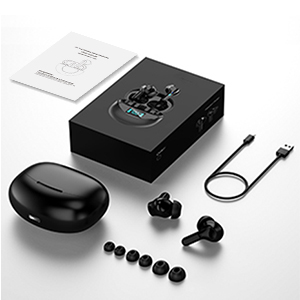
Image: All components included in the Doubc i17 earbud package, neatly arranged.
3. Product Overview
The Doubc i17 earbuds feature an ergonomic in-ear design for a comfortable and secure fit, suitable for various activities. They deliver Hi-Fi stereo sound through 10mm enhanced dynamic drivers.

Image: Illustration demonstrating the comfortable and secure fit of the earbuds, highlighting the various silicone eartip sizes for customization.

Image: Detailed view of the 10mm dynamic driver, emphasizing the Hi-Fi stereo sound capability.
Touch Controls
Each earbud is equipped with a multi-function touch key for easy control of music playback, calls, and voice assistant activation.
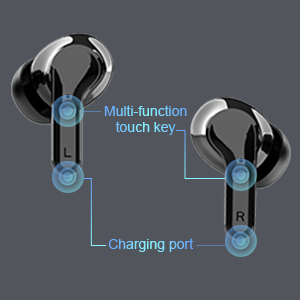
Image: Diagram highlighting the location of the multi-function touch key and charging port on the earbuds.
4. Setup
4.1 Initial Charging
Before first use, fully charge the earbuds and the charging case. The charging case features an LED display that shows the battery percentage for both the case and individual earbuds.
- Place the earbuds into the charging case.
- Connect the USB Type-C charging cable to the charging port on the case and to a power source.
- The LED display will show the charging status. A full charge typically takes approximately 1.5 hours.

Image: The charging case's LED display indicating battery levels for the case and each earbud.
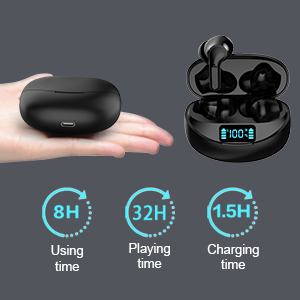
Image: Visual representation of battery life: 8 hours of use per charge, up to 32 hours total with the charging case, and 1.5 hours charging time.
4.2 Bluetooth Pairing
The earbuds utilize Bluetooth 5.1 for a stable and fast connection. They support one-step pairing.
- Open the charging case. The earbuds will automatically power on and enter pairing mode.
- On your device (smartphone, tablet, etc.), go to Bluetooth settings.
- Ensure Bluetooth is enabled.
- Look for "i17" in the list of available devices and select it to connect.
- Once connected, you will hear an audio prompt, and the earbuds are ready for use.

Image: Visual of the earbuds automatically connecting to a smartphone's Bluetooth settings.
5. Operating Instructions
5.1 Music Control
- Play/Pause: Single tap the multi-function touch key on either earbud.
- Next Track: Double tap the right earbud.
- Previous Track: Double tap the left earbud.
5.2 Call Control
- Answer/End Call: Short press the multi-function touch key on either earbud.
- Reject Call: Long press the multi-function touch key on either earbud.
- Volume Control: Adjust volume directly from your connected mobile phone.
5.3 Voice Assistant
- Activate Voice Assistant (e.g., Siri): Triple tap the multi-function touch key on either earbud.

Image: A user demonstrating the touch control functions on the earbud, with corresponding icons for various actions.
6. Maintenance
6.1 Water Resistance
The Doubc i17 earbuds are IPX7 waterproof, making them resistant to sweat and splashes. This feature is beneficial for sports and outdoor activities. However, they are not designed for submersion in water for extended periods.

Image: Earbuds shown with water splashing, illustrating their IPX7 waterproof and sweatproof design.
6.2 General Care
- Keep the earbuds and charging case in a dry place when not in use.
- If not used for long periods, it is recommended to recharge them at least every 2 months to maintain battery health.
- Clean the earbuds and charging contacts regularly with a soft, dry cloth to prevent dust and debris buildup.
7. Troubleshooting
- Earbuds not connecting: Ensure both earbuds are charged and taken out of the case. Check your device's Bluetooth settings to confirm they are visible and selected.
- One earbud not working: Place both earbuds back into the charging case, close the lid, then open it again to reset the connection. Ensure both earbuds have sufficient charge.
- Low volume or poor sound quality: Check the volume level on both your device and the earbuds. Ensure the ear tips are properly seated in your ears for a good seal.
- Earbuds automatically power off: If not connected to any device, the earbuds will automatically power off after 5 minutes to save battery.
8. Specifications
| Feature | Specification |
|---|---|
| Model Name | i17 |
| Connectivity Technology | Wireless (Bluetooth 5.1) |
| Earpiece Shape | Bud |
| Ear Placement | In Ear |
| Control Type | Touch Control |
| Noise Control | Active Noise Cancellation |
| Water Resistance Level | IPX7 Waterproof |
| Playtime (Earbuds) | Up to 8 hours |
| Total Playtime (with Charging Case) | Up to 32 hours |
| Charging Time | Approx. 1.5 hours |
| Item Weight | 1.52 ounces (43 grams) |
| Product Dimensions | 1.38 x 0.79 x 0.71 inches |
| Manufacturer | Doubc |
9. Warranty and Support
For warranty information and customer support, please refer to the documentation included in your product packaging or contact Doubc customer service through their official channels. Keep your purchase receipt for warranty claims.
