
1. Introduction
Thank you for choosing the MAGIC SELECT USB Rechargeable Electric U-Shaped Neck Massage Pillow. This device is designed to provide stimulating massages to the cervical area, helping to relieve pain, muscle tension, and promote relaxation. Please read this manual carefully before use to ensure proper operation and maintenance.
2. Safety Information
- Do not use this product if you have a pacemaker, heart condition, or any other medical condition that may be affected by massage. Consult your doctor before use.
- Keep out of reach of children.
- Do not use in wet environments or near water. The product is not waterproof.
- Avoid using the massager for extended periods (more than 10 minutes per session) to prevent overheating or discomfort.
- If you experience any pain or discomfort during use, discontinue immediately.
- Only use the provided USB cable for charging.
- Do not attempt to disassemble or repair the device yourself. Contact customer support for assistance.
3. Product Overview
The MAGIC SELECT Neck Massage Pillow features an ergonomic U-shaped design, soft memory foam, and silent Shiatsu massage nodes. It is equipped with an integrated USB connector for convenient recharging and a 10-minute automatic timer.
Key Features:
- Memory Foam: Soft, durable, and odorless material that adapts to the neck's contour.
- Adjustable Fit: Two cords with an adjustable clip closure for a secure and comfortable fit.
- Smart Control: Three buttons for On/Off, Intensity adjustment, and Massage Mode selection.
- Silent Operation: Performs Shiatsu massages quietly, suitable for various environments.
- USB Rechargeable: Convenient charging via an integrated USB port.
- Automatic Timer: 10-minute auto-off function for safety and optimal massage duration.

Image: The neck massage pillow in use, highlighting its soft fabric, memory foam, and USB charging cable.

Image: Detailed view of the Shiatsu massage nodes and their bidirectional movement.
4. Setup
Initial Charge:
- Before first use, fully charge the massage pillow.
- Locate the USB charging port on the side of the pillow.
- Connect the included USB cable to the pillow and to a compatible USB power source (e.g., computer, wall adapter).
- The charging indicator light will illuminate. A full charge typically takes approximately 2 hours.
- Once fully charged, disconnect the USB cable.

Image: The MAGIC SELECT Neck Massage Pillow, showing its U-shape and control panel.
Adjusting the Fit:
- Place the U-shaped pillow around your neck.
- Use the two adjustable cords with the clip closure to secure the pillow comfortably.
- To adjust the circumference, press the button on the clip to unlock it, then slide the cords to achieve the desired tightness. Ensure it is snug but not constricting.

Image: Detail of the adjustable cord and clip mechanism for a customized fit.
5. Operating Instructions
The massage pillow features a simple control panel with three buttons:
- Power Button (On/Off): Press to turn the device on or off.
- Intensity Button: Press to cycle through different massage intensity levels.
- Mode Button: Press to switch between massage modes (Vibration, Massage, Vibration + Massage).
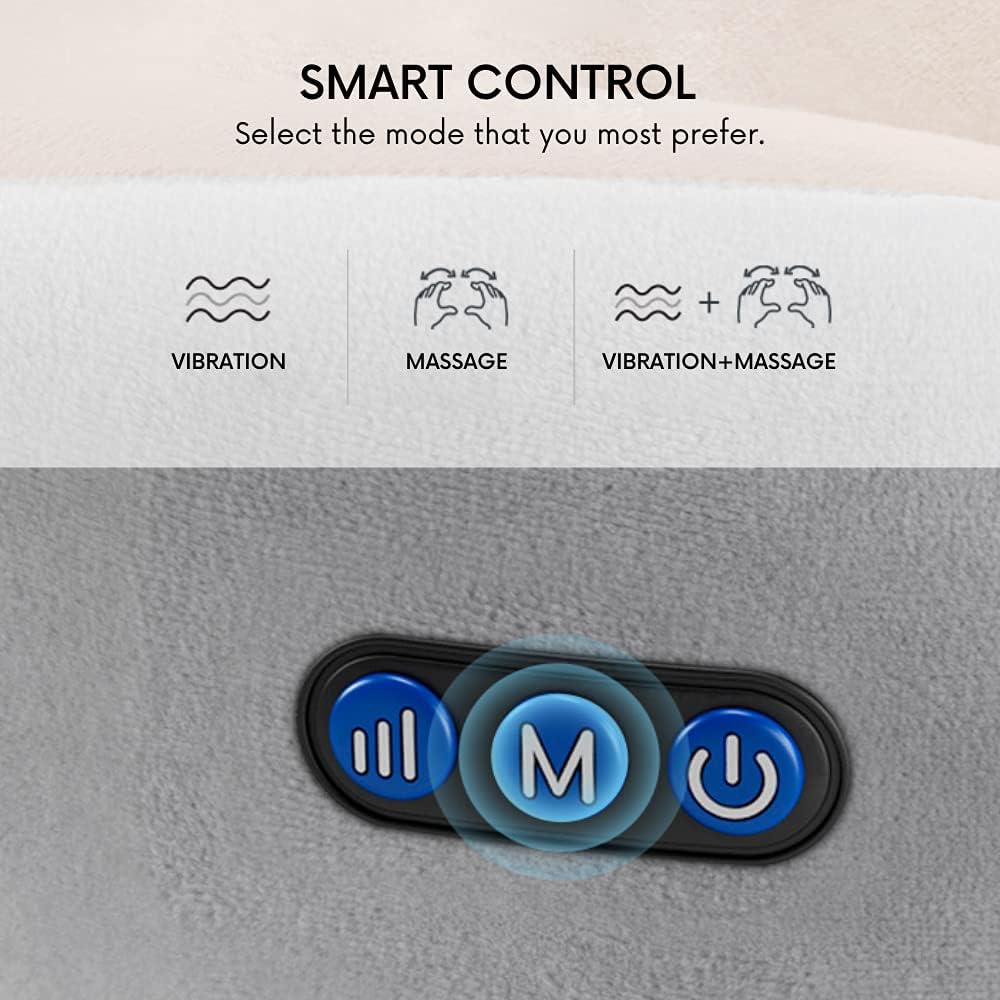
Image: Close-up of the control panel with Power, Intensity, and Mode buttons.
Using the Massager:
- Place the pillow around your neck and adjust for a comfortable fit.
- Press the Power Button to turn on the device. The default massage mode will start.
- Press the Mode Button to select your desired massage type: Vibration, Massage (Shiatsu), or a combination of both.
- Press the Intensity Button to adjust the strength of the massage.
- The device will automatically shut off after 10 minutes. If you wish to stop the massage earlier, press the Power Button again.

Image: User demonstrating the neck massage pillow for relaxation.

Image: The massage pillow can be used on various body parts for targeted relief.
6. Charging Instructions
When the battery is low, the indicator light may flash or the device may stop operating. Recharge the pillow as follows:
- Ensure the massage pillow is turned off.
- Connect the small end of the USB cable to the charging port on the pillow.
- Connect the large end of the USB cable to a standard USB power source (e.g., computer, power bank, or a 5V/1A USB wall adapter).
- The charging indicator light will show the charging status. It typically takes about 2 hours for a full charge.
- Once fully charged, disconnect the USB cable from both the pillow and the power source.

Image: Location of the USB charging port on the neck pillow.
7. Maintenance
Cleaning:
- Ensure the device is turned off and unplugged before cleaning.
- Wipe the surface of the pillow with a soft, slightly damp cloth.
- Do not use abrasive cleaners, solvents, or immerse the pillow in water.
- Allow the pillow to air dry completely before storing or using again.
Storage:
- Store the massage pillow in a cool, dry place, away from direct sunlight and extreme temperatures.
- Avoid placing heavy objects on the pillow to prevent damage to the internal components.
8. Troubleshooting
| Problem | Possible Cause | Solution |
|---|---|---|
| Device does not turn on. | Battery is depleted. | Charge the device for 2 hours. |
| Massage intensity is weak. | Low battery. Incorrect intensity setting. | Recharge the device. Press the Intensity button to increase the level. |
| Device stops unexpectedly. | Automatic 10-minute timer activated. Low battery. | This is normal operation. Recharge the device if it's not due to the timer. |
| Charging indicator not lighting up. | Cable not connected properly. Faulty USB cable or power source. | Ensure cable is securely connected. Try a different USB cable or power source. |
9. Specifications
| Feature | Detail |
|---|---|
| Brand | MAGIC SELECT |
| Model | M |
| Dimensions (L x W x H) | 26 x 24 x 10 cm |
| Weight | 660 Grams |
| Material | 95% Polyester, 5% Elastane |
| Power Source | Battery Powered (2 Lithium-ion batteries included) |
| Charging Time | Approx. 2 hours |
| Automatic Timer | 10 minutes |
| Massage Technique | Shiatsu |
| Water Resistance | Not waterproof |
| Included Components | USB cable |
10. Warranty and Support
For warranty information or technical support, please refer to the product packaging or contact your retailer. Keep your purchase receipt as proof of purchase.