
1. Introduction
The Fame Audio DB 039 Monitor Stand is designed to provide stable and secure support for studio monitors or loudspeakers. Constructed from robust black anodized steel, this stand offers a reliable solution for various audio environments, including TV, broadcast, project, and sound studios. It features an adjustable height mechanism and a sturdy triangular base to ensure optimal positioning and stability for your audio equipment.
Key features include:
- Stable and Secure Support: Supports monitors or speakers up to 23 kg.
- Adjustable Height: Height can be adjusted from 730 mm to 1110 mm.
- Robust Construction: Made from black anodized steel with a triangular base for enhanced stability.
- Support Plate: A 230 x 230 mm support plate accommodates common near-field monitors.
2. Safety Information
Please read and understand all safety instructions before assembling and using the monitor stand. Failure to follow these instructions may result in injury or damage to equipment.
- Weight Limit: Do not exceed the maximum load capacity of 23 kg (50.7 lbs). Overloading can cause instability and damage.
- Stable Placement: Always place the stand on a flat, level, and stable surface. Uneven surfaces can compromise stability.
- Assembly: Ensure all components are correctly assembled and all screws and fasteners are securely tightened before placing any equipment on the stand.
- Height Adjustment: When adjusting the height, ensure the safety pin is correctly inserted into one of the adjustment holes and the clamping screw is fully tightened. Always support the monitor plate when adjusting height.
- Children and Pets: Keep children and pets away from the stand, especially during assembly and when equipment is placed on it, to prevent accidental tipping.
- Pinch Points: Be aware of potential pinch points during assembly and height adjustment.
3. Package Contents
The Fame Audio DB 039 Monitor Stand is delivered disassembled. Please verify that all components are present before beginning assembly.
- Main support pole
- Triangular base
- Monitor support plate
- Height adjustment mechanism (clamp with screw and safety pin)
- Complete set of metal screws for assembly
- Two sets of feet (plastic and metal)
4. Setup and Assembly
Follow these steps to assemble your Fame Audio DB 039 Monitor Stand:
- Unpack Components: Carefully remove all parts from the packaging and lay them out on a clean, flat surface. Check against the package contents list.
- Attach Triangular Base: Secure the triangular base to the bottom of the main support pole using the provided metal screws. Ensure the screws are tightened firmly to prevent wobbling.
- Attach Monitor Support Plate: Fasten the monitor support plate to the top section of the main support pole using the appropriate metal screws. Ensure it is centered and securely attached.
- Install Feet: Choose between the plastic or metal feet based on your flooring type (plastic for hard floors, metal for carpet) and screw them into the designated holes on the triangular base.
- Insert Height Adjustment Mechanism: The height adjustment mechanism, consisting of a clamp with a screw and a safety pin, should already be integrated into the main support pole. Ensure it moves freely.
- Final Check: Before placing any equipment, gently shake the assembled stand to ensure all connections are secure and there is no excessive play.

Image 1: Fully assembled Fame Audio DB 039 Monitor Stand, showing the triangular base, main pole, height adjustment clamp, and top support plate.
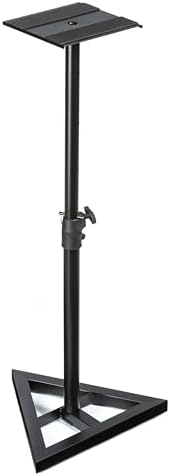
Image 2: Close-up view of the Fame Audio DB 039 Monitor Stand's height adjustment clamp and safety pin, located on the main support pole.
5. Operation
The Fame Audio DB 039 Monitor Stand is designed for easy height adjustment and secure placement of your monitors.
5.1. Adjusting Height
- Remove Safety Pin: Pull out the safety pin from the main support pole.
- Loosen Clamp: Turn the clamping screw counter-clockwise to loosen the height adjustment clamp.
- Adjust Height: Carefully slide the upper section of the pole up or down to your desired height (between 730 mm and 1110 mm). Ensure the monitor plate is supported during this process.
- Insert Safety Pin: Once the desired height is reached, align the holes and re-insert the safety pin through the pole. This provides primary security.
- Tighten Clamp: Turn the clamping screw clockwise to firmly tighten the height adjustment clamp. This provides secondary security and prevents movement.
5.2. Placing Monitors/Speakers
Carefully place your studio monitor or loudspeaker onto the 230 x 230 mm support plate. Ensure the equipment is centered on the plate to distribute weight evenly and maintain stability. Do not exceed the maximum weight capacity of 23 kg.
6. Maintenance
Regular maintenance will ensure the longevity and safe operation of your monitor stand.
- Cleaning: Wipe the stand with a soft, dry cloth to remove dust. For stubborn marks, use a slightly damp cloth and then dry thoroughly. Avoid abrasive cleaners or solvents.
- Check Connections: Periodically check all screws and fasteners to ensure they remain tight. Re-tighten if necessary.
- Inspect for Damage: Regularly inspect the stand for any signs of wear, damage, or corrosion. If any damage is found, discontinue use and contact support.
7. Troubleshooting
If you encounter issues with your Fame Audio DB 039 Monitor Stand, refer to the following common problems and solutions:
- Issue: The stand feels unstable or wobbly.
Solution:- Ensure all assembly screws, especially those connecting the base and the monitor plate, are fully tightened.
- Verify that the stand is placed on a completely flat and level surface.
- Check that the safety pin is fully inserted and the height adjustment clamp is securely tightened after setting the height.
- Ensure the monitor or speaker is centered on the support plate and its weight does not exceed 23 kg.
- Issue: Difficulty adjusting the height.
Solution:- Ensure the clamping screw is sufficiently loosened and the safety pin is fully removed before attempting to adjust the height.
- Check for any obstructions or debris within the pole sections.
8. Specifications
- Model: DB 039
- Brand: Fame Audio
- Height Adjustment: 730 mm – 1110 mm (approx. 28.7 – 43.7 inches)
- Load Capacity: Up to 23 kg (approx. 50.7 lbs)
- Support Plate Dimensions: 230 x 230 mm (approx. 9.1 x 9.1 inches)
- Base Type: Triangular
- Base Diameter: 450 mm (approx. 17.7 inches)
- Material: Black anodized steel
- Product Dimensions (packaged): 66.5 x 52.5 x 8 cm (approx. 26.2 x 20.7 x 3.1 inches)
- Item Weight: 3.62 kg (approx. 7.98 lbs)
- Manufacturer Reference: REC0004066-000
9. Warranty and Support
Specific warranty information for the Fame Audio DB 039 Monitor Stand is not provided in this manual. Please refer to the purchase documentation or contact your retailer or the manufacturer directly for details regarding warranty coverage and support.
For technical assistance or inquiries, please contact Fame Audio customer service or your authorized dealer.