
Introduction
This manual provides essential information for the safe and efficient operation, installation, and maintenance of your Koolatron Modelo Mini Refrigerator, model MOD90. Please read these instructions thoroughly before using the appliance and retain them for future reference.

Image: Front view of the Koolatron Modelo Mini Refrigerator, highlighting its compact design, Modelo branding, built-in bottle opener, and 3.2 cubic foot capacity.
Important Safety Information
WARNING: To reduce the risk of fire, electric shock, or injury when using your appliance, follow these basic precautions:
- Read all instructions before using the refrigerator.
- Do not touch cold surfaces, especially when hands are damp or wet. Skin may stick to extremely cold surfaces.
- Never clean refrigerator parts with flammable fluids. The fumes can create a fire hazard or explosion.
- Do not store or use gasoline or other flammable vapors and liquids in the vicinity of this or any other appliance. The fumes can create a fire hazard or explosion.
- Before performing any maintenance or cleaning, unplug the refrigerator from the power outlet.
- This appliance is not intended for use by persons (including children) with reduced physical, sensory or mental capabilities, or lack of experience and knowledge, unless they have been given supervision or instruction concerning use of the appliance by a person responsible for their safety.
- Children should be supervised to ensure that they do not play with the appliance.
- California Proposition 65 Warning: Product may contain materials cautioned by California Proposition 65.
Product Features
The Koolatron Modelo Mini Refrigerator MOD90 is designed for convenience and efficient cooling. Key features include:
- Generous Capacity: 3.2 cubic feet (90 Liters) of storage space.
- Adjustable Shelving: Three repositionable tempered glass shelves allow for flexible storage configurations.
- Door Storage: Ample space in the door, including a Dispense-a-Can compartment that holds five standard cans.
- Built-In Bottle Opener: A durable steel bottle opener is conveniently attached to the exterior for easy access.
- Compressor Cooling: Efficient and reliable compressor technology maintains temperatures between 32°F (0°C) and 50°F (10°C).
- Adjustable Temperature Control: Easily set your desired cooling level.
- Reversible Door: The door can be hinged on either the left or right side to suit your space.
- Flat-Back Design: Space-saving design with enclosed evaporator coils for flush placement against walls.
- Quiet Operation: Engineered to operate with minimal noise, suitable for various living spaces.

Image: Interior view of the refrigerator, illustrating the three tempered glass shelves and door storage, including the Dispense-a-Can feature.

Image: Detail of the integrated steel bottle opener located on the side of the refrigerator.

Image: Close-up of the internal rotary dial for adjusting the refrigerator's temperature settings.
Setup and Installation
Unpacking
- Remove all packaging materials, including the foam base and adhesive tape.
- Inspect the refrigerator for any damage during transit. Report any damage to your retailer immediately.
- Clean the interior and exterior of the refrigerator with a damp cloth before use.
Placement
- Place the refrigerator on a firm, level surface strong enough to support the unit when fully loaded.
- Allow at least 5 inches (12.7 cm) of space between the back and sides of the refrigerator and any adjacent walls to ensure proper air circulation.
- Avoid placing the refrigerator in direct sunlight or near heat sources (e.g., stoves, heaters, radiators).
- Do not install in areas where the temperature will fall below 50°F (10°C) or rise above 90°F (32°C).
Leveling
The refrigerator has adjustable leveling legs. Turn the legs clockwise to raise the unit and counter-clockwise to lower it. Ensure the refrigerator is level to prevent vibrations and ensure proper door sealing.
Electrical Connection
- Plug the refrigerator into a dedicated 110V AC, 60Hz grounded electrical outlet.
- Do not use extension cords or ungrounded adapters.
- Allow the refrigerator to stand upright for at least 2-4 hours before plugging it in to allow the refrigerant to settle.
Reversible Door Installation
The door hinges can be reversed to open from the left or right side. Refer to the detailed diagrams in the full product manual for specific instructions on reversing the door.

Image: Dimensional drawing of the refrigerator, indicating a height of 33 inches, depth of 18.75 inches, and width of 17.5 inches.
Operating Instructions
Initial Start-Up
After plugging in the refrigerator, allow it to cool for approximately 2-3 hours before placing items inside. This ensures the interior reaches the desired temperature.
Temperature Control
The temperature control dial is located inside the refrigerator compartment. It typically ranges from '1' (warmest) to '7' (coldest). Adjust the dial to your desired setting. A setting of '4' or '5' is generally recommended for normal use.
- Turn the dial towards higher numbers for colder temperatures.
- Turn the dial towards lower numbers for warmer temperatures.
- The optimal operating temperature range is between 32°F (0°C) and 50°F (10°C).
Image: Detail of the temperature control knob with settings from 1 to 7, located within the refrigerator compartment.
Care and Maintenance
Cleaning
- Interior: Clean the interior regularly with a solution of mild detergent and warm water. Rinse thoroughly and dry. Do not use abrasive cleaners or harsh chemicals.
- Exterior: Wipe the exterior with a soft cloth and mild detergent. For the Modelo graphics, use a soft, damp cloth and avoid harsh scrubbing to prevent damage.
- Door Seal: Clean the door gasket regularly to ensure a tight seal.
- Shelves: The tempered glass shelves are removable for easy cleaning. Wash with mild soap and water, rinse, and dry thoroughly before replacing.

Image: Detail of the removable tempered glass shelves, designed for easy cleaning and flexible storage.
Defrosting
This refrigerator features manual defrost. Frost will accumulate on the interior cooling plate. When the frost layer becomes approximately 1/4 inch (6 mm) thick, defrost the unit:
- Unplug the refrigerator from the power outlet.
- Remove all food items and place them in another cooler.
- Leave the door open to allow the frost to melt naturally. Place towels at the bottom to absorb water.
- Do not use sharp objects or heating devices to remove frost, as this can damage the cooling system.
- Once defrosted, clean and dry the interior thoroughly before plugging the unit back in and returning food items.
Power Outage
In case of a power outage, keep the refrigerator door closed as much as possible to maintain internal temperature. Most food items will remain cold for several hours.
Vacation
For long vacations, unplug the refrigerator, empty all contents, clean the interior, and leave the door slightly ajar to prevent odors and mold growth.
Troubleshooting
Before contacting customer service, review the following common issues and solutions:
| Problem | Possible Cause | Solution |
|---|---|---|
| Refrigerator does not operate | Not plugged in; circuit breaker tripped; temperature control set to 'OFF' or too warm. | Ensure plug is secure; reset circuit breaker; adjust temperature control to a colder setting. |
| Temperature is not cold enough | Door opened too frequently; large quantity of warm items added; poor air circulation; temperature control set too warm. | Minimize door openings; allow warm items to cool slightly before placing in fridge; ensure adequate space around unit; adjust temperature control to a colder setting. |
| Excessive frost buildup | Door not sealed properly; high humidity; frequent door openings. | Check door gasket for proper seal; defrost unit manually; minimize door openings. |
| Noises (vibrating, rattling) | Refrigerator not level; loose parts; items inside rattling. | Adjust leveling legs; ensure all internal components are secure; rearrange items to prevent rattling. |
| Door does not close properly | Refrigerator not level; door gasket dirty or damaged; items obstructing door. | Level the unit; clean or replace door gasket; remove obstructions. |
Specifications
| Feature | Detail |
|---|---|
| Brand | Koolatron |
| Model Number | MOD90 |
| Capacity | 3.2 Cubic Feet (90 Liters) |
| Product Dimensions (D x W x H) | 18.75 x 17.5 x 33 inches |
| Item Weight | 1 Pounds (Note: This weight may refer to packaging or a component, actual unit weight is higher) |
| Installation Type | Freestanding |
| Color | Brilliant White |
| Voltage | 110 Volts (AC) |
| Wattage | 85 watts |
| Defrost System | Manual |
| Number of Doors | 1 |
| Shelf Type | Tempered Glass |
| Included Components | 3 Shelves |
| Certification | ETL |
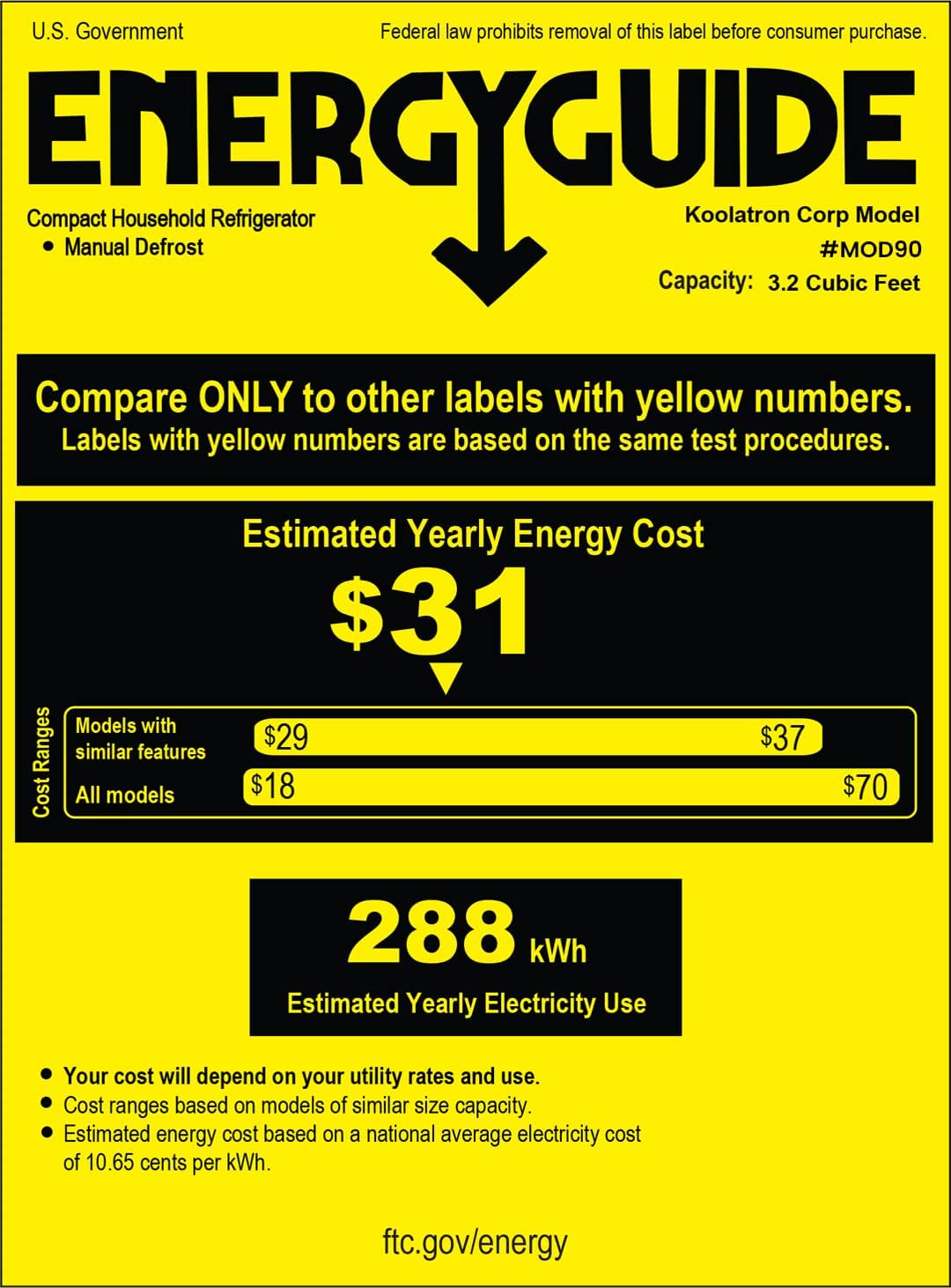
Image: U.S. Government Energy Guide label for the Koolatron Compact Household Refrigerator Model MOD90, indicating an estimated yearly energy cost of $31 and 288 kWh estimated yearly electricity use.
Warranty Information
This Koolatron Modelo Mini Refrigerator comes with a 1-year manufacturer's warranty from the date of purchase. This warranty covers defects in materials and workmanship under normal use. Please retain your proof of purchase for warranty claims.
The warranty does not cover damage resulting from misuse, accident, alteration, neglect, unauthorized repair, or improper installation. For full warranty terms and conditions, please refer to the documentation included with your product or contact Koolatron customer support.
Support
For technical assistance, troubleshooting beyond this manual, or warranty inquiries, please contact Koolatron customer support. Visit the official Koolatron website for contact information and additional resources.
Koolatron Official Website: Koolatron Store on Amazon


