
Introduction
This instruction manual provides guidance for the installation and care of the fqparts Replacement Laptop Bottom Case Cover (D Shell) designed for specific Lenovo ideapad S540-15IML, S540-15IWL, and S540-15IWL GTX models. This component is a direct replacement part intended to restore the structural integrity and aesthetic appearance of your laptop's base.
Compatibility & Pre-installation Checks
Before proceeding with installation, it is crucial to verify the compatibility of this replacement part with your specific laptop model. Incorrect parts can lead to damage or improper fit.
- Model Verification: Confirm that your laptop's full model number precisely matches one of the compatible models: Lenovo ideapad S540-15IML, S540-15IWL, or S540-15IWL GTX. The model number is typically found on a sticker on the bottom of your laptop or within the system information settings.
- Visual Comparison: Carefully compare the provided product images with your existing laptop's bottom case. Pay close attention to screw hole placements, ventilation patterns, port cutouts, and overall shape. If there are any discrepancies, contact the seller for clarification before attempting installation.
- Part Identification: This product is specifically the "D Shell" or Bottom Base Case Cover. Ensure this is the part you intend to replace.
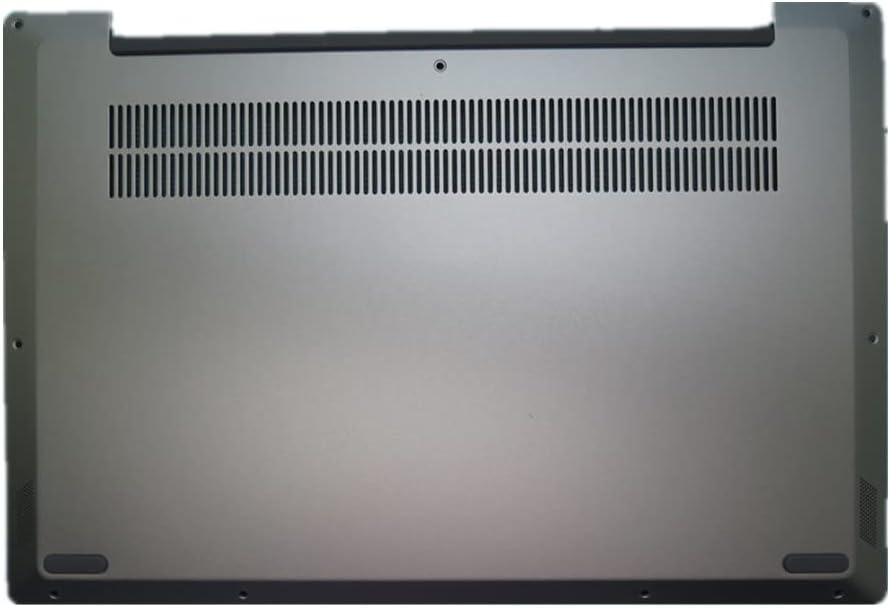
Image 1: Top-down view of the fqparts Replacement Laptop Bottom Case Cover (D Shell). This image displays the silvery-colored bottom panel with ventilation slots and various screw mounting points. The design includes rubber feet cutouts and a central ventilation grille, essential for proper laptop cooling.
Safety Information
Working with electronic components requires caution. Adhere to the following safety guidelines to prevent injury or damage to your device:
- Power Disconnection: Always ensure your laptop is completely powered off and disconnected from its power adapter before beginning any disassembly or installation. Remove the battery if it is externally accessible.
- Static Electricity: Static discharge can damage sensitive electronic components. Work on an anti-static mat or frequently touch a grounded metal object to discharge any static electricity from your body.
- Tool Usage: Use appropriate, non-marring tools for laptop disassembly. Avoid excessive force, which can strip screws or damage plastic components.
- Component Handling: Handle all internal components, especially connectors and delicate cables, with extreme care.
- Professional Assistance: If you are unsure about any step or lack experience with laptop repair, seek assistance from a qualified technician.

Image 2: Product information label. This label includes manufacturing details, company address, and multi-language warnings. Notably, it advises against placing the product at a high place to avoid falling, which is a general handling precaution. It also indicates "Made in China" and a production date.
Setup and Installation
The installation of a laptop bottom case typically involves careful disassembly and reassembly. The following steps are general guidelines; refer to your laptop's specific service manual for detailed instructions if available.
- Preparation:
- Gather necessary tools: small Phillips head screwdriver, plastic spudger or opening tool, anti-static wrist strap (recommended).
- Work on a clean, well-lit, and static-free surface.
- Disassembly of Old Case:
- Power off the laptop completely and disconnect all cables.
- Carefully remove all visible screws securing the existing bottom case. Note different screw lengths and locations if applicable.
- Gently pry open the old bottom case using a plastic spudger, working around the edges to release clips.
- Once clips are released, carefully lift and remove the old D shell.
- Installation of New Case:
- Align the new fqparts bottom case with the laptop's chassis.
- Gently press down around the edges to engage all internal clips. Ensure a snug fit without forcing.
- Reinsert all screws into their original positions. Do not overtighten.
- Post-Installation Check:
- Verify that all screws are securely fastened and the case is properly seated.
- Check that all ports and vents are unobstructed.
- Reconnect the power adapter and power on the laptop to ensure normal operation.
Usage Considerations
Once installed, the new bottom case functions as the original. Ensure that the laptop's ventilation is not obstructed during use to prevent overheating. The case provides structural support and protection for internal components.
Maintenance
To maintain the appearance and functionality of your laptop's bottom case:
- Cleaning: Use a soft, dry, lint-free cloth to wipe the surface. For stubborn marks, slightly dampen the cloth with water or a mild, non-abrasive cleaner. Avoid harsh chemicals or abrasive materials.
- Ventilation: Periodically check the ventilation grilles for dust accumulation. Use compressed air to gently clear any blockages, ensuring proper airflow for cooling.
- Handling: Avoid dropping the laptop or subjecting it to impacts, as this can damage the case and internal components.
Troubleshooting
If you encounter issues during or after installation, consider the following:
- Case Not Fitting Properly:
- Double-check that all internal clips are aligned and engaged.
- Ensure no cables or components are pinched between the case and the chassis.
- Re-verify the compatibility of the part with your exact laptop model.
- Missing or Loose Screws:
- Ensure all screws removed during disassembly have been reinserted.
- If screws are loose, gently tighten them, but do not overtighten.
- Laptop Not Powering On:
- Ensure the battery (if removable) and all internal connectors were properly reconnected.
- Verify the power button cable (if disturbed) is correctly attached.
- If the issue persists, consult a professional technician.
Specifications
| Attribute | Value |
|---|---|
| Product Name | Replacement Laptop Bottom Case Cover D Shell |
| Brand | fqparts |
| Model Number | S540-15-DKE-HS0712 |
| Compatible Devices | Lenovo ideapad S540-15IML, S540-15IWL, S540-15IWL GTX Laptops |
| Form Factor | Case (D Shell) |
| Color | Silvery |
| Product Dimensions | 19.69 x 15.75 x 3.15 inches |
| Item Weight | 4.4 pounds |
| Manufacturer | fqparts |
| ASIN | B099DW7CQP |
| Date First Available | July 14, 2021 |
Warranty and Support
For information regarding product warranty, returns, or technical support, please contact the seller or manufacturer directly. Keep your purchase receipt and product model number (S540-15-DKE-HS0712) readily available for any inquiries.
Manufacturer: fqparts
For further assistance, you may refer to the official Lenovo support resources for your specific laptop model for disassembly/assembly guides, or consult a certified computer repair technician.


