
Sakar 021331010797
Realtree® LED Lantern Rechargeable Outdoor Speakers User Manual
Model: 021331010797 | Brand: Sakar
Introduction
This manual provides comprehensive instructions for the safe and effective use of your Realtree® LED Lantern Rechargeable Outdoor Speaker. This versatile device combines a portable Bluetooth speaker with a 600-lumen LED lantern, designed for both indoor and outdoor environments. Please read this manual thoroughly before operation and retain it for future reference.
Safety Information
- Do not expose the device to extreme temperatures, direct sunlight, or excessive humidity.
- Keep away from water and liquids. While water-resistant, it is not designed for submersion.
- Do not attempt to disassemble, repair, or modify the device. This will void the warranty and may cause damage or injury.
- Use only the provided USB charging cable.
- Keep out of reach of children and pets.
- Clean only with a soft, dry cloth. Do not use abrasive cleaners or solvents.
What's in the Box
Verify that all items are present upon unboxing:
- Realtree® LED Lantern Rechargeable Outdoor Speaker
- USB Charging Cable
- User Manual (this document)
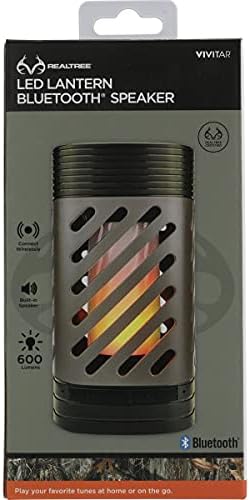
Image: The Realtree LED Lantern Speaker shown in its retail box, indicating the product and its packaging.
Product Overview
Familiarize yourself with the various parts of your speaker lantern.

Image: Front view of the Realtree LED Lantern Speaker, displaying its camouflage-patterned casing and the internal LED light simulating a flame effect. Control buttons are visible at the base.
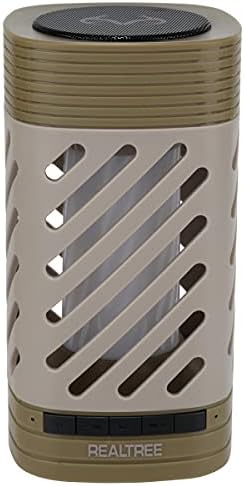
Image: Top view of the Realtree LED Lantern Speaker, highlighting the speaker grille located on the top surface of the device.
Controls and Indicators:
- Power Button: Turns the device on/off.
- Bluetooth Pairing Button: Initiates Bluetooth pairing mode.
- Light Mode Button: Cycles through various LED light modes (flame, solid colors, fading colors, white).
- Volume Controls: Adjusts audio volume.
- USB Charging Port: For recharging the internal battery.
- LED Indicator: Shows charging status and Bluetooth connection status.
Setup
Charging the Speaker Lantern:
- Connect the small end of the included USB charging cable to the USB charging port on the speaker lantern.
- Connect the large end of the USB charging cable to a USB power source (e.g., computer USB port, USB wall adapter, power bank).
- The LED indicator will illuminate during charging and change color or turn off when fully charged.
- A full charge typically takes approximately 3-4 hours.
Operating Instructions
Power On/Off:
- To power on, press and hold the Power Button until the LED indicator lights up and you hear an audible prompt.
- To power off, press and hold the Power Button again until the LED indicator turns off and you hear an audible prompt.
Bluetooth Pairing:
- Ensure the speaker lantern is powered on. It will automatically enter Bluetooth pairing mode if not already connected. The LED indicator will flash.
- On your Bluetooth-enabled device (smartphone, tablet, laptop), navigate to the Bluetooth settings.
- Search for available devices and select "Realtree Speaker" (or similar name) from the list.
- Once successfully paired, the LED indicator will stop flashing and remain solid, and you will hear a confirmation tone.
- The speaker will automatically reconnect to the last paired device when powered on, if the device is within range and Bluetooth is enabled.
Playing Audio:
- After successful Bluetooth pairing, begin playing audio from your connected device.
- Adjust the volume using the volume controls on the speaker or directly on your connected device.
- The speaker delivers clear and crisp audio, suitable for various music genres and outdoor settings.
LED Lantern Operation:
- Press the Light Mode Button to cycle through different lighting effects.
- Available modes include a realistic flame effect, various solid colors (red, blue, green, purple, etc.), a slow color fade, a fast color fade, and a bright white light.
- To return to the flame setting, a long press (hold for a few seconds) on the light control area may be required, or simply cycle through all modes until the flame appears again.
- The 600-lumen LED provides ample illumination for outdoor activities or as mood lighting.
Maintenance
- Cleaning: Wipe the exterior of the speaker lantern with a soft, dry, lint-free cloth. Do not use liquid cleaners, aerosols, or solvents.
- Storage: When not in use for extended periods, store the device in a cool, dry place, away from direct sunlight and extreme temperatures.
- Battery Care: To prolong battery life, avoid fully discharging the battery frequently. Recharge the device regularly, even if not in use.
Troubleshooting
| Problem | Possible Cause | Solution |
|---|---|---|
| Speaker does not turn on. | Battery is depleted. | Charge the speaker using the provided USB cable. |
| Cannot pair via Bluetooth. | Bluetooth is not enabled on your device; speaker is too far; speaker is already paired to another device. | Ensure Bluetooth is on. Move device closer to speaker. Disconnect from other devices or restart speaker. |
| No sound or low volume. | Volume is too low on speaker or connected device; speaker not properly paired. | Increase volume on both speaker and connected device. Re-pair the Bluetooth connection. |
| LED light not working. | Speaker is off; light mode is off or set to a dim setting. | Ensure speaker is on. Press the Light Mode Button to cycle through settings. |
Specifications
- Model Name: Outdoors
- Model Number: 021331010797
- Speaker Type: Outdoor
- Special Feature: Portable, Bluetooth, LED Lantern
- Connectivity Technology: Bluetooth, USB
- Wireless Communication Technology: Bluetooth
- Bluetooth Range: 9.14 Meters (approximately 30 feet)
- Light Output: 600 Lumens (LED)
- Power Source: Battery Powered (Rechargeable via USB)
- Product Dimensions: 4"D x 4"W x 7.2"H
- Item Weight: 1.3 pounds
- Water Resistance Level: Water Resistant
- Color: Green
- Manufacturer: Sakar
Warranty and Support
For warranty information or technical support, please refer to the warranty card included with your product or visit the official Sakar website. Keep your purchase receipt as proof of purchase for warranty claims.
Manufacturer: Sakar International, Inc.
Website: www.sakar.com (Note: This is a placeholder URL as no specific support URL was provided in the data. Users should refer to product packaging for exact support details.)
Ask a question about this manual
Ask about setup, troubleshooting, compatibility, parts, safety, or missing instructions. Manuals+ will review the question and use this page’s manual context to help answer it.