
1. Introduction
The Avaenzo Dual Mode Virtual Wall Barrier is designed to provide precise control over your iRobot Roomba robot vacuum's cleaning path. It creates invisible barriers that your Roomba will not cross, allowing you to define specific cleaning areas or protect delicate items. This manual provides instructions for setup, operation, and maintenance.
2. Product Features
- Dual-Mode Operation: Offers both Beam Mode (Virtual Wall) and Halo Mode (Circular Barrier).
- Battery-Powered: Operates on 2 AA batteries (not included) with a low-energy indicator.
- Easy Setup: No app or syncing required; activate modes with a simple switch.
- Enhanced Cleaning Control: Protects delicate zones and improves cleaning efficiency by confining the robot to desired areas.
3. Setup
3.1 Battery Installation
- Open the battery compartment cover located at the bottom of the barrier unit.
- Insert 2 AA batteries, ensuring correct polarity (+/-).
- Close the battery compartment cover securely.
The unit features a low-energy indicator. The indicator light remains off during normal operation and activates when battery replacement is required.
3.2 Initial Placement
Place the barrier unit on a flat surface in the area where you wish to create a boundary. Ensure the unit is stable and not easily knocked over.

4. Operating Modes
The barrier unit offers two distinct operating modes: Beam Mode (Virtual Wall) and Halo Mode (Circular Barrier). Use the switch on the unit to select your desired mode.

4.1 Beam Mode (Virtual Wall)
In Beam Mode, the barrier projects a 10ft (3m) infrared beam in a straight line. This creates an invisible wall that your Roomba will not cross. This mode is ideal for blocking doorways or creating linear boundaries.
- Slide the switch to the top position (indicated by a straight line icon).
- Place the unit so the beam is directed across the area you wish to block.
- After switching the mode, the light will flash 5 times and then go out, indicating the virtual wall barrier is active.

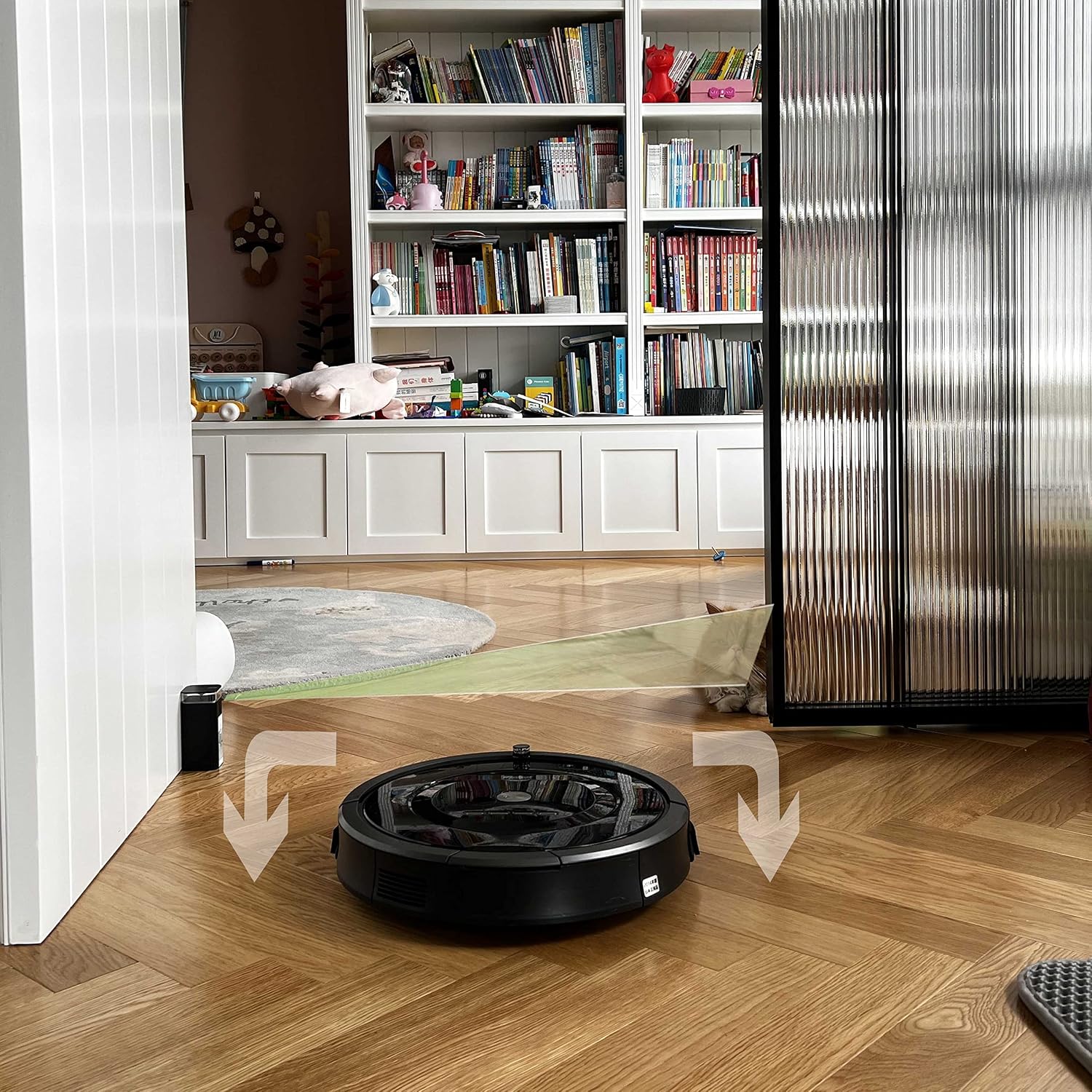
4.2 Halo Mode (Circular Barrier)
In Halo Mode, the barrier creates a 3ft (0.9m) circular protection zone around the unit. This mode is perfect for protecting specific items like pet bowls, floor lamps, or delicate furniture from your Roomba.
- Slide the switch to the bottom position (indicated by a circular icon).
- Place the unit near the item you wish to protect.
- After switching the mode, the light will flash 5 times and then go out, indicating the circular barrier is active.


4.3 General Activation
Regardless of the mode selected, the activation process is consistent:
- Switch the mode to either Halo or Beam.
- The indicator light on the unit will flash 5 times.
- The light will then go out, confirming the virtual wall barrier is now active and functioning.

4.4 Official Product Videos
Video 1: Demonstrates the 'Light House Dual Mode Virtual Wall Barrier for Roomba' in action, showcasing its functionality.
Video 2: A brief demonstration showing the virtual wall barrier in operation.
5. Compatibility
This Avaenzo Dual Mode Virtual Wall Barrier is compatible with a wide range of iRobot Roomba models, including:
- Roomba 800/900 Series
- e/i/s Series (e5, e6, i4, i4+, i6, i6+, i7, i7+, i8, i8+)
- Models: 7150, 5150, 7550, e5120, e5152, e5158, i7158, i7550
- Combo Essential Y0140 & jet m6
Excludes: Roomba 500/700 Series & pre-2015 600 Series models.
Important Note: Avaenzo is an independent manufacturer and is not affiliated with iRobot. These parts are high-quality aftermarket products designed for compatibility with your iRobot vacuum cleaner, offering a reliable and cost-effective alternative to OEM parts.
6. Maintenance
6.1 Battery Replacement
The barrier unit requires 2 AA batteries. When the low-energy indicator activates, it's time to replace the batteries. Follow the battery installation steps in Section 3.1.
6.2 Storage
To maximize battery life, it is recommended to switch the unit to the 'OFF' position (middle position on the switch) when not in use for extended periods.
7. Troubleshooting
- Barrier not working: Ensure batteries are correctly installed and have sufficient charge. Check that the mode switch is firmly in either the Halo or Beam position.
- Roomba crosses barrier: Verify the barrier unit is placed correctly and the selected mode is appropriate for the desired boundary. Ensure no obstructions are blocking the infrared beam (for Beam Mode).
- Short battery life: Always switch the unit to the 'OFF' position when not in active use to conserve battery power.
8. Specifications
| Package Dimensions | 4.88 x 4.45 x 2.24 inches |
| Item Weight | 4.8 ounces |
| Manufacturer | Avaenzo |
| Batteries Required | 2 AA batteries (not included) |
9. Support
For further assistance or inquiries, please contact Avaenzo customer support through the retailer's platform where the product was purchased.