1. Introduction
This manual provides essential information for the proper use, installation, and maintenance of your Xerox Genuine C230/C235 Black Standard Capacity Toner Cartridge (Model: 006R04383). Adhering to these instructions will ensure optimal performance and longevity of your toner cartridge and compatible Xerox printer.
2. Product Overview
The Xerox Genuine C230/C235 Black Standard Capacity Toner Cartridge is designed specifically for Xerox C230 and C235 series printers. It delivers consistent, high-quality black prints with a page yield of approximately 1,500 pages.
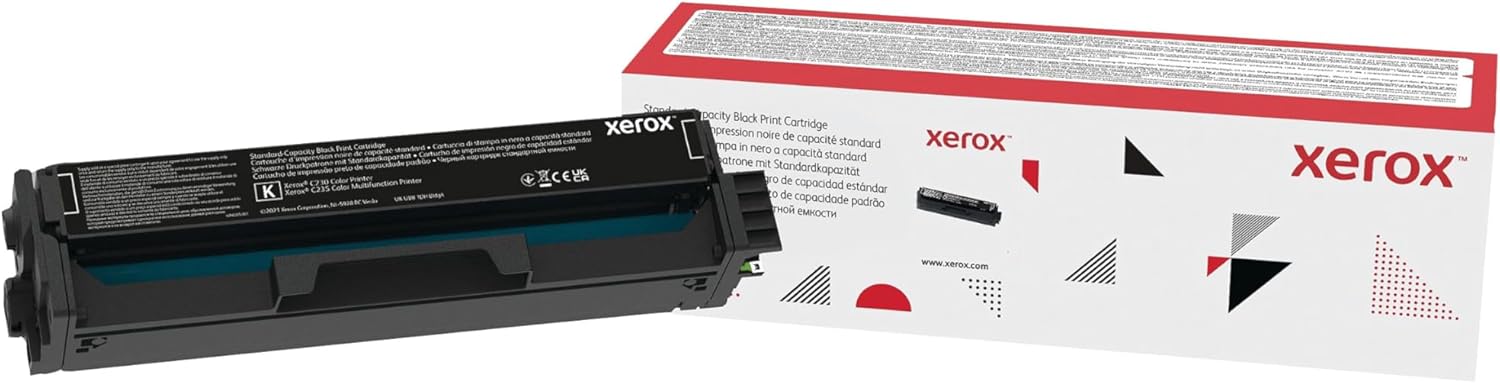
Figure 2.1: Xerox Genuine C230/C235 Black Standard Capacity Toner Cartridge and its retail packaging.
Key Features:
- Page Yield: Approximately 1,500 pages, based on ISO/IEC 19752 standards.
- Unmatched Image Quality: Engineered to produce sharp fine lines, crisp text, smooth gradations, and brilliant colors from the first page to the last.
- Optimized Technology: The toner formulation is customized to work seamlessly with Xerox C230 and C235 printers, maximizing print quality and performance.
- High Performance: Genuine Xerox Toner Cartridges are designed to ensure your Xerox printer operates at its best.
- Reliability: Backed by over 75 years of research and development, ensuring dependable printing results.
3. Setup and Installation
Follow these steps to properly install the toner cartridge into your Xerox C230 or C235 printer.
- Unpack the Cartridge: Carefully remove the new toner cartridge from its packaging. Avoid touching the drum unit or electrical contacts.
- Prepare the Printer: Ensure your printer is powered on and open the front cover or access panel to the toner compartment. Refer to your printer's specific manual for exact instructions on opening the toner access.
- Remove Old Cartridge (if applicable): If replacing an existing cartridge, gently pull it straight out from the printer. Place the used cartridge in a protective bag for recycling.
- Prepare New Cartridge: Gently shake the new toner cartridge horizontally 5-6 times to distribute the toner evenly inside.
- Insert New Cartridge: Align the new toner cartridge with the guides in the printer and push it firmly until it clicks into place. Do not force the cartridge.
- Close Printer Cover: Close the front cover or access panel of your printer. The printer will typically perform a short calibration cycle.

Figure 3.1: Illustration of toner cartridge installation into a compatible printer.
For detailed visual instructions, consult your Xerox C230 or C235 printer's user manual.
4. Operating Instructions
Once the toner cartridge is installed, your printer is ready for use. The printer will automatically detect the new cartridge and update its toner level status.
Printing Tips:
- Print Quality Settings: Adjust print quality settings in your printer driver software for optimal results (e.g., draft, normal, best).
- Paper Type: Use recommended paper types for your printer to achieve the best print output and prevent paper jams.
- Toner Level Monitoring: Monitor toner levels through your printer's control panel or software utility to anticipate replacement needs.

Figure 4.1: The toner cartridge is designed to produce prints with exceptional detail and clarity.

Figure 4.2: Expect exquisite results for both color and monochrome prints with genuine Xerox toner.
5. Maintenance
The Xerox Genuine Toner Cartridge requires minimal maintenance. However, proper handling and storage are crucial for its performance and lifespan.
Storage:
- Store new, unused toner cartridges in their original sealed packaging in a cool, dry place away from direct sunlight and extreme temperatures.
- Avoid storing cartridges in areas with high humidity or significant temperature fluctuations.
Handling:
- Always handle toner cartridges by their sides. Avoid touching the imaging drum or electrical contacts.
- Do not expose the toner cartridge to light for extended periods, as this can damage the drum.
Disposal and Recycling:
Xerox encourages responsible recycling of used toner cartridges. Many regions offer free recycling programs for genuine Xerox supplies.

Figure 5.1: Xerox promotes responsible recycling of used cartridges to save energy and reduce waste.
Visit the official Xerox website or contact your local Xerox representative for information on recycling programs available in your area. Xerox Global Web Access
6. Troubleshooting
This section addresses common issues you might encounter with your toner cartridge.
| Problem | Possible Cause | Solution |
|---|---|---|
| Poor Print Quality (Faded, Streaky, or Incomplete Prints) | Low toner level, uneven toner distribution, or damaged cartridge. |
|
| "Toner Low" or "Replace Toner" Message | Toner is nearing depletion or has run out. | Prepare a new toner cartridge for replacement. Replace the cartridge when print quality degrades significantly or the printer stops printing. |
| Cartridge Not Recognized | Improper installation or dirty electrical contacts. |
|
If you encounter issues not listed here, refer to your printer's comprehensive user manual or contact Xerox customer support.
7. Specifications
Detailed specifications for the Xerox Genuine C230/C235 Black Standard Capacity Toner Cartridge (006R04383).
- Product Name: Xerox Genuine C230/C235 Black Standard Capacity Toner Cartridge
- Model Number: 006R04383
- Color: Black
- Page Yield: Approximately 1,500 pages (ISO/IEC 19752)
- Compatible Printer Models: Xerox C230, Xerox C235
- Manufacturer: Xerox Office Products
- UPC: 095205068764
- Product Dimensions: 15.55 x 4.92 x 4.72 inches (39.5 x 12.5 x 12 cm)
- Item Weight: 1.9 pounds (0.86 kg)
8. Warranty and Support
Xerox Genuine Supplies are designed for reliability and performance. For warranty information and customer support, please refer to the official Xerox website or the documentation included with your printer.
Xerox Customer Support: For technical assistance, product inquiries, or warranty claims, please visit the official Xerox support page or contact their customer service line. Contact details can typically be found on the Xerox website or in your printer's documentation.
Using non-genuine toner cartridges may void your printer's warranty and could lead to suboptimal print quality or printer damage.


