
Yuecoom DGS6110U
Yuecoom DGS6110U Electronic Generator Controller Module User Manual
Model: DGS6110U
1. Product Overview
The Yuecoom DGS6110U Electronic Generator Controller Module is designed for automatic control and monitoring of generator sets. It features an LCD display, multi-language support, and advanced power management capabilities, including power monitoring and automatic power generation switching control (AMF).

Figure 1.1: Front view of the DGS6110U Electronic Generator Controller Module.

Figure 1.2: The DGS6110U controller shown in an operational environment with a generator.
2. Key Features
- Advanced Power Management: Includes power monitoring and Automatic Mains Failure (AMF) control functions for seamless power generation switching.
- User-Friendly Interface: Features an LCD backlight display with an optional language interface and intuitive key operation.
- Manual Test Mode: A dedicated load test key allows the controller to be placed in manual test mode, enabling the generator set to run with load when power generation is normal.
- Multi-Language Support: Supports eight languages including Chinese, English, Spanish, Russian, Portuguese, Turkish, Polish, and French.
- Robust Design: Constructed from durable plastic, ensuring longevity and reliable performance.
3. Package Contents
Upon opening the package, please verify that all items listed below are present and in good condition:
- 1 x DGS6110U Generator Controller
- 1 x Black Gasket
- 4 x Fixing Screws
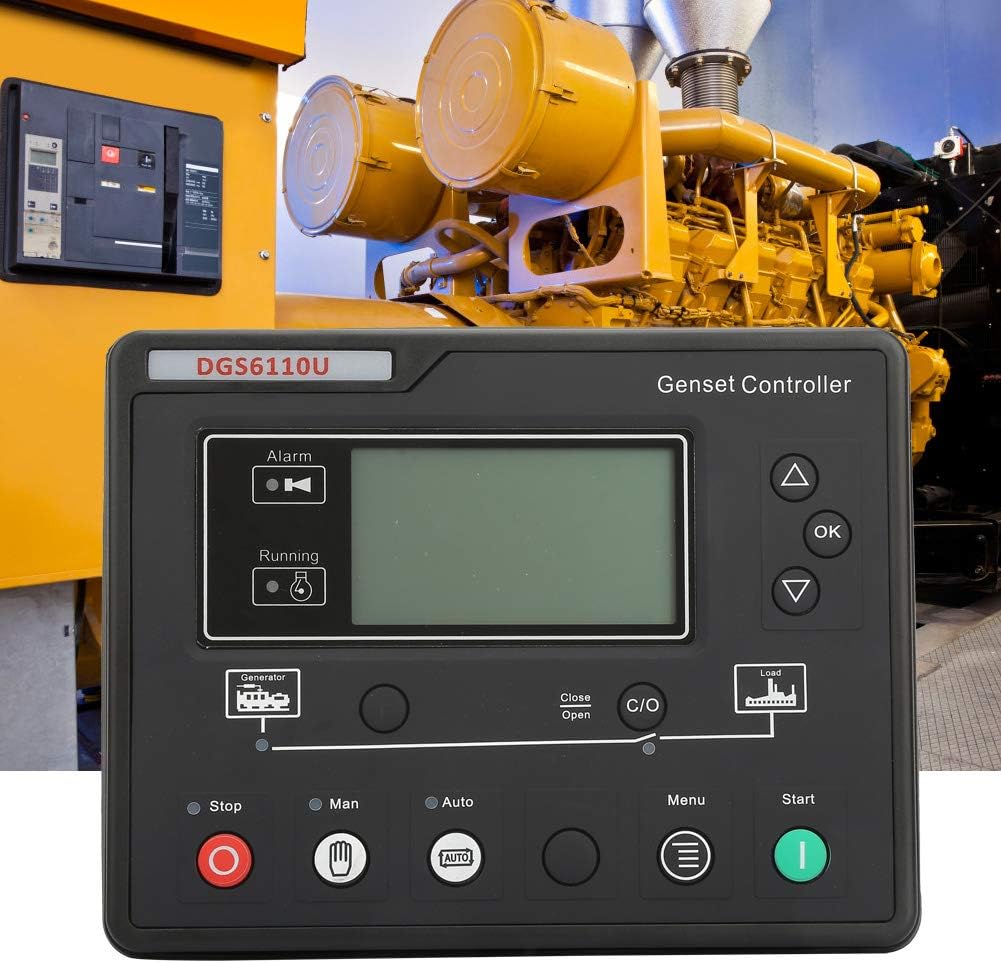
Figure 3.1: The DGS6110U controller shown with the included fixing screws.

Figure 3.2: Close-up view of the four fixing screws provided for installation.
4. Specifications
| Parameter | Value |
|---|---|
| Model | DGS6110U |
| Material | Plastic |
| Weight | 695g / 24.5oz |
| Low Voltage Value | (30-620)V |
| Start Times | (1-10) times |
| Warm-up Time | (0-300)s |
| Start-up Time | (3-60)s |
| Start Interval | (3-60)s |
| Safe Running Time | (1-60)s |
| High-speed Warm-up Time | (0-3600)s |
| High Speed Cooling Time | (0-3600)s |
5. Setup and Installation
The DGS6110U controller is designed for panel mounting. Ensure the installation location is clean, dry, and free from excessive vibrations or extreme temperatures. Refer to the wiring diagram for proper electrical connections.
5.1 Mounting the Controller
- Cut a rectangular opening in the control panel according to the dimensions specified in the product documentation (not provided in input, so general instruction).
- Insert the DGS6110U controller into the opening from the front.
- Secure the controller using the four provided fixing screws and the black gasket from the rear of the panel. Tighten the screws evenly to ensure a snug fit.
5.2 Electrical Connections
All electrical connections should be performed by a qualified electrician. Ensure the generator set is completely shut down and isolated from all power sources before making any connections. Refer to the internal diagram on the back of the unit for detailed wiring instructions.

Figure 5.1: Rear view of the DGS6110U controller showing the internal wiring diagram and terminal blocks. This diagram is crucial for correct electrical installation.
- Connect the generator voltage inputs (U, V, W, N2) to terminals 27-30.
- Connect the mains voltage inputs (R, S, T, N1) to terminals 31-34.
- Connect auxiliary outputs (AUX. OUTPUT 1-4) as required for external devices.
- Connect magnetic pickup, engine temperature, oil pressure, fuel level, and auxiliary inputs (AUX. INPUT 1-5) to their respective terminals (15-22, 38-40).
- Ensure proper grounding and power supply connections (B+, B-).
- For RS485 communication, connect to terminals 35-37.
6. Operating Instructions
The DGS6110U controller offers various modes of operation. Familiarize yourself with the button functions for effective control.
6.1 Button Functions
- Stop/Reset Button (⬤):
- In manual or automatic mode, press to stop the generator set.
- In an alarm state, press to reset any shutdown alarms.
- Press and hold for more than 3 seconds in the shutdown state to test panel indicators (test light function).
- Press again after a test light to quickly stop the machine.
- Start Button (⬤):
- In manual mode or manual test mode, press to start the stationary generator set.
- Manual Mode Button (🖐): Activates manual control mode.
- Auto Mode Button (🔄): Activates automatic control mode (AMF).
- Menu Button (≡): Accesses the controller's menu for settings and configurations.
- Up/Down Arrows (▲ / ▼): Navigate through menu options and adjust values.
- OK Button: Confirms selections or enters sub-menus.
- C/O (Close/Open) Button: Controls the generator breaker.

Figure 6.1: Detailed view of the DGS6110U controller's front panel, highlighting the buttons and LCD display.
7. Maintenance
Regular maintenance ensures the longevity and optimal performance of your DGS6110U controller. Always disconnect power before performing any maintenance.
- Cleaning: Periodically wipe the controller's surface with a soft, dry cloth. Avoid using abrasive cleaners or solvents that could damage the plastic or LCD.
- Connections: Annually inspect all wiring connections to ensure they are secure and free from corrosion. Re-tighten any loose terminals.
- Environment: Ensure the operating environment remains within specified temperature and humidity ranges to prevent damage to internal components.
- Firmware: Check the manufacturer's website (Yuecoom) for any available firmware updates that may improve performance or add features.
8. Troubleshooting
This section provides solutions to common issues you might encounter with your DGS6110U controller. For problems not listed here, please contact technical support.
| Problem | Possible Cause | Solution |
|---|---|---|
| Controller does not power on. | No power supply; incorrect wiring; blown fuse. | Check power connections to terminals B+ and B-. Verify wiring according to the diagram. Check for any tripped breakers or blown fuses in the power supply circuit. |
| Generator fails to start in Auto mode. | AMF settings incorrect; low fuel/battery; generator fault. | Verify AMF settings in the controller menu. Check generator fuel level and battery charge. Inspect the generator for any independent faults. |
| LCD display is blank or dim. | Backlight issue; power saving mode; extreme temperature. | Adjust backlight settings in the menu. Ensure the controller is not in a power-saving mode. Verify ambient temperature is within operating limits. |
| Alarm indicator is active. | Generator fault; sensor error; parameter out of range. | Check the LCD for specific alarm messages. Address the underlying generator issue (e.g., low oil pressure, high temperature). Press the Stop/Reset button to clear the alarm after the fault is resolved. |
9. Warranty and Support
The Yuecoom DGS6110U Electronic Generator Controller Module is manufactured to high-quality standards. For warranty information, technical support, or service inquiries, please contact Yuecoom directly through their official channels or the retailer from whom the product was purchased.
Please retain your proof of purchase for warranty claims.
no relevant documents
Ask a question about this manual
Ask about setup, troubleshooting, compatibility, parts, safety, or missing instructions. Manuals+ will review the question and use this page’s manual context to help answer it.