
1. Introduction
The VIRONE EM-1(GS) Energy Meter is designed to monitor and calculate the electricity consumption and associated costs of connected electrical devices. This power meter features a large LCD display that provides real-time information including current time, voltage, current, power factor, frequency, maximum current load, and an overload warning. It supports dual tariff settings for flexible cost calculation and allows for the input of up to four different currency types. An internal battery (2 x 1.5V LR44) ensures that device settings are retained during power outages.
This manual provides detailed instructions for the safe and efficient use of your VIRONE EM-1(GS) Energy Meter.
2. Safety Information
- Read all instructions carefully before use.
- This device is intended for indoor use only.
- Do not expose the device to moisture, water, or extreme temperatures.
- Do not disassemble or attempt to repair the device yourself. Refer all servicing to qualified personnel.
- Ensure the total load of connected devices does not exceed the maximum rated load of 3680W and 16A.
- Keep out of reach of children.
- Always insert the device fully into a wall socket.
3. Product Overview
The VIRONE EM-1(GS) Energy Meter features a clear LCD display and intuitive buttons for easy operation. The device is designed with a Schuko plug for direct insertion into compatible wall sockets.

Figure 3.1: Front view of the VIRONE EM-1(GS) Energy Meter.
3.1 Components
- LCD Display: Shows various measurement data and settings.
- SET Button: Used to enter setting modes.
- ENERGY Button: Cycles through energy-related display modes.
- COST Button: Cycles through cost-related display modes.
- CLOCK Button: Used for time settings and display.
- UP Button: Used to increase values during settings.
- OK / RESET Button: Confirms settings or resets data.
- PROG Button: Used for programming functions, such as tariffs.
- CLEAR Button: Clears specific data or settings.
- Schuko Plug: For connecting to a wall socket.
- Schuko Socket: For connecting an electrical appliance.

Figure 3.2: Back view with technical specifications label.
4. Setup
4.1 Battery Installation
The device requires 2 x 1.5V LR44 batteries (not included) to retain settings during power outages. Locate the battery compartment on the back of the device, open it, insert the batteries with the correct polarity, and close the compartment securely.
4.2 Initial Connection
- Plug the VIRONE EM-1(GS) Energy Meter directly into a standard Schuko wall socket.
- The LCD display should illuminate, indicating the device is powered on.
- Connect the electrical appliance you wish to monitor into the Schuko socket on the front of the energy meter.
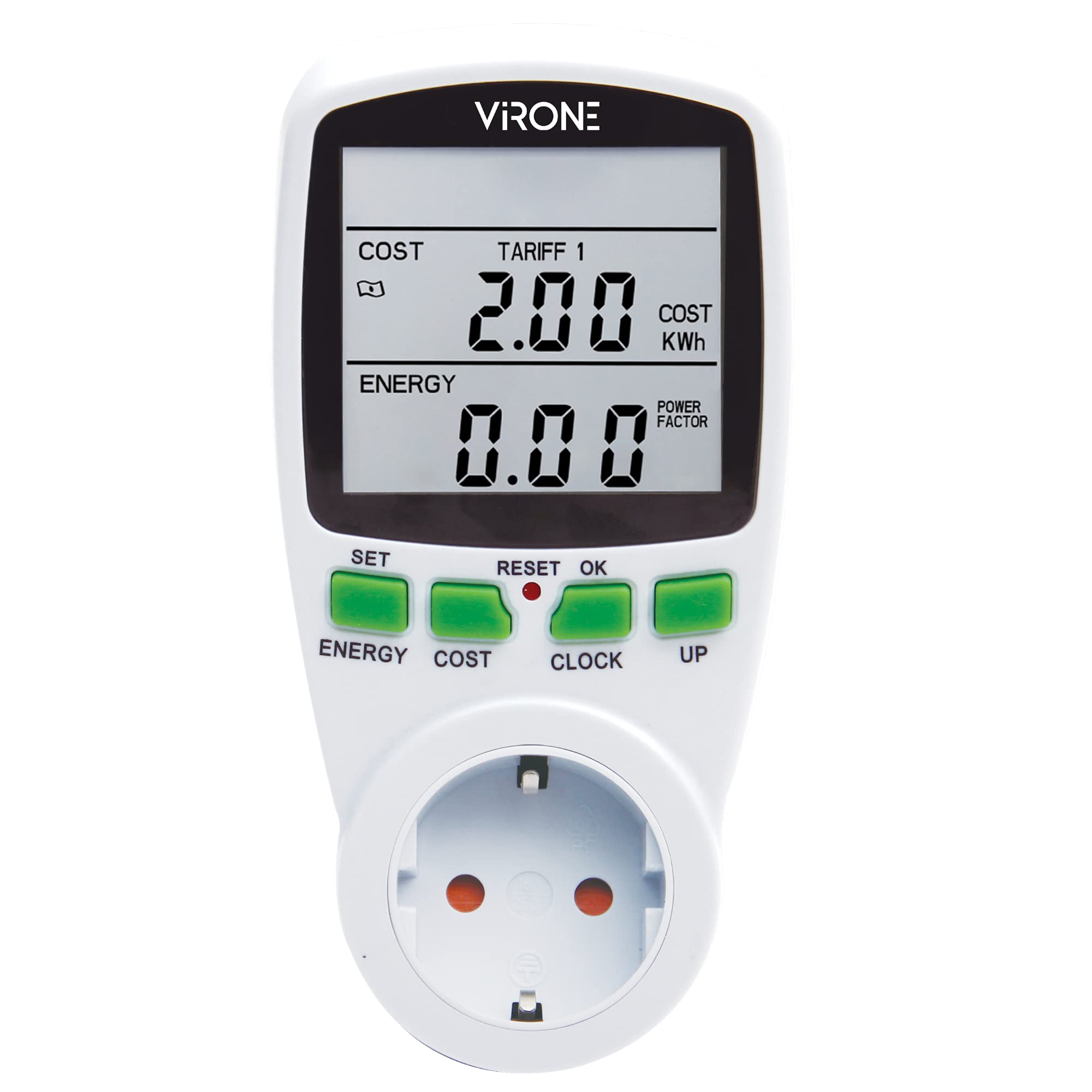
Figure 4.1: Energy meter connected to a wall socket and an appliance.
5. Operating Instructions
The energy meter offers various display modes and settings to monitor and manage your energy consumption.
5.1 Display Modes
Press the ENERGY button to cycle through different energy-related displays, such as total energy consumption (kWh), current power (W), voltage (V), current (A), frequency (Hz), and power factor (PF).
Press the COST button to view cost-related information, including total cost, cost per tariff, and set currency.

Figure 5.1: Display showing cost and energy readings.
5.2 Setting Time and Date
- Press the CLOCK button.
- Press SET to enter time setting mode.
- Use the UP button to adjust the hour, minute, and day.
- Press OK to confirm each setting.
5.3 Setting Currency
The device allows you to set up to 4 currency types.
- Press the SET button repeatedly until the currency setting appears.
- Use the UP button to select the desired currency symbol.
- Press OK to confirm.
5.4 Dual Tariff Setting
This function allows you to set two different electricity rates (e.g., day and night tariffs) for more accurate cost calculation.
- Press the PROG button to enter programming mode.
- Navigate using SET or PROG until you reach the tariff setting (Tariff 1, Tariff 2).
- Use the UP button to adjust the cost per kWh for each tariff.
- Set the start and end times for each tariff period.
- Press OK to save the settings.
5.5 Resetting Data
To clear all accumulated energy consumption and cost data, press and hold the OK / RESET button for a few seconds until the display resets.
To clear specific settings, use the CLEAR button as indicated in the respective setting mode.
6. Maintenance
6.1 Cleaning
Wipe the device with a soft, dry cloth. Do not use abrasive cleaners or solvents. Ensure the device is unplugged from the wall socket before cleaning.
6.2 Battery Replacement
When the internal batteries (2 x 1.5V LR44) are low, the display may dim or settings may not be retained. Replace the batteries by opening the battery compartment on the back of the device. Ensure correct polarity when inserting new batteries.
7. Troubleshooting
- Display is blank or dim: Check if the device is properly plugged into the wall socket. Replace the internal LR44 batteries if necessary.
- No readings for connected appliance: Ensure the appliance is correctly plugged into the meter's socket and is powered on. Verify the appliance is functioning correctly.
- Settings are not saved: Replace the internal LR44 batteries.
- Incorrect time or date: Follow the instructions in Section 5.2 to reset the time and date.
- Inaccurate cost calculation: Verify that the tariff rates and currency settings are correctly entered (Section 5.3, 5.4).
8. Specifications
| Feature | Specification |
|---|---|
| Model | EM-1(GS) |
| Manufacturer | Virone |
| Voltage | 230V~, 50Hz |
| Max. Load | 3680W |
| Max. Current | 16A |
| Accuracy | ±2% |
| Batteries Required | Yes (2 x 1.5V LR44) |
| Battery Cell Type | Alkaline |
| Color | White |
| Package Dimensions | 19.3 x 8.2 x 8.1 cm |
| Weight | 250 g |
9. Warranty and Support
For warranty information and technical support, please refer to the documentation provided with your purchase or contact your retailer. Keep your proof of purchase for any warranty claims.