
1. Introduction
This manual provides essential information for the safe and effective use of your UPS Battery Center APCRBC150 Compatible Replacement Battery Cartridge. This product is designed to restore the performance of your Uninterruptible Power Supply (UPS) by replacing its depleted battery cartridge. Please read this manual thoroughly before installation and retain it for future reference.
2. Safety Information
Your safety is paramount. Observe the following precautions when handling and installing the battery cartridge:
- Always disconnect the UPS from the AC power source and turn it off before attempting any battery replacement.
- Wear appropriate personal protective equipment, such as safety glasses and insulated gloves, to prevent injury.
- Do not short-circuit the battery terminals. This can cause severe burns or fire.
- Do not dispose of batteries in a fire, as they may explode.
- Do not open or mutilate the battery. Released electrolyte is harmful to skin and eyes.
- Keep batteries out of reach of children.
- Ensure the installation area is well-ventilated.
- This battery pack consists of Sealed Lead Acid batteries. Handle with care and dispose of properly.
3. Package Contents
Verify that all components are present upon unpacking:
- (4) 12V 9Ah Sealed Lead Acid Rechargeable Battery Pack with F2 Terminals
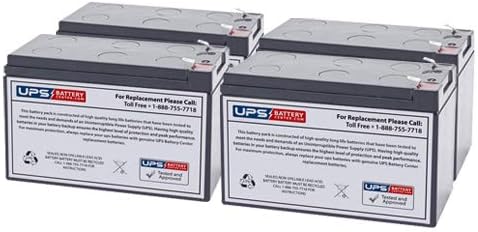
This image displays four individual 12V 9Ah Sealed Lead Acid battery units, designed as replacement cartridges for Uninterruptible Power Supply (UPS) systems. Each battery features a label indicating it is from 'UPS Battery Center' and provides a toll-free number for replacement inquiries. The label also states that the battery pack is constructed of high-quality, long-life batteries and is tested and approved. It also includes recycling symbols and instructions for proper disposal.
4. Compatibility
This replacement battery cartridge is 100% compatible with the following APC UPS Models:
- APC SMC3000I
- APC SMC3000I-RS
Always verify the model number on the back of your UPS unit to ensure compatibility before installation.
5. Setup and Installation
The UPS Battery Center APCRBC150 is designed for Plug & Play installation. Follow these steps to replace your UPS battery cartridge:
- Power Down UPS: Completely shut down your UPS and disconnect it from the AC power outlet. Disconnect any connected equipment.
- Access Battery Compartment: Locate and open the battery compartment on your UPS. Refer to your UPS's original manual for specific instructions on accessing the battery.
- Remove Old Battery: Carefully disconnect the battery cables from the old battery cartridge. Note the polarity (+ and -) for correct re-connection. Remove the old battery cartridge from the UPS.
- Insert New Battery: Place the new UPS Battery Center APCRBC150 replacement battery cartridge into the compartment.
- Connect Cables: Reconnect the battery cables to the new cartridge, ensuring correct polarity. Typically, red connects to positive (+) and black connects to negative (-).
- Secure Compartment: Close and secure the battery compartment cover.
- Power Up UPS: Reconnect the UPS to the AC power outlet and turn it on. Allow the UPS to charge the new battery for at least 24 hours before relying on it for full runtime.
6. Operating Instructions
Once properly installed and charged, the UPS Battery Center APCRBC150 operates automatically as part of your UPS system. The UPS will manage charging and discharging cycles. No specific user interaction with the battery cartridge itself is required during normal operation.
7. Maintenance
To ensure optimal performance and longevity of your replacement battery cartridge:
- Temperature: Operate the UPS in an environment with stable, moderate temperatures. Extreme heat or cold can reduce battery life.
- Charging: Ensure the UPS is regularly connected to AC power to keep the battery fully charged. Avoid prolonged periods of storage with a discharged battery.
- Testing: Most UPS units have a self-test function. Perform these tests periodically as recommended by your UPS manufacturer to monitor battery health.
- Cleaning: Keep the battery compartment clean and free of dust. Do not use liquid cleaners directly on the battery.
8. Troubleshooting
If you encounter issues after installing the new battery cartridge, consider the following:
- UPS Not Powering On: Double-check all cable connections, especially battery polarity. Ensure the UPS is properly connected to a working AC outlet.
- Battery Not Charging: Confirm the UPS is receiving AC power. Allow sufficient time for initial charging (at least 24 hours). If the issue persists, the UPS itself might require service.
- Short Runtime: Ensure the battery has been fully charged. Battery capacity can be affected by extreme temperatures or age.
If troubleshooting steps do not resolve the issue, please contact customer support.
9. Specifications
| Item Model Number | APCRBC150 |
| Battery Cell Composition | Sealed Lead Acid |
| Voltage | 12 Volts (per battery unit) |
| Amperage | 9 Amps (per battery unit) |
| Batteries Required | 4 (included) |
| Manufacturer | UPSBatteryCenterLtd. |
10. Warranty and Support
This UPS Battery Center product is manufactured to high-quality standards. For specific warranty details, please refer to the documentation provided with your purchase or contact the manufacturer directly.
For technical assistance or replacement inquiries, please contact:
UPS Battery Center Customer Support:
Toll Free: 1-888-755-7718
11. Battery Disposal
This product contains Sealed Lead Acid batteries, which must be recycled. Do not dispose of batteries with household waste. Please contact your local waste management facility or a certified battery recycling center for proper disposal instructions. Improper disposal can harm the environment.