
Skmei SKMEI 1454
Skmei Sport Watch SKMEI 1454 User Manual
Analog-Digital PU Leather Watch for Men
1. Introduction
This manual provides comprehensive instructions for the Skmei Sport Watch Model SKMEI 1454. This analog-digital timepiece is designed for men, featuring a durable PU leather band and a robust construction suitable for various activities. Please read this manual carefully to understand the watch's functions, setup procedures, and maintenance guidelines.

Figure 1: Front view of the Skmei Sport Watch SKMEI 1454, displaying both analog hands and a digital time of 12:30:19.
2. Initial Setup
Before using your Skmei Sport Watch, it is recommended to set the time and date. The watch features both analog and digital displays, which can be set independently or synchronized.
2.1. Button Functions
- LIGHT Button (Top Left): Activates the backlight for the digital display.
- MODE Button (Bottom Left): Cycles through digital display modes (Time, Alarm, Stopwatch).
- ADJ (Adjust) Button (Top Right): Used to enter and exit setting modes.
- SET Button (Bottom Right): Used to adjust values within setting modes.

Figure 2: Angled view of the watch, showing the placement of the control buttons on the side.
2.2. Setting Digital Time and Date
- Press the MODE button repeatedly until the digital display shows the desired mode (e.g., Time mode).
- Press and hold the ADJ button until the seconds begin to flash, indicating setting mode.
- Press the MODE button to cycle through the settings: Seconds → Hours → Minutes → Year → Month → Day.
- Use the SET button to adjust the flashing value.
- Once all settings are correct, press the ADJ button again to exit the setting mode.
2.3. Setting Analog Time
- Pull out the crown (the knob on the right side of the watch case) gently.
- Rotate the crown to move the analog hour and minute hands to the correct time.
- Once the analog time is set, push the crown back in to secure it and start the analog movement.
3. Operating Instructions
3.1. Using the Backlight
Press the LIGHT button (top left) to illuminate the digital display for a few seconds, allowing visibility in low-light conditions.
3.2. Alarm Function
- From the Time mode, press the MODE button until "ALM" (Alarm) appears on the digital display.
- Press and hold the ADJ button until the alarm hour flashes.
- Use the SET button to adjust the hour. Press MODE to switch to minutes, then use SET to adjust minutes.
- Press ADJ to exit alarm setting.
- To turn the alarm ON/OFF, press the SET button while in Alarm mode. An alarm icon will appear/disappear.
3.3. Stopwatch Function
- From the Time mode, press the MODE button until "STW" (Stopwatch) appears on the digital display.
- Press the SET button to start the stopwatch.
- Press SET again to pause/resume the stopwatch.
- To reset the stopwatch to zero, press the ADJ button while the stopwatch is paused.
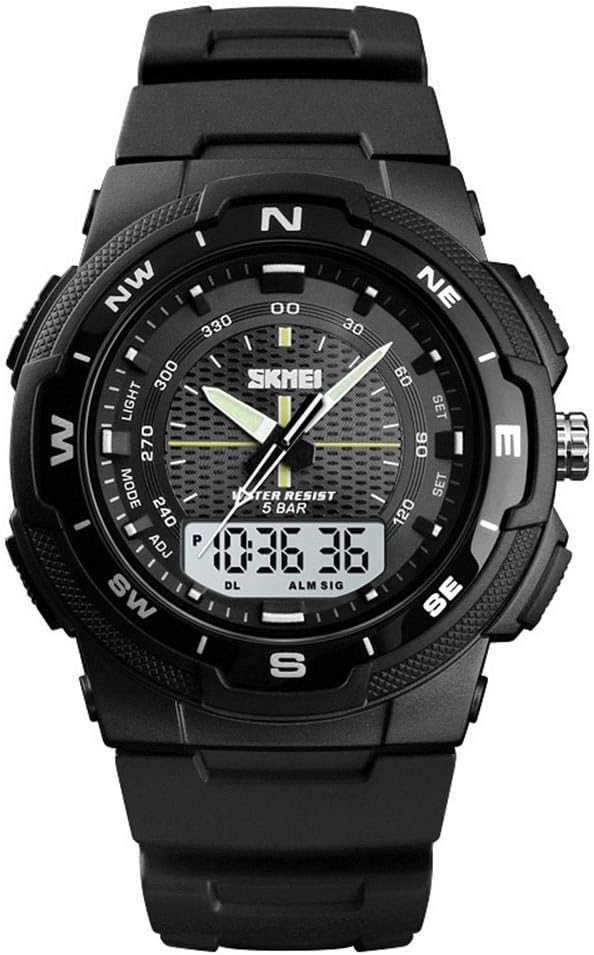
Figure 3: The watch displaying a digital time of 10:36:36, illustrating the digital display clarity.
4. Maintenance and Care
- Cleaning: Wipe the watch case and band regularly with a soft, dry cloth. For the PU leather band, avoid harsh chemicals.
- Water Resistance: The watch is water-resistant to 5 BAR. This means it is suitable for daily use, hand washing, and light rain. It is not suitable for swimming, diving, or showering with hot water. Do not operate buttons underwater.
- Temperature: Avoid exposing the watch to extreme temperatures (hot or cold) or sudden temperature changes.
- Impact: Protect the watch from strong impacts and shocks.
- Chemicals: Keep the watch away from solvents, detergents, perfumes, and other chemicals that may damage the case or band.
- Battery Replacement: When the digital display becomes dim or the watch stops functioning, the battery may need replacement. It is recommended to have the battery replaced by a qualified watch technician to ensure water resistance is maintained.
5. Troubleshooting
| Problem | Possible Cause | Solution |
|---|---|---|
| Digital display is blank or dim. | Low battery. | Replace the battery. |
| Analog hands are not moving. | Crown is pulled out; battery issue. | Push the crown back in; if still not working, replace battery. |
| Buttons are unresponsive. | Watch is in a locked mode; low battery; internal malfunction. | Try pressing ADJ to exit any setting mode; replace battery; consult service center. |
| Water condensation inside the watch. | Exposure to excessive moisture or temperature changes; seal compromised. | Stop using the watch immediately and take it to a qualified technician for inspection and repair. |
6. Specifications
- Model Number: SKMEI 1454
- Display Type: Analog-Digital
- Movement Type: Automatic (for analog, digital is quartz)
- Band Material: PU Leather
- Case Diameter Size: L (40 - 48 mm)
- Water Resistance: 5 BAR (50 meters)
- Product Dimensions: 5 x 12 x 12 cm
- Weight: 160 g
- Targeted Group: Men
- Manufacturer: Skmei
7. Warranty and Support
Specific warranty information for the Skmei Sport Watch SKMEI 1454 is typically provided at the point of purchase or within separate documentation included with the product. Please refer to your purchase receipt or the manufacturer's official website for detailed warranty terms and conditions.
For technical support or service inquiries, it is recommended to contact the retailer where the watch was purchased or visit the official Skmei website for contact information and authorized service centers.
Ask a question about this manual
Ask about setup, troubleshooting, compatibility, parts, safety, or missing instructions. Manuals+ will review the question and use this page’s manual context to help answer it.