
1. Introduction
This manual provides detailed instructions for the installation, operation, and maintenance of your Winnes 4G TK905B GPS Tracker. This device is designed for real-time tracking of vehicles, motorcycles, and trucks, offering features such as geo-fencing, historical route playback, and various alarms. Please read this manual thoroughly before using the product to ensure proper functionality and safety.
2. Package Contents
Upon opening the package, please verify that all the following items are included:
- 1 x Winnes 4G TK905B GPS Tracker Unit
- 1 x USB Charging Cable
- 1 x User Manual
- 1 x Lithium Ion Battery (pre-installed or separate)
- SIM Card Adapters (if applicable)
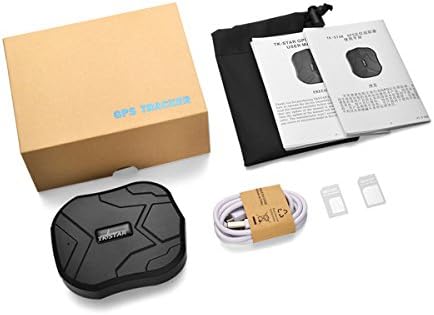
Image: Contents of the Winnes 4G TK905B GPS Tracker package, including the tracker unit, charging cable, user manual, and SIM card adapters.
3. Product Overview
The Winnes 4G TK905B is a compact and robust GPS tracker designed for reliable performance. It features a strong magnetic base for easy installation and an IPX65 waterproof rating for durability in various environments.
3.1 Physical Characteristics
- Dimensions: 3.54 x 2.83 x 1.26 inches
- Weight: 13.4 ounces
- Battery: 10000mAh rechargeable Lithium-ion battery
- Connectivity: 4G/2G Cellular
- Waterproof Rating: IPX65

Image: Detailed view of the Winnes 4G TK905B GPS Tracker showing its dimensions, USB port, SIM card slot, indicator light, lanyard hole, and the five strong magnets on its base.
4. Setup Instructions
4.1 SIM Card Installation
- Ensure the device is powered off.
- Locate the SIM card slot on the side of the tracker.
- Insert a 4G/2G SIM card with an active data plan (minimum 30MB monthly data recommended). Ensure the SIM card is inserted correctly, following the diagram near the slot.
- Close the SIM card slot cover securely to maintain water resistance.
Note: A SIM card is required for the tracker to function. In the USA, Speedtalk SIM cards with a $5 monthly plan are compatible.
4.2 Initial Charging
- Connect the provided USB charging cable to the tracker's USB port.
- Connect the other end of the cable to a standard USB power adapter (not included) or a computer's USB port.
- Allow the device to charge fully before first use. The indicator light will typically change color or turn off when charging is complete.
4.3 Powering On/Off
- Power On: Press and hold the power button (if available) or ensure the SIM card is inserted and the device is charged. The indicator lights will illuminate.
- Power Off: Send an SMS command to the tracker or use the mobile application if supported. Alternatively, remove the SIM card and allow the battery to drain.
4.4 Platform Access
To access tracking features, you will need to use the dedicated mobile application or web platform.
- Mobile App: Download the official tracking app from the App Store (iOS) or Google Play Store (Android). Scan the QR code provided in the manual or on the product packaging.
- Web Platform: Access the web tracking platform via a web browser. The platform URL is http://www.mytkstar.net/.
You will need the device ID (usually found on a sticker on the tracker) and the default password (often '123456' or specified in the manual) to log in.

Image: Screenshot showing the mobile application interface and the web tracking platform for the Winnes 4G TK905B GPS Tracker, along with QR codes for app download.
5. Operating Instructions
5.1 Real-time Tracking
Once the tracker is active and connected to the network, you can view its real-time location on the mobile app or web platform. The GPS accuracy for outdoor tracking is up to 16ft/5m.

Image: The Winnes 4G TK905B GPS Tracker alongside a smartphone displaying its real-time location on a map interface.
5.2 History Route Playback
The device records and stores historical route data. You can review the past movements of the tracker for up to 3 months via the web platform or mobile application.

Image: A smartphone screen showing the history route playback feature, displaying a traced path on a map with date and time options.
5.3 Geo-fence Setup
A geo-fence allows you to define a virtual boundary. When the tracker enters or exits this predefined area, an alert will be sent to your registered contact. This feature is configurable through the mobile app or web platform.

Image: An illustration demonstrating the geo-fence feature, where a virtual zone is set on a map, and alerts are triggered when a vehicle crosses the boundary.
5.4 Multiple Alarms
The TK905B supports various alarm functions to enhance security and monitoring:
- Movement Alarm: Alerts you if the vehicle moves from its parked location.
- Overspeed Alarm: Notifies you if the vehicle exceeds a preset speed limit.
- Vibrate Alarm: Triggers an alert if the device detects significant vibration or impact.
- Low Battery Alarm: Sends a notification when the battery level drops below 10%.

Image: Visual representation of various alarm types including movement, overspeed, vibrate, and low battery alerts.
5.5 Sleep Modes
The tracker features smart sleep modes to optimize battery consumption:
- Sleep by Time: The tracker works for a configured time interval after being woken up (e.g., 5 minutes), then returns to sleep mode. It can be woken by SMS command or a call.
- Sleep by Shock: If no shock is detected within a set period (e.g., 5 minutes), the device enters sleep mode. It can be woken by shock, SMS commands, or a call.
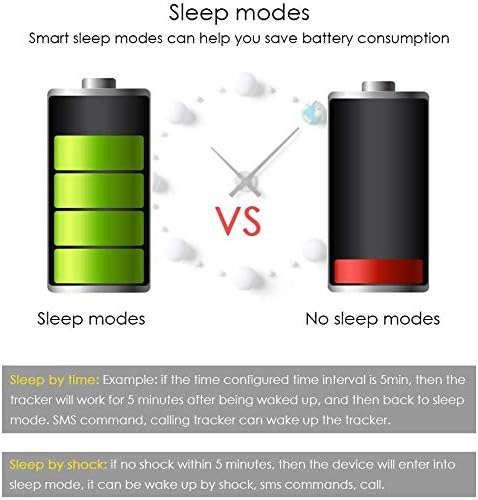
Image: A comparison illustrating battery consumption differences between active and sleep modes for the GPS tracker.
6. Features
The Winnes 4G TK905B GPS Tracker offers a comprehensive set of features for reliable tracking and security:
- 4G/2G Connectivity: Ensures broad network compatibility for tracking.
- Precise Positioning: GPS accuracy up to 5 meters outdoors.
- Magnetic Installation: Built-in strong magnets allow for quick and secure attachment to any flat iron surface on vehicles or assets.
- Waterproof Design: IPX65 rating protects against water splashes and dust.
- Long Battery Life: 10000mAh battery provides up to 100 days of standby time.
- Geo-fence: Set virtual boundaries and receive alerts upon entry or exit.
- Multiple Alarms: Includes movement, overspeed, vibrate, and low battery alerts.
- History Route Playback: Review up to 3 months of past travel routes.
- Sleep Modes: Intelligent power management to extend battery life.
- Free Tracking Platform: Lifetime free access to mobile app (iOS/Android) and web tracking platform.

Image: Diagram illustrating various potential magnetic installation locations on a car, such as the rear bumper, under the seat, inside the trunk, and glove box.
7. Maintenance
To ensure the longevity and optimal performance of your Winnes 4G TK905B GPS Tracker, follow these maintenance guidelines:
- Charging: Recharge the device regularly, especially when a low battery alert is received. Use the provided USB cable and a compatible 5V USB power source.
- Cleaning: Wipe the device with a soft, dry cloth. Avoid using harsh chemicals or abrasive cleaners.
- Water Resistance: While IPX65 rated, avoid prolonged submersion in water. Ensure the SIM card slot cover is always securely closed.
- Storage: Store the device in a cool, dry place when not in use. If storing for an extended period, ensure it has a partial charge (around 50%) to preserve battery health.
8. Troubleshooting
If you encounter issues with your GPS tracker, refer to the following common problems and solutions:
| Problem | Possible Solution |
|---|---|
| Device cannot connect to the network. | Check if the SIM card is correctly inserted and has an active data plan. Ensure 4G/2G network coverage in the area. Restart the device. |
| Inaccurate positioning. | Ensure the device has a clear view of the sky for GPS signals. Indoor or underground locations may result in LBS (Location Based Service) positioning, which is less accurate (100-1000m). |
| Battery drains quickly. | Verify that sleep modes are enabled. Frequent real-time tracking updates (e.g., every 10 seconds) consume more power. Reduce tracking frequency if possible. |
| Cannot log in to the platform/app. | Double-check the device ID and password. Ensure the device is powered on and has network connectivity. Contact customer support if the issue persists. |
| No alerts received. | Confirm that alarm settings are correctly configured in the app/platform. Check notification settings on your mobile device. |
For further assistance, please refer to the Warranty & Support section.
9. Specifications
| Feature | Detail |
|---|---|
| Product Dimensions | 3.54 x 2.83 x 1.26 inches |
| Item Weight | 13.4 ounces |
| Model Number | 4G TK905B |
| Battery | 10000mAh Lithium Ion (included) |
| Connectivity Technology | Cellular (4G/2G) |
| Special Features | International, Magnetic, Waterproof (IPX65) |
| Supported Application | GPS Tracking App/Web Platform |
| Manufacturer | Winnes |
| Date First Available | July 7, 2021 |
10. Warranty & Support
The Winnes 4G TK905B GPS Tracker comes with a 12-month warranty from the date of purchase. Additionally, lifetime technical support is provided to assist you with any questions or issues you may encounter.
10.1 Technical Support
For technical assistance, please contact the support team:
- Seller Support (HYXSYWLKJ): Contact via Amazon Messages or email june@zeerkeer.com.
- Manufacturer Support (Winnes): Email support@mytkstar.com.
10.2 Software Download
For the latest tracking software and app downloads, please visit the official website: