
1. Introduction
The PeroBuno HL-103 is a versatile 3-in-1 device designed for cleaning various electronic devices and household items. It functions as both a powerful air duster and a mini vacuum cleaner, offering a cordless and portable solution for dust and debris removal. This manual provides detailed instructions for the safe and effective use, maintenance, and troubleshooting of your device.

Figure 1.1: The PeroBuno HL-103 device in both air duster and vacuum cleaner configurations.
2. Package Contents
Please verify that all items listed below are included in your package:
- Main Unit (Vacuum Cleaner / Air Duster)
- User Manual
- Mini Brush 1
- Vacuum Nozzle
- Short Nozzle
- Vacuum Pump (integrated function)
- Mini Brush 2
- Blow Nozzle
- USB-C Charging Cable
- HEPA Filter (pre-installed or spare)

Figure 2.1: Visual representation of the PeroBuno HL-103 and its included accessories.
3. Safety Information
To ensure safe operation and prevent damage, please read and follow these safety guidelines:
- Keep the device away from water or other liquids.
- Do not operate the device with wet hands.
- Avoid blocking the air inlets or outlets during operation.
- Do not use the device to vacuum flammable or combustible materials.
- Store the device in a cool, dry place, out of reach of children.
- Use only the provided charging cable or a certified USB-C cable for charging.
- Do not attempt to disassemble or repair the device yourself. Contact customer support for assistance.
4. Setup
4.1 Charging the Device
Before initial use, fully charge the device. The PeroBuno HL-103 features a 6000mAh rechargeable battery with a 10W fast-charging system. A full charge typically takes approximately 3 hours and provides up to 25 minutes of operation.
- Connect the provided USB-C charging cable to the charging port on the device.
- Connect the other end of the USB-C cable to a compatible USB power adapter (not included) or a USB port on a computer.
- The power indicator light will illuminate red during charging.
- Once fully charged, the indicator light will turn green. Disconnect the device from the charger.

Figure 4.1: Charging the PeroBuno HL-103 using the USB-C cable and power indicator lights.
4.2 Attaching Nozzles
The device comes with various nozzles for different cleaning tasks. Ensure the device is powered off before attaching or detaching any accessories.
- For Blower Mode: Attach the Blow Nozzle or Mini Brush 2 to the air outlet port.
- For Vacuum Mode: Attach the Vacuum Nozzle, Short Nozzle, or Mini Brush 1 to the air inlet port (dust collection side).
5. Operating Instructions
5.1 Powering On/Off
To power on the device, press and hold the power button. To power off, press and hold the power button again.
5.2 Blower Mode
Use the blower mode to dislodge and clear dust from surfaces and crevices. This mode is particularly effective for cleaning keyboards, computer components, and other electronics.
- Attach the desired nozzle (e.g., Blow Nozzle) to the air outlet.
- Point the nozzle towards the area to be cleaned.
- Power on the device.
- Move the device steadily to blow away dust.

Figure 5.1: Using the PeroBuno HL-103 in blower mode to clean a keyboard.

Figure 5.2: The air duster function effectively removing dust from inside a computer case.
5.3 Vacuum Mode
The vacuum mode is designed to collect dust, crumbs, and small debris. It is ideal for cleaning keyboards, car interiors, and other surfaces where debris needs to be collected rather than just dispersed.
- Attach the desired nozzle (e.g., Vacuum Nozzle) to the air inlet.
- Point the nozzle towards the area to be cleaned.
- Power on the device.
- Move the device slowly over the surface to vacuum debris.

Figure 5.3: The PeroBuno HL-103 in vacuum mode, effectively cleaning a keyboard.
5.4 Recommended Applications
The PeroBuno HL-103 is suitable for a wide range of cleaning tasks, both indoors and outdoors:
- Cleaning computer keyboards, laptops, and desktop PCs.
- Dusting sensitive electronic components.
- Vacuuming crumbs and debris from desks, car interiors, and sofas.
- Cleaning coffee machines and other small appliances.
- Dusting household items like fans and blinds.

Figure 5.4: Examples of various cleaning tasks the PeroBuno HL-103 can perform, including desk, window tracks, camera, and fan cleaning.
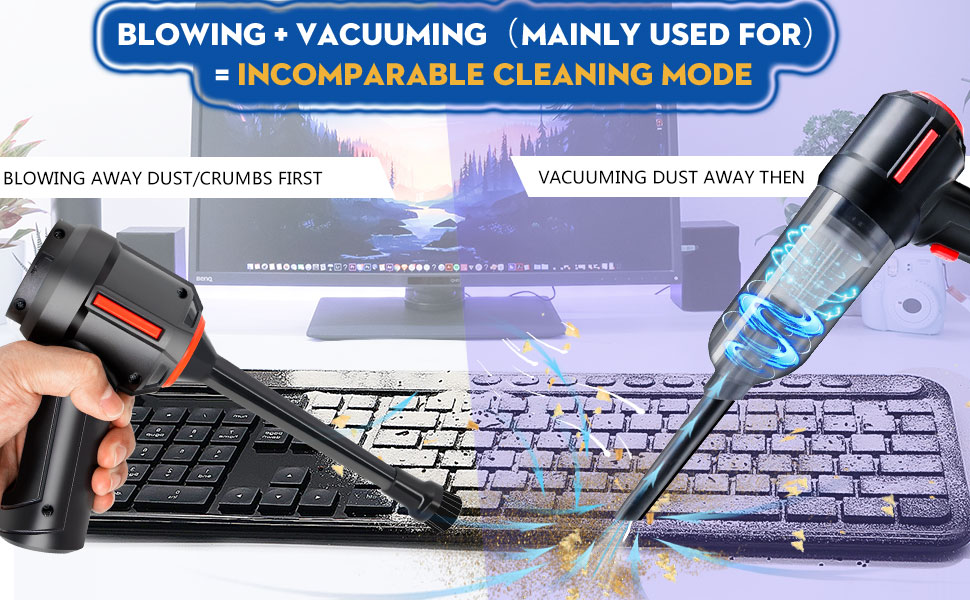
Figure 5.5: Illustration demonstrating the combined use of blowing to dislodge dust and vacuuming to collect it for thorough cleaning.
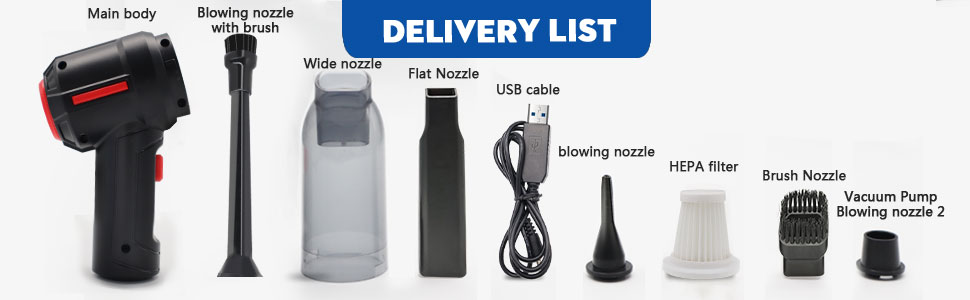
Figure 5.6: The PeroBuno HL-103 effectively cleaning a coffee machine, first blowing grounds and then vacuuming them.
6. Maintenance
6.1 Emptying the Dust Bin
Regularly empty the dust bin to maintain optimal suction performance.
- Ensure the device is powered off.
- Twist or unlatch the dust collect bin from the main unit.
- Carefully empty the collected debris into a waste receptacle.
- Reattach the dust bin securely to the main unit.
6.2 Cleaning the HEPA Filter
The HEPA filter helps capture fine dust particles. Clean it periodically to ensure efficient filtration.
- Ensure the device is powered off and the dust bin is removed.
- Carefully remove the HEPA filter from the dust bin.
- Tap the filter gently to dislodge loose dust. For a more thorough cleaning, rinse the filter under running water.
- Allow the filter to air dry completely before reinserting it. Do not use the device with a wet filter.
- Reinsert the dry HEPA filter into the dust bin and reattach the bin to the main unit.
7. Troubleshooting
If you encounter issues with your PeroBuno HL-103, please refer to the following common problems and solutions:
- Device does not power on:
- Ensure the device is fully charged. Connect it to the charger and check the indicator light.
- Press and hold the power button for a few seconds to ensure it's not a brief press.
- Low suction or blowing power:
- Check if the dust bin is full and empty it if necessary.
- Inspect the HEPA filter for clogs and clean it.
- Ensure all nozzles are securely attached and there are no blockages in the air pathways.
- Verify the battery is sufficiently charged.
- Device stops unexpectedly:
- The battery might be depleted. Recharge the device.
- The device may have overheated. Allow it to cool down before resuming use.
- Charging indicator not working:
- Ensure the USB-C cable is properly connected to both the device and the power source.
- Try a different USB-C cable or power adapter.
If the problem persists after trying these solutions, please contact PeroBuno customer support.
8. Specifications

Figure 8.1: Dimensions of the PeroBuno HL-103 device.
| Feature | Specification |
|---|---|
| Brand | PeroBuno |
| Model Name | HL-103 |
| Special Feature | Portable, Lightweight, Compact, HEPA Filter |
| Filter Type | HEPA Filter |
| Cordless | Yes |
| Capacity | 0.5 Liters |
| Wattage | 120.00 W |
| Charging Time | 3 Hours |
| Maximum Suction | 1.52 Inches |
| Recommended Uses | Indoor and Outdoor Cleaning |
| Form Factor | Handheld |
| Color | Basic-black |
| Product Dimensions | 7.9"L x 2.64"W x 6.9"H |
| Battery Type | Lithium-Ion |
| Noise Level | 70 dB |
| Amperage | 7.4 Amps |
| Battery Life | Up to 25 minutes |
| Controller Type | Push Button |
| Connectivity Technology | USB |
| Item Weight | 1 pound |
9. Warranty and Support
For warranty information or technical support, please refer to the contact details provided with your purchase documentation or visit the official PeroBuno website. Keep your proof of purchase for warranty claims.