
AIDITIYMI ADA-RF-RC284300401B-ADA001
AIDITIYMI RC2843004/01B Replacement Remote Control User Manual
Model: ADA-RF-RC284300401B
Product Overview
The AIDITIYMI RC2843004/01B is a replacement remote control designed to work with Time Warner Cable DTA TV Players. This manual provides instructions for setting up, operating, and maintaining your remote control to ensure optimal performance.

Image: Front view of the RC2843004/01B remote control. This image displays the full layout of the remote, including the TV POWER and DTA POWER buttons at the top, number pad, navigation cluster, and various function buttons like MUTE, VOL, CH, GUIDE, INFO, and INPUT.
Setup Guide
To begin using your new remote control, follow these steps for battery installation and initial pairing.
1. Battery Installation
- Locate the battery compartment on the back of the remote control.
- Slide the battery cover downwards or press the latch to open it.
- Insert two (2) new 1.5V AAA alkaline batteries, ensuring the positive (+) and negative (-) terminals align correctly with the markings inside the compartment.
- Replace the battery cover by sliding it back into place until it clicks securely.
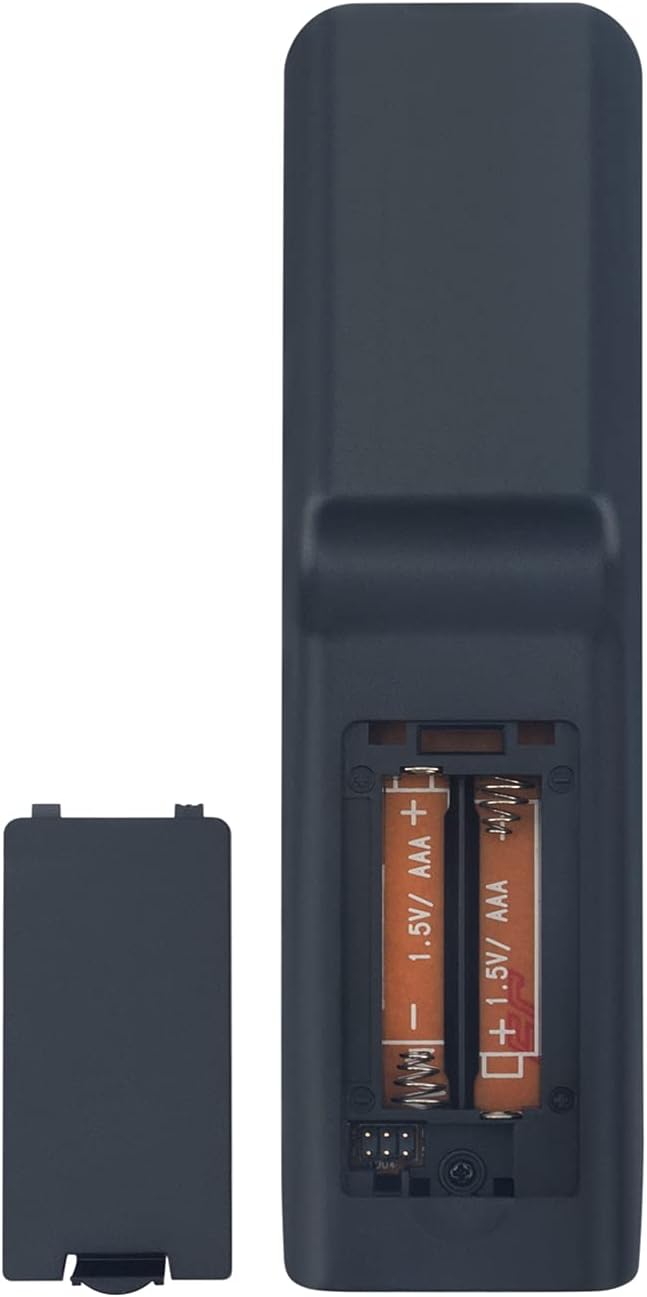
Image: Rear view of the remote control with the battery compartment open, illustrating the correct orientation for inserting two AAA batteries. The battery cover is shown detached next to the remote.
2. Initial Pairing (if required)
After installing the batteries, the remote control should be ready to operate your Time Warner Cable DTA TV Player. In most cases, this replacement remote does not require complex programming. Simply install the batteries, and it should function directly with compatible models. If the remote does not respond, ensure your device is powered on and try pressing a few buttons. Refer to your DTA TV Player's manual for specific pairing instructions if direct operation is not achieved.
Operating Instructions
This section details the primary functions of the buttons on your remote control.
- TV POWER: Powers your television on or off.
- DTA POWER: Powers your Digital Transport Adapter (DTA) or cable box on or off.
- Number Pad (0-9): Used to directly enter channel numbers.
- A, B: Function buttons, typically used for interactive features or specific menu options as indicated on screen.
- MENU: Accesses the main menu of your DTA TV Player.
- CLEAR: Clears entered numbers or exits certain menus.
- Navigation Buttons (Up, Down, Left, Right): Used to navigate through menus and guides.
- SELECT: Confirms a selection or enters a highlighted option.
- MUTE: Mutes or unmutes the audio.
- GUIDE: Displays the program guide.
- LAST: Returns to the previously viewed channel.
- VOL +/-: Increases or decreases the volume.
- CH +/-: Changes the channel up or down.
- INFO: Displays information about the current program.
- INPUT: Cycles through the input sources on your television.
Maintenance
Proper care will extend the life of your remote control.
- Cleaning: Use a soft, dry cloth to clean the remote. Do not use liquid cleaners or abrasive materials.
- Battery Replacement: Replace batteries when the remote's performance degrades or it stops responding. Always replace both batteries at the same time with new ones.
- Storage: Store the remote in a cool, dry place away from direct sunlight and extreme temperatures.
- Avoid Drops: Protect the remote from physical impact, as drops can damage internal components.
Troubleshooting
If you encounter issues with your remote control, try the following solutions:
- Remote Not Responding:
- Ensure batteries are inserted correctly with proper polarity (+/-).
- Replace old batteries with new 1.5V AAA alkaline batteries.
- Check if there are any obstructions between the remote and the DTA TV Player/TV.
- Ensure the DTA TV Player/TV is powered on.
- Limited Functionality:
- Verify that the remote is compatible with your specific Time Warner Cable DTA TV Player model (RC2843004/01B, RC284300401B, RC2843004 01B).
- Some advanced functions might require specific setup on your DTA TV Player; consult its user manual.
- Buttons Not Working:
- Clean the remote's surface and buttons to remove any dirt or debris that might be obstructing button presses.
- If only specific buttons are not working, it might indicate internal damage; consider replacement.
Specifications
| Feature | Detail |
|---|---|
| Model Number | ADA-RF-RC284300401B-ADA001 |
| Compatible Models | RC2843004/01B, RC284300401B, RC2843004 01B |
| Power Source | 2 x 1.5V AAA Batteries (not included) |
| Product Dimensions | 6 x 2 x 0.6 inches |
| Item Weight | 2.46 ounces |
| Color | Black |
| Manufacturer | AIDITIYMI Factory |
Support
For any questions or assistance regarding your AIDITIYMI remote control, please contact the manufacturer or your retailer. Refer to the contact information provided with your purchase or visit the AIDITIYMI official support channels.
Note: Batteries and detailed instructions for your specific Time Warner Cable DTA TV Player are not included with this replacement remote control. Please refer to your original device's manual for comprehensive setup and pairing procedures if needed.
Ask a question about this manual
Ask about setup, troubleshooting, compatibility, parts, safety, or missing instructions. Manuals+ will review the question and use this page’s manual context to help answer it.