
SINSEN SA28F
SINSEN Car Safety Hammer Flashlight (Model SA28F) Instruction Manual
Comprehensive guide for operating and maintaining your SINSEN multi-functional emergency tool.
1. Introduction
The SINSEN Car Safety Hammer Flashlight (Model SA28F) is a versatile emergency tool designed for vehicle safety and various utility purposes. It integrates multiple functions to assist in emergency situations and provide convenient lighting. This manual provides detailed instructions for its proper use and care.

Figure 1: SINSEN Car Safety Hammer Flashlight, Model SA28F.
2. Product Overview and Features
The SINSEN Car Safety Hammer Flashlight combines 16 essential functions into one compact device:
- Window Breaker: Tungsten steel alloy head for emergency window shattering.
- Seatbelt Cutter: Embedded ultra-sharp blade for quickly cutting seatbelts.
- Rescue Alarm: Integrated siren for attracting attention in emergencies.
- Flashlight (Front Light): Three modes: High, Medium, and Flash.
- Side Light: Three modes: High, Medium, and Strobe SOS Beacon.
- Solar Charging: Built-in solar panels for eco-friendly recharging.
- USB Charging: Micro USB port for convenient charging.
- Mobile Power Bank: USB output port to charge external devices.
- Powerful Magnet: For attaching the device to metallic surfaces for hands-free use.
- Portable Design: Compact and easy to carry.

Figure 2: Overview of the 16-in-1 emergency kit features.
3. Setup and Charging
Before first use, fully charge the device using one of the available methods.
3.1. USB Charging
- Locate the USB charging port on the device (typically covered by a rubber flap).
- Connect the provided USB cable to the device and to a 5V USB power adapter (not included) or a computer USB port.
- The charging indicator light will illuminate (e.g., red) to show charging is in progress.
- A full charge typically takes approximately 5 hours. The indicator light will change color (e.g., green) or turn off when fully charged.
3.2. Solar Charging
The device features built-in solar panels for supplementary charging. Place the flashlight with the solar panels facing direct sunlight. Solar charging is slower than USB charging and is ideal for maintaining charge or for emergency power in outdoor settings.

Figure 3: Solar and USB charging ports and functionality.
Video 1: Demonstration of the SINSEN Multi-functional Car Safety Hammer, including charging features.
4. Operating Instructions
4.1. Flashlight (Front Light)
Press the main power button (usually a black square button) to cycle through the front light modes:
- First press: High brightness.
- Second press: Medium brightness.
- Third press: Flash mode.
- Fourth press: Turn off.
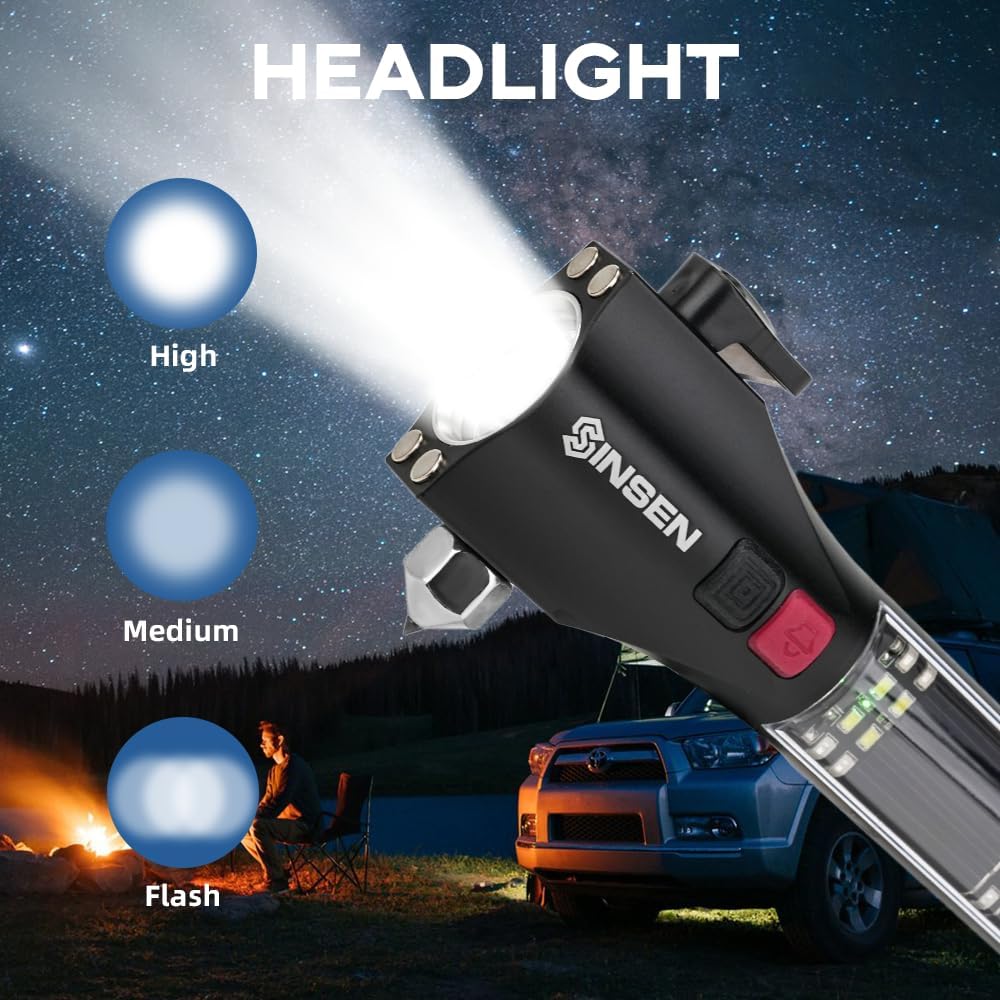
Figure 4: Front light (headlight) with High, Medium, and Flash modes.
4.2. Side Light (Work Light & SOS Beacon)
Long press the main power button to activate the side light. Subsequent short presses will cycle through its modes:
- Long press: Activate High brightness side light.
- Short press: Medium brightness side light.
- Short press: Strobe SOS Beacon (flashing red and blue lights).
- Short press: Turn off.

Figure 5: Side light with Bright, Weak, and Strobe Beacon modes.
4.3. Rescue Alarm (Siren)
To activate the loud rescue alarm, long press the red button (speaker icon). The alarm has multiple tones. Press the red button again to cycle through different alarm sounds or to turn it off.

Figure 6: SOS alarm and strobe lights for emergency signaling.
4.4. Window Breaker
In an emergency, use the tungsten steel alloy tip to break vehicle windows. Remove the protective silicone cover before use. Aim for a corner of the side window and strike firmly. This tool is designed for tempered glass found in side windows, not windshields.

Figure 7: Close-up of the enhanced tungsten steel spike for window breaking.
Video 2: Demonstration of the Car Emergency Flashlight's window breaking and seatbelt cutting capabilities.
4.5. Seatbelt Cutter
The device includes an embedded ultra-sharp blade for cutting seatbelts. Hook the seatbelt into the cutter's slot and pull firmly to slice through it. The design protects fingers from accidental cuts.
Figure 8: Close-up of the embedded ultra-sharp blade for seatbelt cutting.
4.6. Mobile Power Bank
To use the device as a power bank, open the rubber flap covering the USB ports. Connect your mobile phone, tablet, or other USB-powered device to the USB output port using your device's charging cable. The flashlight will provide power to charge your external device.
4.7. Magnetic Mount
The flashlight features powerful magnets on its head, allowing it to be securely attached to metallic surfaces. This is useful for hands-free lighting during vehicle repairs (e.g., under the hood) or as a warning light on the car's exterior.

Figure 9: Flashlight demonstrating magnetic attachment for hands-free use.
5. Maintenance
- Keep the device clean and dry. Wipe with a soft, damp cloth if necessary.
- Regularly check the battery level and recharge as needed, especially if stored for extended periods.
- Ensure the protective silicone cover for the window breaker tip is in place when not in use to prevent accidental damage or injury.
- Store the device in a cool, dry place, away from direct sunlight and extreme temperatures.
6. Troubleshooting
| Problem | Possible Cause | Solution |
|---|---|---|
| Flashlight not turning on. | Low battery. | Charge the device using USB or solar power. |
| Device not charging via USB. | Faulty cable or power source. | Try a different USB cable or power adapter. Ensure the cable is fully inserted. |
| Solar charging seems slow. | Insufficient sunlight or normal operation. | Ensure solar panels are in direct, strong sunlight. Solar charging is inherently slower than USB. |
| Power bank not charging external device. | Low battery in flashlight or incorrect cable. | Ensure flashlight is sufficiently charged. Use the correct charging cable for your external device. |
7. Specifications
- Model: SA28F
- Brand: SINSEN
- Material: Aluminum
- Color: Black
- Light Source Type: LED
- Power Source: Solar Powered, USB Rechargeable
- White Brightness: 1200 Lumens (Front Light), 200 Lumens (Side Light)
- Voltage: 5 Volts
- Battery Cell Composition: Lithium Ion (Rechargeable)
- Item Weight: 0.55 Pounds (approximately 8.8 ounces)
- Product Dimensions: 9"D x 1"W x 4"H (Note: Dimensions might be approximate or refer to packaging)
- Water Resistance Level: Not Water Resistant
- Special Features: Car Emergency Kit, Solar Powered, Multifunctional Tactical Tool, Seat Belt Cutter, Window Glass Breaker, Mobile Power Bank, Magnetic Mount.
8. Safety Information
- This device is intended for emergency use and general utility. Use the window breaker and seatbelt cutter only in genuine emergency situations.
- Keep out of reach of children. The sharp components (window breaker tip, seatbelt cutter blade) can cause injury.
- Do not aim the flashlight directly into eyes, as the high lumen output can cause temporary vision impairment.
- Do not expose the device to water or excessive moisture, as it is not water resistant.
- Do not attempt to disassemble or modify the device, as this may void the warranty and pose safety risks.
- Avoid extreme temperatures. Do not leave the device in direct sunlight for prolonged periods inside a closed vehicle, as this can damage the battery.
9. Warranty and Support
For warranty information or product support, please refer to the contact details provided in the original product packaging or visit the official SINSEN website. Keep your purchase receipt for warranty claims.
Ask a question about this manual
Ask about setup, troubleshooting, compatibility, parts, safety, or missing instructions. Manuals+ will review the question and use this page’s manual context to help answer it.