
Introduction
This manual provides instructions for the proper installation, use, and maintenance of your jjphonecase R0072 Tennis Case Cover, designed specifically for the Samsung Galaxy A22 5G. This case is engineered to protect your device while maintaining its functionality and aesthetic appeal.
Setup and Installation
Follow these steps to correctly install the R0072 Tennis Case Cover onto your Samsung Galaxy A22 5G.
- Prepare Your Device: Ensure your Samsung Galaxy A22 5G is clean and free of dust or debris. Gently wipe the front and back surfaces with a soft, dry cloth.
- Align the Case: Hold the case with the design facing outwards. Carefully align the camera cutout and button cutouts of the case with those on your phone.
- Insert the Phone: Starting from one corner, gently push your phone into the case. Apply even pressure around the edges until the phone is fully seated within the case. Ensure all edges of the phone are securely covered by the case.
- Verify Fit: Check that all ports, buttons, and the camera lens are accessible and unobstructed. The case should fit snugly without any loose areas.
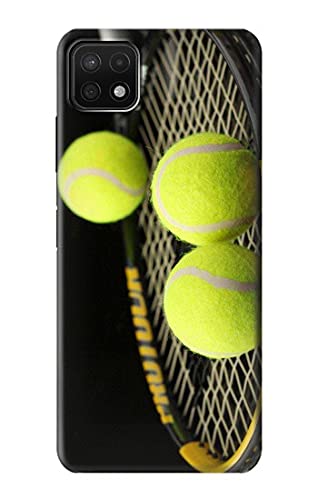
Image 1: The R0072 Tennis Case Cover securely installed on a Samsung Galaxy A22 5G device.
Operating and Usage
The R0072 Tennis Case Cover is designed for daily use, providing protection without hindering your phone's functionality.
- Port Access: The case features precise cutouts for the charging port, headphone jack (if applicable), and speakers, allowing full access without removal.
- Button Functionality: The case is designed with responsive button covers that allow for easy operation of the power and volume buttons.
- Camera Use: The camera cutout ensures that the phone's camera functions are fully accessible and unobstructed for photography and video recording.
- Wireless Charging: This case is compatible with wireless charging. You do not need to remove the case to charge your device wirelessly.
Maintenance and Care
To ensure the longevity and appearance of your R0072 Tennis Case Cover, follow these simple cleaning instructions:
- Cleaning: Use a soft, damp cloth with mild soap and water to gently wipe the surface of the case. Avoid abrasive cleaners or harsh chemicals, as these can damage the finish.
- Drying: After cleaning, dry the case thoroughly with a clean, soft cloth. Ensure no moisture remains before reattaching it to your phone.
- Storage: If removing the case for extended periods, store it in a clean, dry place away from direct sunlight and extreme temperatures.
Troubleshooting
If you encounter any issues with your R0072 Tennis Case Cover, refer to the following common solutions:
- Case Does Not Fit:
Solution: Ensure you have the correct model of phone (Samsung Galaxy A22 5G). This case is specifically designed for this model. Verify that the phone is inserted correctly and fully seated within the case.
- Difficulty Accessing Ports/Buttons:
Solution: Check if the case is misaligned. Remove the case and re-install it, ensuring all cutouts align perfectly with your phone's features.
- Case Appears Damaged:
Solution: Inspect the case for any cracks or deformities. If the case is damaged, its protective capabilities may be compromised, and replacement is recommended.
Specifications
| Product Name | R0072 Tennis Case Cover |
| Brand | jjphonecase |
| Compatible Phone Model | Samsung Galaxy A22 5G |
| Material | High-grade plastic |
| Features | Glossy finish, Slim fit, Lightweight, Impact resistant, Durable, Easy access to all ports, controls & sensors. |
| Style | Printed (Tennis graphic) |
Warranty Information
Specific warranty details for the jjphonecase R0072 Tennis Case Cover are not provided in this manual. Please refer to the product packaging or the retailer's website for any applicable warranty terms and conditions.
Customer Support
For further assistance or inquiries regarding your jjphonecase R0072 Tennis Case Cover, please contact the retailer or manufacturer directly. Contact information may be available on the product packaging or their official website.