
JAYEGT JY-30-W
JAYEGT Motorized Rotating Display Stand User Manual
Model: JY-30-W
1. Introduction
Thank you for choosing the JAYEGT Motorized Rotating Display Stand. This electric turntable is designed to provide a professional and dynamic display solution for various applications, including product photography, live shows, and general product display. With its 360-degree rotation, remote control capabilities, and robust load capacity, it offers versatility and ease of use. Please read this manual thoroughly before operation to ensure proper setup and safe use.

Image 1.1: Overview of the JAYEGT Motorized Rotating Display Stand, showcasing its components and load capacity.
2. Safety Information
- Power Supply: Use only the provided power adapter. Ensure the voltage matches your local power supply (AC110~240V).
- Load Capacity: The maximum load capacity is 350 lbs (158 kg). For optimal performance and stability, place items centrally on the turntable. Placing heavy items off-center may reduce the effective load capacity and affect rotation smoothness.
- Stable Surface: Always place the display stand on a flat, stable, and level surface to prevent tipping or uneven rotation.
- Environment: Do not expose the unit to water, excessive moisture, or extreme temperatures. Use indoors only.
- Children and Pets: Keep out of reach of children and pets to prevent accidents.
- Maintenance: Do not attempt to disassemble or repair the unit yourself. Refer all servicing to qualified personnel.
3. Package Contents
Please check the package for the following items:
- JAYEGT Motorized Rotating Display Stand (11.8-inch, White)
- Remote Control
- Power Adapter (AC110~240V)
- Instruction Manual (this document)
- 5 Colors PVC Backgrounds (Black, White, Grey, Blue, Orange)
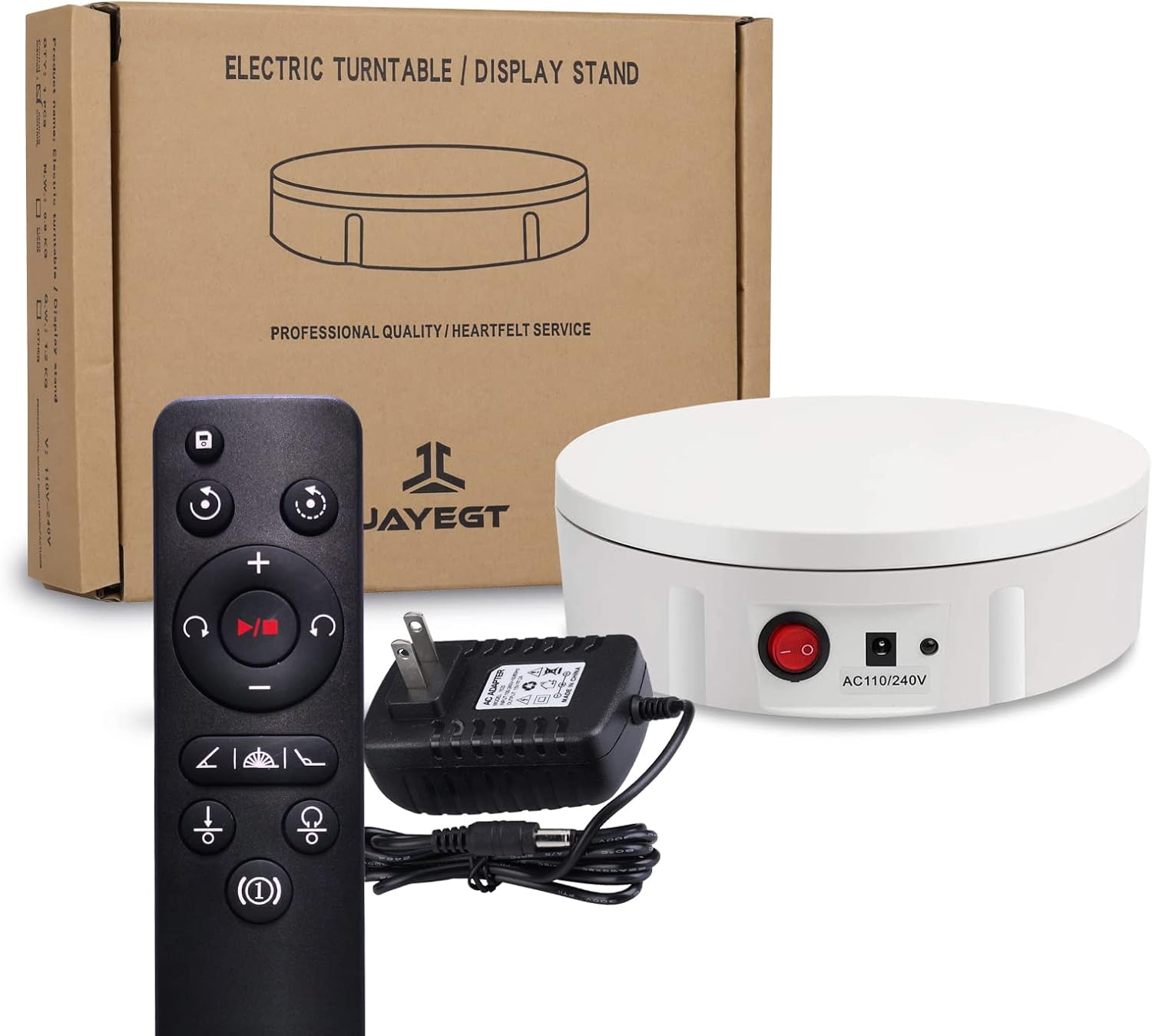
Image 3.1: All components included in the JAYEGT Motorized Rotating Display Stand package.
4. Setup
- Unpack: Carefully remove all components from the packaging.
- Placement: Place the display stand on a flat, stable, and level surface. Ensure the non-slip feet are securely positioned.
- Connect Power: Locate the power socket on the side of the display stand. Connect the power adapter to the socket, then plug the adapter into a suitable electrical outlet.
- Power On: Flip the red power switch on the side of the stand to the 'ON' position. The indicator light should illuminate.
- Attach Background (Optional): If desired, place one of the 5 colored PVC backgrounds on top of the turntable.

Image 4.1: Details of the display stand's base, showing non-slip feet and control panel.
5. Operating Instructions
The JAYEGT Motorized Rotating Display Stand is controlled via the included remote. Ensure the remote has batteries and is pointed towards the sensor light on the stand.
5.1 Remote Control Functions
- Power Button: Turns the stand on/off.
- Direction Control: Toggle between clockwise and counter-clockwise rotation.
- Speed Adjustment: Increase or decrease rotation speed. The speed range is 22-60 seconds per revolution (10 adjustable gears).
- Angle Circulation Modes: Select specific rotation angles (45°, 90°, 180°) for intermittent rotation.
- Continuous/Intermittent Rotation: Switch between continuous rotation and rotation with pauses at set angles.
- Position Memory: The stand can remember its last position or settings.
5.2 Placing Items on the Stand
For best results and to utilize the full load capacity, always place the item you wish to display as centrally as possible on the turntable. This ensures balanced rotation and prevents strain on the motor.

Image 5.1: Examples of different items displayed on the rotating stand for various applications.

Image 5.2: The display stand in use for capturing 360-degree product images.

Image 5.3: The display stand supporting a person for live show demonstrations or dynamic photography.
5.3 Using the Backgrounds
The included 5 colors PVC backgrounds can be placed directly on the turntable surface to provide a clean and consistent backdrop for your displayed items. Choose the color that best complements your product or desired aesthetic.

Image 5.4: The display stand with its accompanying set of five colored PVC backgrounds.
6. Maintenance
- Cleaning: To clean the display stand, unplug it from the power source. Wipe the surface with a soft, dry cloth. Do not use abrasive cleaners, solvents, or excessive moisture, as this may damage the unit.
- Storage: When not in use, store the display stand in a cool, dry place, away from direct sunlight and extreme temperatures.
- Remote Control: If the remote control is not responding, check and replace its batteries if necessary.
7. Troubleshooting
| Problem | Possible Cause | Solution |
|---|---|---|
| Stand does not rotate. | No power; Power switch off; Remote battery low/dead. | Ensure power adapter is securely plugged in. Turn the red power switch to 'ON'. Replace remote control batteries. |
| Rotation is uneven or jerky. | Item placed off-center; Overload; Unstable surface. | Reposition the item to the center of the turntable. Reduce the weight of the item. Place the stand on a flat, stable surface. |
| Remote control not responding. | Low/dead batteries; Obstruction between remote and sensor; Remote too far. | Replace remote control batteries. Ensure clear line of sight to the stand's sensor. Move closer to the stand. |
| Stand makes unusual noise. | Overload; Internal issue. | Reduce the weight on the stand. If noise persists, discontinue use and contact customer support. |
8. Specifications
- Brand: JAYEGT
- Model Number: JY-30-W
- Material: Acrylonitrile Butadiene Styrene (ABS)
- Color: White
- Item Diameter: 11.8 Inches (30 cm)
- Item Weight: 3.52 pounds (1.6 Kilograms)
- Maximum Load Capacity: 350 lbs (158 kg) - Note: Load capacity may be reduced if items are not centered.
- Power Supply: AC110~240 V
- Rotation Speed Range: 22-60 seconds per revolution (10 adjustable gears)
- Control Method: Remote Control
9. Warranty and Support
JAYEGT products are manufactured with quality and performance in mind. For specific warranty information, please refer to the warranty card included with your purchase or contact the seller directly. If you encounter any issues or require technical assistance, please reach out to JAYEGT customer support through the retailer's platform or visit the official JAYEGT store for contact details.
JAYEGT Store Link: https://www.amazon.com/stores/JAYEGT/page/18BBA215-CA7D-4311-AA33-05B29E7292C2
Related documentsJY-30-W


Ask a question about this manual
Ask about setup, troubleshooting, compatibility, parts, safety, or missing instructions. Manuals+ will review the question and use this page’s manual context to help answer it.