
Introduction
This manual provides instructions for the MONSIATUG Replacement Remote Control, designed for use with various Klipsch Soundbar models. This remote control requires no programming and is ready for use after battery installation.
Compatible Klipsch Soundbar Models:
- RSB-3
- RSB-8
- RSB-6
- R4B
- R-4B
- RSB-11
- RSB-14
Setup
1. Battery Installation
The remote control operates on one CR2025 coin cell battery (not included). Follow these steps to install the battery:
- Locate the battery compartment on the back of the remote control.
- Press the "RELEASE" tab and slide out the battery tray.
- Insert one CR2025 battery with the positive (+) side facing upwards, as indicated by the diagram inside the compartment.
- Slide the battery tray back into the compartment until it clicks securely into place.
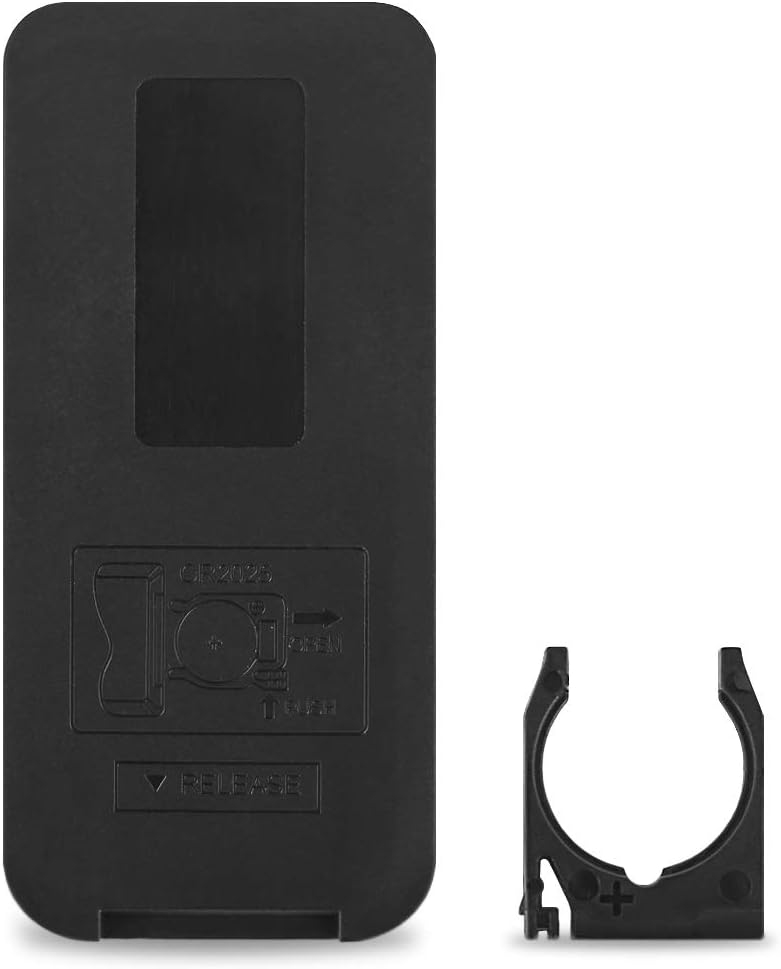
Image Description: This image displays the back of the remote control, highlighting the battery compartment. A separate battery tray is shown next to it, illustrating how to insert a CR2025 battery with the positive (+) terminal facing up. The word "RELEASE" is visible near the tab for opening the compartment.
Note: This remote control does not require any programming. It is designed to work immediately with compatible Klipsch Soundbar models once the battery is installed.
Operating Instructions
The remote control features various buttons for controlling your Klipsch Soundbar. Refer to the image below for button layout and functions.

Image Description: A clear, top-down view of the MONSIATUG replacement remote control. The remote is black with gold-colored buttons, each labeled with an icon or text indicating its function, such as Power, TV, Mute, Volume Up/Down, Subwoofer Up/Down, HDMI, LED, Bluetooth, Analog, Digital, Play/Pause, Skip Back, Skip Forward, Surround, Voice/Dialog, and Night mode.
Button Functions:
| Button | Function |
|---|---|
| Power (⏻) | Turns the soundbar on or off. |
| TV | Switches the soundbar input to TV. |
| Mute (🔇) | Mutes or unmutes the soundbar audio. |
| Volume Up (🔊) | Increases the soundbar volume. |
| Volume Down (🔉) | Decreases the soundbar volume. |
| SUB+ | Increases subwoofer volume. |
| SUB- | Decreases subwoofer volume. |
| HDMI | Selects HDMI input. |
| LED | Controls the LED indicator on the soundbar. |
| Bluetooth (☆) | Activates Bluetooth pairing mode or selects Bluetooth input. |
| ANALOG | Selects Analog input. |
| DIGITAL | Selects Digital input. |
| Play/Pause (⏸) | Plays or pauses media playback. |
| Skip Back (⏮) | Skips to the previous track. |
| Skip Forward (⏭) | Skips to the next track. |
| SUR (Surround) | Activates or deactivates surround sound mode. |
| VOICE (Dialog) | Enhances dialog clarity. |
| NIGHT | Activates Night mode for reduced dynamic range. |
Maintenance
Cleaning the Remote Control
To maintain the remote control's appearance and functionality:
- Wipe the surface with a soft, dry cloth.
- Do not use abrasive cleaners, waxes, or solvents.
Battery Replacement
Replace the CR2025 battery when the remote control's response becomes inconsistent or stops working. Refer to the "Battery Installation" section for instructions.
Important: Dispose of used batteries according to local regulations. Keep batteries out of reach of children.
Troubleshooting
| Problem | Possible Cause | Solution |
|---|---|---|
| Remote control is not working. | Battery is dead or incorrectly installed. | Replace the CR2025 battery, ensuring correct polarity. |
| Remote control range is reduced. | Low battery power. Obstruction between remote and soundbar. | Replace the battery. Ensure a clear line of sight to the soundbar's IR receiver. |
| Specific buttons are not responding. | Remote control malfunction. | Ensure the remote is pointed directly at the soundbar. If the issue persists after battery replacement, the remote may be faulty. |
| Remote works for some soundbar models but not others. | The remote is designed for specific Klipsch Soundbar models. | Verify your soundbar model is listed in the compatible models section of this manual. |
Specifications
- Brand: MONSIATUG
- Model: RSB-3 (Replacement Remote)
- Compatible Devices: Klipsch Soundbar models RSB-3, RSB-8, RSB-6, R4B, R-4B, RSB-11, RSB-14
- Battery Type: 1 x CR2025 (not included)
- Special Feature: No Programming Required
- Color: Black
- Dimensions: Approximately 3.38 inches (Length) x 1.57 inches (Width) x 0.23 inches (Thickness)
- Weight: Approximately 0.634 ounces

Image Description: This image provides a diagram of the remote control with its key dimensions labeled. The length is shown as 3.38 inches, the width as 1.57 inches, and the thickness as 0.23 inches. This helps users understand the physical size of the device.
Warranty and Support
MONSIATUG provides a 360-day warranty return service for this product. For any issues or support inquiries, please contact the seller directly through your purchase platform.
Contact Information: Refer to your purchase receipt or the seller's information on the platform where the product was acquired.