
AUVON B098JMHPFN
AUVON 24 Modes Dual Channel TENS Unit Muscle Stimulator User Manual
Introduction
This manual provides essential information for the safe and effective operation of your AUVON 24 Modes Dual Channel TENS Unit Muscle Stimulator. Please read it thoroughly before first use and retain it for future reference.
The AUVON TENS Unit is designed to provide drug-free pain relief and improve muscle performance. It utilizes Transcutaneous Electrical Nerve Stimulation (TENS) to help reduce pain and muscle spasms caused by various conditions such as neck pain, back pain, knee pain, arthritis, period pain, and sports injuries. Additionally, Electrical Muscle Stimulation (EMS) activates muscles through electrical impulses to assist in increasing strength and endurance, serving as a rehabilitation and strength training tool.
Important Safety Information
WARNING: This product is not suitable for individuals with certain medical conditions or circumstances. Please read the following points carefully before using this product.
- Do not use this product if you have an implanted defibrillator, cardiac pacemaker, or any other implanted metallic or electronic device.
- Do not use this product if you have heart rhythm problems, epilepsy, brain diseases, or neurological disorders.
- Do not use this product if you have undiagnosed chronic pain.
- Do not use this product if you are pregnant or in labor.
- Do not use this product if you have cancer.
- Do not use this product if you are sensitive to electrotherapy.
- Do not use this product excessively.
- Do not use this product above the neck, especially on the head or neck area.
- Do not use this product if you are under 22 years of age.
Individual symptoms, situations, circumstances, and results may vary. The information provided is not intended to be used for medical diagnosis or treatment or as a substitute for professional medical advice. Please consult your physician or qualified health care provider regarding your condition and appropriate medical treatment.
What's Included
Your AUVON TENS Unit package includes the following items:
- 1 x AUVON TENS machine
- 10 x TENS Unit Pads (4 pcs 2x2", 2 pcs 2x4", 4 pcs 1.3" round)
- 2 x Lead Wires (with Cable Ties)
- 1 x Type-C to USB Cable
- 1 x User Manual (this document)
- 1 x Pads Holder
- 1 x Dust-Proof Bag
- 1 x Belt Clip

Image: The AUVON TENS unit, various sizes of electrode pads, lead wires, and accessories including a belt clip and storage bag.
Product Features
- Dual Channel Operation: Independent A/B channels allow for simultaneous treatment of two different body areas with varying intensity settings.
- 24 Modes & 20 Intensities: Offers a wide range of massage modes and adjustable intensity levels for personalized pain relief and muscle stimulation.
- Extended Battery Life: Equipped with a large 300mAh lithium battery, providing up to 40 hours of standby time, significantly longer than many comparable units.
- Adjustable Timer: Features a flexible time setting from 10 to 90 minutes, as well as a continuous mode for uninterrupted sessions.
- Premium Electrode Pads: Self-adhesive pads designed for durability, offering up to 45 uses per set. Includes various sizes for different body parts.
- Portable Design: Compact and lightweight, with an included belt clip and dust-proof bag for convenient transport and storage.
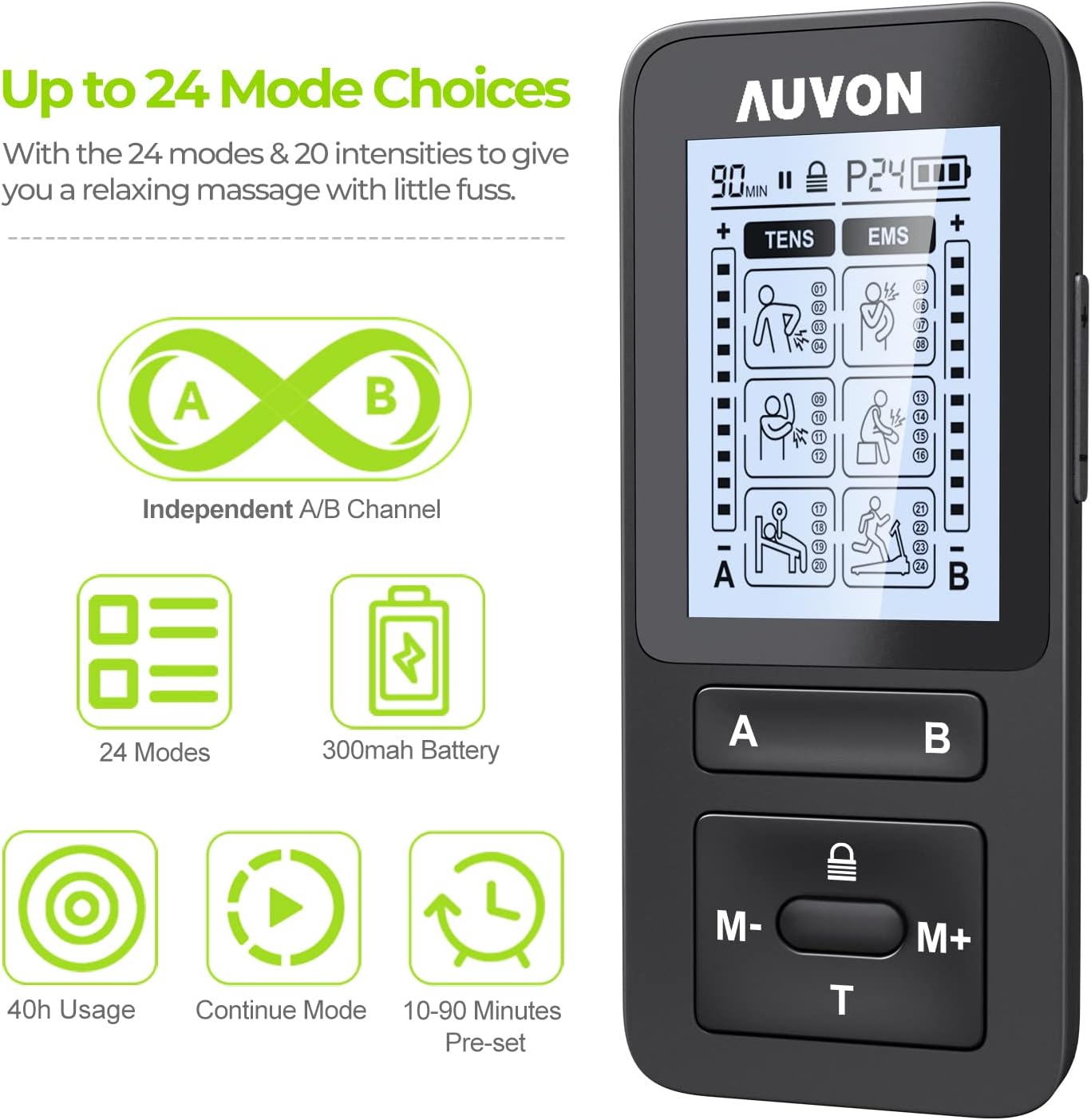
Image: The AUVON TENS unit display highlighting the 24 modes, independent A/B channels, 300mAh battery, 40h usage, continuous mode, and 10-90 minute pre-set timer.

Image: A visual comparison showing the AUVON unit's 300mAh battery capacity providing up to 40% longer lasting power compared to a 150mAh battery.
Setup Instructions
- Charge the Device: Before first use, fully charge the TENS unit using the provided Type-C to USB cable. Connect it to a wall charger, power bank, or laptop. The battery indicator on the screen will show charging status.
- Connect Lead Wires: Insert the pin connectors of the lead wires into the output ports (A and B) on the top of the TENS unit.
- Attach Electrode Pads: Connect the other end of the lead wires to the electrode pads. Ensure a secure connection. Peel the protective film from the gel side of the pads.
- Apply Pads to Skin: Clean and dry the skin area where you intend to apply the pads. Place the pads firmly on the desired treatment area. Ensure pads are not placed over broken skin, open wounds, or sensitive areas like the neck or head.

Image: A detailed diagram illustrating the layers of the medical-grade electrode pads, including strong non-woven cloth, conductive wire-end layer, conductive carbon film, and TENS premium gel. It also shows different pad sizes for various body parts.
Operating Instructions
- Power On/Off: Press and hold the central button (between M- and M+) for 2 seconds to turn the device on or off.
- Select Channel: Press the 'A' or 'B' button to select the desired channel for adjustment.
- Choose Mode: Use the 'M-' or 'M+' buttons to cycle through the 24 available modes. The selected mode will be displayed on the screen.
- Adjust Intensity: Use the '+' and '-' buttons (located above the A/B buttons) to increase or decrease the intensity level for the selected channel. Start with a low intensity and gradually increase until a comfortable, yet effective, sensation is felt.
- Set Timer: Press the 'T' button to adjust the treatment time. You can select from 10 to 90 minutes or choose the continuous mode.
- Lock Function: Press the lock button (above the 'T' button) to lock the screen and prevent accidental changes to settings during use. Press again to unlock.

Image: A three-step diagram illustrating how to operate the AUVON TENS unit: Step 1 for On/Off and Channel selection, Step 2 for Mode and Intensity adjustment, and Step 3 for Timer and Lock function.
Maintenance
- Cleaning Pads: After each use, gently wipe the gel side of the electrode pads with a damp (not wet) microfiber cloth. Allow them to air dry before reattaching them to the pads holder.
- Storing Pads: Store the pads on the provided pads holder to maintain their adhesive quality and prolong their lifespan. Keep them in the dust-proof bag when not in use.
- Device Cleaning: Wipe the TENS unit with a soft, dry cloth. Do not use abrasive cleaners or immerse the device in water.
- Charging: Recharge the device when the battery indicator is low. Avoid overcharging for extended periods.
- Storage: Store the unit and accessories in a cool, dry place away from direct sunlight and extreme temperatures.
Troubleshooting
| Problem | Possible Cause | Solution |
|---|---|---|
| No sensation or weak sensation |
|
|
| Device does not turn on |
|
|
| Pads losing stickiness quickly |
|
|
Specifications
- Model: B098JMHPFN
- Brand: AUVON
- Battery: 300mAh Lithium Battery
- Channels: Dual (A/B Independent)
- Modes: 24
- Intensity Levels: 20
- Timer Settings: 10-90 minutes, Continuous Mode
- Pad Lifespan: Up to 45 uses per set (with proper care)
- Dimensions: 5.83 x 3.58 x 2.64 inches (Package)
- Weight: 10.55 ounces (Package)
Warranty and Support
AUVON provides 24-month Worry-free Services and Lifetime Technical Support for your TENS unit. If you encounter any issues or have questions regarding your device, please contact AUVON customer support for assistance.
For further information or support, please visit the official AUVON website or contact their customer service directly.
Ask a question about this manual
Ask about setup, troubleshooting, compatibility, parts, safety, or missing instructions. Manuals+ will review the question and use this page’s manual context to help answer it.