1. Introduction
Thank you for choosing the DORTALA 4-in-1 Portable Evaporative Air Cooler. This versatile appliance functions as an air cooler, fan, humidifier, and anion generator, designed to provide a comfortable and fresh indoor environment. It effectively turns hot, dry air into cool, moist air while also purifying it. Please read this manual thoroughly before operation to ensure proper use, maintenance, and safety.

Image 1.1: The DORTALA Evaporative Air Cooler, showcasing its sleek design, remote control, and included ice boxes.
2. Safety Instructions
To reduce the risk of fire, electric shock, or injury, always follow these basic safety precautions:
- Read all instructions before using the appliance.
- Ensure the power supply voltage matches the rating label on the appliance.
- Always unplug the cooler from the power outlet before cleaning, servicing, or moving it.
- Do not immerse the appliance, cord, or plug in water or other liquids.
- Keep the appliance away from heat sources, direct sunlight, and flammable materials.
- Do not operate the cooler with a damaged cord or plug, or if it has been dropped or damaged in any manner.
- Place the cooler on a stable, level surface to prevent tipping.
- Do not block the air inlets or outlets. Maintain at least 20 cm clearance from walls and furniture.
- Keep children and pets away from the appliance during operation.
- Only use attachments/accessories specified by the manufacturer.
- Do not attempt to repair or disassemble the appliance yourself. Contact qualified service personnel.
3. Package Contents
Please check the package contents upon opening. If any items are missing or damaged, contact your retailer.
- 1 x DORTALA Evaporative Air Cooler
- 4 x Ice Crystal Box
- 1 x Remote Control
- 1 x Instruction Manual
4. Product Overview
Familiarize yourself with the components of your DORTALA Evaporative Air Cooler.

Image 4.1: Side view of the air cooler showing its dimensions (28 inches height, 11.5 inches depth, 11 inches width) and key features like 3 speed settings, wide angle air supply, remote control, 12L water tank, low noise, and energy saving.
4.1 Key Features
- 4-in-1 Functionality: Combines fan, humidifier, air cooler, and anion generator.
- Large Water Tank: 12L capacity for extended operation.
- Multiple Wind Modes: Standard, Cooling, Breeze, and Sleep modes.
- Adjustable Speeds: Low, Medium, and High settings.
- Timer Function: Up to 7.5 hours auto-off timer.
- Wide Angle Air Supply: Automatic left/right oscillation and manual up/down adjustment.
- Remote Control & Touch Panel: Convenient operation.
- Low Noise Operation: Designed for quiet performance.
- Energy Efficient: Operates at 65W.
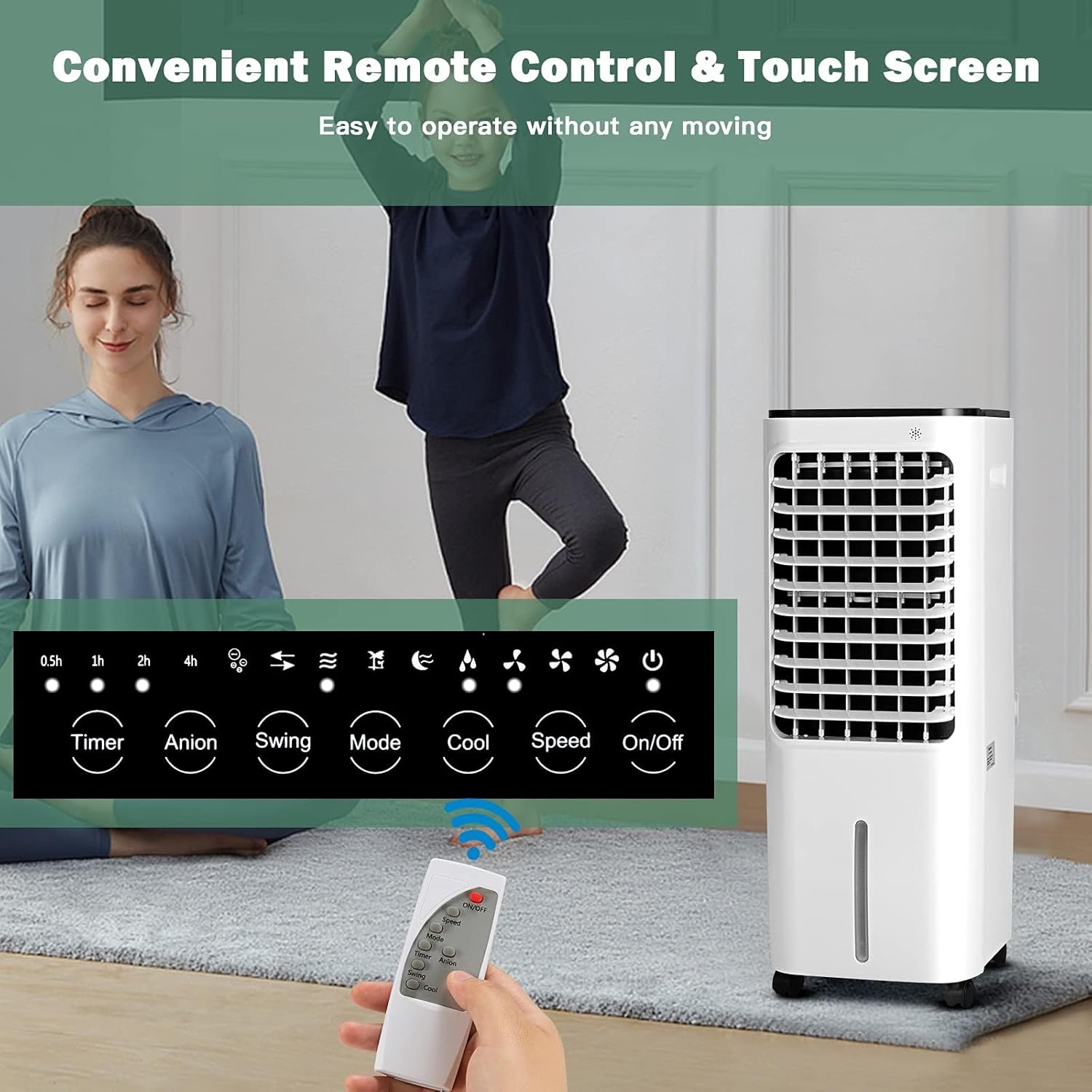
Image 4.2: Close-up of the control panel and remote control, showing buttons for Timer, Anion, Swing, Mode, Cool, Speed, and On/Off.
5. Setup
Follow these steps to set up your air cooler for the first time:
- Unpacking: Carefully remove the air cooler and all accessories from the packaging. Retain packaging for future storage or transport.
- Placement: Place the air cooler on a firm, level surface in the desired location. Ensure there is adequate space around the unit for proper airflow (at least 20 cm from walls/furniture).
- Adding Water/Ice Boxes:
- Open the top cover of the water tank.
- Pour clean water into the water tank. Do not exceed the 'MAX' water level indicator.
- For enhanced cooling, place the provided ice crystal boxes in a freezer until completely frozen. Once frozen, place them into the water tank.
- Close the top cover securely.
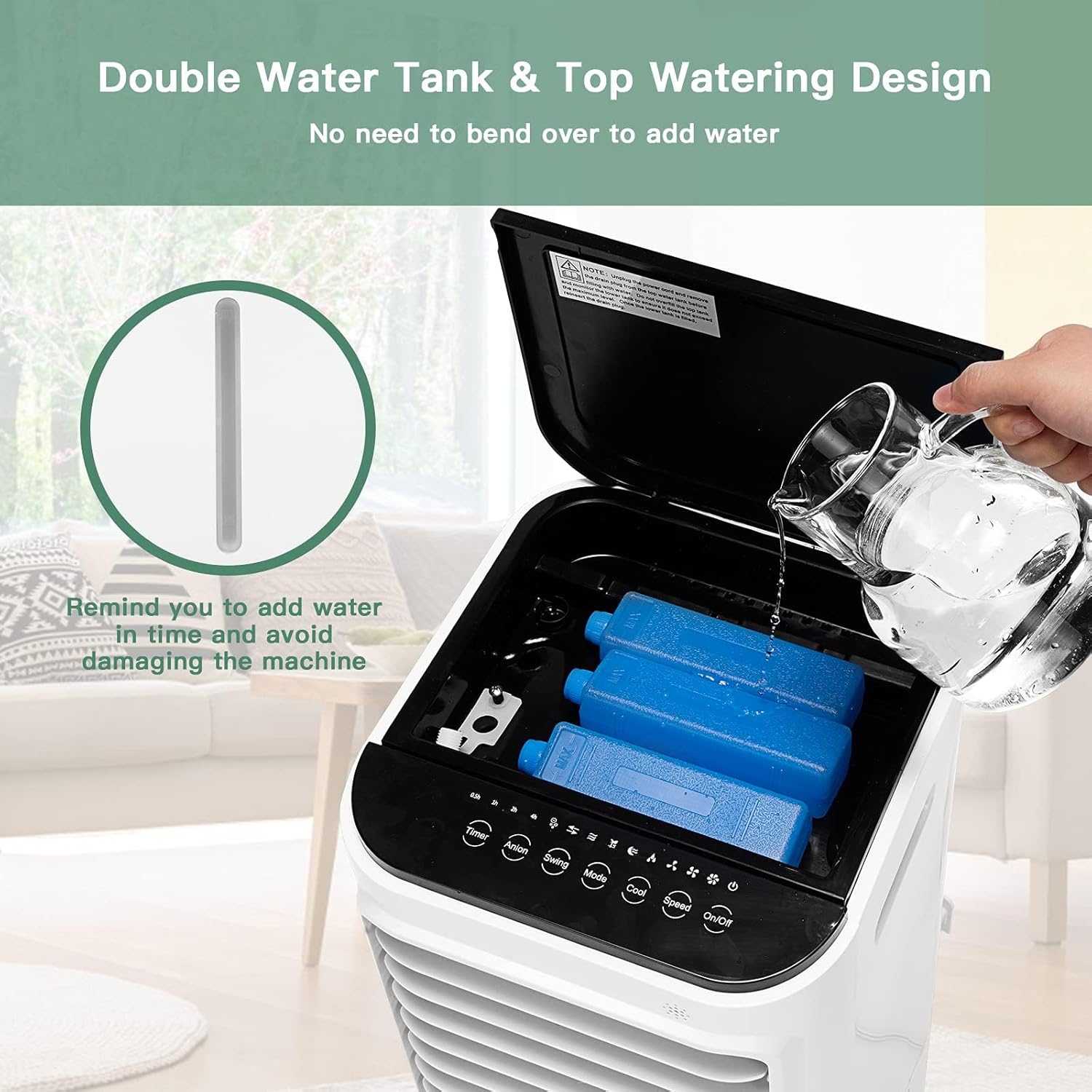
Image 5.1: Illustrates the convenient top-watering design, allowing easy addition of water and placement of ice boxes without bending over.
- Power Connection: Plug the power cord into a standard electrical outlet (120 Volts).
6. Operating Instructions
Your DORTALA Evaporative Air Cooler can be operated using the touch control panel on the unit or the included remote control.

Image 6.1: Depicts the three wind speeds (Low, Medium, High) and four wind modes (Cooling, Standard, Breeze, Sleep) available on the air cooler.
6.1 Control Panel & Remote Control Functions
- On/Off Button: Press to turn the unit on or off.
- Speed Button: Press repeatedly to cycle through Low, Medium, and High wind speeds.
- Mode Button: Press to select desired wind mode: Standard, Cooling, Breeze, or Sleep.
- Cool Button: Activates or deactivates the evaporative cooling function. This function requires water in the tank.
- Swing Button: Activates or deactivates the automatic left-right oscillation of the internal blades. The outer blades can be adjusted manually up and down.
- Anion Button: Activates or deactivates the anion generator for air purification.
- Timer Button: Press to set the auto-off timer in increments (e.g., 0.5h, 1h, 2h, up to 7.5 hours).

Image 6.2: Illustrates the wide-angle air supply with inner blades swinging left and right automatically (120 degrees) and outer blades adjustable manually for upper and lower direction.
6.2 Understanding Wind Modes
- Standard Mode: Provides a consistent airflow at the selected speed.
- Cooling Mode: Activates the evaporative cooling function, using water and ice (if added) to lower air temperature.
- Breeze Mode: Simulates natural wind by varying the fan speed.
- Sleep Mode: Operates at a lower, quieter speed, often with reduced LED display brightness, ideal for nighttime use.

Image 6.3: Explains the 4-in-1 functionality: Regular Fan (without water), Humidifier + Fan (add water), More Cooler Wind (add ice boxes & water), and Anion Mode (clean and fresh air).
7. Maintenance
Regular maintenance ensures optimal performance and extends the lifespan of your air cooler. Always unplug the unit before performing any maintenance.
7.1 Cleaning the Dust Filter
The dust filter is washable and should be cleaned regularly, especially in dusty environments.
- Unplug the air cooler.
- Locate and remove the dust filter from the back of the unit.
- Rinse the filter under running water until clean. For stubborn dirt, use a soft brush and mild detergent.
- Allow the filter to air dry completely before reinserting it into the unit.
7.2 Cleaning the Water Tank
To prevent mold and mildew growth, clean the water tank regularly.
- Unplug the air cooler and drain any remaining water from the tank.
- Wipe the inside of the tank with a soft cloth and a mild cleaning solution.
- Rinse thoroughly with clean water.
- Ensure the tank is dry before refilling or storing the unit.
7.3 Storage
If the air cooler will not be used for an extended period:
- Drain all water from the tank and clean it thoroughly.
- Clean the dust filter and allow it to dry.
- Store the unit in a cool, dry place, preferably in its original packaging.
8. Troubleshooting
If you encounter issues with your DORTALA Evaporative Air Cooler, refer to the following table for common problems and solutions.
| Problem | Possible Cause | Solution |
|---|---|---|
| Unit does not turn on | No power supply Power cord not properly plugged in | Check power outlet and plug connection Ensure power switch is ON |
| No cool air | Water tank is empty Cooling function not activated Ice boxes not frozen or used | Fill water tank Press the 'Cool' button Freeze ice boxes and place them in the tank |
| Weak airflow | Dust filter is dirty Air inlets/outlets blocked | Clean the dust filter Ensure no obstructions around the unit |
| Unusual noise | Unit not on a level surface Foreign object inside Low water level (pumping sound) | Place on a stable, level surface Unplug and check for obstructions (if safe) Refill water tank |
| Remote control not working | Batteries are dead or incorrectly inserted Obstruction between remote and unit | Replace batteries; check polarity Remove any obstructions; ensure direct line of sight |
If the problem persists after trying these solutions, please contact DORTALA customer support.
9. Specifications
| Feature | Specification |
|---|---|
| Brand | DORTALA |
| Model Number | DO-ES10012US-WH-CA |
| Product Dimensions | 29.21 x 27.94 x 71.12 cm (11.5 x 11 x 28 inches) |
| Item Weight | 5.22 kg (11.5 lbs) |
| Colour | White |
| Material | Polypropylene (PP) |
| Voltage | 120 Volts |
| Wattage | 65 watts |
| Sound Level | 20 dB (approx.) |
| Mounting Type | Freestanding |
| Special Features | Filter, Humidifier, Anion Generator, Remote Control, Timer |
| Included Components | Air Cooler, 4 Ice Crystal Boxes, Instruction Manual |
10. Warranty and Support
DORTALA is committed to providing high-quality products. Specific warranty information for your Evaporative Air Cooler is typically included with your purchase documentation or can be found on the official DORTALA website. Please retain your proof of purchase for warranty claims.
Customer Support:
For technical assistance, troubleshooting beyond this manual, or warranty inquiries, please contact DORTALA customer service through their official website or the contact information provided with your product.
Please note: Unauthorized repairs or modifications may void the product warranty.


