
1. Introduction
1.1 Product Overview
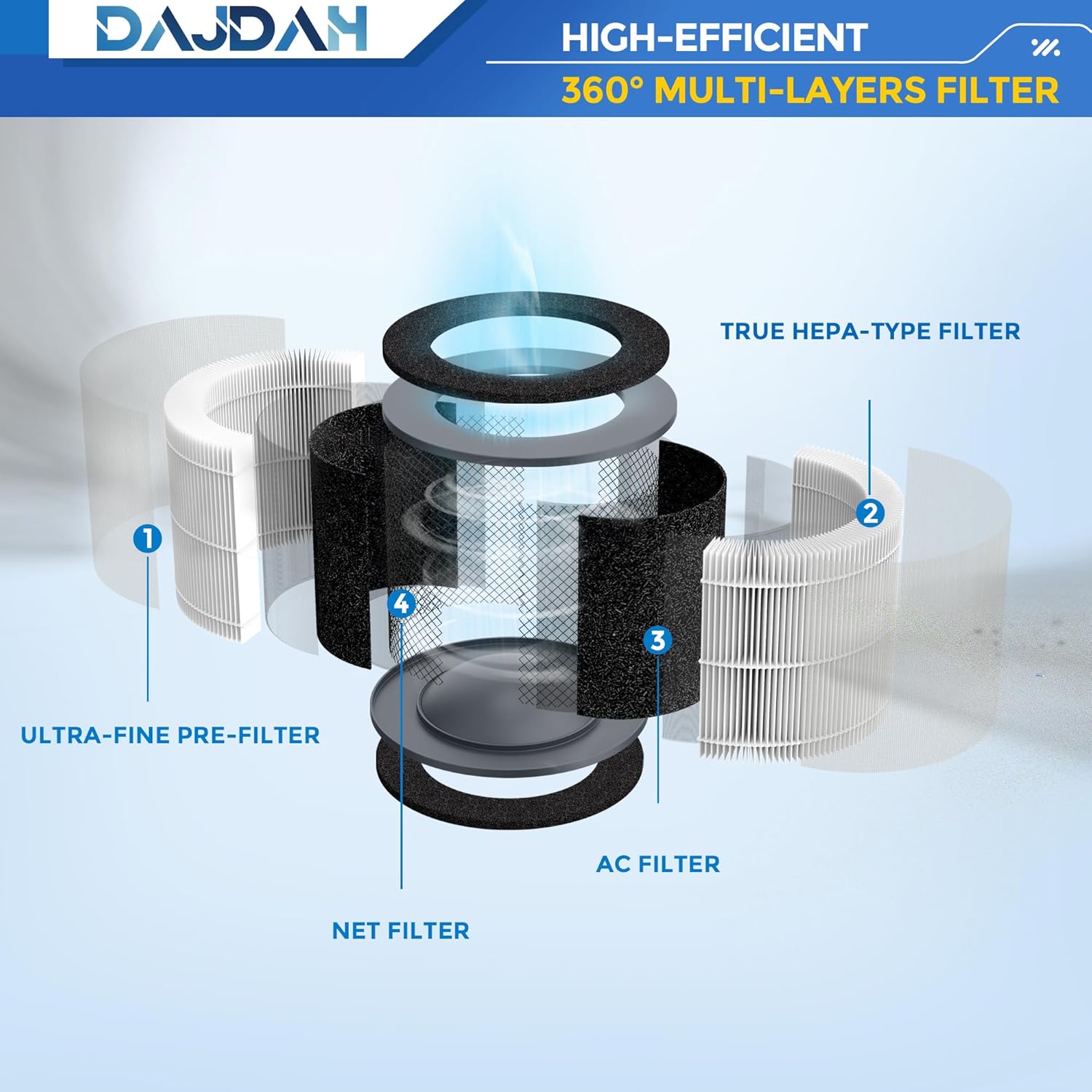
The DAJDAH AP-T10FL is a high-efficiency replacement filter designed for compatible Homedics air purifiers. It features a multi-layer filtration system, including a HEPA-Type filter and activated carbon, to improve indoor air quality by capturing various airborne particles and odors.
1.2 Compatibility
This filter is perfectly compatible with the following Homedics air purifier models:
- AP-T10
- AP-T10-BK
- AP-T10-WT
- Total Clean 4-in-1 HEPA-Type Tower Air Purifier
To ensure correct fit, please verify your air purifier's model number, typically located on the bottom or back of the unit, or in its user manual.

Video: An overview of the AP-T10FL filter and its compatibility with Homedics AP-T10, AP-T10-WT, and AP-T10-BK air purifiers. This video is provided by Air Purifier Filter Expert, a seller of the product.
2. Setup: Filter Installation
Follow these steps to install the replacement filter in your Homedics AP-T10 series air purifier. No special tools are required.
- Unplug the Air Purifier: Always ensure the unit is unplugged from the power outlet before performing any maintenance or installation.
- Access the Filter Compartment: Gently turn the air purifier upside down. Locate the base cover and turn it counter-clockwise to unlock and open it.
- Remove Old Filter: Carefully remove the used filter from the compartment.
- Prepare New Filter: Remove the new DAJDAH AP-T10FL filter from its plastic packaging.
- Insert New Filter: Place the new filter into the air purifier's compartment. Ensure it is seated correctly.
- Secure the Base Cover: Replace the base cover and turn it clockwise to lock it into position.
- Restore Power: Plug the air purifier back into the power outlet.

Video: Demonstrates the process of replacing the AP-T10FL filter in a compatible air purifier. This video is provided by SAPU TECH, a seller of the product.
3. Operating the Air Purifier with New Filter
Once the new filter is installed, your air purifier is ready for operation. The AP-T10FL filter is designed to provide comprehensive air purification:
- Deep Hyperfine Purification: The HEPA-Type filter effectively captures tiny particles as small as 0.3 microns, including dust, hair, lint, and common airborne pollutants. It is particularly effective against pet dander and fur, with a purification rate greater than 99.9%.
- Efficient Odor Removal: The activated carbon layer targets and filters various unfavorable odors and fumes, such as volatile organic compounds (VOCs), tobacco smoke, cooking smells, and pet odors, contributing to a fresher indoor environment.

4. Maintenance
4.1 Filter Replacement Schedule
To maintain optimal performance of your air purifier, it is recommended to replace the DAJDAH AP-T10FL filter every 6 to 12 months. Actual replacement frequency may vary based on air quality and usage intensity.
4.2 Pre-Filter Cleaning (if applicable)
Some air purifiers may have a washable pre-filter. If your unit includes one, regular cleaning can extend the life of the main filter. Refer to your air purifier's original manual for specific cleaning instructions for its pre-filter.
Video: Instructions on how to clean an H13 HEPA Pre-Filter, demonstrating removal, cleaning with a vacuum or brush, washing, drying, and reinstallation. This video is provided by TER AIR, a seller of air purifier products.
5. Troubleshooting
If your air purifier is not performing as expected after filter replacement, consider the following:
- Filter Packaging: Ensure all plastic packaging has been removed from the new filter before installation.
- Correct Installation: Double-check that the filter is correctly seated and the base cover is securely locked.
- Air Purifier Issues: If problems persist, consult the original user manual for your Homedics air purifier for specific troubleshooting steps related to the unit itself.
6. Specifications
| Feature | Detail |
|---|---|
| Model Number | AP-T10FL |
| Brand | DAJDAH |
| Compatible Devices | Homedics AP-T10, AP-T10-BK, AP-T10-WT Air Purifiers |
| Filtration Type | HEPA-Type, Activated Carbon |
| MERV Rating | 8 |
| Product Dimensions | 1"L x 1"W x 1"Th (approximate, based on provided data) |
| Item Weight | 9.6 ounces |
| UPC | 798357450288 |
7. Warranty and Support
DAJDAH provides quality guaranteed replacement parts. For any questions or concerns regarding your AP-T10FL series filter, please contact DAJDAH customer service. They are available to assist you.
Please refer to the product packaging or the seller's information on the purchase platform for specific warranty details and contact methods.