
Gamefitz GF-2002
Gamefitz GF-2002 Gaming Chair Instruction Manual
Model: GF-2002 | Brand: Gamefitz
1. Introduction
This manual provides essential instructions for the safe assembly, operation, and maintenance of your Gamefitz GF-2002 Gaming Chair. Please read this manual thoroughly before use and retain it for future reference.
Safety Information
Please observe the following safety guidelines to prevent injury or damage:
- Ensure all components are securely fastened before use.
- Do not stand on the chair.
- Avoid placing heavy objects on the chair.
- Keep hands and fingers clear of moving parts during adjustment.
- This chair is designed for indoor use only.
- Maximum weight capacity: 250 lbs (approximate, refer to product specifications for exact details).
2. Setup and Assembly
The Gamefitz GF-2002 Gaming Chair requires assembly. Please ensure all parts are present before beginning. Assembly typically involves attaching the base, casters, gas lift, seat, backrest, and armrests. The head and lumbar pillows are adjustable and can be positioned as desired.

This image displays the Gamefitz GF-2002 Gaming Chair in its upright position, showcasing its black and red design, ergonomic shape, and included head and lumbar support pillows. The retractable footrest is shown in its stored position beneath the seat.
Included Components:
- Chair Base with Casters
- Gas Lift Cylinder
- Seat Assembly
- Backrest Assembly
- Armrests (pre-attached or separate)
- Head Pillow
- Lumbar Pillow
- Hardware Kit (screws, washers, Allen wrench)
Refer to the separate assembly diagram for detailed step-by-step instructions.
3. Operating Instructions
Chair Height Adjustment
To adjust the chair height, locate the lever on the right side beneath the seat. While seated, pull the lever up to lower the chair. To raise the chair, stand up slightly and pull the lever up. Release the lever at the desired height.
Backrest Recline Adjustment
The chair features a reclining backrest. Locate the recline lever on the right side of the chair, typically near the armrest. Pull the lever up to unlock the backrest, then lean back to the desired angle. Release the lever to lock the backrest in place. The chair has one reclining position.
Footrest Operation
The GF-2002 includes a retractable footrest for added comfort.
- To extend: Pull the footrest handle located beneath the front of the seat. The footrest will slide out.
- To retract: Push the footrest back under the seat until it is fully stored.

This image illustrates the Gamefitz GF-2002 Gaming Chair with its integrated footrest extended forward, demonstrating its use for leg support. The chair maintains its black and red color scheme.
Head and Lumbar Pillow Adjustment
The head and lumbar pillows are designed for adjustable support. They are attached with straps that can be moved up or down to suit your preference and body type. Position them to provide optimal comfort for your neck and lower back.
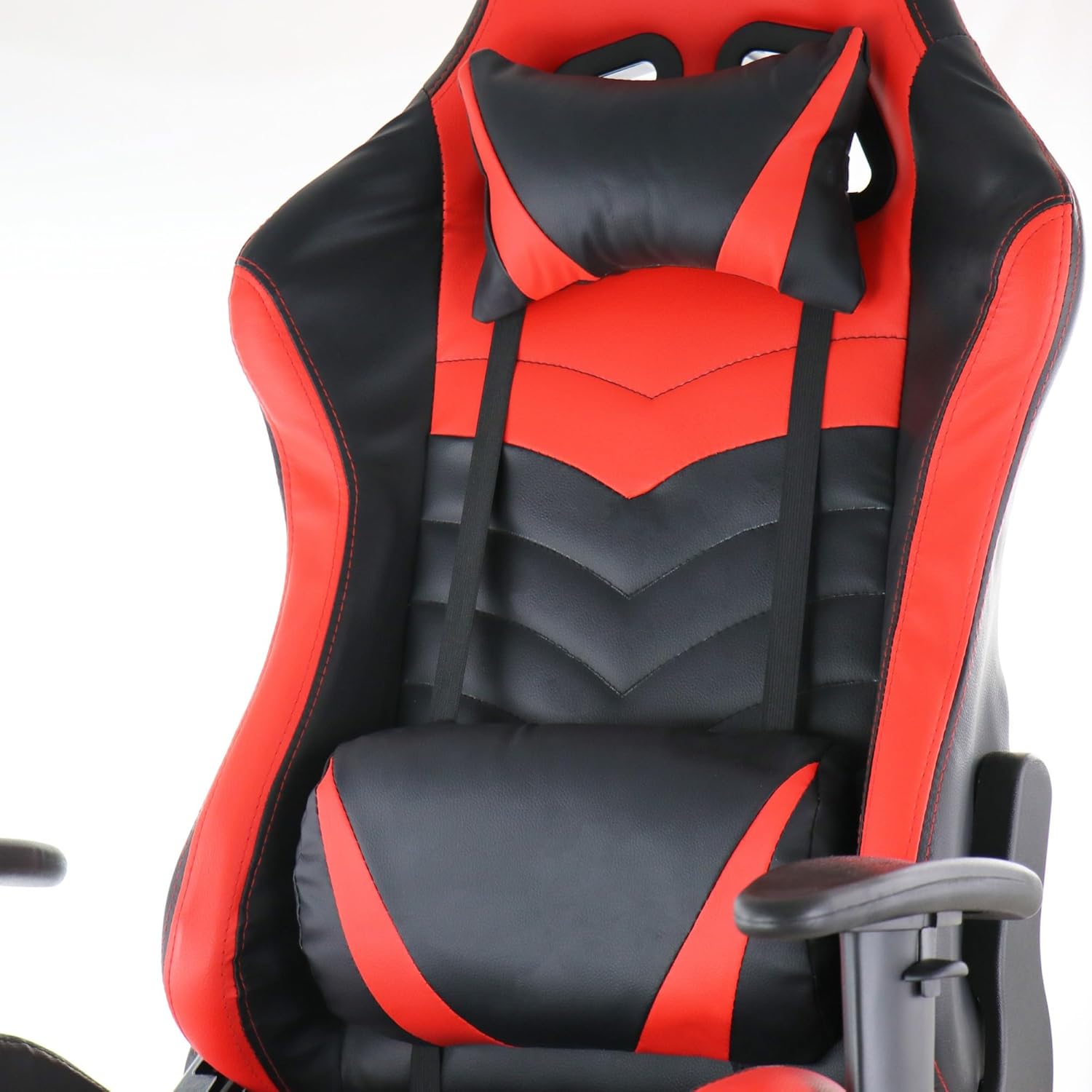
A detailed view of the Gamefitz GF-2002 Gaming Chair's headrest and lumbar support pillows. Both pillows are black with red accents and are adjustable via straps, designed to provide ergonomic support during use.
4. Maintenance
Cleaning Instructions
To clean the pleather material of your Gamefitz GF-2002 Gaming Chair, simply wipe it clean with a damp cloth. For stubborn stains, use a mild soap solution and then wipe with a clean, damp cloth. Avoid harsh chemicals or abrasive cleaners, as these can damage the material.
General Care
- Regularly check all screws and bolts to ensure they are tight. Retighten as necessary.
- Avoid prolonged exposure to direct sunlight to prevent fading and material degradation.
- Keep the chair away from heat sources.
5. Troubleshooting
Chair Does Not Adjust Height
Ensure the gas lift lever is fully engaged or disengaged as required. Check if the gas lift cylinder is properly installed into the base and seat mechanism. If the issue persists, the gas lift cylinder may need replacement.
Chair Squeaks or Wobbles
Tighten all assembly screws and bolts. Lubricate moving parts, such as the recline mechanism or caster stems, with a silicone-based lubricant if squeaking persists.
Footrest Does Not Extend/Retract Smoothly
Check for any obstructions in the footrest mechanism. Ensure the sliding rails are clean and free of debris. A small amount of lubricant on the rails may improve movement.
6. Specifications
| Brand | Gamefitz |
| Model Name | GF-2002 |
| Color | Black, Red |
| Item Weight | 42 pounds |
| Seat Material Type | Leather (Pleather) |
| Recommended Uses | Gaming |
| Included Components | Foot Rest, Head Pillow, Lumbar Pillow |
| Special Features | Arm Rest, Cushion Availability, Foldable Footrest |
| Furniture Base Movement | Swivel |
| Reclining Position Count | 1 |
| Product Care Instructions | Wipe Clean |
| UPC | 840191200304 |
7. Warranty Information
Specific warranty details for the Gamefitz GF-2002 Gaming Chair are not provided in this manual. Please refer to the warranty card included with your purchase or contact the retailer/manufacturer directly for information regarding warranty coverage and terms.
8. Support
For further assistance, technical support, or to inquire about replacement parts, please contact Gamefitz customer service or the retailer from whom you purchased the product. Have your model number (GF-2002) and purchase date ready when contacting support.
Ask a question about this manual
Ask about setup, troubleshooting, compatibility, parts, safety, or missing instructions. Manuals+ will review the question and use this page’s manual context to help answer it.